Postback URL Tracking: How S2S Conversion Tracking Works
Postbacks fail for boring reasons: the wrong macro dialect, a click id mangled by a character limit, a duplicate that got counted twice. This is the setup guide with the per-network details nobody publishes.

A Postback Is a Phone Call Between Two Servers
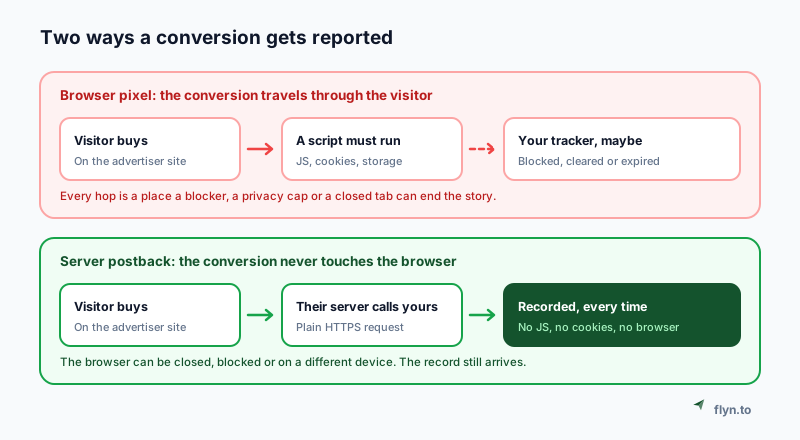
A postback URL, also called an S2S or server-to-server postback, is one of the plainest things in tracking: a URL you hand to somebody else so their server can call yours when a sale happens. No script, no cookie, no browser. Their backend makes an HTTPS request, your backend records it, done.
It exists because the browser turned out to be a bad place to keep a record of money. Ad blockers stop scripts. Privacy features expire storage. Tabs get closed before a pixel fires. And the purchase often happens somewhere the browser cannot follow at all, when a subscription rebills three weeks later or a refund is processed by a human in a back office.
 Tap to enlarge
The trade is simple. A pixel is easy to install and fragile. A postback is harder to set up once and then almost never lies to you. If you own the page where the sale completes, the browser tag route is genuinely fine and much less work. If somebody else owns that page, which is the affiliate's whole situation, a postback is the only honest option you have. The same constraint is why affiliates reach for link cloaking and destination masking in the first place: you are always working on somebody else's property.
Postback, Pixel and UTM Are Three Different Layers
These three get argued about as if they were competing choices. They are not. They sit at different heights and a complete setup usually has all three.
UTMs label the traffic
UTM parameters ride inside the destination URL and tell your own analytics what to call a visit. They never report anything back to anyone; they are annotation, not measurement. The UTM guide covers the conventions, and the UTM builder assembles them without typos. Note that they travel fine through a redirect: short links preserve tracking parameters, so shortening a tagged URL does not lose the tags.
Pixels chase the person
An ad pixel exists to build an audience: it tells Meta or Google that this browser saw something, so you can advertise to it again. That is a different job from counting a sale, and it is covered separately in retargeting affiliate link clicks and the retargeting pixels feature. A pixel does not tell you which link earned the money.
The postback reports the money
Only the postback carries the outcome, with a value attached, from the system that actually processed the payment. That is why it is the layer worth getting right if revenue is the question you are asking. Clicks alone, including the click analytics every link gets, tell you about attention. The postback tells you about money.
If you can install a script on the page where the money changes hands, use the browser tag and skip all of this. If you cannot, because the checkout belongs to a merchant or a network, the postback is not the advanced option, it is the only option.
The Two Identifiers Everyone Confuses
Almost every failed setup traces back to this, and almost no guide separates them clearly. There are two distinct places an identifier appears, and they usually have different names.
Outbound: the parameter you append
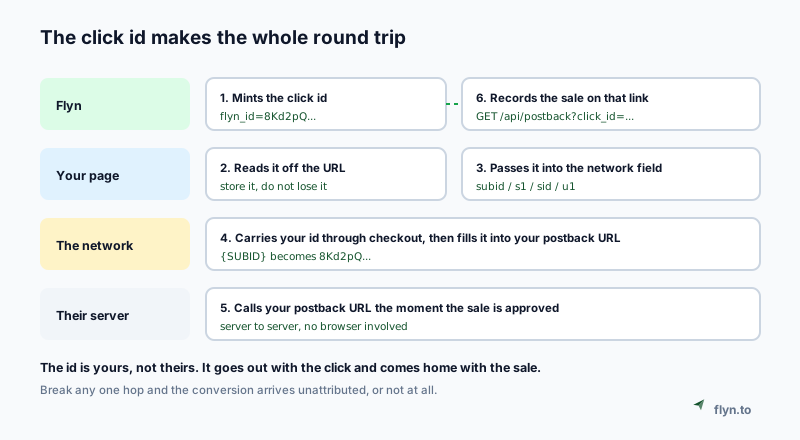
When you send traffic, you attach your own id to the tracking link using whatever field that network reserves for partner data. ShareASale calls it afftrack. Digistore24 calls it cid. Impact calls it subId1. Awin calls it clickref. ClickBank now provides extclid specifically for an external click id, alongside the older tid.
Inbound: the macro that comes back
When the sale is approved, the network builds your postback URL by substituting macros, placeholder tokens that it swaps for real values. The macro that returns your id is usually named differently from the parameter you sent it in. Everflow, for example, takes your value in sub1 and returns the click identifier as {transaction_id}.
 Tap to enlarge
Read that flow once more and the whole protocol is there. Your id goes out with the click, gets carried through checkout by the network, and comes home in the postback. Everything else in this guide is detail about how each hop breaks. If you are running one link per campaign, creating many links for one URL is the practical way to keep the ids separated.
The postback is not complicated. It is just a value you sent, coming back to you, under a different name, at a different time, from a different machine.
Build the Postback URL
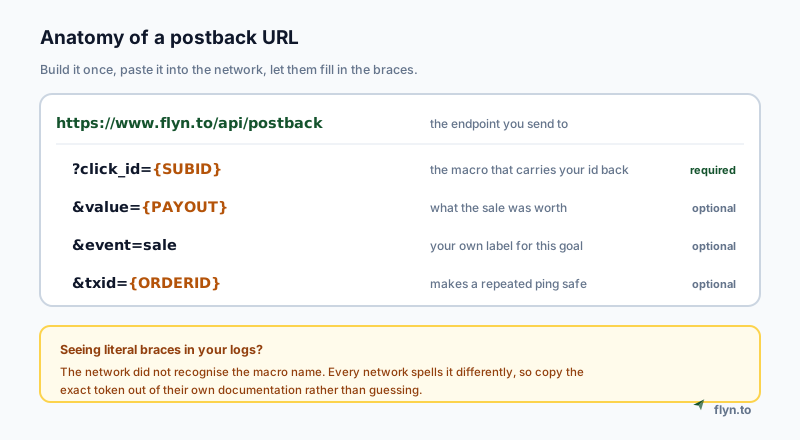
Your side of the deal is one URL. On Flyn it looks like this, and every field except the click id is optional.
 Tap to enlarge
The required part
click_id is the value that came out on the click. Flyn also accepts clickid, cid and flyn_id as aliases, because affiliate documentation uses all of them and a URL copied out of another platform's docs should just work. If you are wiring this from your own backend rather than a network, the API guide covers authenticating and creating the links programmatically.
The optional parts
value is the sale amount in major units, and it accepts payout, sum and amt as aliases for the same reason. event is your own label, so a multi-step funnel can report signup and purchase separately. txid is the network's order or transaction id, which is what makes a repeated ping safe.
Values arrive messier than you expect
Macros resolve into whatever the network has, which in practice means currency symbols, comma decimal separators, thousands separators and occasionally an empty string. A parser that rejects those loses the conversion, which is the same category of quiet failure as counting bot traffic as real, covered in click fraud prevention. Flyn parses defensively instead: it reads both 1,234.56 and 1.234,56 correctly, strips symbols, and records a zero-value conversion rather than dropping a sale because the amount was unreadable.
Every Network Spells It Differently
This is the table that should exist on every tracking blog and does not. The exact names below come from each network's own current documentation, and they are the difference between a working setup and an afternoon of guessing.
| Network | Parameter you append | Macro that returns it | Limit |
|---|---|---|---|
| ClickBank | extclid (legacy tid) | {extclid} | 256 chars |
| Digistore24 | cid | {cid} | Restricted set |
| Everflow | sub1 to sub10 | {transaction_id} | 32 chars |
| impact.com | subId1 | {SubId1} (case sensitive) | 255 chars |
| CJ Affiliate | sid | CJEVENT on the advertiser side | Varies |
| Awin | clickref | awc on the landing page | 50 chars |
| ShareASale | afftrack | !!afftrack!! | 255 chars |
| BuyGoods | subid | {SUBID} | Varies |
| TUNE / HasOffers | aff_sub | {transaction_id} | Varies |
The delimiter is where it actually breaks
Notice that the punctuation is not consistent either. There are at least four dialects in active use, and none of them errors when you use the wrong one.
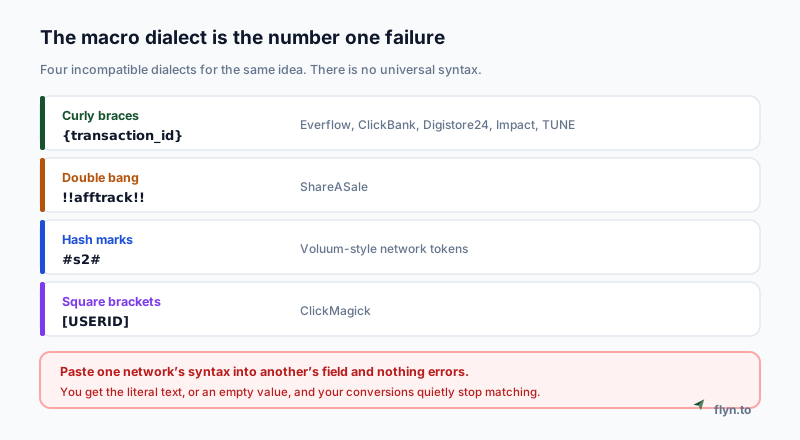 Tap to enlarge
Awin gives publishers six click references, but only clickref (also called pref1) is transmitted to the advertiser's landing page. References two through six are internal to Awin and never reach the advertiser, so any design that expects to read clickref3 on the merchant side is dead before you start. Put the id you need downstream in the first slot.
Characters That Silently Destroy a Click Id
Here is a failure mode that costs people weeks, because the symptom is "the postback fires but the id does not match" and the cause is invisible.
Allowed character sets are narrower than you think
ClickBank's tracking parameters accept only letters, digits, space, underscore, hyphen and plus. That looks generous until you notice what is missing: =, /, ., : and %. A base64 identifier ends in = padding. A UUID wrapped in braces carries braces. A JSON-ish id carries colons. Every one of those gets mangled or dropped on the way through, and what comes back is not what you sent.
Length limits truncate rather than reject
Awin caps click references at 50 characters. Everflow's identifier is 32. Impact allows 255 but requires letters and numbers only for its SharedId field, no spaces and no special characters. A long id does not produce an error, it produces a shorter id, which will never match anything.
Pick short and URL-safe and you never think about this again. Flyn mints a 16 character id from letters, digits, underscore and hyphen only, which fits inside every limit in the table above and survives every character set. If you are building your own, copy that shape rather than reaching for a UUID.
Encode once, and only once
If your id ever does contain a reserved character, URL-encode it when you append it, and make sure the network is not encoding it a second time. Double encoding turns %2F into %252F, which arrives back as a different string entirely.
Test It Before Real Money Depends On It
Nobody writes this part down, which is odd, because it is the part where you find out whether any of it works. You do not need a real sale.
The sentinel recipe
It works on any network:
1. Replace the macro with a literal sentinel value on your outbound link, something like afftrack=TEST123 instead of afftrack=!!afftrack!!. 2. Click your own link. 3. Confirm TEST123 shows up in the network's click report, which proves the outbound half. 4. Fire the postback yourself with that sentinel and check what comes back. That proves the inbound half.
Against Flyn, step four is one line in a terminal, using a real click id from a link you clicked yourself:
curl -i "https://www.flyn.to/api/postback?click_id=YOUR_ID&value=49.00&event=sale&txid=test-1"
Save the postback in the network before you run a test conversion. If the conversion is recorded while no postback exists, nothing is sent and you will spend an hour debugging a message that was never dispatched.
Read the response, do not assume it worked
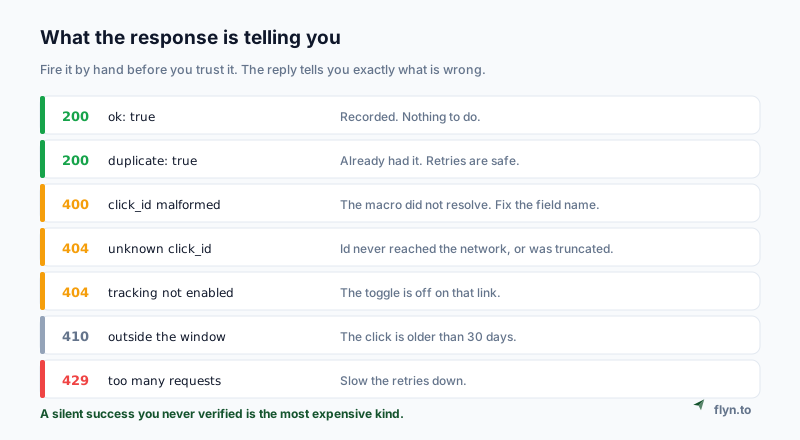 Tap to enlarge
| Status | Body | What it means |
|---|---|---|
| 200 | ok: true | Recorded. Nothing to do. |
| 200 | duplicate: true | Already recorded. A retry was correctly ignored. |
| 400 | click_id malformed | The macro did not resolve, so the literal token arrived. |
| 404 | unknown click_id | The value returned is not the value that went out. |
| 404 | tracking not enabled | Conversion tracking is switched off on that link. |
| 410 | outside the window | The click is older than 30 days. |
| 429 | too many requests | Retries are arriving faster than 60 a minute. |
The two that catch everyone are 400 click_id malformed, which almost always means the macro did not resolve and you sent the literal token, and 404 unknown click_id, which means the value that came back is not the value that went out. Both are the same underlying problem seen from different sides.
Refunds, Rebills and Double Counting
Postbacks are retried, and real commerce is messier than one click producing one sale. Handle these three cases up front or your numbers drift within a month.
Never deduplicate on the click id
This is the single most important design rule and it is almost never stated. One click legitimately produces many events: an initial sale, then an upsell, then a rebill every month afterwards, and possibly several line items. All of them carry the same click id. Deduplicate on it and you throw away real revenue; ignore duplicates entirely and one retried delivery counts twice.
Deduplicate on the transaction or order id instead. Flyn's key is the combination of click id, event name and txid, so a repeated ping collapses into the row that already exists while a genuine rebill under a new transaction id counts as new.
Make the endpoint idempotent, because retries are normal
Networks retry on anything that is not a success, and some retry aggressively. Your endpoint has to be safe to call twice, not merely correct when called once. Flyn returns 200 with duplicate: true for a repeat, which stops the network's retry loop cleanly rather than encouraging it.
Refunds are negative values
When a sale reverses, send the same postback with a negative value and a distinct transaction id. The count and the total adjust together. Be aware that some networks make this harder than it sounds: a refund on a recurring ClickBank product also triggers a cancellation notification, so a naive receiver records one refund twice.
Anyone who sees one postback URL, in a browser network tab or a shared document, learns the shape of every other one. Flyn's protection is that the click id itself is the credential: it is random, it is minted per human click, it expires with the 30-day window, and there is a ceiling on how many conversions one click can produce. If you are building your own receiver, add a shared verification token and check it, because a value taken straight off a query string is a value anyone can invent.
When the Postback Never Arrives
Triage in order. Each symptom has one common cause, and checking them in this sequence saves the most time.
The log is completely empty
The network is not sending anything. Either the postback was never saved, or it is scoped to a different offer than the one converting. Check the scope before you check the URL. If the network offers both a global and an offer-specific postback, prefer the specific one: a global postback fires for every conversion including offers whose format does not match, which fills your reporting with junk rows.
It fires, but the id is not recognised
You are sending one value out and getting a different one back. In order of likelihood: the macro dialect is wrong (braces where the network wants double bangs), the macro name is wrong, the id was truncated by a length limit, or a character in it was stripped. Go back to the sentinel test, which isolates which half is broken in about two minutes.
The network shows the conversion but you do not
Your endpoint returned something other than a success and the network gave up. Look at the network's postback delivery report, which grades every attempt by HTTP status, and at your own rate limits. Flyn accepts 60 pings a minute from one address, which is far above any real conversion volume but reachable by a retry storm. Sanity-check the click side too: the human versus bot split shows whether the clicks you are expecting conversions from were people at all.
The network will not send postbacks at all
Some will not. ShareASale's affiliate postbacks are off by default and granted case by case on request, and are reported to deliver some conversions rather than all of them. The realistic answer is to treat the postback as the fast path and a scheduled report pull as the source of truth, reconciling on the sub-id you sent. Do not build anything that assumes every network cooperates. Where a network gives you nothing, a discount code per placement remains the honest fallback.
When You Do Not Need Any of This
A postback is the right tool when somebody else owns the page where the money changes hands. If you own that page, it is unnecessary work.
You own the checkout
Use the browser tag. Two lines, one sitewide and one on the thank-you page, and you are done in a few minutes. The conversion tracking setup covers it, and the method for deciding what to measure is in the placement guide.
You own the checkout and want it server-side anyway
Reasonable, and the two mix freely. Pass the click id into your payment provider when you create the session, Stripe's client_reference_id or a metadata field, then fire the postback from your webhook handler when the payment actually settles. That version never depends on the customer's browser at all and handles refunds and rebills naturally, because your payment provider already tells you about both.
You only need to know which link got clicked
Then none of this applies. Click counts and the human versus bot split are free on every Flyn link, and click tracking answers plenty of questions on its own. Conversion tracking, including the postback endpoint, is a Pro feature because it is a heavier piece of machinery, and you should only take it on when the click number has genuinely stopped being enough. If you are not there yet, a free account gives you the click layer with nothing to install.
If you are comparing link routing software with conversion tracking
Most link routing software, meaning the tools that send a click to different destinations by device rule, country rule, or split test, stops at counting the click. Add "must record the sale" to your requirements and the field narrows fast. As of August 2026 the realistic options are Flyn, where Pro pairs device routing, per-country geo rules, and A/B split testing with the postback endpoint this guide describes, Dub, which has made conversion attribution central to its product, and affiliate trackers such as GeoRedir, which reserves postback conversion tracking for its $49 per month Business tier. One question sorts the whole category instantly: does the platform accept a server-side postback, or only a browser script? A script-only answer means rebills and refunds are invisible to it. If geography is the routing axis you care about, the geo redirect tools comparison ranks that field, and geo-targeted links vs standard redirects covers whether you need it at all.
If you are working the affiliate side of this, the strategy layer, sub-ids, disclosure and cloaking, is covered in the affiliate link tracking guide, and the audience page for affiliate marketers has the shorter version. Disclosure is not optional either: how to disclose affiliate links covers the rel attribute and the wording. For the vocabulary, the glossary entry is the two-minute read. When you are ready to see what your network actually receives, the free postback URL tester resolves your macros, fires the postback, and shows you the exact response.
Frequently Asked Questions
What is a postback URL in plain terms?
What is the difference between a postback and a pixel?
How do I test a postback URL without a real sale?
Why does my postback return "unknown click_id"?
Can the same click convert more than once?
How do I report a refund or a chargeback?
Does a postback need to be a GET request?
How long after the click can a postback still be accepted?
Which link routing software supports server side conversion tracking?
Do link management platforms with analytics dashboards show conversions?
Free tools for this
Three Flyn tools that pair well with the strategy in this article, all free, no signup needed.
UTM Builder
Build campaign-tracked URLs in seconds.
Broken Link Checker
Scan any page for dead links and 404s.
Open Graph Checker
Preview how URLs unfurl on social.
Keep reading
Three related deep-dives from the Flyn blog.
The Anatomy of a URL: Every Part Explained in Detail
15 min read

301 vs 302 Redirect: When to Use Each
14 min read

Bulk Shorten URLs From a Spreadsheet: CSV vs Formulas
17 min read
Ready to try Flyn?
Free plan includes 25 links/month, full analytics, and access to all 30+ free tools above. No credit card required.
Already a member? Log in
Karan Bhakuni is the founder of Flyn. He writes about branded links, click analytics, and the link-management tooling growth teams and creators actually need, drawn from building Flyn and reading a lot of user feedback.
Find these guides useful? Add Flyn as a preferred source so more of them show up in your Google results.