Free Postback URL Tester
Paste a server-to-server postback URL, fill in the macros, and fire it for real. You get back the exact status code, timing and response body your affiliate network would see. No more debugging blind.
Paste it exactly as your network or tracker gave it to you. The example loads a harmless documentation domain, so you can watch macro detection work before you point it at anything real. Six macro styles are recognised: {macro}, {{macro}}, [macro], %macro%, #macro#, and ${macro}.
This sends a real HTTP GET from our server, not a simulation. If the URL points at a live tracker with a valid click id, it can record a real conversion. Use a throwaway click id, or your tracker's own test mode, when that matters.
How we handle this send
- One plain
GET, no request body, identified asFlyn-Bot/1.0with anX-Flyn-Test-Postback: 1header so the receiving side can tell test traffic apart from a real network postback. - No cookies, no authorisation headers, and nothing from your browser is forwarded. If you put a username and password in the URL we refuse the send rather than replay the credentials.
- At most 3 redirect hops, an 8 second timeout, and only ports 80 and 443.
- We read the first 2 KB of the response and stop, so a huge body is never pulled through our server or shown back to you in full.
- Rate limited to 6 sends a minute per visitor and 6 a minute per target host. That limit lives in each server instance rather than in one shared counter, so treat it as the configured ceiling, not a guarantee.
- We will not fire at Flyn's own domains. A request from here would reach our endpoints carrying our server's IP instead of yours, so test a Flyn postback with curl from your own machine.
Need a link that mints the click id in the first place?
A postback can only return an id something handed out. Flyn short links count every click for free, and Pro links append a unique click id to your destination so the postback has something real to match.
How to Test a Postback URL in 3 Steps
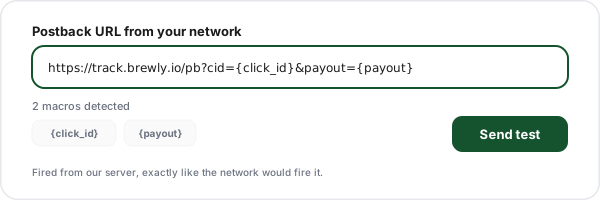
Paste the postback URL
Paste the template exactly as your network gave it to you, braces and all. The tool recognises six macro syntaxes, so a Voluum {clickid}, an Impact {SubId1}, a CAKE #s2# and a shell-style ${sub1} are all detected without you changing anything.
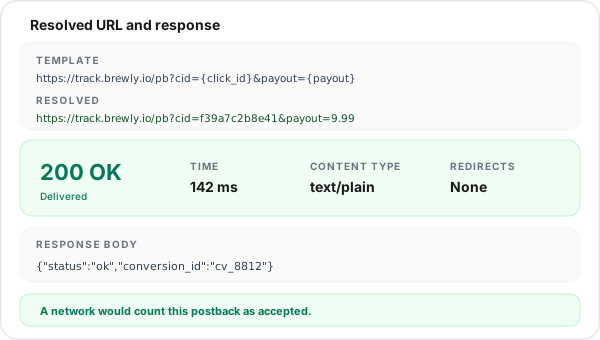
Fill in the test values
Every macro gets a sensible default: a realistic random click id, a 9.99 payout, USD, a sale event and a transaction id. Edit any value inline, then check the resolved URL, which is character for character what will be sent.
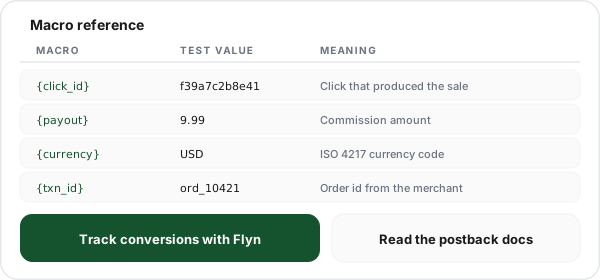
Read the real response
We fire the request from our server and hand back the status code, response time, content type, any redirect hops and the first 2 KB of the body, with a plain-English verdict on whether a network would count it as delivered.
What Is a Postback URL?
A postback URL is an address on your tracker that an affiliate network calls from its own servers when a conversion is confirmed. It is often called an S2S postback, a server-to-server callback, a conversion callback or simply a pixel-free conversion, and all four names describe the same mechanism: two systems agreeing on a shared click id, then trading it back when money changes hands.
The exchange has two halves. On the way in, you append a click id placeholder to the destination URL, so the network stores an id for that specific click. On the way out, the network calls your postback URL and substitutes that stored id into the template. Your tracker looks the id up, finds the campaign, placement and creative behind it, and books the revenue against them. Nothing in that loop touches the visitor browser, which is exactly why it keeps working when cookies, pixels and third-party storage do not.
The failure mode is unforgiving. If the click id never reaches the network, or the macro never resolves, or the parameter is spelled differently on the two ends, the conversion still happens but attribution vanishes. And because the whole exchange runs server to server, you cannot open developer tools and watch it. That is the gap this tool closes: it makes the invisible request visible.
Anatomy of a Postback URL
A worked example, part by part. Here is a postback URL example in the shape most networks expect.
https://tracker.example.com/postback
?clickid={clickid}
&payout={payout}
¤cy={currency}
&event=sale
&txid={transaction_id}The base URL
The endpoint on your tracker that accepts conversions. This part never changes and contains no macros. If this is wrong you get a 404 no matter what else you do.
clickid={clickid}
The load-bearing parameter. The left side is the name your tracker expects, the right side is the macro your network substitutes. Get either one wrong and every conversion arrives unattributable.
payout={payout}
The commission or sale value in major units, so 9.99 rather than 999. Networks vary on whether this is your commission or the gross order value, so confirm which before you build reports on it.
currency={currency}
Three-letter ISO code. Skip it and most trackers assume USD, which quietly corrupts revenue reporting the moment you run an offer that pays in EUR or GBP.
event=sale
A fixed value, not a macro, when you want one postback per event type. Networks that support multiple goals will usually offer a goal or status macro you can put here instead.
txid={transaction_id}
The order id. This is what makes the postback idempotent: if the network retries, a tracker that dedupes on transaction id records the sale once instead of twice.
Click ID and Payout Macros by Network
There is no standard here, which is why so many postbacks are wired wrong. This table maps what each major platform calls the click id and the payout, so you can translate your network vocabulary into a working template. Where a platform confirms conversions with a payload instead of macro substitution, that is said plainly rather than guessed at.
| Platform | Click id token | Payout token | Notes |
|---|---|---|---|
| Flyn | click_id (aliases clickId, flyn_id, clickid, cid) | value (aliases payout, sum, amt) | Verified in the Flyn docs. Also takes event, currency and txid. Negative value records a refund. |
| Voluum | {clickid} | {payout} | The click id token goes in your offer URL, and the same value comes back on the postback. |
| Binom | {clickid} | {payout} | Self-hosted, so confirm the receiving parameter names against your own instance. |
| RedTrack | {clickid} | {sum} | Conversion type is usually carried in a separate parameter alongside the payout. |
| Affise | {clickid} | {sum} | Goal name is normally sent as its own parameter so different actions stay separable. |
| Everflow | {transaction_id} is Everflow own click id; you pass yours in sub1 | {payout} | Sub1 through sub5 are the fields you control. Do not confuse transaction_id here with an order id. |
| TUNE / HasOffers | {transaction_id}; your own value rides in aff_sub | {payout} | Same naming convention as Everflow because both descend from the HasOffers model. |
| Impact | {SubId1} | {Payout} and {Amount} | PascalCase tokens inside single braces, and there are more of them for the action, the currency and the status. Copy the exact spellings out of your own Impact account rather than typing them from memory. |
| CJ Affiliate | sid carries your value on the click | Commission fields, named per program | CJ leans on its own event identifier and reporting rather than a macro-substituted GET postback. |
| Awin | clickref, plus additional numbered clickref slots | Commission and sale amount fields | Set clickref on the click, then read it back. How many extra numbered slots you get, and the exact placeholder syntax, are both worth confirming in your Awin account. |
| ShareASale | afftrack | Commission and sale amount fields | afftrack is the field you own. Confirm how your program returns it before wiring a postback. |
| Rakuten Advertising | u1 | Commission fields, named per program | u1 is the classic sub id slot inherited from LinkShare. |
| ClickBank | tid on the hoplink | Order amount in the notification payload | ClickBank confirms sales with a signed notification payload rather than macro substitution, so map tid out of the payload. |
| Digistore24 | A custom tracking parameter you append to the promolink | Order amount in the notification payload | Confirmation arrives as a notification payload. Read your tracking parameter back out of it. |
| CAKE | Hash-delimited tokens, for example #s2# | Hash-delimited payout token | CAKE-style systems wrap tokens in hash marks instead of braces. Check the exact names in your instance. |
Platforms rename tokens between versions, and some let each program define its own. Treat this table as a translation starting point and your network documentation as the authority. The one row that is verified against source rather than documentation is Flyn, because that endpoint is ours.
The Six Macro Syntaxes You Will Meet
Networks never agreed on a delimiter. The tester detects all six, so you can paste a template from any platform without translating it first.
| Style | Example | Commonly seen on |
|---|---|---|
| {macro} | {clickid} | Voluum, Binom, RedTrack, Affise, Everflow, Impact |
| {{macro}} | {{click_id}} | In-house tools and webhook builders that borrow template syntax |
| [macro] | [sub1] | Several ad networks and demand-side platforms |
| %macro% | %clickid% | Common on push, pop and some mobile networks |
| #macro# | #s2# | CAKE-style platforms |
| ${macro} | ${sub1} | Networks that borrow shell-style substitution |
One practical note on the percent style: a normal URL is full of percent encoding, so the tester only treats %word% as a macro when the token starts with a letter and runs at least three characters. That keeps %20 and %2F from being mistaken for placeholders.
Postback Not Firing? The 10 Causes, In Order of Likelihood
Work down this list rather than guessing. The first two account for most reports of a postback that is supposedly not firing, and both are visible in seconds with the tool above.
1The macro never resolved
The endpoint received the literal text {clickid} instead of a value. Fire the URL here with the macro left in place and you will see the exact rejection the network is getting.
2The click id was never passed into the offer URL
A postback can only return an id that was stored on the way in. If your destination link has no sub id parameter, there is nothing for the network to give back at conversion time.
3The parameter name is wrong
clickid, click_id, cid and clickId are four different strings to a strict endpoint. Compare the name in your template against the one your tracker documents, character for character.
4The endpoint wants POST, not GET
A 405 response is the giveaway. Some conversion APIs only accept POST with a JSON body, in which case a GET postback template will never work no matter how correct the values are.
5The postback is behind a redirect
A large share of networks fire and forget without following redirects. If the URL answers 301 or 302, wire the final address in directly.
6The attribution window expired
Trackers only match a conversion to a click for a limited period. Flyn uses 30 days and answers 410 past that. A postback that works on fresh clicks and fails on old ones is almost always this.
7The template got double encoded
If your postback arrives as %7Bclickid%7D instead of {clickid}, something in the middle URL-encoded the braces and the network no longer recognises the token to substitute.
8An unescaped ampersand truncated the URL
Postback templates are often pasted into fields that treat the URL as a value inside another URL. Everything after the first stray ampersand can be dropped, which silently removes your payout and currency.
9A firewall blocked the network server
A 403 with an HTML body usually means a web application firewall, not your application. Server-side callers have no browser fingerprint, so bot rules catch them easily.
10It returned 200 with an error body
Some endpoints answer 200 no matter what so the network stops retrying, and describe the real failure in the body. Always read the body, not just the status code.
What Each Status Code Means for a Postback
A postback is judged entirely on its HTTP response, so it pays to know what each code implies about your integration.
| Status | Verdict | What to do |
|---|---|---|
| 200 / 201 / 202 | Delivered | Every network treats this as success. 200 with an empty body is completely normal. |
| 204 | Delivered, no content | Also a success. The endpoint recorded the conversion and deliberately returned nothing. |
| 301 / 302 | Treat as failed | Many networks do not follow redirects on postbacks. Configure the final URL directly instead. |
| 400 | Parameter rejected | A required parameter is missing or malformed. Unresolved macros land here more than anything else. |
| 401 / 403 | Blocked | Missing key, or a firewall stopping an unfamiliar server-side caller before your app sees it. |
| 404 | Wrong path, or unknown click id | Some endpoints use 404 for both. Check the base URL first, then the click id value. |
| 405 | Wrong method | The endpoint refuses GET. Switch the integration to the POST variant. |
| 410 | Outside the attribution window | The click is too old to convert. Flyn returns this past 30 days. |
| 429 | Rate limited | Usually a testing artifact. Real postbacks arrive one per conversion. |
| 5xx | Receiving side broke | Most networks retry 5xx for a while, so an occasional one survives. A persistent one loses conversions. |
One caveat worth repeating: a 2xx proves delivery, not attribution. Plenty of endpoints answer 200 and then explain in the body that they could not match the click. Read the body every time, which is why the tester shows it rather than just a green tick.
S2S Postback vs Tracking Pixel vs JavaScript Tag
Three ways to report a conversion, with genuinely different failure modes. Most serious setups run a tag for on-site events and a postback for network-confirmed sales.
| Question | S2S postback | Tracking pixel | JavaScript tag |
|---|---|---|---|
| Where does it run? | Network or merchant server | Visitor browser | Visitor browser |
| Survives ad blockers? | Yes | Often not | Often not |
| Survives cookie limits? | Yes | Partly | Partly |
| Needs a shared click id? | Yes | No | No |
| Can report a refund later? | Yes | Rarely | Rarely |
| Testable without a browser? | Yes, with this tool | Awkward | Awkward |
| Typical setup effort | Medium | Low | Low |
If you are still deciding how to attribute revenue at all, the longer walkthrough in our guide to postback URL tracking covers the whole loop, and tracking which posts drive sales shows the same idea applied to content rather than paid placements.
How the Flyn Postback Endpoint Works
If you are wiring a network up to Flyn, here is the shape of our receiving end. Conversion tracking is a Flyn Pro feature, and the endpoint follows the same conventions every network already speaks.
https://www.flyn.to/api/postback
?click_id={clickid}
&event=sale
&value={payout}
¤cy=USD
&txid={transaction_id}When conversion tracking is on for a link, the redirect mints a unique click id for each human click and appends it to your destination URL. Your site or your network sends that id back to the endpoint above, and the conversion lands on the exact link that earned it. The attribution window is 30 days: past that the endpoint answers 410 and the click can no longer convert.
Refunds work by sending a negative value, which subtracts from both the conversion count and the total. One detail that trips people up: deduplication is keyed on click id, event and transaction id together, so a refund sent with the same event and the same transaction id as the sale it reverses collides with that sale and changes nothing. Send it as its own event name, or reuse the event name with a distinct transaction id.
The tester deliberately refuses to fire at flyn.to, flyn.im, flyn.link and flyn.co, including their subdomains. A request sent from our server would arrive at our own endpoint carrying our server address instead of yours, which would make our abuse handling and our rate limits read the wrong caller. Test ours from your own machine instead, where the request comes from you:
curl -i "https://www.flyn.to/api/postback?click_id=tst_notarealid&event=sale&value=9.99"Run that with an invented click id and you get 404 unknown click id, which is the correct answer. It proves the endpoint is live and reachable while refusing to record a conversion for an id it never minted. That is exactly the distinction the tester is built to make visible: delivery and matching are two different problems. Use the tester for your own tracker, and curl for ours.
What Stays Free, and What Pro Adds
This tester is free forever with no account. Here is the honest split between what a free Flyn account gets you and what conversion tracking actually needs.
Free: this tester, no account
No sign-up, no credit card, nothing to install. Because every send is a real request at someone else's server, it is rate limited to 6 sends a minute, which is far more than a normal debugging session needs.
Free: real click counts
25 new links a month and a bot-filtered click count on every link, so the number you see is humans rather than scanners and previews, before you spend on anything.
Pro: click ids and postbacks
Conversion tracking appends a unique click id to your destination and accepts server-to-server postbacks with a 30-day attribution window and refund support.
Pro: the rest of the routing stack
Branded custom domains, per-country geo routing, iOS and Android device routing with deep links, A/B split tests, click limits with a fallback URL, and password protection.
Pro is $9 a month billed annually ($108 a year), or $12 month to month. Lifetime access is $249 once. Full breakdown on the pricing page.
Frequently Asked Questions
What is a postback URL?
How do I test a postback URL?
What is S2S postback tracking?
Why is my postback not firing?
What does the click id macro do?
What status code should a postback URL return?
Can I test a postback URL without making a real conversion?
What is the difference between a postback URL and a tracking pixel?
Why does my postback return 404 unknown click id?
Do postbacks use GET or POST?
What macro does my affiliate network use for the click id?
Does Flyn support server-to-server postbacks?
More Free Link Tools
The rest of the affiliate and campaign debugging kit. All free, all instant, none of them ask for an account.
Affiliate Link Checker
Confirm your affiliate tag survives every redirect between the click and the merchant.
Link Inspector
See everything a single URL does: headers, redirects, parameters and final destination.
Redirect Map Generator
Build a clean old-to-new redirect map before a migration breaks your tracked links.
Branded Domain Finder
Find a short, available domain for links people actually trust enough to click.
UTM Builder
Build consistent campaign URLs so the traffic side of the loop matches the revenue side.
Redirect Checker
Trace a full 301 and 302 chain and spot the hop that drops your tracking parameters.
URL Expander
Unwrap a short link to its real destination before you send traffic to it.
Campaign URL QA Checker
Catch missing UTMs, duplicate parameters and casing drift before a campaign launches.
Also useful: Short Link Safety Checker, UTM Parser, Deep Link Tester, Link Cloaker and the full free tools index. For background reading, see the affiliate link tracking guide and how to cloak affiliate links.
Stop guessing where the conversion went
Test the postback here for free, then let Flyn mint the click ids on the other end. Free accounts get 25 links a month with honest, bot-filtered click counts. Pro adds the click id, the postback endpoint and a 30-day attribution window.
Wiring it up? Conversion tracking docs and the help center cover the whole setup.