Free Campaign URL QA Checker
Paste any campaign URL and catch attribution problems, duplicate parameters, missing UTMs, and redirect issues before traffic starts.
Want safer branded short links?
Create Flyn links with click counts, QR codes, and clean one-hop redirect control; custom domains, passwords, and full analytics are on Pro.
How to Use Campaign URL QA Checker in 3 Steps
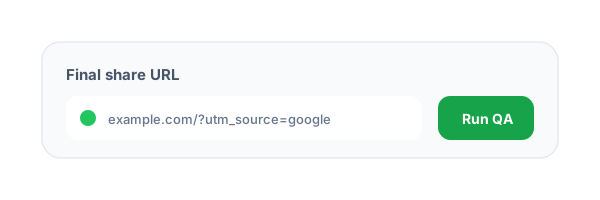
Paste the final share URL
Use the exact URL users will click, including tracking parameters, short links, and redirect wrappers.
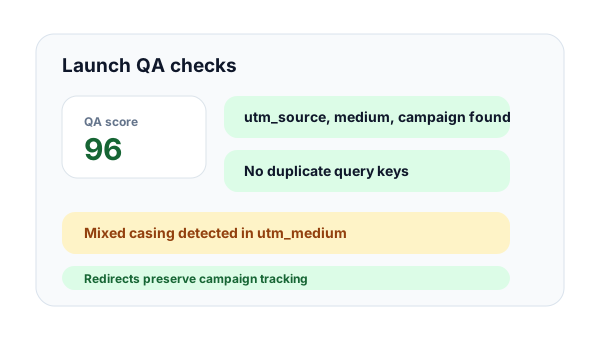
Review URL quality checks
Flyn checks required UTMs, duplicate query keys, naming consistency, HTTPS, and redirect preservation.
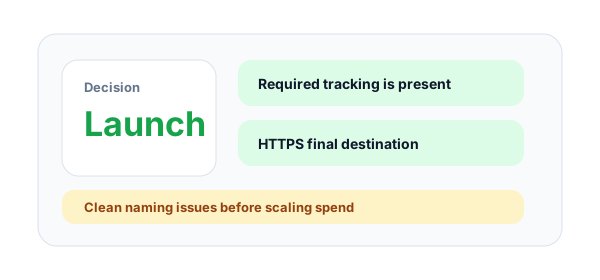
Launch or fix issues
Use the QA score and findings to decide whether the campaign URL is ready or needs cleanup.
What is campaign URL QA?
Campaign URL QA is the final check before a tracked link goes into an ad, email, social post, affiliate placement, or QR code. It verifies that the URL is measurable, readable, secure, and unlikely to break during redirects.
The most common campaign URL mistakes
Teams often miss utm_source, utm_medium, or utm_campaign, duplicate parameters during copy-paste, mix uppercase and lowercase naming, or shorten a link in a way that drops query strings. These issues can make reports unreliable.
How this QA checker helps
The tool combines static URL checks with a redirect-aware final destination scan. That means it can catch both local naming problems and tracking loss that only appears after a shortener or landing-page redirect runs.
Example campaign URL to QA:
https://flyn.to/demo?utm_source=linkedin&utm_medium=paid_social&utm_campaign=q2_pipelineCampaign URL QA Checks Explained
core_utm_fieldsRequiredChecks whether source, medium, and campaign exist so analytics can classify the visit.
Examples
utm_source, utm_medium, utm_campaign
Pro tip
Treat these three fields as the minimum for any owned campaign link.
naming_consistencyLooks for uppercase values, spaces, and empty fields that fragment reports across tools.
Examples
google vs Google, spring_sale vs spring sale
Pro tip
Use lowercase with dashes or underscores, then document the convention for every team.
duplicate_parametersFinds repeated query keys that can make different analytics platforms read different values.
Examples
utm_source=google&utm_source=facebook
Pro tip
Keep one value per key unless you have a documented reason to support duplicate parameters.
redirect_preservationResolves the final destination and confirms tracking values survive the redirect path.
Examples
short link to landing page, ad wrapper to short link
Pro tip
QA the final share URL, not a draft URL from earlier in the campaign process.
Campaign URL QA Best Practices
Do
Do not
Use source, medium, and campaign on every tracked link
Launch links with only one UTM field
Use lowercase campaign naming
Mix q2_demo, Q2_Demo, and Q2 demo
Remove duplicate query parameters
Let copied URLs keep repeated tracking keys
Check redirects after shortening
Assume the original URL and short link behave the same
Use HTTPS destinations
Send launch traffic through insecure pages
Save a QA-approved URL before launch
Keep editing the link after approval
Test links in the channel where they will be used
Only test inside an internal spreadsheet
Pair Flyn links with campaign analytics
Rely on one analytics source for every answer
Why Flyn
Built around link workflows, not generic page checks.
Launch score
Get a practical QA score based on required UTMs, redirects, HTTPS, and duplicates.
UTM naming review
Spot empty values, spaces, mixed casing, and missing core campaign fields.
Duplicate detection
Catch repeated query keys that make attribution inconsistent across tools.
Redirect validation
Confirm the final URL still carries the tracking values you expected.
How to QA Campaign URLs Before Launch
Use this workflow for paid ads, newsletters, partner campaigns, influencer links, launch posts, and QR campaigns before traffic starts.
Validate the tracking format
Check required UTMs, casing, empty values, spaces, and duplicate keys before shortening.
Resolve the final destination
Follow redirects to confirm the destination loads, stays on HTTPS, and preserves campaign parameters.
Approve or fix the link
Use the QA score to decide whether the campaign can ship or needs cleanup.
Campaign QA rule
A campaign link is not ready until both the visible URL and the final resolved URL preserve the same tracking intent.
Common Campaign URL Mistakes to Avoid
Missing required UTMs
Without source, medium, and campaign, analytics can misclassify paid or owned traffic as direct.
Using inconsistent campaign names
Different capitalization or separators split one campaign across multiple report rows.
Leaving duplicate parameters
Duplicate query keys make attribution unpredictable because tools do not always pick the same value.
Testing before the short link is created
The raw URL may pass QA while the short link drops parameters during redirect.
Launching without checking mobile paths
Social, email, and QR traffic often happens on mobile, where redirect and HTTPS issues hurt conversion.
Campaign URL QA Examples by Channel
LinkedIn ads
https://flyn.to/linkedin-demo?utm_source=linkedin&utm_medium=paid_social&utm_campaign=q2_pipelineCheck naming consistency and final UTM preservation before paid spend begins.
Newsletter launch
https://flyn.to/may-offer?utm_source=newsletter&utm_medium=email&utm_campaign=may_offerNewsletter tools can wrap links, so QA the final link after it is inserted into the email.
Partner campaign
https://flyn.to/partner-demo?utm_source=partner_portal&utm_medium=referral&utm_campaign=q2_partnerPartner traffic needs stable naming so referral reports stay clean.
Influencer post
https://flyn.to/creator?utm_source=creator_name&utm_medium=social&utm_campaign=launch_weekShort links make creator URLs easier to share while keeping campaign parameters measurable.
QR flyer
https://flyn.to/flyer?utm_source=event_flyer&utm_medium=qr_code&utm_campaign=booth_launchCheck the URL before print because offline assets cannot be patched quickly.
Frequently Asked Questions
What does the Campaign URL QA Checker validate?
Which UTMs are required?
Why does casing matter in UTMs?
Are spaces in UTM values invalid?
Why are duplicate query parameters risky?
Does this checker follow redirects?
Can I use this for paid ads?
Does the checker store my campaign links?
What is a good campaign URL QA score?
How does this fit with Flyn short links?
More Free Link Tools
Explore other free tools from Flyn to audit, clean, and improve your links.
UTM Redirect Preservation Checker
Confirm UTMs and click IDs survive the full redirect chain.
UTM Builder
Build clean campaign URLs with platform presets.
URL Cleaner
Remove tracking clutter from URLs when you need a clean destination.
QR Destination Audit
Check whether QR landing URLs are fast, secure, and mobile-ready.
Build safer link campaigns with Flyn
Use free link QA tools first, then create branded short links with analytics, QR codes, and redirect controls.