Affiliate Link Tracking: Cloaking & Attribution
You're running affiliate links across a blog, a YouTube channel, and a newsletter, but you can't say which one earned last month's commissions. This is the complete, compliance-aware guide to cloaking, disclosure, and attribution that actually holds up.


What Affiliate Link Tracking Actually Means
You publish a gear roundup, embed eight affiliate links, and a month later a deposit lands from the affiliate network. Useful, except you have no idea which link, which post, or which channel earned it. That gap is the problem this guide fixes. Affiliate link tracking is the practice of structuring, cloaking, disclosing, and measuring your affiliate links so every commission traces back to the exact content that produced it. Most creators treat the link as fire-and-forget, paste the merchant URL, move on, and that works right up until you want to make a decision (double down on video, kill a newsletter section, renegotiate a rate) and discover your data can't support it.
The four jobs a good affiliate link does
A well-built affiliate link does four things at once. Miss any one and you lose money or lose trust:
- Presentation, it's short, readable, and on a domain you control, not a 200-character string of tracking parameters.
- Attribution, it tells you which post, video, or email the click came from.
- Integrity, it carries your affiliate ID intact all the way to the merchant, through every redirect hop.
- Compliance, it's labeled honestly so both Google and the FTC are satisfied.
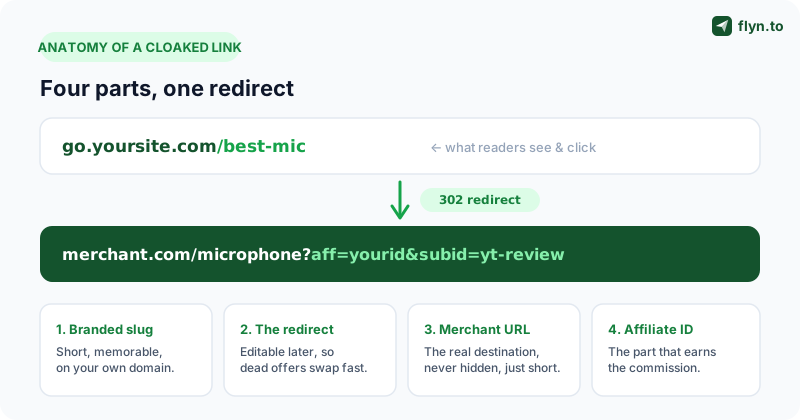
The rest of this guide walks each one. We'll be honest about the parts the affiliate-marketing internet usually skips, chiefly that cloaking has real failure modes and disclosure is a legal requirement, not a courtesy. One clarification up front, because people use these words interchangeably: cloaking makes the URL pretty, tracking records the click, and attribution connects that click to a source and a sale. A purpose-built link cloaker handles cloaking and tracking in one step; attribution is the layer you design on top.
 Tap to enlarge
Link Cloaking: When It Helps and When It Hurts
Link cloaking has a bad reputation, and it half-deserves it. The word sounds like hiding, and hiding is exactly the wrong instinct. The difference between the legitimate use and the abuse is the line between a clean affiliate business and a banned one, so it's worth getting right.
What cloaking legitimately does for you
A raw affiliate URL is often genuinely awful: merchant.com/dp/B09XYZ?tag=yoursite-20&ascsubtag=...&linkCode=.... Cloaking it as go.yoursite.com/best-mic delivers four concrete wins:
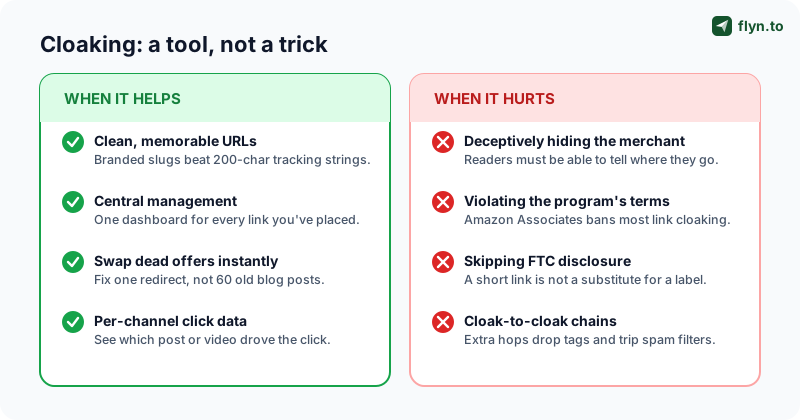
- Clean, memorable URLs, readable in a video, speakable in a podcast, not obviously spammy in an email.
- Central management, every affiliate link you've ever placed lives in one dashboard instead of being scattered across 60 posts.
- Swapping dead offers, when a merchant ends a program or a product goes out of stock, you edit one redirect instead of hunting down every old post. This alone justifies cloaking for a content library of any size.
- Per-channel click data, a cloaked link is a measurement point. The raw merchant URL gives you nothing until the sale clears weeks later.
 Tap to enlarge
When cloaking crosses the line
Cloaking hurts you the moment its purpose shifts from tidy to deceptive. Specifically:
- Hiding the destination to trick the click. If a reader genuinely cannot tell they're heading to a merchant, or to an affiliate offer at all, that's deceptive, and it's the kind of thing that triggers FTC scrutiny and platform bans.
- Violating program terms. This is the big one. Amazon Associates explicitly restricts link cloaking, its operating agreement wants customers to see they're going to Amazon and affiliate links to stay identifiable. Many networks have similar clauses. Read the terms of every program before you cloak its links.
- Chaining cloaks. A cloaked link pointing at another cloaked link pointing at the merchant is fragile, slow, and a great way to drop your affiliate tag. It also looks like exactly the redirect abuse that gets links flagged.
The honest test is one question: if a reader hovered, clicked, or inspected the link, would anything about it surprise or mislead them? If the answer is no, they expected a product page, they got a product page, the merchant is who they'd guess, your cloak is doing presentation, not deception. That's the version a link cloaker is built to support.
Amazon is the program creators most often get wrong. Amazon Associates terms restrict cloaking and require that links remain identifiable as Amazon links. If you sell a lot of Amazon products, use a compliant approach, shorten Amazon links for length and tracking without disguising the destination, and keep your tag= visible in the final URL. Don't risk an Associates ban over a prettier slug.
Disclosure and rel="sponsored": The Non-Negotiable Part
This is the section creators most want to skip and least can afford to. Disclosing affiliate relationships is a legal requirement in the United States, enforced by the Federal Trade Commission, and similar rules exist in the UK, EU, and elsewhere. It is not a best practice. It is the law, and "I cloaked the link" is not a defense.
What the FTC actually requires
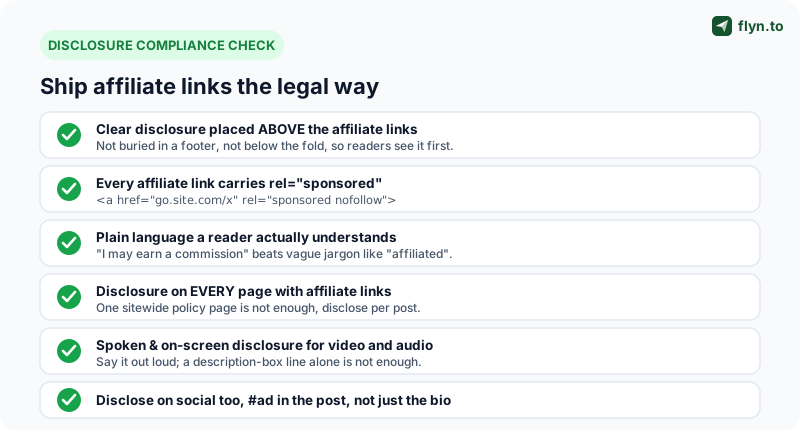
The FTC's standard is that disclosures must be clear and conspicuous, and they sit alongside the rel="sponsored" attribute that satisfies Google; our guide to disclosing affiliate links the right way covers both layers in detail. For affiliate content that means:
- Placement before the link, where a reader sees it before clicking, above the affiliate links, not in a footer or on a separate policy page only.
- Plain language. "I may earn a commission if you buy through these links" works; vague words like "affiliated" or "partner" do not.
- On every piece of content. One sitewide page is not enough, disclose on each post, video, and email with affiliate links.
- In the medium itself. For video and audio, say it out loud and show it on screen, a description-box line alone does not meet the standard.
 Tap to enlarge
Where rel="sponsored" fits, and where it doesn't
Here's the distinction that trips people up: rel="sponsored" is for search engines, FTC disclosure is for humans. Two separate obligations, doing one does not cover the other. Google asks that you mark paid and affiliate links with rel="sponsored" (combine it as rel="sponsored nofollow") so the link doesn't pass ranking signal in a way that looks like link-buying. It is invisible to readers. Our nofollow vs dofollow guide covers how Google treats each value, and the nofollow link checker audits your live pages to confirm every affiliate link is tagged.
A rel="sponsored" attribute keeps you right with Google. A visible, plain-English disclosure keeps you right with the FTC. Skip either one and you're exposed, they protect you from completely different risks.
Use this table as your reference for which rel attribute belongs on which link:
| Link type | rel attribute | Why |
|---|---|---|
| Affiliate / commission link | rel="sponsored" (or sponsored nofollow) | Compensated placement, Google's required marking for paid links. |
| Paid ad or sponsorship | rel="sponsored" | Same category: money changed hands for the placement. |
| Editorial link you genuinely recommend (no commission) | none (dofollow) | An honest, uncompensated recommendation can pass normal signal. |
| Affiliate link in a user comment or forum post | rel="ugc sponsored" | User-generated and commercial, mark both. |
| Untrusted or bulk outbound link | rel="nofollow" | Generic "I don't vouch for this" with no payment involved. |
One catch worth knowing: if you cloak affiliate links through a redirect, the rel="sponsored" goes on the <a> tag in your HTML, the link to your branded slug. The redirect hop itself can't carry a rel attribute, so the discipline is to tag every affiliate <a> element on your own pages.
Per-Channel Attribution: Know What Actually Earns
Now the part that turns affiliate marketing from a hobby into a business. If you promote the same offer on YouTube, in a newsletter, and in a blog post with one shared link, you have one number that means nothing, you cannot tell the channels apart. Per-channel attribution fixes that, and it's not complicated.
Give every channel its own link
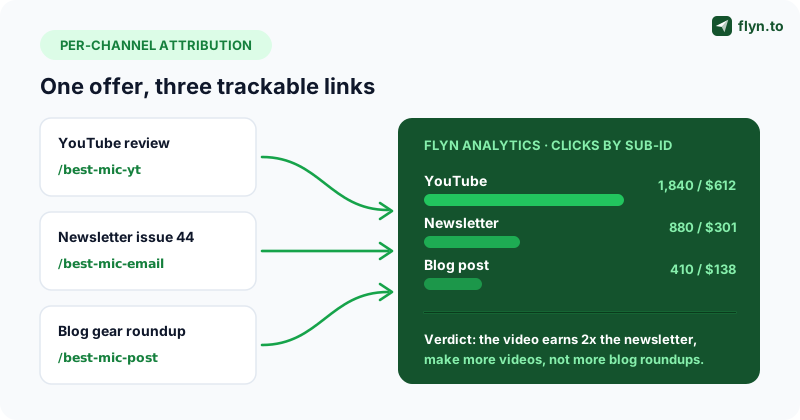
The simplest, most reliable method: create a separate cloaked link per channel for the same offer. One mic review, three links:
go.yoursite.com/best-mic-yt, in the YouTube video descriptiongo.yoursite.com/best-mic-email, in the newslettergo.yoursite.com/best-mic-post, in the blog roundup
All three redirect to the same merchant URL with the same affiliate ID. But now your link cloaker dashboard shows three separate click counts, and you instantly know which channel pulls. This is the single highest-leverage habit in this entire guide. When you need a lot of them at once, you can create multiple short links for one URL in one step.
 Tap to enlarge
Use sub-IDs to push attribution all the way to the sale
Click counts are the top half of attribution; the bottom half lives in the merchant's network. Most affiliate networks let you pass a sub-ID (also called subid, subtag, or SID) that flows through to your commission reports. Set a distinct sub-ID per channel in the destination URL, ?aff=yourid&subid=yt-mic-review for one channel, ?aff=yourid&subid=email-issue-44 for another. When the commission clears, the network report shows which sub-ID earned it; combine that with your cloaked-link click counts and you have clicks and revenue per channel. When the merchant page also feeds an analytics tool you can see, append UTM parameters too, build them with the UTM Builder, verify inbound tagged links with the UTM Parser, and follow the conventions in our ultimate guide to UTM parameters. The principle: sub-IDs attribute the commission, UTMs attribute the on-site behavior, and a serious affiliate uses both.
Name your per-channel links and sub-IDs with a fixed pattern, offer-channel-placement, e.g. best-mic-yt-pinned-comment vs best-mic-yt-description. A consistent scheme means you can split-test placements (pinned comment vs description box) inside a single channel, and your reports stay readable a year later. The same naming discipline we recommend for UTM campaigns applies to affiliate sub-IDs.
Protecting Your Affiliate ID From Being Stripped
Here's a quiet way to lose real money: your content drives the click, the reader buys, and you earn nothing, because your affiliate ID got stripped somewhere between the click and the merchant. It happens more than affiliates realize, and cloaking either prevents it or causes it depending on your setup.
How affiliate IDs get lost
The affiliate ID is just a query parameter, ?tag=yoursite-20, ?aff=12345, and query parameters are surprisingly easy to drop:
- An extra redirect hop that doesn't forward query strings. Each hop is a chance to lose parameters.
- The merchant URL changes, the product page moves and your cloaked link now 404s or lands on a generic page with no affiliate context.
- A reader's privacy tool strips parameters it considers "tracking junk", some aggressive cleaners treat
tag=likefbclid. - You hand-typed the link wrong. The link works; the commission doesn't.
- The cookie window expired or got overwritten by another affiliate's link before checkout.
How to defend the ID
Cloaking helps here when done right, your branded redirect is a stable, single hop you control, with the ID baked into the destination once. To keep it intact:
- Keep the chain to one hop. Your slug redirects straight to the final merchant URL, no intermediate cloaks or third-party shorteners. Verify with a redirect checker that the chain is exactly one step.
- Audit destinations quarterly. Merchants change URLs without telling you; a redirect checker run catches 404s and silent redirects before they cost a season of commissions.
- Confirm the final URL still has the ID. After every hop, the affiliate parameter should still be in the resolved URL. If it's gone, the hop ate it.
- Vet any link before you trust it. Republishing a link from a network dashboard? Run it through the short link safety checker to see the full resolved destination.
Set a quarterly reminder to bulk-test your top 20 affiliate links. Click each cloaked slug, let it resolve, and confirm two things: the page loads (no 404) and the affiliate ID is still in the final URL. Twenty minutes a quarter protects months of commission. A redirect checker automates the resolve-and-inspect step.
Affiliate ID hijacking, the deliberate version
Beyond accidental stripping, affiliate ID hijacking is when someone deliberately replaces your ID with theirs, via malware or shady browser extensions on the buyer's machine, or scrapers that lift your links and swap the tag before republishing. You can't control an infected browser, but you can control your own links: cloaking keeps the real ID out of plain sight where it'd be scraped and swapped. Monitor your click-to-commission ratio, and treat a healthy click count with collapsing commissions as a red flag.
Tracking Clicks vs Conversions
One of the most common ways affiliates misread their own data is conflating clicks with conversions. A click is someone hitting your affiliate link, your link tool records it at the redirect server instantly, before any cookie restriction interferes. A conversion is someone completing a purchase the merchant pays you for, which only the merchant's affiliate network can confirm, often days later after a return window. Your link dashboard owns one number; the network owns the other. Confusing them leads to bad decisions in both directions, celebrating dead campaigns and killing good ones.
Why clicks still matter even though they aren't revenue
Some affiliates dismiss click data because "clicks aren't money." That's a mistake. Click data is your fast feedback loop, commissions clear slowly, clicks are immediate. Strong clicks on a new video on day one is an early signal; zero clicks is a problem to fix now (wrong placement, weak CTA, link not visible) instead of discovering it a month later when the commission report is empty. Click data also isolates where the funnel breaks:
- Low clicks, low commissions, top-of-funnel problem. Your content isn't driving people to the link at all. Fix placement, context, and CTA.
- High clicks, low commissions, bottom-of-funnel problem. People are clicking but not buying, or your affiliate ID is broken and sales aren't being credited. Check the tag first.
That second pattern is the one to internalize. Healthy clicks with near-zero commissions is the classic signature of a stripped or mistyped affiliate ID, not weak content. Before you rewrite the post, test the link with a redirect checker and confirm the ID survives to the merchant.
Not every click is a human. Preview bots, security scanners, and crawlers all hit affiliate links and inflate raw click counts, which makes your click-to-conversion ratio look worse than reality. Flyn filters obvious bot traffic automatically, but you should understand the pattern: read our click fraud prevention guide so you're comparing real clicks against conversions, not crawler noise.
Reconcile the two numbers monthly
Once a month, put your per-channel click counts next to the network's per-sub-ID commission report and compute a rough click-to-commission rate per channel. Over time those rates become your baseline, and a channel that suddenly falls off its baseline is telling you something broke. This habit is what separates affiliates who know their business from affiliates who are guessing.
Common Affiliate Tracking Mistakes
After looking at a lot of affiliate setups, the same handful of mistakes show up over and over. None are hard to fix; all of them quietly cost money or risk a ban. Here's the field guide.
The mistakes that cost you commissions
- Broken affiliate tags after a redirect. The number one silent killer. A redirect hop drops the query string, or the merchant moved the page, and your ID never arrives. Test the full chain with a redirect checker.
- Reusing one link across every channel. You lose all per-channel attribution and can never tell what's working. Use a distinct cloaked link and sub-ID per channel.
- Chaining shorteners. A short link inside a cloaked link inside another redirect, every hop risks the tag and slows the click. Keep it to one hop. Vet suspicious chains with the short link safety checker.
- Never auditing old posts. Affiliate programs end, products go out of stock, merchants restructure URLs. Last year's roundup is full of dead links earning nothing, quarterly audits catch it.
The mistakes that risk a ban, a fine, or your data
- Missing or buried disclosure. No disclosure, or one hidden in a footer, fails the FTC's clear-and-conspicuous standard. Put a plain-language disclosure above the links on every post.
- Deceptive cloaking and ignoring program terms. Cloaking that hides the destination draws scrutiny; cloaking Amazon links against the Associates agreement can get your account terminated and unpaid. Cloak for tidiness, never for disguise, and read the terms.
- No
rel="sponsored". Affiliate links that pass normal ranking signal look like paid link schemes to Google. Mark every one, audit with the nofollow link checker. - Treating raw clicks as gospel. Bot and scanner traffic inflates counts, see click fraud prevention for what to filter against your conversions.
- Spammy, unbranded links. Long, ugly, or sketchy-domain affiliate links get flagged by email and social filters, see why short links get flagged as spam, and cloaking through a generic shortener instead of your own domain wastes the trust signal, as custom domains and branded link trust explains.
Work down those two lists once and you're ahead of the large majority of affiliate marketers, most never audit, never reconcile, and never check whether their tags survive a redirect.
Building Your Affiliate Tracking Stack
Here's everything assembled into a repeatable system: clean links, honest disclosure, full attribution, and a maintenance habit that keeps it working.
The setup, step by step
For each affiliate offer you promote:
- Build the destination URL with your affiliate ID and a per-channel sub-ID. Double-check the ID for typos, this is where commissions are won or lost.
- Cloak it into a clean branded slug with a link cloaker on your own domain. One slug per channel:
-yt,-email,-post. - Tag the HTML, every affiliate
<a>on your pages getsrel="sponsored". - Write the disclosure, plain language, placed above the links, on that specific piece of content.
- Test the chain with a redirect checker: one hop, no lost parameters, affiliate ID present in the final URL.
- Publish, then watch per-channel click counts for early signal.
Flyn's free toolset maps directly onto that workflow: the Link Cloaker turns raw affiliate URLs into clean branded slugs with tracking built in; the Redirect Checker verifies the hop count and confirms your affiliate ID survives to the merchant; the Nofollow Link Checker audits a page to confirm every affiliate link carries rel="sponsored"; the Short Link Safety Checker expands and inspects any link before you trust it; the UTM Builder and UTM Parser handle offers where on-site analytics applies; and platform shorteners like the Amazon link shortener, eBay link shortener, Temu link shortener, Flipkart link shortener, Rakuten link shortener, Alibaba link shortener, and Gumroad link shortener cover merchant-specific hygiene. Browse the full set on the tools page.
When to move from free tools to a real account
The free tools cover one-off tasks. Once you're running affiliate links at scale, many offers, many channels, a library you maintain for years, you want the durable layer: a branded domain, a central dashboard for every link, per-link click analytics, and bulk auditing. That's where a Flyn account earns its place; see pricing for what each tier includes. When "which post earned that?" becomes a weekly question, you've outgrown spreadsheets. And whichever tier you land on, a tracking stack is not set-and-forget, put two tasks on the calendar: monthly, reconcile per-channel clicks against network commissions to catch broken tags; quarterly, bulk-audit destinations for dead links and verify disclosures are still in place on older content. That rhythm is the difference between affiliate income you understand and affiliate income you merely hope for. And once the tracking is solid, the next lever is retargeting the people who click your affiliate links: fire an ad pixel on the redirect and turn one-time clicks into a warm audience you can advertise to again.
What is an affiliate link?
An affiliate link is an ordinary product or page URL with your unique affiliate ID attached, usually as a tracking tag like ?tag=yourname-20 on Amazon or ?ref=yourid elsewhere. When someone clicks it and buys, the merchant reads that ID and credits the commission to you. The destination is the same page everyone sees; only the tag says "this visitor came from me."
Where you get one
You get an affiliate link from the program you joined. In Amazon Associates, browse to any product while logged in and use the SiteStripe bar to copy your tagged link. Networks like ShareASale, Impact, and CJ give you a per-product "get link" button. The raw link is long and exposes your ID, which is exactly why affiliates clean it up.
Why affiliates shorten and cloak them
A raw affiliate URL looks untrustworthy and breaks anywhere parameters get stripped. Shortening fixes that, and a clean code is easier to share on video, in a bio, or on print. Use the Amazon link shortener for tagged product links, cloak the destination so the tag is not visible, and always disclose the link and add rel="sponsored" to stay compliant. When you are ready to close the loop on the sale itself, postback URL tracking covers the server-to-server side end to end. Before you launch, run the link through the free affiliate link checker to confirm your tag survives every redirect.
Frequently Asked Questions
Is affiliate link cloaking against the rules?
Do I have to disclose affiliate links?
What is the difference between rel="sponsored" and a disclosure?
rel="sponsored" is an HTML attribute aimed at search engines, it tells Google a link is paid or affiliate so it does not pass ranking signal like a normal editorial link. It is invisible to your readers. An FTC disclosure is human-facing text that tells your readers you may earn a commission. You need both: rel="sponsored" keeps you compliant with Google's link guidelines, and a visible disclosure keeps you compliant with the FTC. Doing one does not cover the other. You can confirm your affiliate links carry the attribute with a nofollow link checker.How do I track which channel my affiliate sales come from?
/best-mic-yt, /best-mic-email, and /best-mic-post, all redirecting to the same merchant URL. Your link cloaker dashboard then shows three distinct click counts. To carry attribution all the way to the commission, also set a unique sub-ID per channel in the destination URL (subid=yt-mic-review), which most affiliate networks pass through to your commission reports. Together, per-channel cloaked links and sub-IDs let you see both clicks and revenue by channel.Why are my affiliate links getting clicks but no commissions?
Can I use a regular URL shortener for affiliate links?
What is a sub-ID in affiliate tracking?
?aff=yourid&subid=email-issue-44 tells the network this sale came from your newsletter's 44th issue. When the commission clears, the network's report breaks revenue down by sub-ID, so you can see exactly which content earns. Sub-IDs are the bottom half of attribution; your cloaked-link click counts are the top half. Use both for a complete picture.How often should I audit my affiliate links?
What is an affiliate link?
Free tools for this
Three Flyn tools that pair well with the strategy in this article, all free, no signup needed.
UTM Builder
Build campaign-tracked URLs in seconds.
Open Graph Checker
Preview how URLs unfurl on social.
Broken Link Checker
Scan any page for dead links and 404s.
Keep reading
Three related deep-dives from the Flyn blog.

Short Links in SMS Marketing: The Complete Guide
11 min read

Geo-Targeting Links by Country: One URL, Every Market
11 min read

Link-in-Bio Strategy for Creators: Beyond Linktree
13 min read
Ready to try Flyn?
Free plan includes 25 links/month, full analytics, and access to all 30+ free tools above. No credit card required.
Already a member? Log in
Karan Bhakuni is the founder of Flyn. He writes about branded links, click analytics, and the link-management tooling growth teams and creators actually need, drawn from building Flyn and reading a lot of user feedback.
Find these guides useful? Add Flyn as a preferred source so more of them show up in your Google results.