How to Retarget People Who Click Your Affiliate Links
You send hundreds of clicks to a merchant every month and never see any of them again, because you do not own the page they land on. Here is how a retargeting pixel on your short link captures that audience so you can advertise to warm buyers instead of paying twice for cold ones.


The affiliate blind spot nobody talks about
Here is the quiet math that keeps most affiliates poor. You spend months building an audience: a YouTube channel, a review site, an Instagram following, an email list. You put in the work, you earn the trust, and you send that hard-won traffic to a merchant. Then a person clicks your affiliate link, lands on the merchant's product page, and you never see them again. Whether they buy or bounce, that visitor belongs to the merchant now, not you.
Think about what you just lost. That click was the most qualified traffic you will ever generate: a real human who read your recommendation and was interested enough to click through to buy. If they did not convert on the first visit, and most people never do, you have no way to reach them a second time. You paid, in content and reputation, to warm that person up, and then you handed them to a company that will happily retarget them with its own ads for the next month.
Every other kind of marketer gets a second chance at a visitor. An ecommerce store pixels everyone who views a product. A SaaS pixels every trial signup. But an affiliate is structurally locked out of retargeting, because retargeting has always required a pixel on the destination page, and the destination is a page you do not own and cannot touch. This guide is about the one mechanism that breaks that lock.
Why a normal retargeting pixel cannot help you
To see the fix, you have to understand exactly why the normal approach fails for affiliates. A retargeting pixel (the Meta Pixel, Google Ads tag, the TikTok or Pinterest pixel) is a small piece of JavaScript that has to run inside the page the visitor loads. When it runs, it drops a cookie or fires a browser event that tells the ad platform "this person was here, add them to my audience." Later you can run ads targeted only at that audience.
That model has one hard requirement: you must be able to install code on the page the visitor sees. On your own site, easy. On a merchant's product page, impossible. You cannot paste your Meta Pixel into Amazon, into a SaaS pricing page, into a course checkout, or into any offer you promote as an affiliate. So the clicker loads a page with the merchant's pixels on it, not yours, and the audience gets built for them.
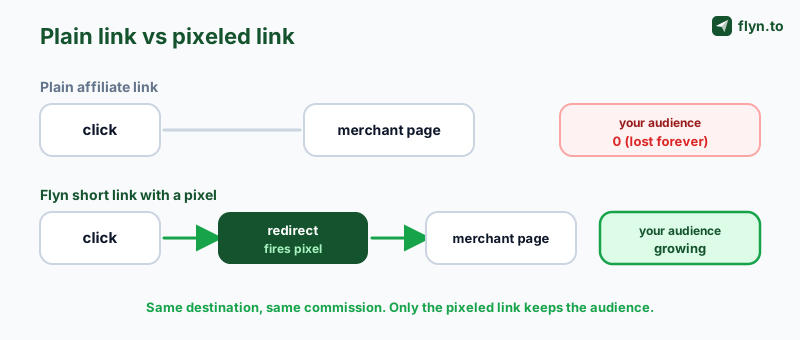
People try workarounds and they all fall short. Sending clicks to a bridge page on your own domain first does let you pixel them, but it adds friction, tanks your click-through rate, and many programs forbid it. Some try to read the referrer or scrape conversions; none of that builds a retargetable audience. The honest conclusion is that with a plain link, an affiliate has no clean way to retarget clickers. You need the pixel to fire somewhere you do control, on the path between the click and the merchant.
 Tap to enlarge
Raw affiliate link versus pixeled short link
Put the two side by side and the gap is obvious. A branded short link (the same kind you would build with a link cloaker to clean up an ugly affiliate URL) costs you nothing extra and quietly earns you the one thing the raw link never could.
| What you get | Raw affiliate link | Flyn short link + pixel |
|---|---|---|
| Commission tracks correctly | Yes | Yes |
| Works in a bio, email, or video | Yes | Yes |
| Clean, branded URL | No | Yes |
| Pixel fires without merchant access | No | Yes |
| Clickers added to your ad audience | No | Yes |
| Build lookalikes from clickers | No | Yes |
| Retarget the people who did not buy | No | Yes |
How a pixel on the redirect fixes it
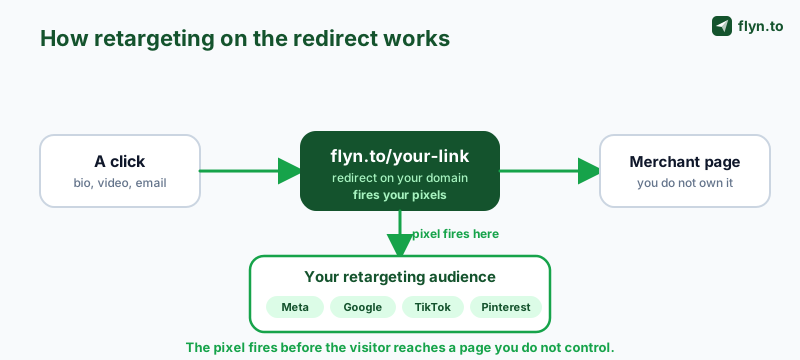
A short link is not just a shorter URL. It is a stop you own. When someone clicks flyn.to/your-slug, their browser hits your redirect on your domain first, and only then gets forwarded to the merchant. That half-second on your own turf is the opening. If a pixel fires during that redirect, it runs on a page you control, adds the visitor to your ad audience, and then sends them on to the offer, all so fast the visitor just feels like the link worked.
That is exactly what a retargeting pixel on a Flyn link does. You attach one or more ad pixels to a link. On every click, Flyn serves a fast interstitial that fires your pixels, then forwards to the destination. The visitor lands on the merchant page as normal; the difference is that your Meta, Google, TikTok, or Pinterest audience just grew by one proven, intent-rich clicker, on a link pointing at a page you never had access to.
This is the part worth sitting with: the destination does not have to be yours anymore. A merchant offer, an Amazon product, a partner's landing page, a course checkout, a booking page. If you can put your affiliate link behind a Flyn short link, and you can, you can retarget everyone who clicks it. The same trick works far beyond affiliate offers, and the full list of cases is in retarget anyone who clicks a link you do not own. The redirect is the one place the affiliate finally owns.
 Tap to enlarge
Compare that to the old flow, where the click goes straight to the merchant and the affiliate audience never grows. The pixel-on-redirect step is small, but it is the entire difference between renting attention once and owning an audience you can market to again and again.
Set it up in three minutes
The whole thing is a one-time setup, then it runs on autopilot for every link you attach it to. Here is the full flow.
- Get your pixel ID from the ad platform. In Meta (Events Manager), Google Ads, TikTok Ads, or Pinterest, copy the pixel or tag ID you already use, or create one. You are not installing anything on a merchant site; you just need the ID.
- Add it to Flyn once. Open Settings, Retargeting Pixels, choose the provider, paste the ID, and save. You can store several (for example a Meta Pixel and a Google tag) and reuse them across links.
- Attach it to your affiliate link. When you create or edit a short link, tick the pixel(s) you want it to fire. Point the link at your affiliate URL (with your affiliate ID and any subid intact).
- Share the short link everywhere you already share affiliate links: a link in bio, a YouTube description, a blog review, a newsletter, a Pinterest pin, a Reddit comment where allowed.
- Watch the audience fill. In your ad platform, the custom audience built from that pixel grows with every click. Once it clears the platform's minimum size (Meta needs about 100 matched people, for example), you can run retargeting ads to it.
If you have used a link cloaker before, this feels identical to publish, you swap your raw affiliate URL for a clean branded short link, except now that link is also quietly building an audience. The pixel step adds zero friction for the person clicking; the redirect is imperceptible.
What to actually do with the audience
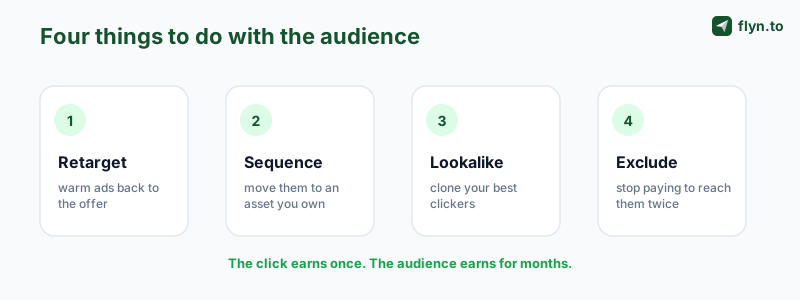
Building the audience is step one. The money is in what you do with it. A retargeting audience of affiliate clickers is unusually valuable because every person in it has already raised their hand. Here are the plays that work.
 Tap to enlarge
Warm retargeting to the same or a better offer
The obvious one: run a cheap retargeting ad to everyone who clicked but (probably) did not buy, nudging them back to the offer, or to a higher-converting one. These clicks are a fraction of cold-traffic cost because the audience is pre-qualified. You are no longer paying to find interested people; you already found them.
Sequence them to your own asset
Smarter affiliates do not just resell the merchant. They retarget clickers into an email capture, a comparison post, a YouTube deep-dive, or a bonus offer, turning a one-time merchant click into a subscriber you own outright. Now the merchant is a lead source for your list, which flips the whole relationship in your favor.
Build lookalikes from your best clickers
Once you have a few hundred clickers, most platforms let you build a lookalike (or similar) audience: cold people who resemble your provers. That is how you scale prospecting on top-of-funnel ads without guessing at interests, seeded from real behavior instead.
Segment by offer
Attach different pixels, or use different links, per niche or per offer, so your "best VPN" clickers and your "email tool" clickers become separate audiences you can message differently. The affiliate link tracking guide covers the subid and UTM conventions that keep those segments clean.
Use a separate short link per offer or niche so each audience stays clean. If you want one link to spread clicks across several merchant offers while still pixeling every clicker, a link rotator spreads the clicks across them, and tagging each destination with the UTM Builder keeps your reporting from fragmenting. For offers that expire, an expiring link retires the placement on its own.
Know the rules before you scale
This works, and precisely because it works you have to run it responsibly. Retargeting off affiliate traffic sits at the intersection of three sets of rules, and ignoring any one of them can cost you an ad account or an affiliate account. None of this is a reason not to do it; it is how you do it without blowing yourself up.
Affiliate program terms
Some networks and merchants restrict how you can use traffic that touches their offers, including retargeting and bridge pages. Read the program agreement. You are pixeling your own clickers on your own redirect, which is materially different from pixeling the merchant's site, but the program's rules still govern the relationship. When in doubt, ask your affiliate manager.
Ad-network policies
Meta, Google, TikTok, and Pinterest each have rules about what you can advertise and how you build audiences. Retargeting a custom audience is standard and allowed; just make sure the offer and the creative comply, and that your pixel setup follows their business-tools terms.
Privacy and consent
A retargeting pixel drops tracking. Under GDPR and ePrivacy in the EU/UK, and increasingly elsewhere, that requires informed consent before the pixel fires for those visitors. Run a real cookie-consent banner, honor opt-outs, and disclose your use of advertising cookies in a privacy policy.
And keep your affiliate disclosure visible, and use rel="sponsored" on the links themselves. Retargeting does not change your disclosure obligations; it just gives you more reason to be the trustworthy affiliate people click in the first place.
Never fire a retargeting pixel for EU or UK visitors without a working consent banner. Under GDPR and ePrivacy, advertising cookies need opt-in before the pixel runs, and getting it wrong risks fines and a suspended ad account. It is the cheapest safeguard on this list and the most expensive to skip; the full rules are in retargeting pixels and consent. If your links also struggle to land, the guide on why short links get flagged as spam covers the deliverability side.
Which platforms to pixel, and which to start with
Flyn supports thirteen ad platforms on a single link (Meta, Google Ads, GA4, Google Tag Manager, LinkedIn, X, TikTok, Pinterest, Quora, Reddit, Snapchat, Microsoft Advertising, and AdRoll), and you can fire more than one at once. But you should not spread yourself across all thirteen on day one. Pick where your buyers and your ad budget actually are.
- Meta (Facebook / Instagram) is the default first pick for most affiliates: the largest retargeting reach, the cheapest warm clicks, and strong lookalike modeling. If you run one pixel, run this. The step-by-step is in how to add a Meta pixel to a link.
- Google Ads is where you catch intent later, in search and across the display and YouTube networks. Pair it with Meta once your audience is large enough.
- TikTok and Pinterest punch above their weight for creator-led and visual niches (beauty, home, gear, software with a demo). If your affiliate content lives there, pixel there; see how to add a TikTok pixel to a link.
- Reddit, Quora, X, Snapchat, and LinkedIn are worth it when your niche skews to those communities (LinkedIn for B2B tools, for instance).
A practical starting stack: attach Meta plus Google to your top affiliate links, let the audiences build for a couple of weeks, then turn on a small retargeting campaign once each clears the platform minimum. Add a third platform only when the first two are earning.
Common mistakes to avoid
The mechanism is simple; the ways people waste it are predictable. Avoid these.
The click earns a one-time commission. The audience earns for months. Treat the retargeting list as the real product of your affiliate work.
Waiting for the audience to be "big enough" forever
The pixel only builds an audience from the day you attach it. Every week you publish plain links is a week of provers you will never get back. Attach the pixel to your top links today, even before you plan to run ads, so the audience is already there when you are ready.
Pixeling low-intent links
A click on "read my full review" is warmer than a click on a random mention. Put your pixels on the links closest to the buying decision (the "get the deal", "check price", "start trial" links), not every URL you ever share.
Firing a pixel with no consent flow
Retargeting EU/UK visitors without a consent banner is a compliance problem, not a growth hack. Set up consent first; it is cheap and it keeps you out of trouble.
Forgetting the audience is the asset, not the click
The click earns a one-time commission if you are lucky. The audience earns for months. Treat the retargeting list as the real product of your affiliate work, sequence it, nurture it, build lookalikes from it, and you stop starting from zero every campaign.
Ready to stop giving away your best traffic? Create a free Flyn account, add your pixel in Settings, and put it on your next affiliate link. The full setup reference lives in the retargeting pixels documentation. Pixels chase the people who clicked; if you also want the network to report the sale back to you, that is postback URL tracking.
Frequently Asked Questions
Can affiliates really retarget people who click their links?
How is this different from putting a pixel on a bridge page?
Does the person clicking notice anything?
Which ad platforms can I retarget with?
How many clicks do I need before I can run retargeting ads?
Is retargeting affiliate traffic against the rules?
Do I still need a cookie-consent banner?
Will this affect my affiliate commission tracking?
Can I retarget people who clicked a link in my bio or a video description?
What can I do with the audience once it is built?
Do I need a paid Flyn plan for retargeting pixels?
How is this different from affiliate link tracking?
Free tools for this
Three Flyn tools that pair well with the strategy in this article, all free, no signup needed.
UTM Builder
Build campaign-tracked URLs in seconds.
Broken Link Checker
Scan any page for dead links and 404s.
Open Graph Checker
Preview how URLs unfurl on social.
Keep reading
Three related deep-dives from the Flyn blog.

How to Track Which Posts Drive Sales, Not Just Clicks
19 min read

Email Newsletter Click Tracking: Measure Your Real CTR
12 min read

How to Choose a Branded Short Domain for Your Links
13 min read
Ready to try Flyn?
Free plan includes 25 links/month, full analytics, and access to all 30+ free tools above. No credit card required.
Already a member? Log in
Karan Bhakuni is the founder of Flyn. He writes about branded links, click analytics, and the link-management tooling growth teams and creators actually need, drawn from building Flyn and reading a lot of user feedback.
Find these guides useful? Add Flyn as a preferred source so more of them show up in your Google results.