How to Add a TikTok Pixel to a Link
You post a TikTok, the clicks fly to a page you do not own, and none of that audience is yours. Here is how to attach a TikTok pixel to the link itself so every clicker becomes retargetable.


Why TikTok clicks vanish the moment they leave the app
You cut a video, it does numbers, and thousands of people tap your link. Then they land on a merchant page, an app store, or a sponsor's site, and every one of those humans evaporates. You cannot retarget them, because the TikTok pixel that would have tagged them lives on a page you do not control. That is the tax creators and affiliates pay for sending traffic somewhere other than their own domain.
The gap between a view and an audience
A view is rented attention. An audience is an asset you can reach again tomorrow without paying TikTok for fresh reach. The difference between the two is a pixel firing on the click. If you only rely on organic reach, you rebuild your audience from zero with every post. Retargeting flips that: a person who clicked once can be shown a paid ad next week, when they are actually ready to buy.
Why the destination page is the wrong place
Most tutorials tell you to drop the TikTok pixel into your site header. Great, if you own the site. Affiliates, creators, and anyone running a retarget affiliate link clicks play do not own the destination. You cannot paste a script into Amazon, an app store listing, or a brand's landing page. So the pixel has to live somewhere you do control: the link.
Move the pixel to the link itself
Flyn is a URL shortener that fires your pixel on the redirect. You attach a TikTok pixel to a short link once, and from then on every click passes through flyn.to, fires the pixel, and forwards to the destination. The clicker never notices. You just gained a retargetable audience member on a page you will never have login access to. That is the core idea, and the rest of this guide is the how.
What the TikTok Pixel actually is (and is not)
The TikTok Pixel is a snippet of tracking code, identified by a unique pixel ID, that reports events (like a page view or a click) back to TikTok Ads Manager. Those events feed two things: conversion measurement and, more usefully for creators, audience building. When a known TikTok user triggers the pixel, TikTok can add them to a custom audience you later target with ads.
Pixel versus Events API
TikTok offers a browser pixel (client side) and an Events API (server side). For the link-level retargeting we are doing, the browser pixel is exactly right: it fires in the clicker's browser during the redirect, which is where the user actually is. You do not need the Events API for basic audience building, and you do not need to touch either code base directly because Flyn holds the pixel for you.
What you do NOT install
This is the part people trip over. You do not install anything on the destination site. You do not need developer access, an FTP login, or a tag manager on the merchant's domain. You only need one thing: the numeric or alphanumeric pixel ID from TikTok Ads Manager. Flyn does the firing.
Create one dedicated TikTok pixel for your link traffic and name it clearly, for example "Flyn Link Clicks". Keeping it separate from any website pixel makes your custom audiences cleaner and your Events diagnostics far easier to read.
How it differs from a Meta setup
The mechanism mirrors the Meta flow almost exactly, so if you already read our add a Facebook pixel to a link guide, this will feel familiar. Same three steps, same fire-on-redirect behavior, different platform ID. The only real difference is where you copy the ID from and which helper extension you use to verify.
Getting your TikTok pixel ID from Ads Manager
Before Flyn can fire anything, you need the ID. This lives inside TikTok Ads Manager, and if you have never opened Ads Manager you will need a free advertiser account first (you do not have to run a paid campaign to create a pixel).
Step by step to find the ID
- Open TikTok Ads Manager and go to the top menu, then choose Tools and then Events.
- Select Web Events. If you have no pixel yet, click Manage or Set Up Web Events to create one.
- When prompted for a connection method, you can pick the standard TikTok Pixel (not the Events API), and choose manual setup. You are not going to paste code anywhere, you just want the ID it generates.
- Once created, the pixel appears in your Web Events list with its Pixel ID, a string of letters and numbers. Copy it.
Where exactly the ID shows up
The Pixel ID is displayed at the top of the pixel's detail view and again in the setup code snippet (it is the value passed inside the load call). You want only the ID itself, not the surrounding script. If TikTok shows you a block of JavaScript, ignore everything except the identifier.
Do not confuse your Pixel ID with your Advertiser ID or your TikTok Business Account ID. They look similar but only the Pixel ID fires events. Pasting the wrong one into Flyn means the pixel never records a thing, and you will not notice until an empty audience refuses to grow.
Keep the ID handy
Copy the Pixel ID to your clipboard or a notes file. In the next section you paste it into Flyn exactly once, and from then on you reuse it across as many links as you like without ever returning to Ads Manager.
The 3-step Flyn setup
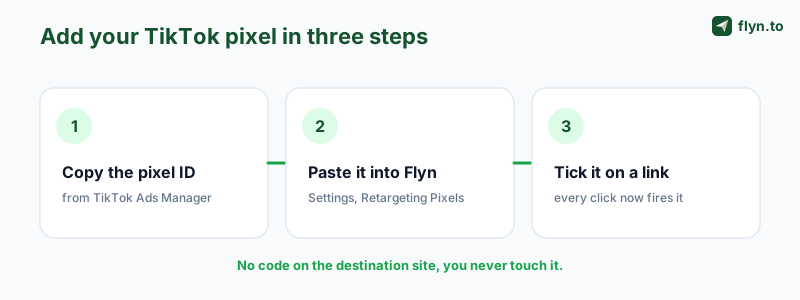
Here is the entire workflow. It takes about ninety seconds and you do it once per pixel, not once per link.
 Tap to enlarge
Step 1: Save the pixel in Settings
Go to Settings, Retargeting Pixels, choose TikTok from the thirteen supported platforms, paste your Pixel ID, and save. This stores the pixel in your account so it is available to every link you create. You never have to enter the ID again.
Step 2: Tick TikTok on a link
Create or edit any short link. In the link's options you will see your saved pixels listed as checkboxes. Tick TikTok (and any others you want firing on the same click). That is the entire per-link action. If you use a TikTok link shortener flow, the pixel option sits right in the same panel.
Step 3: Share the link and let it fire
Put the short link in your TikTok bio, your video description, or a comment. From the first click onward, Flyn fires your TikTok pixel on the redirect. There is no step four. You do not revisit Ads Manager, you do not edit the destination, and you do not manage scripts.
Reusing pixels across many links
Because the pixel lives at the account level, you can attach it to a hundred links in a campaign and they all feed the same custom audience. That is how you build a meaningful audience fast: one pixel, many links, one growing pool of retargetable clickers. The retargeting pixels documentation covers advanced attachment patterns if you want them.
Where the pixel fires on the redirect
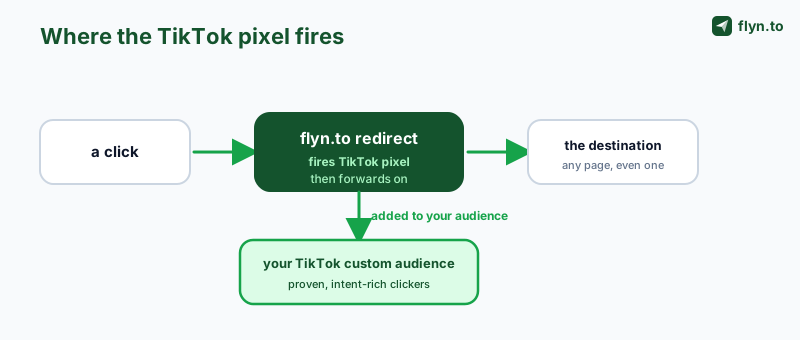
Understanding the timing matters, because it is what lets this work on pages you do not own. When someone clicks your Flyn link, they do not go straight to the destination. They hit flyn.to first, for a fraction of a second.
 Tap to enlarge
The interstitial moment
Flyn serves a fast, near-invisible interstitial on its own domain. In that instant the attached pixels fire, then the browser forwards to the real destination. To the clicker it feels like a normal redirect. To TikTok, a pixel event just arrived from a real user's browser.
The pixel does not care where the visitor ends up. It fires on Flyn's domain during the redirect, so the destination can be a merchant, a sponsor, or an app store you will never have login access to, and the audience is still yours.
Why owning the destination is irrelevant
This is the unlock. The pixel lives on the redirect, and you own the redirect. So the destination being someone else's property, a brand deal landing page, an Amazon listing, an app install page, does not matter at all. This is the exact mechanism explained in retargeting links you do not own, applied to TikTok specifically.
Firing multiple pixels at once
You can tick TikTok alongside Meta, Reddit, Pinterest, or any of the thirteen platforms on the same link. Every ticked pixel fires on that single redirect, so one click can populate audiences across several ad networks simultaneously. If you also cloak the destination, pair it with the link cloaker so the raw affiliate URL never shows in the address bar.
Verifying with the TikTok Pixel Helper
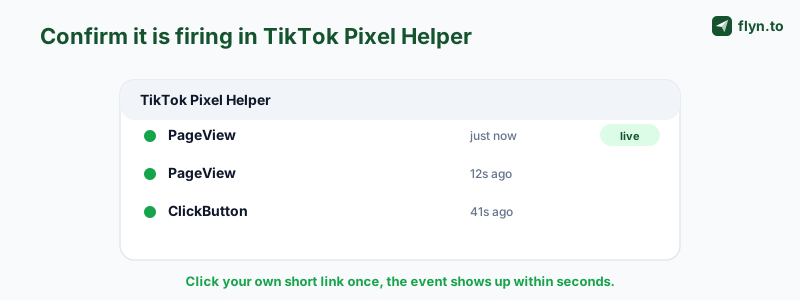
Never scale ad spend on a pixel you have not verified firing. Two tools confirm it in under a minute: the TikTok Pixel Helper Chrome extension and the Events diagnostics inside Ads Manager.
 Tap to enlarge
Using the Chrome extension
Install the TikTok Pixel Helper from the Chrome Web Store. With it enabled, click your Flyn short link yourself. As the redirect passes through flyn.to, the helper icon should light up and its panel should list your Pixel ID plus the event that fired, typically a PageView or ClickButton. Seeing your ID there is proof the pixel is live on the redirect.
Reading the Events diagnostics
Back in Ads Manager, open your pixel and check the Events or diagnostics tab. Recent events should appear within a few minutes of your test click. If the helper shows the pixel but diagnostics stay empty, wait a little longer, TikTok's dashboard lags the browser by design.
What to do if nothing fires
If the helper stays dark, work backwards: confirm you saved the correct Pixel ID in Settings, confirm you actually ticked TikTok on the specific link you clicked, and confirm no browser ad blocker is suppressing the pixel during your test (disable it for the check). Once the helper lights up, you are clear to scale.
Building custom audiences and lookalikes
Firing the pixel is the means. The end is a custom audience you can spend against, and the lookalikes TikTok can build from it.
Creating the custom audience
In Ads Manager, go to Audiences and create a new custom audience of the type based on website traffic or pixel activity. Point it at your Flyn link pixel and choose an event and a lookback window (for example, everyone who fired a PageView in the last 30 days). TikTok populates that audience with the real users who clicked your links. Now you can run retargeting ads to people who already showed intent.
Scaling with lookalikes
Once your custom audience has enough members, use it as the seed for a lookalike audience. TikTok finds users who resemble your clickers, letting you scale prospecting well beyond your organic reach. Your link clicks, the ones you were losing entirely before, now power both retargeting and cold acquisition.
Comparing where the pixel can live
| Approach | Works on pages you do not own | Install effort | Best for |
|---|---|---|---|
| Pixel on destination site | No | Edit site header or tag manager | Your own web pages |
| Pixel on a Flyn short link | Yes | Paste ID once, tick per link | Affiliates, creators, sponsors |
| No pixel at all | N/A | None | Losing every clicker |
Layering UTM data on top
Audiences tell you who to reach; UTM parameters tell you which video or post drove the click. Build tagged destinations with the UTM builder and decode incoming ones with the UTM parser so your retargeting and your attribution reinforce each other. For the broader picture on measuring clicks, see how to track clicks on a link.
Creator and affiliate use cases, consent, and common mistakes
Now the practical part: where you actually put these links, how to stay compliant, and the mistakes that quietly kill campaigns.
Bio link and video description plays
Two placements matter most on TikTok. Your bio link is your evergreen funnel: point it at a pixeled Flyn link and every profile visitor who taps becomes retargetable. Your video description link (or the pinned comment) captures intent per-post: use a fresh pixeled link per campaign so you can build audiences segmented by which video sent them. A QR code generator lets you extend the same pixeled link to any physical or cross-platform placement too.
Consent and compliance
Retargeting pixels fire tracking in the clicker's browser, so you owe them a lawful basis and transparency, especially for EU and UK audiences. This is not optional. Read the consent and GDPR guide before you scale, and if you send affiliate or sponsored traffic, disclose it properly per how to disclose affiliate and sponsored links. Your privacy policy should reflect that you use retargeting pixels.
Common mistakes that waste spend
- Wrong ID pasted: using the Advertiser ID instead of the Pixel ID means nothing ever fires.
- Forgetting to tick the link: saving the pixel in Settings does nothing until you check TikTok on the actual link.
- Not verifying: scaling before the TikTok Pixel Helper confirms the fire builds an empty audience.
- One link for everything: you lose per-video insight; use distinct links per campaign and layer UTMs.
- Ignoring consent: firing pixels on EU clicks without a lawful basis is a real liability.
Rotate and expire where it helps
For split tests or time-boxed drops, pair pixeled links with the link rotator to spread clicks across destinations, or an expiring link generator for offers that end. All of it, the pixel firing, the audiences, the sharing, sits on the Pro and Lifetime plans. If you have not yet, create a free account and upgrade when you are ready to turn clicks into audiences.
Frequently Asked Questions
Can I add a TikTok pixel to a link without owning the destination page?
Where do I find my TikTok pixel ID?
Do I need to install anything on my website?
Is the TikTok pixel a Pro feature on Flyn?
How do I verify the TikTok pixel is actually firing?
PageView. Second, open your pixel in Ads Manager and check the Events or diagnostics tab, where recent events appear within a few minutes. If the helper stays dark, confirm you saved the right ID in Settings, ticked TikTok on that exact link, and disabled any ad blocker for the test.What is the difference between the TikTok Pixel and the Events API?
Can I fire a TikTok pixel and a Meta pixel on the same link?
Where should creators put their pixeled TikTok links?
How do I build a custom audience from my TikTok link clicks?
Will the redirect slow down my TikTok traffic?
Do I need consent to retarget TikTok clickers?
What are the most common mistakes when adding a TikTok pixel to a link?
Free tools for this
Three Flyn tools that pair well with the strategy in this article, all free, no signup needed.
UTM Builder
Build campaign-tracked URLs in seconds.
Broken Link Checker
Scan any page for dead links and 404s.
Open Graph Checker
Preview how URLs unfurl on social.
Keep reading
Three related deep-dives from the Flyn blog.

How to Track Which Posts Drive Sales, Not Just Clicks
19 min read

Email Newsletter Click Tracking: Measure Your Real CTR
12 min read

How to Choose a Branded Short Domain for Your Links
13 min read
Ready to try Flyn?
Free plan includes 25 links/month, full analytics, and access to all 30+ free tools above. No credit card required.
Already a member? Log in
Karan Bhakuni is the founder of Flyn. He writes about branded links, click analytics, and the link-management tooling growth teams and creators actually need, drawn from building Flyn and reading a lot of user feedback.
Find these guides useful? Add Flyn as a preferred source so more of them show up in your Google results.