Retarget Anyone Who Clicks a Link You Do Not Own
A retargeting pixel normally has to live on the destination page, so any time you link to a page you do not control, the audience is lost. Firing the pixel on the redirect flips that. Here are six everyday cases where it quietly builds an ad audience you were giving away.


The pattern: you keep sending traffic to pages you cannot pixel
Stop and count how often your marketing points people at a page you do not control. You link to a sponsor. You share a PDF media kit. You send followers to an app store. You drop a Calendly link, an Eventbrite page, a guest post with your byline, a product on a marketplace. Every one of those is a page you cannot install code on, which means every one of those clicks builds an audience for someone else and leaves you with nothing to remarket to.
This is the same structural trap that affiliates live in, and it is far more common than most marketers realize. A retargeting pixel (Meta, Google, TikTok, Pinterest) only works if it runs inside the page the visitor loads. On your own site, no problem. On any destination you do not own, impossible. So the default outcome is that your most qualified traffic, people who clicked because they were interested, evaporates the moment they leave your surface.
There is one place you always control on the way to any destination: the redirect. If your link is a short link, the click passes through your domain first. Fire the pixel there and you capture the audience no matter where the click is headed. This guide walks through six everyday situations where that one move turns a leak into a list.
How a pixel on the redirect changes the equation
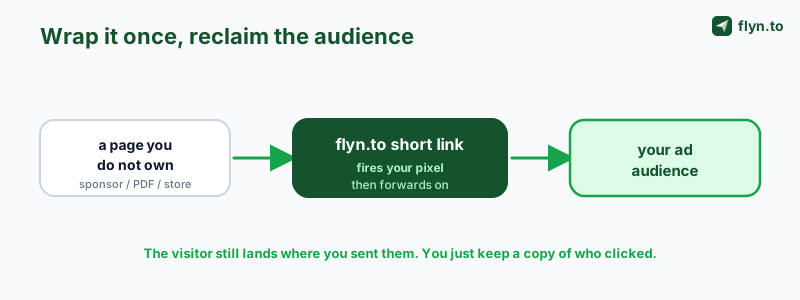
The mechanism is worth stating plainly once, because everything below depends on it. When someone clicks flyn.to/your-slug, their browser hits your redirect on your domain, and only then gets forwarded to the real destination. If a retargeting pixel fires during that redirect, it runs on a page you control, adds the visitor to your ad audience, and forwards them on, all in a fraction of a second the visitor never notices.
 Tap to enlarge
The visitor still lands exactly where you sent them: the sponsor, the app store, the doc. Nothing about their experience changes, and any tracking parameters on the final URL stay intact. The only difference is that your Meta, Google, TikTok, or Pinterest audience just grew by one interested person, on a link pointing at a page you had no access to. That is the entire trick, and it applies to any destination you can wrap in a short link. If you want the deep version with the affiliate example, this post covers it end to end.
Six places this unlocks an audience you were losing
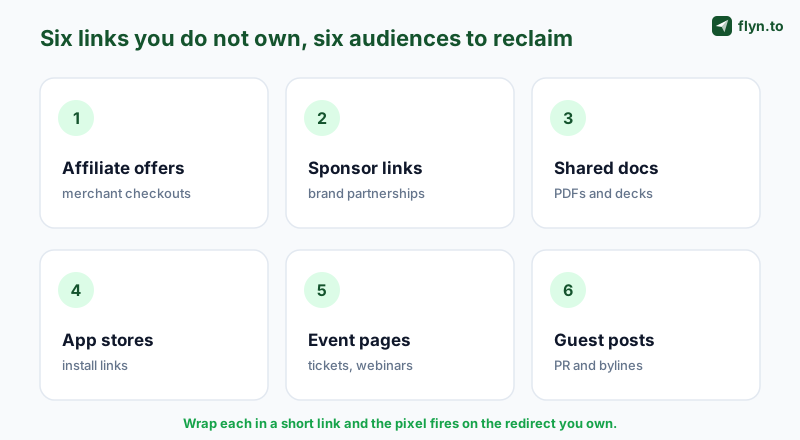
Here are the situations where this pays off most, roughly in order of how much audience the average marketer leaks through each. Pick the one or two that match how you actually work and start there.
 Tap to enlarge
1. Affiliate and merchant offers
The classic case. You send buyers to Amazon, a SaaS pricing page, or a course checkout and never see them again. Wrap the affiliate link, keep your affiliate ID intact, and every clicker joins your audience so you can retarget the ones who did not buy, or promote a better offer. The full playbook, including the compliance angle, is in how to retarget affiliate link clicks.
2. Sponsored and brand-partner links
When a brand sponsors your newsletter, video, or post, you drive a wave of your hardest-won traffic to their page and hand them the whole audience. Put the sponsor link behind your short link and you keep a copy: a retargetable audience of people who responded to that placement. That data makes you a more valuable partner (you can report real engaged reach) and lets you build lookalikes of the buyers your content actually moves.
3. Shared docs, decks, and PDFs
Lead magnets, media kits, pitch decks, price sheets, and case studies usually live on Google Drive, Notion, Dropbox, or a raw PDF, none of which you can pixel. Share the short link to the doc instead and everyone who opens it enters your audience. Now a downloaded PDF is not a dead end; it is the top of a retargeting funnel you can nurture toward a demo or a purchase.
4. App store and download links
You cannot install a pixel on the App Store or Google Play. So the traffic you push to your app listing, from a bio, an ad, a QR code, is invisible for retargeting. Route it through a short link first (an app-store link keeps it clean) and you build an audience of everyone who clicked to install, which you can retarget with reminders, or exclude from acquisition ads so you stop paying to reach people who already tapped through.
5. Event, webinar, and ticket pages
Registration and ticketing usually happen on Eventbrite, Luma, Zoom, or a partner platform you do not own. Wrap the registration link and you can retarget everyone who clicked to sign up (great for filling seats), and separately retarget attendees afterward with the replay or the next event. Pair it with an add-to-calendar link and you have both attendance and an audience.
6. Guest posts, PR, and syndicated bylines
When your article runs on someone else's site, or a journalist links to you, that traffic reads your work on a domain you will never control. Point your byline or resource links through a short link and you capture the readers who clicked, turning a one-off placement into an audience you can bring back to your own funnel long after the article scrolls off the homepage.
| Use case | Destination you cannot pixel | Audience you reclaim |
|---|---|---|
| Affiliate offer | Amazon, a SaaS checkout | Buyers who did not convert |
| Sponsor link | The sponsor's page | Everyone who responded to the placement |
| Shared doc | Drive, Notion, a raw PDF | Everyone who opened the lead magnet |
| App link | App Store, Google Play | Everyone who clicked to install |
| Event page | Eventbrite, Luma, Zoom | Registrants and no-shows |
| Guest post | Someone else's site | Readers of your byline |
What to do with each audience
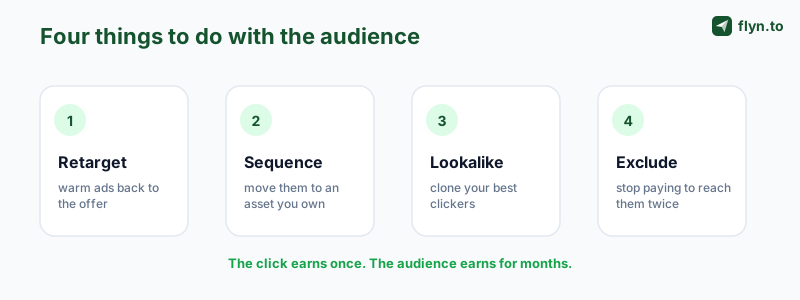
Capturing the audience is half the value; using it is the other half. The same handful of plays work across all six cases.
 Tap to enlarge
- Warm retargeting. Run a cheap ad back to the same offer, doc, or event to the people who clicked but did not finish. They are pre-qualified, so the clicks cost a fraction of cold traffic.
- Sequence to your own asset. Move clickers from a page you do not own to one you do: an email capture, a related post, a demo booking. Now the borrowed destination becomes a lead source for your list.
- Lookalikes. Once an audience is a few hundred strong, build a lookalike to prospect cold people who resemble your provers, seeded by real behavior instead of guessed interests.
- Exclusions. The underrated one: exclude people who already clicked or installed from your acquisition ads, so you stop paying twice to reach the same person.
Attach different pixels or use different links per campaign so these audiences stay separate and you can message each one for where it is in the journey. The subid and UTM conventions that keep those segments clean are in the affiliate link tracking guide.
The exclusion play is the one most people skip. Build an audience of everyone who already clicked or installed and exclude it from your cold acquisition campaigns, so you stop paying twice to reach the same person. It routinely saves more wasted ad spend than the retargeting ads themselves earn.
The rules that keep you safe
Because this works on traffic headed to other people's pages, run it responsibly. Three things to get right, none of them hard.
Consent
A retargeting pixel drops advertising tracking, so under GDPR and ePrivacy in the EU and UK (and increasingly elsewhere) you need informed consent before it fires for those visitors. Run a real cookie-consent banner and honor opt-outs. This is the one that most often trips people up, and the cheapest to fix.
Platform and program terms
Ad networks allow custom-audience retargeting, but the offer and creative still have to comply with their policies. And if you are pixeling traffic tied to an affiliate program or a sponsorship agreement, check that the agreement does not restrict how you use that traffic. You are pixeling your own clickers on your own redirect, which is different from pixeling the partner's site, but the agreement still governs.
Honesty
Keep disclosures visible where they apply (sponsored content, affiliate links) and use rel="sponsored" where appropriate; the affiliate disclosure guide covers the exact markup. Retargeting does not change your disclosure duties.
Consent is not optional theater. Firing pixels on EU or UK visitors without opt-in can trigger real fines and get your ad account suspended, which erases every audience you built. Stand up a consent banner before you attach a single pixel. The full compliance picture (GDPR, ePrivacy, CCPA) is in retargeting pixels and consent.
Handle those three and this is simply good marketing hygiene: keeping a copy of the audience you already paid, in content and reputation, to create.
Which platforms to pixel first
You do not need all thirteen platforms on day one. Attach pixels where your budget and buyers already are, then expand.
Start with Meta and Google
Meta (Facebook and Instagram) gives the widest retargeting reach and the cheapest warm clicks, so it is the default first pixel for almost everyone. Google Ads catches intent later across Search, Display, and YouTube. Running both on your top links covers most of the funnel; follow the walkthrough for adding a Meta pixel or a TikTok pixel.
Add the platform your content lives on
If your links live on visual or creator surfaces, pixel there too: TikTok and Pinterest punch above their weight for product and lifestyle niches. For community-driven audiences, Reddit and Quora are worth it, and LinkedIn is the one to add for B2B tools and services. You can fire several at once on a single link, so there is no cost to matching each placement to its native platform.
One link, many surfaces
Because the pixel rides on the redirect, the same short link builds your audience whether it is clicked in a bio, sent in an email, or scanned as a QR code off a flyer. Print and digital feed the same audience.
Common mistakes to avoid
The mechanism is simple; the ways people waste it are not. Avoid these.
The link earns you a click once. The audience earns you a customer for months. The audience is the asset.
Publishing raw links while you wait to be ready
The pixel only builds an audience from the day you attach it. Every week you share plain links to pages you do not own is a week of provers you will never recover. Attach a pixel to your top outbound links today, before you plan any ads.
Pixeling low-intent links
A click on "get the deal" is warmer than a click on a passing mention. Put your pixels on the links closest to the decision, not every URL you ever paste.
Skipping the consent flow
Retargeting EU and UK visitors without a consent banner is a compliance problem, not a growth hack. Set up consent first; it is cheap and it keeps your ad accounts alive.
Forgetting to exclude
Retargeting without matching exclusions means you keep paying cold prices to reach people who already clicked. Every audience you build should also become an exclusion on your prospecting campaigns, which is the fastest way to cut wasted spend.
Set it up once
The setup is identical no matter which of the six cases you are chasing, and it takes a couple of minutes.
- Grab your pixel or tag ID from Meta, Google Ads, TikTok, or Pinterest. You are not touching the destination site; you just need the ID.
- Add it once in Settings, Retargeting Pixels. Store as many as you use and reuse them across links.
- Create a short link to the page you do not own (the sponsor, the PDF, the app store, the event), and tick the pixel(s) you want it to fire.
- Share that short link wherever you were going to share the raw one. You can even generate a QR code from it for print, and it will still fire the pixel on scan.
- Watch the audience build in your ad platform, and start retargeting once it clears the platform's minimum size.
Every link you have been publishing raw is an audience you are giving away. Create a free Flyn account, add your pixel, and put it on the next link you share to a page you do not own. The complete reference is in the retargeting pixels documentation, and the affiliate-specific deep-dive is here.
Frequently Asked Questions
How can I retarget people if I do not own the page they land on?
Does the visitor end up on the right page?
What kinds of links does this work on?
Can I retarget people who clicked a sponsor link in my newsletter or video?
How does retargeting an app-store link work if I cannot pixel the store?
Which ad platforms can I build these audiences on?
Do I need consent to fire these pixels?
Is it allowed to retarget traffic headed to a partner or sponsor?
What can I actually do with the audience once it is built?
Does this require a paid plan?
Will the pixel still fire if I turn the link into a QR code?
How is this different from just using UTM tracking?
Free tools for this
Three Flyn tools that pair well with the strategy in this article, all free, no signup needed.
UTM Builder
Build campaign-tracked URLs in seconds.
Broken Link Checker
Scan any page for dead links and 404s.
Open Graph Checker
Preview how URLs unfurl on social.
Keep reading
Three related deep-dives from the Flyn blog.

How to Track Which Posts Drive Sales, Not Just Clicks
19 min read

Email Newsletter Click Tracking: Measure Your Real CTR
12 min read

How to Choose a Branded Short Domain for Your Links
13 min read
Ready to try Flyn?
Free plan includes 25 links/month, full analytics, and access to all 30+ free tools above. No credit card required.
Already a member? Log in
Karan Bhakuni is the founder of Flyn. He writes about branded links, click analytics, and the link-management tooling growth teams and creators actually need, drawn from building Flyn and reading a lot of user feedback.
Find these guides useful? Add Flyn as a preferred source so more of them show up in your Google results.