Free App Store Link Generator
Build one smart link that sends iOS users to the App Store, Android users to Google Play, and everyone else to your site, generated as a self-hosted HTML file, no sign-up required.
Add at least one store URL. Both is best, the link routes each visitor to the right one.
Where desktop and other visitors land. Leave blank to send them to a store page instead.
Shown on the brief “Opening…” screen while redirecting.
You're on Desktop, this link would send you to the fallback URL.
Add your store URLs, then generate a device-aware smart link.
See your iOS vs Android split (and which campaign drove it).
The HTML file routes visitors but reports nothing back. With Flyn Pro, one short link sends iPhone to the App Store and Android to Google Play, and your analytics show the device split. No file to host.
How to Create an App Store Smart Link in 3 Steps
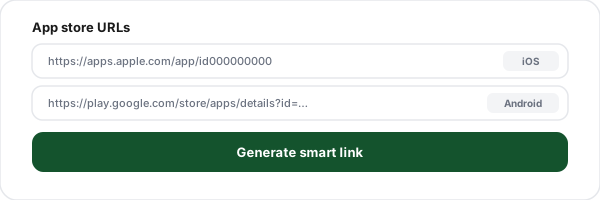
Add your store URLs
Paste your iOS App Store URL and your Google Play URL. Add an optional desktop fallback and your app name.
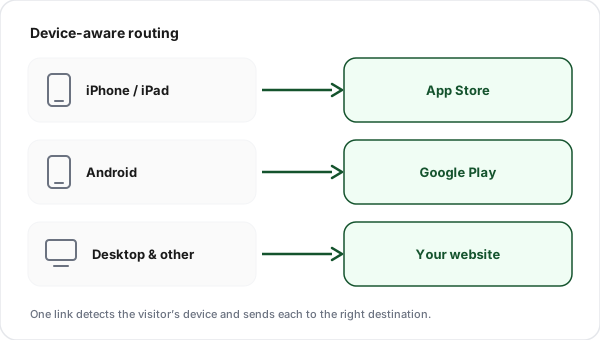
See how each device routes
The tool detects your own device and shows where the link would send you, iOS to the App Store, Android to Google Play, everyone else to your fallback.
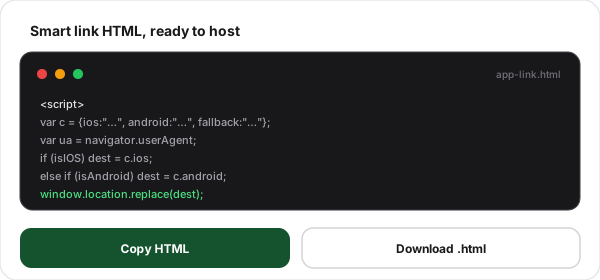
Copy or download the HTML
Generate the smart link, then copy the HTML or download the ready-to-host file. Host it anywhere and share one link for every platform.
What Is a Smart App Link?
A smart app link, sometimes called a universal download link, is one URL that sends every visitor to the right place for their device. Open it on an iPhone and it loads the App Store; open it on an Android phone and it loads Google Play; open it on a laptop and it loads your website. You promote a single link instead of asking people to find the store that matches their phone.
This tool builds that smart link as a small, self-contained HTML file. A short script reads the browser's user-agent the instant the page loads, decides the platform, and redirects, there is no server to run and nothing to install. You host the file anywhere static pages are served and share its URL. Because the routing happens in the browser, the file itself records nothing; when you need to know the iOS-versus-Android split, a managed smart link is what logs it.
One thing a raw store link cannot do is build you an audience, because you cannot install an ad pixel on the App Store or Google Play. Route the install traffic through a short link with a pixel and you can retarget everyone who clicked to install, one of six ways to reclaim an audience from links you do not own.
Getting the Right Store URLs
The smart link is only as good as the store URLs you feed it. Here is exactly where to find each one. Only have a Google Play URL? Paste just that one and this works as a Play Store link generator too.
iOS, App Store
apps.apple.com/app/idXXXXXXXXXOpen your app in the App Store, choose Share, and copy the link. The number after "id" is your App Store ID. Apple auto-redirects each visitor to their local storefront.
Android, Google Play
play.google.com/store/apps/details?id=com.company.appOpen your app on the Play Store website and copy the address-bar URL. The id parameter is your package name. Add install-referrer parameters here if you track campaigns.
What People Use Smart App Links For
One link that just works, wherever you put it, on whatever device.
One link in every bio
Put a single smart link in your Instagram, TikTok, and X bios, it works for every follower, on any phone.
One QR on print & packaging
A single QR code on flyers, posters, or product boxes routes every scanner to the right store automatically.
App-install email & SMS
One "Get the app" button in an email or text that opens the correct store on each recipient's device.
Paid install campaigns
Point one ad link at both stores instead of splitting budget and creative across two separate destinations.
Website download button
A single "Download our app" button on your site that adapts to whoever clicks it, no device picker.
Press kits & partner links
Give journalists and partners one tidy link to share instead of a list of platform-specific store URLs.
Smart Link vs. Universal Link vs. Deferred Deep Link
Three different jobs, often confused. Here is what each one does and when to reach for it.
Smart store link (this tool)
Routes by device to the App Store or Google Play. No app-side setup. Always lands on the store listing, built for acquisition and install campaigns.
Universal Link / App Link
Opens your app directly when it is installed, and the web when it is not. Requires an association file on your domain plus matching app config. Best for engagement.
Deferred deep link
Routes to the store, remembers the user's intent, and opens the exact screen after first install. Needs a managed service that pairs the click to the install.
Client-Side Routing vs. Managed Smart Links
This free tool routes visitors correctly today. A Flyn Pro link adds the analytics a static file cannot.
Capability
This free tool
Flyn Pro
Device routing, iOS / Android / desktop
iPadOS-as-Mac detection
Platform-split click analytics
Hosting included
Clean branded short link
Turn a Smart Link Into an Install Channel
Generate a free smart link here, or let Flyn Pro host one that shows where every click came from.
Platform-split analytics
See iOS, Android, and desktop clicks separately, with country, device, and referrer on each.
Editable destination
Change where the link points after it is printed or shared, without changing the URL.
QR code included
Every Flyn short link comes with a QR code for print and packaging.
Branded short link
One clean branded URL on your own domain instead of a raw .html file path.
Frequently Asked Questions
What is an app store link generator?
How does the smart link know if someone is on iOS or Android?
What URL should I use for the iOS App Store?
What URL should I use for Google Play?
Is this also a Play Store link generator?
Does the link open the app if it is already installed?
What happens on desktop or unsupported devices?
Do I need to host the HTML file myself?
Can I see how many iOS vs Android visitors my link gets?
What is deferred deep linking and do I need it?
Can I use this for QR codes and ad campaigns?
How is this different from a Universal Link or App Link?
Is this app store link generator free? Do I need an account?
To serve both stores and the web from a single URL, follow one link, different destinations by device.
More Free Link Tools
Explore more free link tools from Flyn, instant, no sign-up required.
Deep Link Tester
Verify iOS Universal Links and Android App Links open your app correctly.
Link Rotator
Split one link across multiple destination URLs with weighted rotation.
App Install Campaign Link Generator
Add Play referrer and Apple campaign tags to store URLs, attribution rather than device routing.
UTM Builder
Tag your install-campaign links with UTM parameters for analytics.
Ready to drive more app installs?
Generate a free smart link above, or use Flyn Pro for one hosted short link that routes by device and shows the iOS vs Android split.