Free App Install Campaign Link Generator
Build two attribution-tagged store URLs from one form: a Google Play link with a correctly double-encoded referrer, and an App Store link with your pt and ct tokens. Live decode panel and character counters included.
This tool tags installs. It does not route devices.
You get two separate URLs here, one per store, each carrying campaign attribution. If what you actually want is a single link that sends iPhone visitors to the App Store and Android visitors to Google Play, that is a different job and it lives in the App Store Link Generator. The two work together: build your tagged URLs here, then paste them into the routing tool so one link in your ad still delivers a properly tagged store page on each platform.
Build both tagged store URLs
Fill in one store or both. The campaign fields build the Play referrer; Apple gets its own two tokens.
Google Play
A full play.google.com listing URL works too, we read the id parameter out of it.
Campaign values (these become the Play referrer)
0 / 512The counter measures the encoded string, not what you typed: every = costs 3 characters and every space costs 6.
Apple App Store
Identifies your developer account. Generated once in App Store Connect, reused forever.
Apple gives you one campaign field, so source and medium have to live inside this string.
Tagged store URLs are long. Fix that.
An encoded referrer can run past 200 characters before you have said anything interesting. Shorten each tagged URL with Flyn and see total clicks free on every link. Country, device, and referrer breakdowns come with Pro.
How to Tag an App Install Campaign in 3 Steps
Enter your app IDs and campaign values
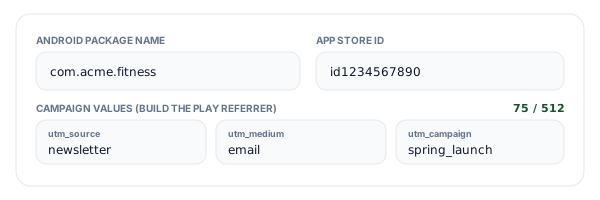
Add the Android package name (com.yourcompany.app) and the numeric App Store ID. You can paste a full apps.apple.com URL and we will pull the ID out of it. Then fill in source, medium, campaign, and optionally content and term. Those five fields build the Play referrer; Apple only gets one token, so there is a button that flattens them for you.
Generate both URLs and read the decode panel
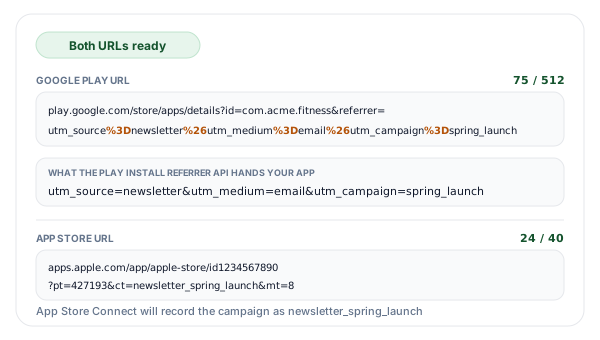
We encode each value, join them into a referrer query string, then percent encode that whole string a second time so Google Play stores it as one parameter. The decode panel plays the process back: the exact string your app receives from the Install Referrer API, the parsed key and value pairs, and the campaign name App Store Connect will record. Counters track the encoded referrer against 512 characters and the campaign token against 40.
Shorten each tagged URL and ship the campaign
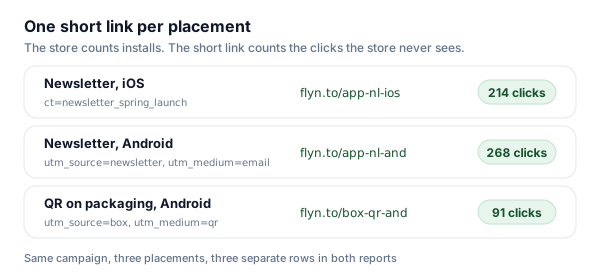
Copy both URLs, or shorten each one with Flyn right below the output. A short link is what actually goes in the newsletter, the QR code, or the partner brief, and its click count tells you how many clicks reached the store page. The store then tells you how many of those turned into installs, which is the ratio worth watching.
Why the Play Referrer Has to Be Encoded Twice
Google Play does not read utm_source, utm_medium, or utm_campaign from the store URL. It reads exactly one parameter, referrer, and stores whatever sits inside it. The convention everyone settled on is to put a query string in there, which means the value of one query parameter is itself a query string. Google's own example is unambiguous about what that looks like:
https://play.google.com/store/apps/details?id=com.sample.package
  &referrer=utm_source%3Dsearch%26utm_medium%3Dcpc%26utm_campaign%3Dsummerpromo
Look at what changed: every = inside the referrer became %3D and every & became %26. That is the outer encoding pass, and skipping it is the single most common mistake in app campaign setup. An unencoded ampersand does not stay inside the referrer value, it ends it. The browser hands Play a URL with three top-level parameters, Play keeps the first pair as the referrer, and utm_medium and utm_campaign are discarded as parameters it does not recognise. The link still works, the store page still opens, and your report quietly loses two thirds of its dimensions.
The inner pass matters for a different reason. If a campaign name contains a space, an ampersand, a plus sign, or a hash, that character has to be encoded before it goes into the referrer string, and then encoded again with everything else. A space becomes %20 on the way in, and %2520 in the finished URL. It looks wrong the first time you see it, and it is correct: Play decodes once when it stores the value, your app or SDK decodes once more when it parses the pairs, and the campaign name comes out the other end with the space intact.
Google also fixes the size of the whole thing: the referrer string must be URL encoded, 512 characters or less. Because the count is on the encoded form, a referrer that looks like 300 characters in your notes can be 380 in the URL. Every = and every & costs three characters instead of one, and every space in a value costs six. The counter above the Play output tracks the real number.
| What you put after referrer= | What Play stores | Verdict | Why |
|---|---|---|---|
| utm_source=email&utm_medium=news | utm_source=email | Broken | Nothing was encoded, so the raw ampersand ended the referrer value. utm_medium became a sibling parameter of the Play URL and was discarded. |
| utm_source%3Demail%26utm_medium%3Dnews | utm_source=email&utm_medium=news | Correct | The separators inside the referrer are encoded, so Play keeps the whole string and hands it to your app intact. |
| utm_campaign%3Dspring sale | utm_campaign=spring sale | Risky | A literal space is not valid inside a URL. Browsers usually cope, but ad platforms and email clients frequently cut the link at the space. |
| utm_campaign%3Dspring%2520sale | utm_campaign=spring%20sale | Correct | The space was encoded once as part of the value and once again with the rest of the string, so your app decodes it back to "spring sale". |
Google Play and Apple Name the Same Idea Differently
The two stores solve identical problems with incompatible vocabularies. This is the map, and it is why a single tagged link for both platforms is not a thing that exists.
| What you are naming | Google Play | Apple App Store | Notes |
|---|---|---|---|
| Traffic source | utm_source, inside referrer | folded into ct | Apple has one campaign field, so source has to be baked into the token text itself. |
| Channel type | utm_medium, inside referrer | folded into ct | Same problem: email, cpc, and qr all end up as part of one Apple string. |
| Campaign name | utm_campaign, inside referrer | ct (campaign token) | The only field that maps one to one across both stores. |
| Creative or ad variant | utm_content, inside referrer | no field | To split creatives on iOS you need a separate ct value per creative. |
| Keyword | utm_term, inside referrer | no field | Keyword level reporting on iOS comes from Apple Search Ads, not from campaign links. |
| Who owns the link | nothing, the package id identifies the app | pt (provider token) | pt identifies your developer account, is generated once in App Store Connect, and never changes. |
| Store or media type | not applicable | mt=8 | mt=8 marks the link as pointing at an app rather than another kind of Apple media. |
| Encoding rule | the whole referrer value is percent encoded | ordinary query parameters | Play is the one that needs a second encoding pass. Apple parameters are flat and encode normally. |
| Length cap | 512 characters, encoded | 30 characters per Apple's current help page | The Play count is on the encoded string, so every = costs 3 characters and every & costs 3. |
| Where the data lands | Play Install Referrer API inside your app | App Store Connect Analytics, Campaigns | Play hands the string to your app, Apple keeps the reporting on its own dashboard. |
Where Each Store Hands the Data Back
On Android the referrer is not a report, it is a payload. Your app calls the Play Install Referrer API after first launch and gets back the referrer string exactly as you wrote it, alongside the referrer click timestamp, the install begin timestamp (both a client-side and a server-side version of each), the app version at the time of first install, and whether the user interacted with your instant experience in the previous seven days. Whatever analytics you use, an SDK or your own backend, reads that string and splits it into the utm pairs you built here. The device needs the Play Store app at version 8.3.73 or later for the call to succeed.
On iOS the flow is the opposite: nothing reaches your app. Apple keeps the campaign data and reports it inside App Store Connect Analytics, grouped by the campaign token you chose. That is why the Apple side of this generator is so much smaller than the Play side, and why the token names matter so much: the token text is the entire report. Apple also gates the feature on data, so a campaign link cannot be generated until the app has analytics to attach it to.
Both of those measure installs, not clicks. Neither store tells you how many people saw the link and never tapped it, which is the number that tells you whether a placement is working at all. That gap is why most teams put a short link in front of the store URL: the short link counts the click, the store counts the install, and the ratio between them is your store-page conversion rate per placement. Our campaign URL QA checker is worth a pass before you ship, because it catches the tags that got mangled somewhere between this page and your ad platform.
Naming Conventions That Survive a Year
Campaign reports do not degrade gradually, they degrade the first time two people spell the same thing differently. Spring_Launch and spring-launch are two campaigns forever, and no amount of downstream cleanup puts them back together. Pick lowercase, pick one separator, and write the rule down somewhere your agency can read it. Underscores are the safer separator here: a hyphen is fine too, but underscores never get mistaken for a line break when a long URL wraps in an email client.
The Apple side needs its own rule, because one token has to carry what Play splits across three fields. Fix the word order once, source first, then medium, then campaign, and never vary it: newsletter_email_spring_launch sorts and filters cleanly, while spring_launch_from_newsletter does not. Keep it under 30 characters if you can, which means abbreviating aggressively and consistently: nl for newsletter, qr for a printed code, and so on. A legend in a shared doc costs ten minutes and saves an argument every quarter.
Finally, budget the 512 characters before you need them. Five utm fields with generous names can pass 200 encoded characters on their own, and if you also carry an internal click id or a partner reference, the ceiling arrives faster than you expect. If you are already comfortable with web campaign tagging, our UTM builder uses the same vocabulary for ordinary web destinations, so the same naming rules carry across your whole stack.
Where Tagged Install Links Earn Their Keep
Ad networks tag their own traffic. Everything else you drive to a store page arrives untagged unless you tag it yourself.
Newsletter and lifecycle email
Your own list is the cleanest install traffic you have, and no ad network is going to tag it for you. One tagged Play URL and one tagged App Store URL per send, and the installs stop landing in the organic bucket.
QR codes on packaging and print
A poster, a receipt insert, and a trade show badge can each carry a different campaign token, so you learn which physical placement actually converted instead of guessing from an install spike.
Partner and affiliate placements
Give every partner a distinct utm_source and a distinct Apple campaign token. When the invoice arrives you can point at the store reports instead of arguing about a shared dashboard.
Creator and influencer drops
Each creator gets their own tagged pair, and because the tags live in the store URL rather than in a tracking script, the attribution survives even when the creator posts the link somewhere you did not plan for.
Tagged Store URLs + Flyn: The Click Half of the Funnel
The generator is free forever. Add Flyn when you want to know how many clicks reached the store page, not just how many installed.
Clicks the stores cannot see
Total clicks are free on every link. Country, device, and referrer breakdowns come with Pro.
Editable destinations
Fix a typo in a campaign token after the poster is printed. Re-point the short link and every copy follows.
QR codes included
A 250-character encoded referrer makes an ugly QR code. Encode the short link instead, free on every link.
A free plan that lasts
25 links a month with total click counts and QR codes. No trial countdown. Custom domains come with Pro.
Frequently Asked Questions
How do I add UTM parameters to a Google Play Store link?
Why does the Play referrer have to be encoded twice?
What is the character limit for the Google Play referrer parameter?
What are pt and ct in an App Store link?
How long can an Apple campaign token be?
Can one link cover both the App Store and Google Play?
Where do I find my Apple provider token?
What does the Play Install Referrer API actually give my app?
Do these tags work with Google Ads or Apple Search Ads?
Why is my utm_campaign missing in reporting?
Should I use the same naming for Play and Apple?
Do the tags survive a short link or a QR code?
More Free Tools
More free link tools from Flyn, instant, no sign-up required.
App Store Link Generator
One link that routes iOS to the App Store and Android to Google Play.
UTM Builder
The same campaign vocabulary for ordinary web destinations.
Deep Link Generator
Open a screen inside an app people already installed, with a store fallback.
Campaign URL QA Checker
Catch mangled or missing tags before the campaign goes live.
Stop losing installs to the organic bucket
Build correctly encoded store URLs for free, then shorten them with Flyn so you can see the clicks the stores never report. Analytics, QR codes, and editable links included.