How to Link to the Microsoft Store and the Mac App Store
Your desktop app lives in two stores, and each one has its own link format, its own ID and its own badge rules. Here are the formats that work today, where to find the IDs, and how one short link sends Windows and Mac visitors to the right store.

Two Stores, Two Link Formats, One Launch Email
You shipped a desktop app to the Microsoft Store and the Mac App Store, and now every launch email, README and video description needs a link. Each store has its own link format, app ID, store scheme and badge rules, and the wrong pick fails quietly: a Windows-only scheme that does nothing on a Mac, or a Mac listing a Windows reader can look at but never install. This guide covers the formats that work today, checked on each store's own pages on October 18, 2026, then shows how one short link sends iPhone, Android, Windows and Mac visitors to the right store.
- The Microsoft Store web link, the Store ID, the legacy format and the campaign tag.
- The Mac App Store web link, the Apple ID,
mt=12and?platform=mac. - The store schemes
ms-windows-store://andmacappstore://, badge rules and direct downloads. - One smart routing short link for every platform, a reference table and a checklist.
For the wider question of how one link picks a destination by device, start with one link, different destinations by device; this post is the store-link reference underneath it. For URL parts in general, see the anatomy of a URL.
The Microsoft Store Link Format
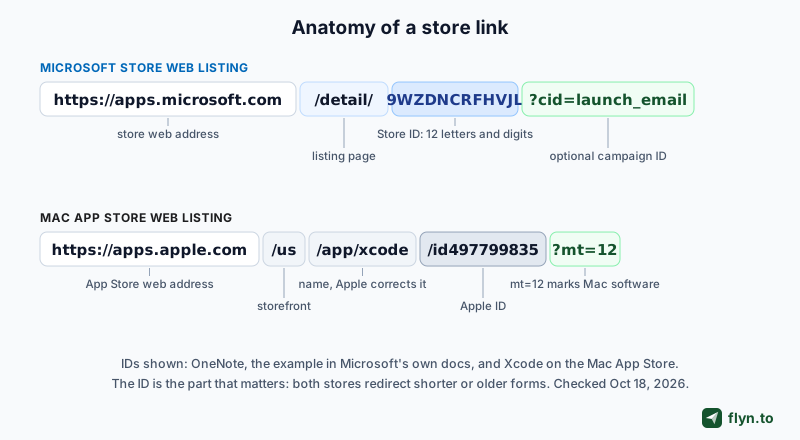
Microsoft's documented web link for a Store listing is https://apps.microsoft.com/detail/ plus your app's Store ID. Per Microsoft's app identity documentation, clicking it opens the web-based listing, and on Windows devices the Store app also launches and shows the same listing. That makes it the right default for anything clicked in a browser, an email or a chat app.
 Tap to enlarge
Finding the Store ID
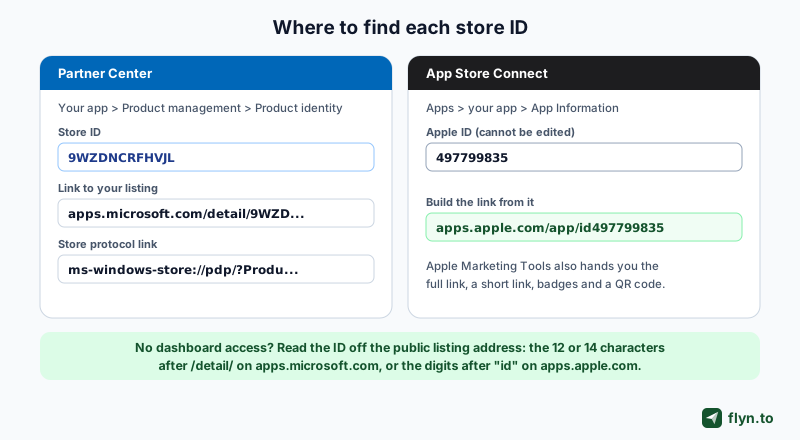
- In Partner Center: open the app, expand Product management and choose Product identity. That page shows the Store ID, the listing link and the Store protocol link. (Microsoft's badge page names the same screen App management, then App identity.)
- On the public listing: the ID is the end of the address. Microsoft's badge page describes it as a unique 12-character alphanumeric code at the end of
apps.microsoft.com/detail/. Apps the Store sells as .exe or .msi installers (Win32 apps, which Microsoft's Intune documentation says the Store now supports) carry a longer ID: Visual Studio Code's is the 14-characterXP9KHM4BK9FZ7Q, the ID in Microsoft's own winget install example.
This guide uses 9WZDNCRFHVJL, the example ID in Microsoft's docs (OneNote for Windows 10). Case does not matter: the store redirected the upper-case form to lower case.
Older microsoft.com/store/apps links still redirect
Until January 2025, Microsoft's docs gave the listing format as https://www.microsoft.com/store/apps/ plus the Store ID; the change is visible in Microsoft's public documentation history. Old badges and READMEs still carry it, along with www.microsoft.com/store/productId/. Both reached the listing when we followed them on October 18, 2026, but through a chain of redirects (five from our test location), and each redirect hop is one more place a link can break later. Swap in the current form the next time you touch the page; the free redirect checker shows the whole chain for any link you inherit.
Tracking a channel with a campaign ID
Microsoft lets you tag the listing link with your own campaign: add ?cid= and a name of up to 100 characters, as in https://apps.microsoft.com/detail/9wzdncrfhvjl?cid=launch_email. Partner Center then reports page views and conversions for that campaign in its Acquisitions report, per Microsoft's custom campaign guide. The same guide counts a conversion when the customer acquires the app within 24 hours of the click, and warns that your campaign name can appear in another developer's report, so keep names free of anything private. The store tag measures installs; a UTM tag measures your own site, as our UTM parameters guide explains.
The Mac App Store Link Format
Apple's listing pages live on apps.apple.com, and a Mac app's full address looks like https://apps.apple.com/us/app/xcode/id497799835?mt=12. Read it part by part:
id497799835is the app's Apple ID with anidprefix, and it is the part that identifies the app./uspicks the storefront, the country store. Leave it out and Apple redirects to a full storefront address./xcodeis the app name and it is cosmetic: we requested the same ID under a made-up name and Apple redirected to the real one.?mt=12marks Mac software. Apple's store adds it when it redirects to a Mac app, and the link Apple's own marketing tool generates for a Mac app carries it too.
So the shortest dependable form is https://apps.apple.com/app/id plus the number. To route by device from your own site, the free App Store link generator builds a self-hosted HTML file that sends iOS, Android, Windows and Mac visitors to the link you enter for each, with its own iPad check; the App Store link shortener covers a short, tracked link to one listing.
Finding the Apple ID in App Store Connect
In App Store Connect, open your app and go to App Information. Apple's App Store Connect help describes the Apple ID there as an identifier generated when you add the app, used in the App Store URL on desktop computers, and not editable. Put that number after https://apps.apple.com/app/id and the link works. Without dashboard access, copy the digits after id from the public listing.
 Tap to enlarge
The ?platform=mac view for apps on several devices
Some apps share one listing across iPhone, iPad and Mac. When we loaded one on October 18, 2026, Apple's page source showed the iPhone view by default, while ?platform=mac asked for the Mac view, titled App Store for Mac, as in https://apps.apple.com/us/app/pages-create-documents/id361309726?platform=mac. If your Mac and iPhone apps share an Apple ID, add ?platform=mac to the link Mac visitors get, so they see Mac screenshots.
Apple Marketing Tools and campaign links
Apple's App Store Marketing Tools lets you pick Mac as the platform, find your app, and copy a ready-made link, a short link, badges and a QR code. For measurement, App Store Connect can generate campaign links that add a campaign token (ct=) and your provider token (pt=) to the listing address, and Apple shows a campaign's figures once a metric reaches a threshold of five.
Store Schemes: ms-windows-store and macappstore
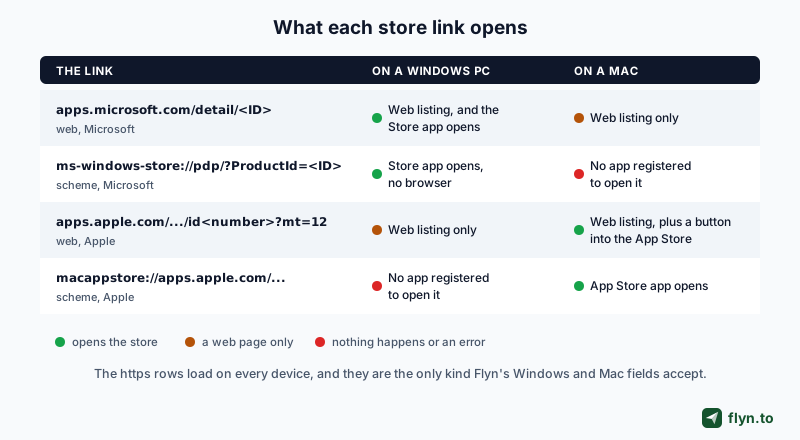
Both stores also answer a custom URL scheme that skips the browser and opens the store app. That sounds like an upgrade until you picture who clicks a link in an email: people on phones, Macs, Windows PCs and Chromebooks, and only one of them has the matching store app.
The Microsoft Store protocol
Microsoft's ms-windows-store URI reference calls ms-windows-store://pdp/?ProductId=9WZDNCRFHVJL the recommended way to open a product page, and lists ms-windows-store://review/?ProductId=9WZDNCRFHVJL for the write-a-review screen. The same page marks the older package family name and App ID forms as deprecated, and says that from February 2026 the store no longer supports the mode=mini pop-up, so those links open the full page instead. Microsoft describes the protocol link as the way to reach your listing without opening a browser, for example from inside an app, and a campaign tag works here as &cid=.
The macappstore scheme on a Mac
On a Mac, the App Store app registers macappstore:// (it is listed, next to itms-apps, in the app's own Info.plist), and Apple's App Store web pages use it to hand a Mac visitor over: they keep the listing address and swap https for macappstore, as in macappstore://apps.apple.com/us/app/xcode/id497799835?mt=12. We found no Apple developer documentation for the scheme, so treat it as a convenience that can change, not a contract.
 Tap to enlarge
When a scheme is the right link
- Inside your own Windows app, such as an Update or Rate this app button:
ms-windows-store://opens the Store app with no browser in between. - Inside Mac software, where a Mac is certain to handle the click:
macappstore://works, though the https listing is the documented route. - Everywhere else (web pages, email, social posts, QR codes, ads): use the https listing. It loads in any browser, and on Windows the Microsoft one opens the Store app anyway.
A store scheme in a newsletter or on a web page is a dead click for most readers. Macs and phones have no app registered for ms-windows-store://, and a Windows PC normally has none for macappstore://, so the browser usually shows an error or does nothing, and you never see the lost install. Test any scheme on a device without that store before it ships.
Store schemes are cousins of the URI schemes behind deep links that open native apps; Flyn's Pro deep links do that job for 16 supported apps such as YouTube, which is different from opening a store.
Store Link Format Reference
Every format below was followed live on October 18, 2026. Swap in your own ID.
| Format | Example | What it opens | Use it for |
|---|---|---|---|
| Microsoft Store web listing | https://apps.microsoft.com/detail/9WZDNCRFHVJL | The web listing on any device; on Windows the Store app opens too | Web pages, email, social, QR codes, Flyn's Windows field |
| Microsoft listing with a campaign | https://apps.microsoft.com/detail/9WZDNCRFHVJL?cid=launch_email | The same, with views and conversions reported by campaign | Comparing channels in Partner Center |
| Legacy Microsoft link | https://www.microsoft.com/store/apps/9WZDNCRFHVJL | A chain of redirects to the apps.microsoft.com listing | Nothing new; replace it when you can |
| Microsoft Store protocol | ms-windows-store://pdp/?ProductId=9WZDNCRFHVJL | The Store app directly, Windows only | Buttons inside your Windows app |
| Microsoft review protocol | ms-windows-store://review/?ProductId=9WZDNCRFHVJL | The Store's write-a-review screen | Rating prompts inside your app |
| Mac App Store web listing | https://apps.apple.com/us/app/xcode/id497799835?mt=12 | The web listing; on a Mac it offers a button into the App Store | Web pages, email, QR codes, Flyn's Mac field |
| Short Apple form | https://apps.apple.com/app/id497799835 | A redirect to the full storefront address | Typing by hand, docs, scripts |
| Shared listing, Mac view | https://apps.apple.com/us/app/pages-create-documents/id361309726?platform=mac | The Mac view of an app that also runs on iPhone and iPad | Mac visitors of a shared listing |
| Mac App Store scheme | macappstore://apps.apple.com/us/app/xcode/id497799835?mt=12 | The App Store app, Mac only; undocumented | Rarely, from inside Mac software |
A store scheme is a shortcut for people already inside that store's world. Everywhere else, the https listing is the link.
Inherited a link from an old press kit or a teammate? Paste it into the URL expander to see where it really ends up before you reuse it.
Store Badges: What Microsoft and Apple Allow
A badge is the visual half of a store link, and both companies publish rules for it.
The Microsoft Store badge
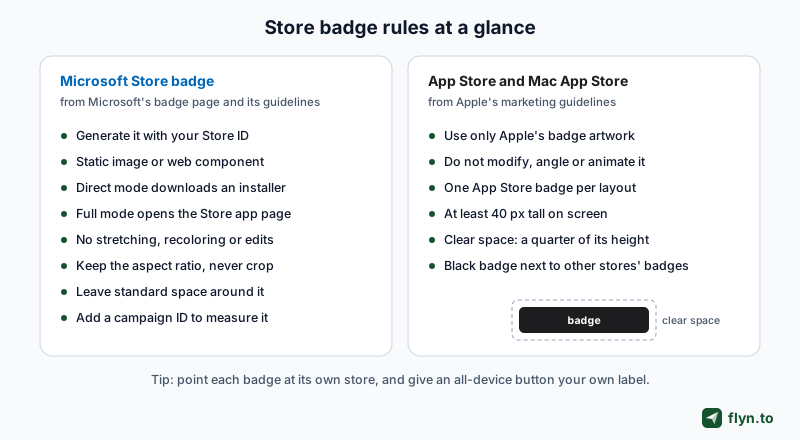
Microsoft's badge generator builds the badge from your Store ID in two forms: a static badge (an image plus a link, for READMEs and pages that block scripts) and a web component that follows the visitor's language and theme. You choose a launch mode: Direct, the default, downloads your app's installer, and Full opens your product page in the Store app. The guidelines on that page ask you to:
- Keep standard spacing around the badge and place it prominently.
- Never stretch, recolor or modify the artwork, and keep a static image's aspect ratio (no skewing or cropping).
- Add a campaign ID so you can measure each placement.
Microsoft hosts the assets, so a generated badge follows future rebrands on its own.
The App Store and Mac App Store badges
Apple's marketing guidelines cover the Download on the Mac App Store badge alongside the other App Store badges:
- Use only the badge artwork Apple provides, and do not modify, angle or animate it.
- Use one App Store badge per layout or video.
- Keep it at least 40 px tall on screen (10 mm in print), with clear space of a quarter of its height.
- Use the preferred black badge whenever badges for other platforms appear in the same layout.
Apple also asks that its trademarks appear in your own URLs only after your company or product name, so name a page or slug after your app, not after the store.
 Tap to enlarge
One button for every device
Point each badge at its own store. For a single Download button that works on any device, use your own label rather than a store badge, with a device-routed short link behind it (setup below). On Pro that link can sit on one of up to three custom domains, which builds trust in the address.
Not in a Store? Direct Download Links
Plenty of desktop software ships outside the stores too. A direct link to an .exe, .msi or .dmg works, with one platform rule each to respect.
Windows: .exe and .msi downloads
- The Microsoft Store accepts MSI and EXE installers as well as MSIX packages, so an existing installer does not keep you out of the store.
- Outside the store, Microsoft's code signing guide covers how to sign your installer, and notes that new files can show a SmartScreen warning until they build reputation.
Mac: .dmg downloads and notarization
- Apple's Developer ID page explains that Gatekeeper checks software from outside the Mac App Store for a Developer ID certificate, and that notarization adds Apple's automated security scan.
- Link to a download page rather than the raw file when you can: the page can explain the first-launch prompt and offer the right build for each kind of Mac.
A short link in front of a download page earns its keep when versions change: update the destination when 2.0 ships and every README, email and printed QR code follows it. Destination editing works on every Flyn plan, including free.
Put iPhone, Android, Windows and Mac in One Short Link
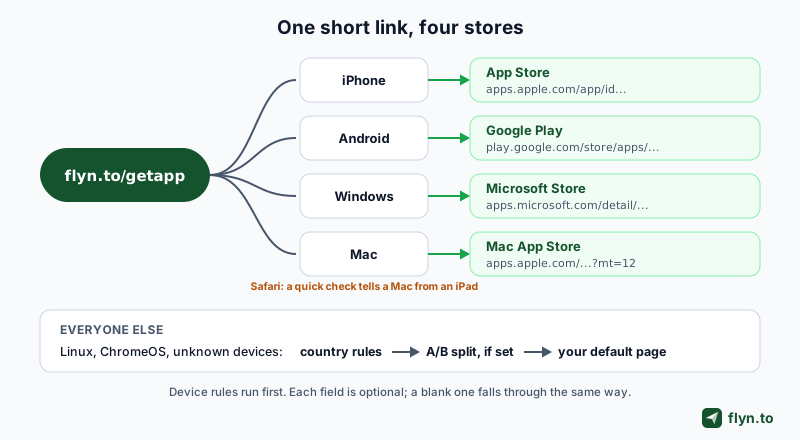
A launch email or a YouTube description gives you one link slot for four kinds of device. On Flyn Pro ($9 per month billed annually or $12 monthly, and on Lifetime and Team), one short link sends each device to its own store.
 Tap to enlarge
Set it up in the Routing tab
- Create a link whose main destination is your download page; it serves everyone no device rule catches. (Sign up free to build it first.)
- Open the Routing tab. Paste your App Store listing into iOS and your Google Play listing into Android.
- Paste
https://apps.microsoft.com/detail/plus your Store ID into Windows. - Paste your Mac App Store listing into Mac, with
?platform=macif it is shared with iPhone. - Save and test on each kind of device (checklist below).
The help article on routing by country or device walks through the same tab with a screenshot of each step.
Device rules run first, then country rules, then the link's A/B split if it has one, then the default destination. Linux and ChromeOS have no field, so they take that path too, and so does Chrome on a large Android tablet (10 inches and 8 GB of RAM or more), which requests the desktop site by default and reports Linux. That is why the default page should offer every download. Routing does not run on password-protected links, links past their click limit, mailto, tel or sms links, or for crawlers.
Building links in a release script? The links API has the same four fields under targeting.device (creating an API key needs a paid plan):
curl -X POST https://www.flyn.to/api/links \
  -H "Authorization: Bearer flyn_sk_live_..." \
  -H "Content-Type: application/json" \
  -d '{"url": "https://example.com/download",
       "targeting": {"device": {
         "ios": "https://apps.apple.com/app/id...",
         "android": "https://play.google.com/store/apps/details?id=...",
         "windows": "https://apps.microsoft.com/detail/...",
         "macos": "https://apps.apple.com/app/id...?mt=12"}}}'
Why the fields take the https store page
The Windows and Mac fields accept only http or https addresses. Paste ms-windows-store: or macappstore: and the editor refuses it when you save, and the API answers with a 400 error and the code INVALID_TARGETING. The rule costs nothing: the Microsoft web link already opens the Store app on Windows, Apple's Mac listing has its own button into the Mac App Store, and an https page still loads for any visitor it reaches.
Safari on a Mac or an iPad
By default, Safari on an iPad sends the same user agent as Safari on a Mac (iPadOS 13 made iPad Safari present desktop websites), so on a link with a Mac URL, Safari visitors first see a blank page for a moment that checks touch support (maxTouchPoints) and then continue, a Mac to the Mac URL and an iPad to the iOS URL. Chrome, Edge and Firefox on a Mac go straight to the Mac URL, and a link without a Mac URL never shows the check. Why Safari on an iPad sends a Mac user agent, and how to test each case, is in iPad Safari says it is a Mac, and the free What Is My User Agent tool shows what your own browser sends.
Put each store's campaign tag inside its destination, such as ?cid= on the Microsoft link. Flyn counts clicks on the short link, with device and OS breakdowns in Pro click analytics, and each store reports the installs that followed. For print, make the same link a dynamic QR code; every scan routes by the phone that made it.
Decision Checklist: Which Store Link Goes Where
Run any new link through this list before it goes out:
- Web page, email, social post, ad or QR code: the https listing for that store.
- A button inside your Windows app:
ms-windows-store://pdp/?ProductId=plus your Store ID, orreview/for ratings. - A button inside your Mac app: the https listing, or
macappstore://if you accept that it is undocumented. - Mac and iPhone share one listing: add
?platform=macto the link Mac visitors get. - You want install numbers:
cid=on Microsoft links; on Apple links, App Store Connect's campaign links withct=andpt=. - The app is not in a store: a signed
.exeor.msi, or a notarized.dmg, behind a download page. - One slot, mixed devices: a Flyn short link with iOS, Android, Windows and Mac fields and your download page as the default.
- Showing badges: each badge to its own store, and your own label on an all-device button.
Test before you ship
- Windows PC, Edge: the Microsoft listing, with the Store app opening.
- Mac, Safari and Chrome: the Mac App Store listing.
- iPhone and an Android phone: the App Store and Google Play.
- iPad in Safari, if tablets matter to you: the iOS destination.
- A Linux or ChromeOS browser: your default download page.
For the wider picture, read what smart links are, the device routing shortener comparison and our guide to click tracking; product teams can start from Flyn for SaaS product marketers, and developers from the link shortener API guide. Then create a free account, build the link, and unlock the Routing tab with Pro.
Frequently Asked Questions
How do I link to my app in the Microsoft Store?
What is the Mac App Store URL format?
Where do I find my Microsoft Store product ID?
What is the difference between an apps.microsoft.com link and an ms-windows-store link?
Does the macappstore:// link still work?
Why will Flyn not accept an ms-windows-store or macappstore link in the Windows or Mac field?
Can I show the Microsoft Store badge and the App Store badge on the same page?
Should I link to the store listing or to a direct download?
Free tools for this
Three Flyn tools that pair well with the strategy in this article, all free, no signup needed.
UTM Builder
Build campaign-tracked URLs in seconds.
Broken Link Checker
Scan any page for dead links and 404s.
Open Graph Checker
Preview how URLs unfurl on social.
Keep reading
Three related deep-dives from the Flyn blog.

How to Track Which Posts Drive Sales, Not Just Clicks
19 min read

Email Newsletter Click Tracking: Measure Your Real CTR
12 min read

How to Choose a Branded Short Domain for Your Links
13 min read
Ready to try Flyn?
Free plan includes 25 links/month, full analytics, and access to all 30+ free tools above. No credit card required.
Already a member? Log in
Karan Bhakuni is the founder of Flyn. He writes about branded links, click analytics, and the link-management tooling growth teams and creators actually need, drawn from building Flyn and reading a lot of user feedback.
Find these guides useful? Add Flyn as a preferred source so more of them show up in your Google results.