How to Update a Link Without Changing the Published URL
You shipped the URL and then the destination moved. A redirect layer lets you point a published link, or a printed QR code, somewhere new in seconds without touching the URL itself.

The Edit Once Problem: When the URL Outlives the Destination
You printed 5,000 menus with a QR code on them, or pushed one campaign link to six channels, and the landing page just moved. Every marketer eventually ships a published URL that outlives its destination: the promo ends, the domain migrates, the PDF gets replaced, the product sells out. The fix is not reprinting or reposting. It is a link whose destination you can edit after publishing while the URL itself never changes.
This capability goes by several names: editable destination, link redirect update, edit once links. They all describe one mechanic. The address you share is a short link that forwards visitors to a destination you control from a dashboard. Change the destination and every copy of that link, in bios, emails, print and ads, updates instantly, because none of those copies ever pointed at the destination directly. If you have never made a short link before, the two minute version is in how to shorten a URL.
Here is what this guide covers:
- The redirect mechanics that make edit once links work, including why the status code matters
- The situations where you genuinely need one, and the ones where you do not
- Why printed QR codes are the strongest case of all
- What Bitly, Rebrandly and Short.io actually charge for destination editing, from their own documentation
- How editing differs from link rotation, and how to fix a live campaign without losing attribution
One scope note up front: this is not a general shopping guide. If you want the whole field compared on price, analytics and domains, read our best URL shorteners roundup. This guide cares about exactly one capability, editing the destination after the URL is public, because it is the one capability several big tools quietly lock behind paid tiers.
How the Redirect Layer Works: 301, 302 and Your Short Link
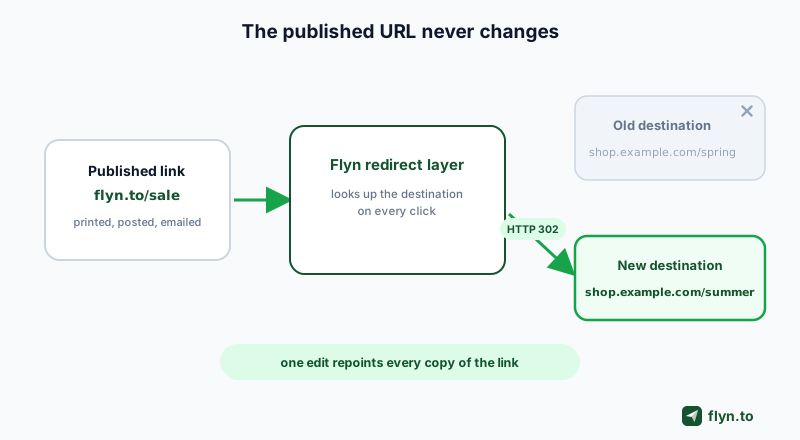
An editable link is a well behaved HTTP redirect with a database behind it. Here is the full journey of one click:
- A visitor taps your published link, say
flyn.to/sale. - The request hits the redirect layer, which looks up the slug in a database and finds the current destination.
- The server answers with a redirect status code and a
Locationheader pointing at that destination. - The browser follows it, and the visitor lands on your page in a fraction of a second.
The lookup happens on every single click. That is the entire trick: because the destination is resolved at click time, not at publish time, changing the database row changes where the next click goes. The printed poster, the six month old email and the bio link all keep working because they only ever knew the short URL.
 Tap to enlarge
301 vs 302: the status code that decides whether you can edit
A 301 redirect means "moved permanently" and browsers take that literally: they cache the answer and skip asking your server next time. A 302 redirect means "found here for now, ask me again next time". For a link you intend to edit, that difference is everything. Serve a 301 and returning visitors will keep flying to the old destination long after you change it, because their browser never asks again.
Why Flyn answers with a 302
Flyn serves short link clicks with a 302 precisely so that every click re-checks the current destination. That is what makes an edit take effect on the very next tap, whether the link lives on a free plan or behind a custom branded domain (a Pro feature). It is also what lets a branded short link double as permanent campaign infrastructure: the URL is the asset, the destination is a setting.
Never build an editable link on a hard coded 301 or a meta refresh page you cannot change. Browsers and CDNs cache permanent redirects aggressively, so even after you update the mapping, returning visitors can land on the old destination for weeks. If you inherited an old setup and are not sure what it returns, test it with the free redirect checker.
When You Need an Editable Link (and When You Do Not)
The rule of thumb: you need an editable link anywhere the published copy is expensive or impossible to change. Some surfaces freeze the moment you ship them.
Five places the URL outlives the destination
| Surface | Why the URL freezes | What editing saves you |
|---|---|---|
| Printed menus, posters, packaging | Ink does not update | The entire reprint run |
| Sent emails and newsletters | You cannot recall an inbox | Dead promo links in every past send |
| Old video descriptions | Hundreds of videos, one stale offer | Bulk description surgery |
| Podcast show notes | Episodes syndicate to every directory | Editing notes app by app |
| Paid ads mid-flight | Editing the ad resets learning or review | The relaunch and the review queue |
Creators feel this hardest. A YouTube description link in a three year old video still gets clicks today; a podcast link in show notes on Apple Podcasts is mirrored across a dozen apps you do not control; an Instagram bio link is one editable slot doing the work of twenty. In each case, publishing a short link instead of the raw URL means the old placement keeps earning clicks for whatever you sell next.
When a plain direct link is fine
Honesty cuts both ways: not every link needs the layer.
- Links you control end to end, like navigation on your own site, should be plain URLs. Your CMS already lets you edit them.
- One-off chat messages that will scroll away in an hour gain little from being editable.
- Permanent site moves belong to server side 301s, not marketing links; that playbook is in website migration redirects.
Route every hard to change placement through a short link on day one, before anything breaks. An editable destination only saves you if the redirect layer was already inside the printed code, the bio or the email footer when it shipped. You cannot retrofit a layer into ink.
Printed QR Codes: The Strongest Case for Editable Links
A QR code is a URL rendered as ink, which makes it the most frozen surface in marketing. Once the stickers are on the packaging and the menus are laminated, the encoded URL is physically unchangeable. Whether that is a disaster or a non-event depends entirely on which URL you encoded.
Static vs dynamic QR codes
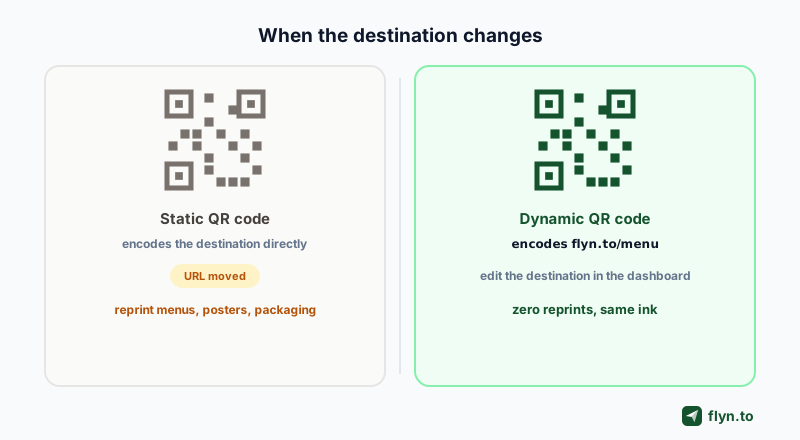
A static QR code encodes the destination directly. The QR industry's own marketing admits the consequence: the link is set in stone the moment you generate it, as QR Code Generator PRO (a Bitly owned product) puts it. A dynamic QR code encodes a short link instead, and the destination behind that short link stays editable forever. That is the whole difference. A dynamic QR code is not a special image format; it is a normal QR code pointed at a redirect layer, which means any shortener with free destination editing gives you free dynamic QR codes.
 Tap to enlarge
The reprint bill nobody budgets
Reprint pain is well documented. QR platform Hovercode lists the material you stop reprinting once a code is dynamic:
- Restaurant menus that rotate seasonally or weekly
- Real estate window displays repointed after each sale
- Event signage that should promote the next event once this one ends
- Product packaging with long production lead times
- Printed collateral that shipped with a typo in the URL
The failure mode is real too. One designer on Reddit described a printed batch whose QR code pointed at a leftover stock photo site from the design template instead of the company website, discovered only after printing. With a static code the fix is a bin and a reorder. With a dynamic code it is a thirty second destination edit.
A printed QR code is a promise that the link will still make sense next year. A redirect layer is the only way to keep that promise without a reprint budget.
On Flyn, every link comes with a branded QR code you can download free in the standard green, with custom colors on Pro (see pricing). The workflow is: shorten the URL, grab the code from the link card as shown in download your QR code, and print knowing the destination stays yours to change. The dynamic QR code generator builds one in a single step, and QR codes on Flyn covers the full feature. For a concrete offline example, the free Google review link generator builds a review link and QR for a counter card whose destination you can repoint if your review link ever changes.
How to Update a Link Destination in Flyn (Step by Step)
Here is the entire workflow, using a campaign link as the example. The edit flow below works on every plan, free included.
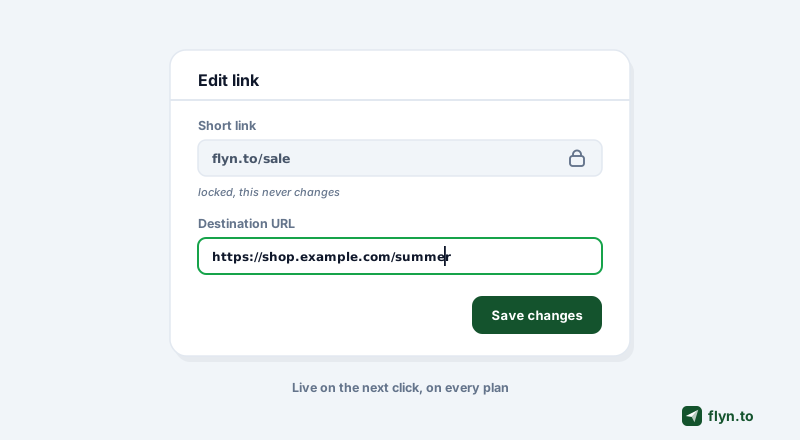
- Open your dashboard and find the link you need to repoint. Search by slug or destination if you manage many.
- Open the link editor. The short URL itself is fixed, which is the point: everything already printed or posted stays valid.
- Paste the new destination URL into the destination field. This is the only field that needs to change.
- Save. The edit is live on the next click, because Flyn resolves the destination per click rather than caching it into a permanent redirect.
 Tap to enlarge
What happens to your click history
Nothing resets. The click history belongs to the link, not to the destination, so your counts continue across the edit. Raw click counts are free on every Flyn plan, and the geo, device and referrer breakdowns in click analytics are Pro. If you want to see whether the new destination changed behavior, note the edit date and compare clicks before and after, the same technique covered in how to track clicks on a link.
What edits cost on each plan
On Flyn the answer is deliberately boring: nothing, on any plan, any number of times. The free plan meters new link creation at 25 links per month, but an edit is not a new link and never counts against that cap. That distinction matters more than it sounds, because as the next section shows, the biggest name in the industry counts each destination change against your monthly link allowance.
What the Top Tools Charge for Destination Editing
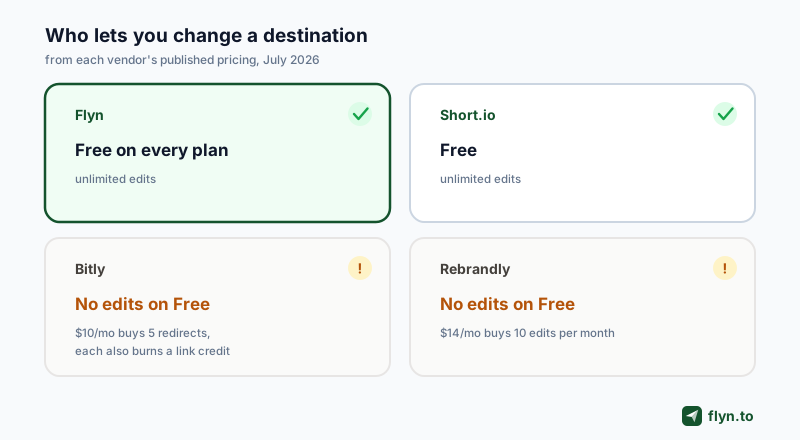
If you searched for the top tools for edit once links, here is the honest landscape as of July 2026, drawn from vendor pricing pages and help centers where they publish them, and from July 2026 third-party pricing captures where they do not.
| Tool | Free plan | Cheapest paid option | Edit limits |
|---|---|---|---|
| Flyn | Unlimited destination edits | Pro adds domains, rotation, deep links | None on any plan |
| Short.io | Unlimited destination edits | Not needed for editing | None |
| Bitly | No destination editing | Core at $10/mo: 5 redirects/mo | Each redirect also consumes a link credit |
| Rebrandly | No destination editing | Essentials at $14/mo: 10 edits/mo | Metered per tier: 10, 50 or 150 per month |
 Tap to enlarge
Bitly meters redirects and burns a link credit per edit
Bitly support states the feature is available with some paid plans, and the pricing page puts numbers on it: zero redirects on Free, 5 per month on Core at $10/mo, 20 on Growth, 110 on Premium. The double charge is the part that surprises people: Bitly's help center says a redirected link also counts as a new link against your monthly limit, and once you hit that limit you cannot redirect anything until next month. Bitly even sells extra redirects a la carte.
Rebrandly sells edits in packs of 10
Rebrandly ships no destination editing on its free tier, then meters it by plan: 10 edits per month on Essentials at $14/mo, 50 on Professional at $39/mo, 150 on Growth at $119/mo, per Replug's March 2026 pricing breakdown. Nobody expects editing a link to be a countable commodity, which is exactly why it is worth checking before you standardize on a tool.
Flyn and Short.io: free and unlimited
Credit where due: Flyn is not alone here. Short.io states plainly that editing the destination URL is available free an unlimited number of times, and it deserves the mention. The dividing line in this market is not Flyn versus everyone; it is the tools that treat destination editing as table stakes versus the two biggest brands, which treat it as a revenue lever.
Bitly's help center also documents three lock-in traps: remove a custom domain and its links stop being editable, downgrade to a plan without custom domains and your old branded links freeze, and auto branded links can never be edited or redirected at all. Read the fine print before you print.
Destination Editing vs Link Rotation: Two Different Jobs
Editing and rotation both live behind the same short URL, and people constantly reach for the wrong one. The distinction is simple:
- Destination editing replaces the destination for everyone, permanently, until you edit again. One destination at a time.
- Link rotation serves multiple destinations at once, splitting live traffic between them by percentage. On Flyn this is the A/B testing feature, a Pro capability (see pricing), and the standalone link rotator shows the mechanic in action.
When to rotate instead of edit
Rotate when the question is which destination performs better: two landing pages for one ad, two checkout flows, two signup forms. The rotation splits traffic 50/50 or any ratio you choose, and your analytics tell you which variant wins. Then you edit the destination to the winner and switch rotation off. Editing is the decision; rotation is the experiment that informs it. The full mental model, including weighted splits and when a winner misleads you, is in A/B testing short links, and the free link rotator handles the splitting.
Adjacent routing: deep links
One more routing behavior shares this infrastructure: iOS and Android deep links, configured in the Routing tab on Flyn (Pro). Instead of choosing between destinations over time, a deep link chooses per visitor, sending iPhone and Android users into the right native app while everyone else gets the web destination. Deep links are part of Flyn Pro, and the technical setup lives in the deep links documentation. The same Routing tab covers geographic routing by country: add a geo rule per market and one link serves every region, instead of you maintaining separate links per country.
Fixing a Live Campaign Without Losing Attribution
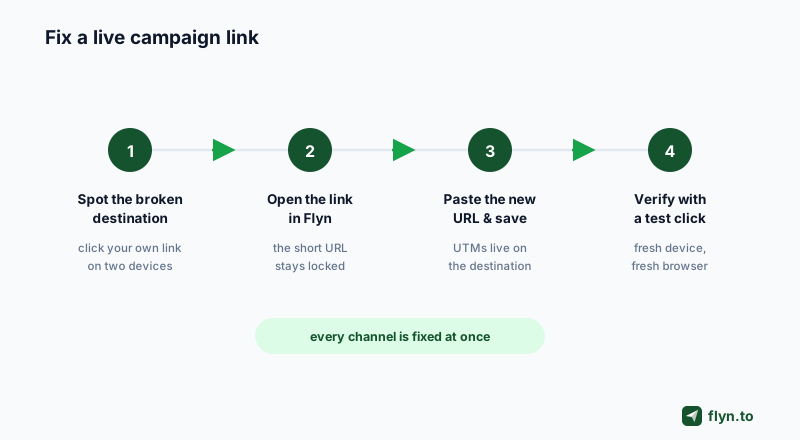
The highest stakes version of this problem: the campaign is live, budget is burning, and the destination is wrong. A typo domain, a landing page that got unpublished, a 404 after a site restructure. Because your ads, posts and emails all carry the short link, the fix is one edit instead of a channel by channel scramble.
 Tap to enlarge
The five minute fix checklist
- Confirm what is broken. Click your own short link on desktop and mobile. Is the destination down, wrong, or redirecting badly?
- Prepare the replacement URL and load it directly in a browser first. Never repoint a firehose at an untested page.
- Edit the destination in your dashboard and save.
- Verify with a fresh click from a device that has not visited recently, confirming the new destination and that your page analytics register the visit.
- Check your click graph the next day. A recovering click to conversion path shows up immediately if you have conversion tracking (Pro) wired to the link.
Keep your UTMs where you can edit them
Attribution is the detail most people fumble mid-fix. Put your UTM parameters on the destination URL, not scattered across channel posts, and they travel with every edit: swap the destination and re-attach the tags in the same field, built cleanly with the UTM builder. Flyn also forwards any query parameters a visitor appends to the short link onto the destination, so channel specific tags added on top of the published link keep flowing to your analytics after the edit. If you are repairing many links at once after a site restructure, create the replacements in bulk with the bulk URL shortener and edit the survivors rather than reposting anything.
That is the whole discipline. Publish pointers, not destinations. The URL is the contract with your audience; the destination is an implementation detail you reserve the right to change.
Frequently Asked Questions
Can I change where a link goes after I have shared it?
Does updating the destination change my QR code?
Why can Bitly free users not edit their link destinations?
Is editing a link destination bad for SEO?
Will my click stats reset when I change the destination?
What is the difference between destination editing and link rotation?
How fast does a destination edit go live?
Free tools for this
Three Flyn tools that pair well with the strategy in this article, all free, no signup needed.
UTM Builder
Build campaign-tracked URLs in seconds.
Broken Link Checker
Scan any page for dead links and 404s.
Open Graph Checker
Preview how URLs unfurl on social.
Keep reading
Three related deep-dives from the Flyn blog.

How to Track Which Posts Drive Sales, Not Just Clicks
19 min read

Email Newsletter Click Tracking: Measure Your Real CTR
12 min read

How to Choose a Branded Short Domain for Your Links
13 min read
Ready to try Flyn?
Free plan includes 25 links/month, full analytics, and access to all 30+ free tools above. No credit card required.
Already a member? Log in
Karan Bhakuni is the founder of Flyn. He writes about branded links, click analytics, and the link-management tooling growth teams and creators actually need, drawn from building Flyn and reading a lot of user feedback.
Find these guides useful? Add Flyn as a preferred source so more of them show up in your Google results.