How to Shorten a URL: The Complete Guide
Pasting a link into a shortener takes 30 seconds. Doing it in a way that earns clicks, survives spam filters, and tells you what happened afterward takes a little knowledge. Here is all of it in one place.


Shorten a URL in 30 Seconds
You have a long, ugly URL and you need it short. Here is the whole process, and it works the same on Flyn, TinyURL, Bitly, or any other shortener worth using.
The four steps
- Copy the long URL from your browser's address bar. Grab the entire thing, including the
https://and any parameters after the?. - Paste it into the shortener. On the Flyn homepage, the input is the first thing on the page. No account, no credit card.
- Click Shorten. You get back a link like
flyn.to/x7Kq2. - Copy and share it. The short link behaves exactly like the long one: anyone who clicks lands on your original page.
Free without an account, permanent with one
That is genuinely all there is to the mechanical part. Anonymous links created this way on Flyn stay live for 30 days; create a free account and they are yours permanently, with click stats included.
Shorten the final destination, not a page that itself redirects. Every extra hop adds latency and another point of failure. If you are not sure whether your URL already redirects, run it through the free Redirect Checker first and shorten whatever URL sits at the end of the chain.
What Actually Happens When You Shorten a URL
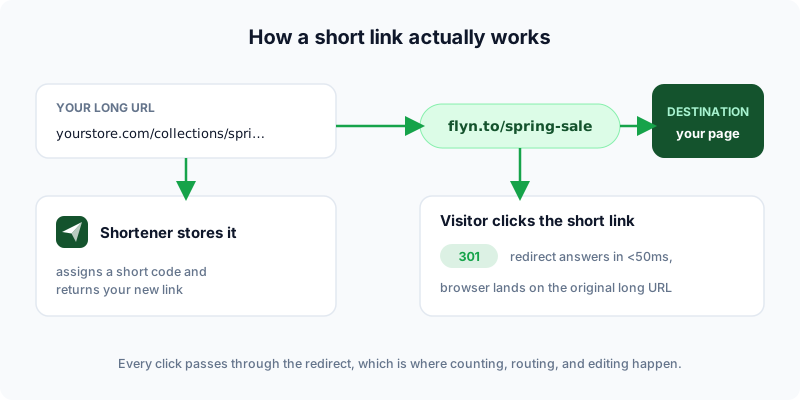
A shortened URL is not a compressed version of your link. It is a brand-new, tiny URL that redirects to your original one. Understanding this single fact explains almost everything else about short links.
 Tap to enlarge
The redirect, step by step
(If any of the pieces named below are unfamiliar, the anatomy of a URL explains every part of an address in detail.)
When you shorten https://yourstore.com/collections/spring?utm_source=newsletter, the shortener saves that full URL in its database and assigns it a short code, say x7Kq2. When someone clicks flyn.to/x7Kq2, their browser asks Flyn's server for that page, the server looks up the code, and answers with an HTTP 301 redirect pointing at your original URL. The browser follows it automatically. The visitor sees nothing but a fast hop.
Why this design is a feature, not a hack
Because every click passes through the short domain first, the shortener can do useful work in that millisecond: count the click, record country and device, run an A/B split, route mobile visitors to an app, or let you change the destination later without touching the link you already shared. None of that is possible with a raw URL. The redirect layer is the whole product.
Want to see the machinery yourself? Paste any short link into the URL Expander and it shows you the full redirect chain and final destination without you having to click anything.
Five Ways to Shorten, Compared
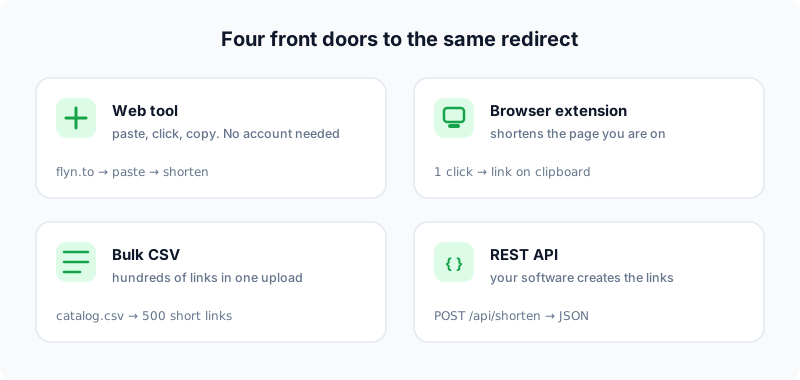
"Paste into a website" is the obvious route, but it is one of five. Which one fits depends on how many links you make and what happens after the click.
| Method | Best for | Limitation |
|---|---|---|
| Web shortener, no account | One-off links, right now | No editing, no stats, links often expire |
| Web shortener, free account | Anyone sharing links regularly | Generic domain unless you upgrade |
| Browser extension | Shortening the page you are on, in one click | Tied to one browser |
| Bulk CSV import | Hundreds of links at once (catalogs, migrations) | Needs a tool that supports it |
| API | Links created by your own software | Requires a developer |
 Tap to enlarge
The browser extension route
If you shorten more than a couple of links a week, the copy-switch-tab-paste loop gets old. The Flyn Chrome extension shortens the page you are currently viewing in one click and puts the short link on your clipboard. Searches like "how to shorten a URL in Chrome" are really asking for this.
Bulk and API
Migrating a spreadsheet of product links or generating a short link for every row in your CRM is not a copy-paste job. Flyn supports CSV import and bulk operations on paid plans, and the REST API creates links programmatically: one POST to /api/shorten with your API key returns a short URL in JSON. Zapier-style automations sit on the same endpoint.
Custom Slugs: Rename the Link, Not Just Shrink It
The random code a shortener hands you (x7Kq2) is short, but it is also meaningless. Almost every "how do I rename a URL link" question is solved by the custom slug: you choose the part after the slash.
Random code vs readable slug
flyn.to/x7Kq2tells the reader nothing.flyn.to/spring-saletells them exactly where they are going, and that you put care into the link.
On Flyn you set the slug in the same form you paste the URL into; with a free account every link can have one. Three rules make slugs work harder.
The three slug rules
- Keep it short and readable: two to four words, hyphens between them. The free Slug Generator turns any headline into a clean slug.
- Make it match the destination. A slug that says
/pricingshould land on pricing. Mismatches feel like bait and erode trust instantly. - Keep it evergreen. Avoid years and dates in slugs you will reuse, so
/black-fridayworks every November without edits.
You cannot rename the path of someone else's website, and no shortener can change yourstore.com/products/12345 itself. What a custom slug renames is the short link that points there, which is the part your audience actually sees and clicks.
Branded Domains: When flyn.to Becomes go.yourbrand.com
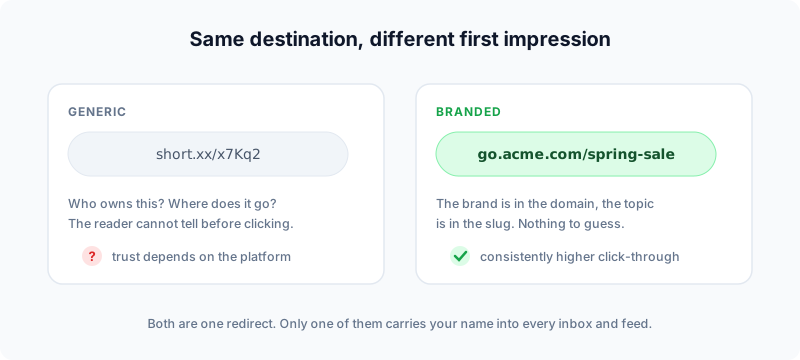
Every example so far used a shared domain. The next level is a branded short domain you own, like go.yourbrand.com or l.yourbrand.com, with every short link carrying your name instead of a shortener's.
 Tap to enlarge
Why branding a link pays
This is not cosmetic. Branded links consistently earn higher click-through than generic ones (the data we collected in why branded short links increase CTR puts the lift around 30%+), because the reader can verify the source before clicking. The same property keeps your links out of trouble: shared shortener domains carry the reputation of everyone using them, which is exactly how short links end up flagged as spam. Your own domain carries only your reputation.
Setting one up takes minutes
On Flyn you add a subdomain like go.yourbrand.com under Pro, point one CNAME record at Flyn, and SSL is provisioned automatically. From then on every link you shorten can use it. If you currently pay Bitly for this, compare notes with our alternatives hub or the Bitly migration guide; branded domains are the single feature where pricing differs most across shorteners.
The shortest way to say it: a generic short link borrows someone else's reputation, a branded short link builds yours. Every click you send through go.yourbrand.com is a tiny deposit in your own name.
Track Every Click After You Shorten
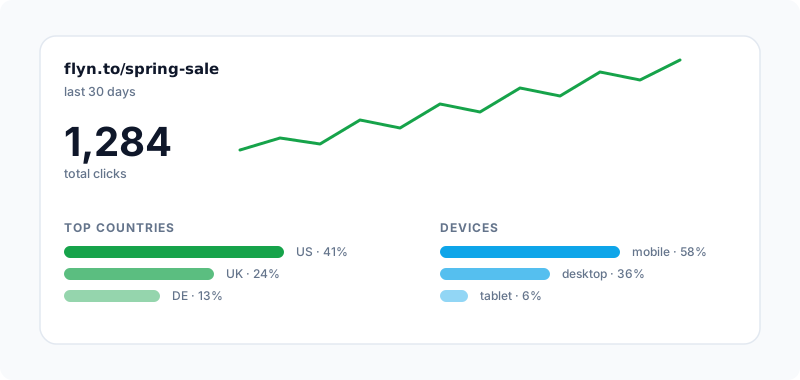
Shortening without tracking is leaving the best part on the table. Because every click passes through the redirect, a good shortener can answer the questions a raw URL never can: how many times people clicked, from where, on what device, coming from which site.
 Tap to enlarge
The two-layer tracking setup
The professional pattern combines two tools that answer different questions:
- Short-link analytics count and segment the click itself. Flyn counts every click on every link, free plan included, and Pro segments them by country, device, and referrer. Our guide to tracking clicks on a link covers reading these numbers.
- UTM parameters tell your website analytics where the visitor came from, surviving all the way into GA4 or PostHog. Build them with the free UTM Builder, then shorten the tagged URL. The full recipe lives in the ultimate UTM guide.
Order matters: add UTMs first, shorten second. The parameters hide inside the short link and reappear at the destination. Verify any link survived the round trip with the UTM Parser.
If a link redirects through several services (shortener to retargeting tool to landing page), UTMs can get stripped along the way. The free UTM Redirect Preservation Checker follows the chain and tells you whether your parameters reach the end intact.
Common URL-Shortening Mistakes
The mechanics are easy, which is exactly why the mistakes are so common: nobody thinks a 30-second task can go wrong. These are the ones that cost real clicks.
Mistakes that cost clicks
- Shortening the wrong URL. Test the long URL in a private window first. If it 404s, requires a login, or redirects, fix that before shortening. The Broken Link Checker catches dead destinations across a whole page.
- Random codes in human-facing places. Slides, print, podcasts (show notes especially), and live talks need readable slugs. Nobody can type
x7Kq2from memory.
Mistakes that cost trust
- Generic domains in cold email. Spam filters score the link domain, and shared shortener domains carry strangers' baggage. Branded domains are the fix, as covered above.
- Forgetting links can expire. Anonymous links often have a shelf life, and that is sometimes the point: the Expiring Link Generator makes self-destructing links deliberately. For permanent links, use an account.
- Never auditing old links. Destinations rot. A quarterly pass with the Bulk Health Checker finds short links whose destinations have died since you shared them.
- Ignoring what happens on the other side. Recipients increasingly check links before clicking, and you should make that easy, not hard. How they check, and how to be the sender whose links pass that check, is the subject of our companion guide on short link safety.
Avoid those six and you are ahead of most professional marketers. The full toolkit, from QR codes to rotating links, lives in the free tools library.
Frequently Asked Questions
Can I shorten a URL for free without creating an account?
How do I rename a URL so it reads like words instead of random characters?
Do short links expire?
Do shortened URLs hurt SEO?
Can I change where a short link points after sharing it?
What is the difference between Flyn, TinyURL, and Bitly?
How can I see where a short link goes before I click it?
Free tools for this
Three Flyn tools that pair well with the strategy in this article, all free, no signup needed.
UTM Builder
Build campaign-tracked URLs in seconds.
Broken Link Checker
Scan any page for dead links and 404s.
Open Graph Checker
Preview how URLs unfurl on social.
Keep reading
Three related deep-dives from the Flyn blog.

How to Track Which Posts Drive Sales, Not Just Clicks
19 min read

Email Newsletter Click Tracking: Measure Your Real CTR
12 min read

How to Choose a Branded Short Domain for Your Links
13 min read
Ready to try Flyn?
Free plan includes 25 links/month, full analytics, and access to all 30+ free tools above. No credit card required.
Already a member? Log in
Karan Bhakuni is the founder of Flyn. He writes about branded links, click analytics, and the link-management tooling growth teams and creators actually need, drawn from building Flyn and reading a lot of user feedback.
Find these guides useful? Add Flyn as a preferred source so more of them show up in your Google results.