Are Short Links Safe? How to Check Before You Click
Every short link is a small act of trust: you cannot see where it goes until you are already there. Here is how to verify any short URL in seconds, the red flags that matter, and what senders can do to be worth trusting.


The Honest Answer: The Link Is Not the Threat
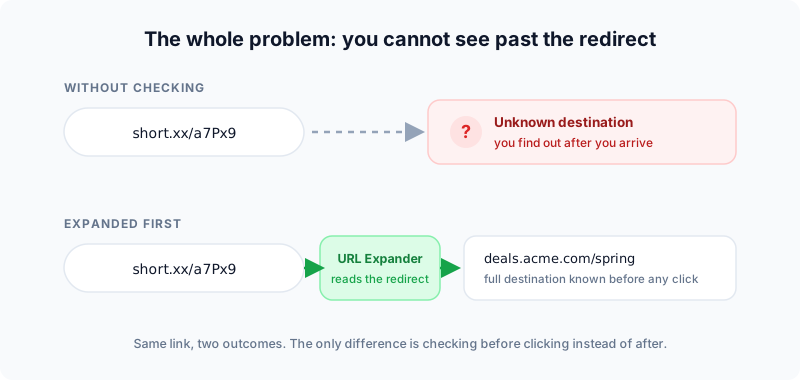
You received a bit.ly or tinyurl.com link, hovered over it, learned nothing, and asked the sensible question: is this safe? Here is the honest answer that most security write-ups bury under fear: a short link is neither safe nor dangerous by itself. It is a redirect, a forwarding address. What matters is the destination it forwards to, and whether you can verify that destination before you arrive.
That nuance cuts both ways. Billions of legitimate short links power marketing campaigns, QR codes, and social posts every day (the mechanics are in our guide to how to shorten a URL). At the same time, phishing crews genuinely do use shorteners to disguise malicious pages, which is why email security vendors consistently list URL shorteners among the most abused services on the internet. Both facts are true. The skill worth learning is not "never click short links"; it is how to check one in under ten seconds, which is exactly what this guide teaches.
Who this guide serves
- If you mostly receive short links: sections two to five show you how to verify any of them before clicking.
- If you mostly send short links: section six shows you how to make yours pass everyone else’s checks.
Why Criminals Like Short Links
Understanding the attacker’s playbook makes the defenses obvious. A short link gives a phishing operation four things a raw URL cannot:
 Tap to enlarge
The four advantages
- A hidden destination.
paypal-account-verify.sketchy.examplescares people off; a neutral short code does not. The disguise is the product. - A trusted domain wrapper. Shared shorteners are used by millions of honest people, so their domains cannot simply be blanket-blocked. Attackers ride that reputation.
- Filter evasion. Some security scanners judge the visible URL. A short link puts a clean URL in front of a dirty one, and redirect chains (short link to short link to payload) stack the trick.
- Editability. Some services let the owner change a link’s destination after sharing. Useful for marketers fixing typos; equally useful for someone swapping a clean page for a nasty one after the link passes review.
The QR variant: quishing
The same mechanics also power quishing: QR codes are short links you cannot even read, which is why fake parking-meter and menu stickers work. Before trusting a printed code, the free QR Destination Audit shows where it actually points.
None of these tricks is unique to short links. A long URL on an unfamiliar domain, an HTML email button, or a "click here" anchor hides its destination just as effectively. Short links get the reputation because they are the most visible form of the problem, not the only one.
How to Check Any Short Link Before You Click
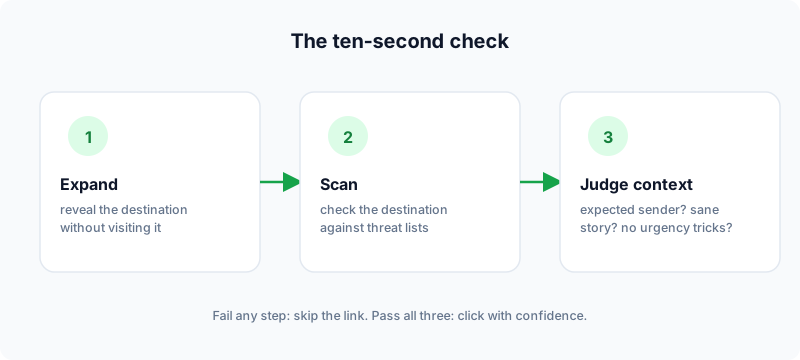
The ten-second routine. It works on every shortener’s links (Flyn, Bitly, TinyURL, t.co, anything) and never requires visiting the link itself.
 Tap to enlarge
Step 1: Expand the link
Paste the short URL into the free URL Expander. It follows the redirect server-side (your browser never touches the link) and shows the full chain plus the final destination. Long chains through multiple shorteners are themselves a warning sign; honest links rarely need more than one hop, which you can verify on any URL with the Redirect Checker.
Step 2: Scan the destination
A clean-looking domain is not proof. The Short Link Safety Checker expands the link and checks the destination against Google Safe Browsing threat lists in one pass: known phishing, malware, and deceptive pages get flagged before you ever load them.
Step 3: Judge the context
Tools verify the link; you verify the situation. Did you expect this message? Does the sender normally share links like this? Does the preview text promise something urgent or too good? A perfectly clean destination sent by a compromised account is still a trap, so context always gets a vote.
The built-in preview tricks
Several shorteners ship a native preview mode that shows the destination without redirecting:
| Shortener | Trick | Example |
|---|---|---|
| Any shortener | Server-side expander | flyn.to/url-expander |
| TinyURL | Add preview. before the domain | preview.tinyurl.com/abc123 |
| Bitly | Add + to the end of the link | bit.ly/abc123+ |
| is.gd | Add - to the end | is.gd/abc123- |
| tiny.cc | Add = to the end | tiny.cc/abc123= |
The tricks are handy when you remember them; the expander works everywhere and needs no memorizing.
Red Flags That Outrank Any Scanner
Automated checks catch known threats. Brand-new phishing pages are unknown by definition, so the human checklist still matters. Treat a short link as hostile when several of these line up:
Red flags in the message itself
- Manufactured urgency. "Your account closes in 24 hours", "your package is held", "unpaid toll". Urgency exists to beat your verification routine; that alone is reason to slow down.
- A link with no surrounding substance. One bare short link in an email or DM, no context, no signature. Legitimate senders explain what they are sending.
- SMS delivery. Text messages strip every trust signal: no sender domain, no hover preview. Smishing leans on short links precisely because phones hide so much. Verify SMS links on a desktop, or type the company’s address by hand instead.
Red flags after you expand
- A mismatch after expanding. The message says Netflix, the expanded destination is a hyphenated domain registered nowhere near Netflix. Done; delete.
- Login pages on the far side. Arriving at a credentials form via a short link is the single highest-risk pattern in phishing. Navigate to the real site yourself instead of signing in through any redirected page.
- Shortened links where none belong. Banks, payroll, and government services almost never send shortened URLs. From those senders, a short link is itself the anomaly.
Attackers increasingly put a real, harmless-looking page behind the link for the first hours, then swap the destination once the campaign is in inboxes. If a link matters (a payment, an account action), expand and scan it at the moment you intend to click, not just when it arrived.
Can Clicking Alone Actually Hurt You?
The question behind the question: if I slip and click, am I compromised? The honest, slightly reassuring answer: usually not from the click alone. Modern browsers sandbox pages aggressively, and the drive-by exploits that once installed malware on page-load are now rare, expensive, and mostly aimed at high-value targets, not bulk phishing.
What a click actually reveals
What a bad click does expose, immediately and reliably:
- Confirmation that you exist. The click tells the sender your address is live and you engage, which raises your value for the next campaign.
- Basic device metadata. IP (rough location), browser, device type: the same data any web page sees, now in hostile hands.
- A persuasion surface. The landing page itself is the weapon: a fake login, a "your device is infected" scare, an invoice download. The damage happens at step two.
The land, touch nothing, leave rule
So the post-click rule is simple: land, touch nothing, leave. Do not enter credentials, do not download, do not grant notification or permission prompts. If you typed a password before realizing, change that password now (and everywhere it was reused), turn on two-factor auth, and watch the account. If you downloaded and opened a file, run a reputable malware scan before doing anything sensitive on that machine.
The quieter privacy cost
There is also a quieter privacy cost worth knowing even on legitimate links: the shortener records every click (that is the product; see how click tracking works), and marketing parameters travel with you to the destination. The URL Cleaner strips tracking parameters from any URL when you would rather arrive quietly, and our link security and GDPR guide covers what responsible link services may store about clicks in the first place.
For Senders: Make Your Short Links Worth Trusting
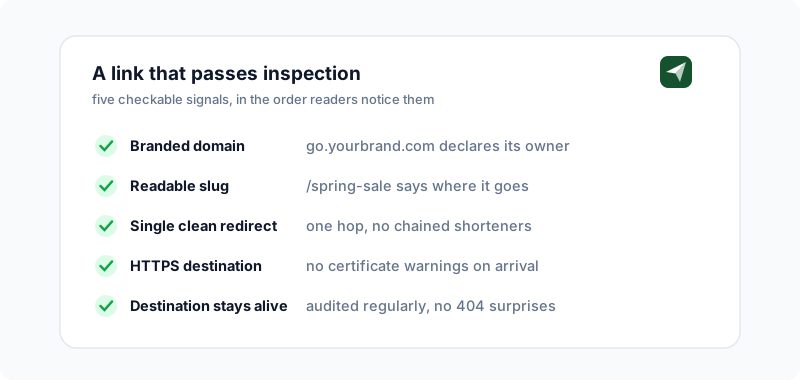
Flip the perspective. Everything above is now your audience’s checklist, which means every box they check is a box your links need to pass. Most "nobody clicks my links" problems are trust problems wearing a metrics costume.
 Tap to enlarge
- Use a branded domain.
go.yourbrand.com/offeris verifiable in a way no shared domain can be: the reader knows who owns it before clicking. This is the core finding in our branded-link CTR research and the trust mechanics are unpacked in custom domains and link trust. Setup takes minutes on Flyn Pro. - Write readable slugs.
/spring-salesurvives the expand test;/x7Kq2makes people do the check in the first place. - Keep the redirect single-hop. Shortener to destination, done. Stacked redirects look like evasion to both humans and filters; audit yours with the Redirect Checker.
- Point at HTTPS and keep destinations alive. A short link that lands on a certificate warning or a 404 burns trust permanently. Sweep your library quarterly with the Bulk Health Checker.
- Never use cloaking to deceive. Keeping a branded frame around an affiliate destination is legitimate; disguising a destination someone would refuse is the exact behavior this entire article teaches people to catch.
A trustworthy link is one your reader could verify but does not feel the need to. Branded domain, honest slug, one clean hop: that is the whole formula.
Shared-domain reputation is the other half of the sender story: when strangers spam from the same domain your links use, you inherit their consequences. That mechanism (and the fix) is covered in why short links get flagged as spam.
What Flyn Does About Malicious Links
Fair question for any shortener you are asked to trust, so here is our own answer, concretely:
Four layers, in order
- Destinations are scanned at creation. Every new link’s destination is checked against Google Safe Browsing threat lists before the link goes live, and high-risk categories are refused outright.
- Links can be reported, and reports have teeth. Reported links are disabled automatically pending review: clicks stop redirecting and answer with a gone status instead.
- Editing is account-bound and audited. Destination changes happen inside an authenticated dashboard, so a Flyn link cannot be silently repointed by a stranger.
- Branded domains isolate reputation. Pro users send from their own domains, so no one inherits anyone else’s behavior.
No shortener can promise that zero bad links ever pass through; anyone claiming that is selling something. What a responsible one can do is scan at the front door, respond fast at the back, and give honest senders the tools (branded domains, readable slugs, analytics) to be verifiably themselves. That is the standard we build against, and the standard worth holding any link service to, including the alternatives we compare ourselves with.
Frequently Asked Questions
How do I know if a shortened link is safe?
Can someone steal my information just because I clicked a link?
How can I check if a TinyURL link is safe?
preview. in front of the domain, so tinyurl.com/abc123 becomes preview.tinyurl.com/abc123, and TinyURL shows you the destination instead of redirecting. If you do not want to remember per-service tricks, the URL Expander works on TinyURL and every other shortener: it follows the redirect server-side and shows the final URL plus the full chain. For an extra layer, the Short Link Safety Checker also screens the revealed destination against known phishing and malware lists.Is Bitly safe? What about Flyn and other shorteners?
Why do short links show up in so many scam texts?
If short links can hide destinations, why do legitimate companies use them at all?
go.brand.com) and readable slugs, so the link declares its owner instead of hiding it. When a company you trust uses links you can verify, both sides of the redirect win: they get the data, you keep the certainty.What should I do if I already clicked a suspicious short link?
Free tools for this
Three Flyn tools that pair well with the strategy in this article, all free, no signup needed.
Security Headers Checker
Audit HTTP security headers.
Redirect Checker
Trace 301/302 redirect chains.
URL Cleaner
Strip tracking params from any URL.
Keep reading
Three related deep-dives from the Flyn blog.

Retargeting Pixels and Consent: GDPR & CCPA
12 min read

Does a Short Link Click Need Cookie Consent? Law by Law
31 min read

Are Geo-Redirects Legal in the EU? Regulation 2018/302
15 min read
Ready to try Flyn?
Free plan includes 25 links/month, full analytics, and access to all 30+ free tools above. No credit card required.
Already a member? Log in
Karan Bhakuni is the founder of Flyn. He writes about branded links, click analytics, and the link-management tooling growth teams and creators actually need, drawn from building Flyn and reading a lot of user feedback.
Find these guides useful? Add Flyn as a preferred source so more of them show up in your Google results.