LinkedIn Links: Post Them Without Killing Your Reach
Every LinkedIn creator eventually notices it: the post with a link dies, the same post without one flies. Here is what the data actually shows, the six placements ranked, and the workflow that keeps both your reach and your clicks.


Yes, LinkedIn Throttles Link Posts. Here Is the Honest Math
You wrote two posts of equal quality. The one with an external link reached a fraction of your audience; the plain-text one took off. That experience is so common among LinkedIn creators that "links kill reach" has become folk law. The folk law is mostly right, with caveats worth knowing.
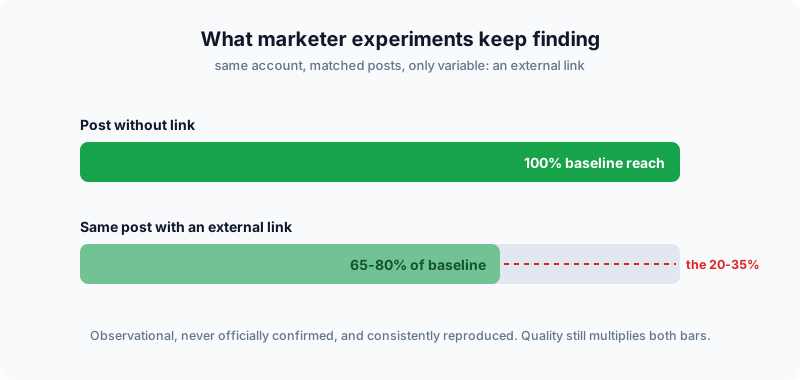
LinkedIn has never published an official "link penalty" number, so the evidence is observational, and here is the honest range of it:
The numbers, with their sources
- Controlled marketer experiments (running matched posts with and without links) repeatedly land on 20-35% less reach for the linked version.
- Creator-reported extremes go much further; prominent voices claim link posts earn only 10-15% of their normal distribution. Treat those numbers as worst cases on large accounts, not averages.
- LinkedIn’s own statements say the algorithm rewards content that keeps members engaged on the platform. That is not a denial of the penalty; it is a description of its mechanism.
 Tap to enlarge
Two caveats that keep it honest
Two caveats keep this honest. First, quality dominates: a genuinely useful post with a link will outperform a mediocre post without one; the throttle is a multiplier, not a death sentence. Second, the penalty is about external links: links to LinkedIn’s own content (profiles, newsletters, other posts) travel free.
Why LinkedIn Does It (and Why It Will Not Stop)
No conspiracy required, just a business model. LinkedIn sells attention: ads, premium subscriptions, recruiting products. Every member who clicks out to your blog is a member not seeing the next sponsored post. So the feed is tuned to reward dwell time: posts people read to the end, comment on, and stay for.
Understand that and the rest of this guide writes itself:
Three consequences of the economics
- The algorithm is not anti-you, it is pro-session. Content that holds attention on-platform gets distribution as a reward.
- Native formats are subsidized. Documents (carousels), polls, and long text posts keep people scrolling inside LinkedIn, so they earn reach that link posts do not.
- The penalty is a price, not a wall. LinkedIn happily shows link posts; it just charges you reach for the privilege. Your job is to decide when the click is worth the price, then minimize the bill.
The lnkd.in detail
One mechanical detail worth knowing: when you paste an external URL, LinkedIn often routes it through its own lnkd.in redirector and renders a preview card it controls. You are already inside someone else’s link infrastructure, which is exactly why the preview and the URL you feed it deserve attention (covered in section five).
The Six Link Placements, Ranked
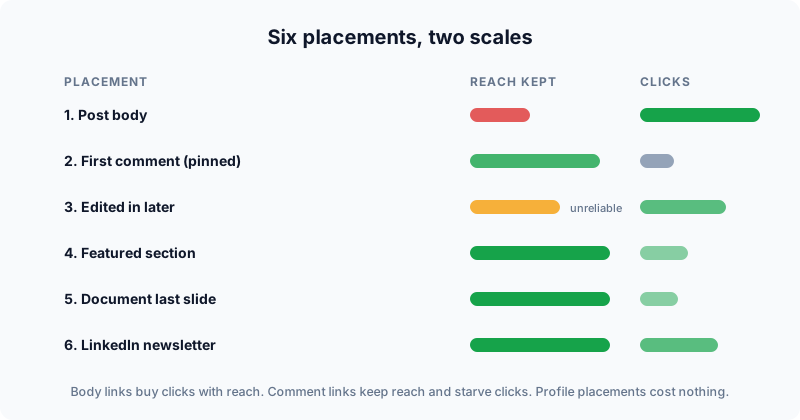
"Should I put the link in the post or the comments?" undersells the menu. There are six placements, and they trade reach against click-through differently:
 Tap to enlarge
| Placement | Reach cost | Click quality | Use when |
|---|---|---|---|
| 1. In the post body | High (the 20-35%) | Best: visible, one tap | The click IS the goal (launch, registration) |
| 2. First comment | Low | Poor: most viewers never see it | Reach matters more than the click |
| 3. Edit in after posting | Unreliable | Same as body once added | You accept the gamble (see below) |
| 4. Featured section / profile | None | High intent, low volume | Evergreen destination for profile visitors |
| 5. Document last slide | None (typed URL) | Low but qualified | Carousels that earn the ask |
| 6. LinkedIn newsletter | None (native) | Good: links allowed freely | Recurring audience you want to link to often |
The edit-in-later trick, honestly
The folk tactic: publish without the link, wait 10-15 minutes while early distribution is scored, then edit the link in. Creators swear by it; nobody outside LinkedIn can verify it, and LinkedIn can (and periodically seems to) re-score edited posts. Treat it as a coin-flip optimization, not a strategy. If the link matters, the body is more reliable; if reach matters, the comment is.
The placements nobody uses enough
Placements four and five are the quiet winners because their reach cost is zero. A strong post makes people open your profile; a Featured link with a clean branded URL converts that visit. The same applies to the link-in-bio pattern: one stable, readable link (go.you.com/start) that every piece of content can point to indirectly.
The Link-in-Comments Verdict, Settled Honestly
The most-given advice deserves its own audit. Does dropping the link in the first comment work?
For reach: yes. The post itself carries no external link, so it distributes like native content. Every test that measures impressions confirms the protection.
For clicks: mostly no. And this is the half the advice always omits. The click-through collapse has three causes:
Where the clicks go instead
- Most viewers never open the comments. The link simply is not seen by the majority of the post’s audience.
- Comments get buried. The moment real engagement arrives (which is the point), your link comment slides below the fold unless you pin it.
- The extra step filters casuals. "Link in comments 👇" converts the motivated few and loses everyone else.
Link-in-comments does not transfer your reach to your link. It protects the reach and sacrifices the link. Choose it when the post is the product; choose the body link when the click is.
If you use it anyway
If you use it: pin the comment (post it from the same account immediately and engage with it so it stays on top), reference it explicitly in the post, and use a branded short link readable enough that people can retype it from memory if the comment gets buried. Then measure what actually happened: comment-placed links routinely earn a fraction of body-link clicks at twice the impressions, and only your own numbers can say which trade wins for your goal.
Posting a Body Link the Right Way
Sometimes the click is the whole point: a product launch, a webinar registration, this article. Accept the reach price and squeeze everything from the clicks that remain.
 Tap to enlarge
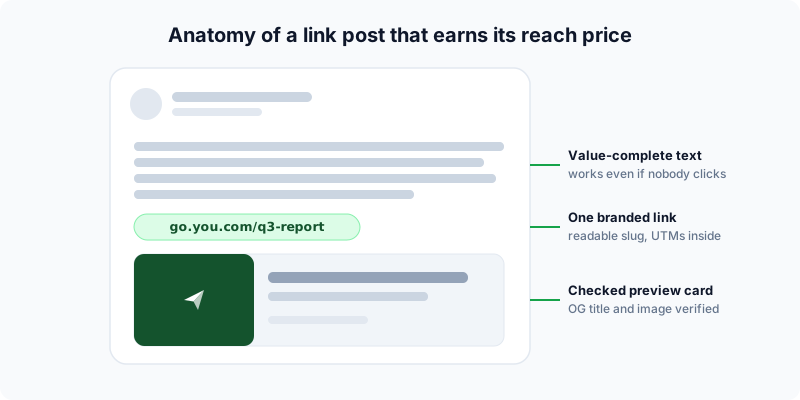
- Write a post that survives without the click. Posts that read as "content" earn engagement, and engagement buys back distribution the link spent. Posts that read as "a caption for my link" get neither.
- One link only. Multiple external links multiply the signal you are trying to soften and split your click data.
- Use a branded short link with a readable slug.
go.you.com/q3-reportoutperforms a raw 140-character URL for the same reasons everywhere else: it is typeable, trustworthy, and trackable. The LinkedIn link shortener guide covers the setup, and the CTR data explains the lift. - Control the preview card. LinkedIn builds the card from your page’s Open Graph tags, and a broken card (missing image, truncated title) quietly kills click-through. Check the tags with the Open Graph Checker before posting; if you need to fix them, the Meta Tag Generator writes correct markup. LinkedIn’s own Post Inspector forces a re-scrape when you have updated a page it cached.
- Flyn users: short links can carry custom OG titles and images, so even a link to a third-party page can present your framing in the card.
Post the link version to the audience segment that clicks, not to everyone. A plain-text insight post on Monday builds reach; the link post on Wednesday harvests it. Sequencing beats cramming both jobs into one post.
Make Every Click Count
The throttle means fewer clicks; the response is to waste none of them.
Tag before you shorten
Add UTM parameters so LinkedIn traffic is unmistakable in analytics: utm_source=linkedin, utm_medium=social (or employee for advocacy posts), and a campaign per post or series. Build them with the UTM Builder, then shorten the tagged URL; the parameters ride inside the short link invisibly. The naming discipline that keeps this usable at scale is in the UTM guide.
Read both sides of the click
Link analytics (clicks, country, device, referrer on every Flyn link; see how click tracking works) tell you what the post earned. Your site analytics, fed by the UTMs, tell you what the visit was worth. The pair answers the only question that matters: did the link post out-earn the native post? Often the honest answer is that the link post with 35% less reach drove 100% more pipeline, which ends the reach anxiety permanently.
Reuse what the click taught you
Because a Flyn link’s destination is editable, the same shared link can outlive a campaign: re-point go.you.com/webinar from the registration page to the replay after the event, and every old share keeps working. Old LinkedIn posts become permanent referrers instead of dead ends.
Company Pages, Personal Profiles, and a 30-Day Plan
Company pages play the same game on hard mode. Organic page reach is a fraction of personal reach to begin with, and the link throttle applies on top. The pattern that works: the page posts the link version for the record, and employees post personal, native-first takes that reference it. People follow people; the team link workflow covers giving every employee the same tracked link without chaos.
The 30-day rhythm that balances both
- Roughly 3:1 native to link. Three posts that build reach and trust (text insights, documents, polls), then one that spends some of it on a click. The ratio is a guide, not a law; watch your own numbers.
- Batch the link posts around real destinations. A launch (the Product Hunt playbook pairs well here), a report, a registration: things worth the reach price. Routine traffic belongs in your Featured section, newsletter, and comment placements.
- Measure weekly, by clicks and conversions. One dashboard line per link (which is why every post gets its own short link and campaign tag), reviewed against the goal you set before posting.
- Re-run the experiment quarterly. The algorithm shifts. The 3:1 ratio, the comment trick, the edit window: test them against your own audience every few months rather than trusting any guide, including this one, forever.
The meta-lesson is the same one running through every platform guide we have written: platforms rent you reach; links you control are owned infrastructure. Build the audience on LinkedIn, but route it through links whose analytics, destinations, and branding belong to you. That part the algorithm can never throttle. (New to setting that up? Start with how to shorten a URL, then add the branded domain on Pro.)
Frequently Asked Questions
Does LinkedIn really penalize posts with external links?
Is putting the link in the comments still worth it?
Does the "edit the link in after 10 minutes" trick work?
Should I use a short link on LinkedIn or paste the full URL?
Why does my LinkedIn link preview look broken, and how do I fix it?
How many links can I put in one LinkedIn post?
Do these rules apply to LinkedIn company pages too?
Free tools for this
Three Flyn tools that pair well with the strategy in this article, all free, no signup needed.
UTM Builder
Build campaign-tracked URLs in seconds.
Broken Link Checker
Scan any page for dead links and 404s.
Open Graph Checker
Preview how URLs unfurl on social.
Keep reading
Three related deep-dives from the Flyn blog.
QR Codes for Events: Tickets & Check-In
12 min read

How to Add a Link to Your TikTok Bio
12 min read

Instagram Bio Link: How to Add One and Track Clicks
12 min read
Ready to try Flyn?
Free plan includes 25 links/month, full analytics, and access to all 30+ free tools above. No credit card required.
Already a member? Log in
Karan Bhakuni is the founder of Flyn. He writes about branded links, click analytics, and the link-management tooling growth teams and creators actually need, drawn from building Flyn and reading a lot of user feedback.
Find these guides useful? Add Flyn as a preferred source so more of them show up in your Google results.