How to Add a Link to Your TikTok Bio
TikTok gives you exactly one clickable link, buried in a Website field that may be locked. Here is how to unlock it, what to point it at, and how to track every tap it earns.


The One Link TikTok Gives You
You have a video going viral, comments asking "where do I buy this?", and a profile that sends every one of those people precisely nowhere. TikTok is brutal about outbound links: it hands you exactly one clickable link, tucks it inside a field called Website, and on a personal account it may not even let you use it yet. This guide walks you through adding that link, unlocking it if it is hidden, choosing what to point it at, and tracking every tap it earns so your TikTok reach turns into traffic you can measure.
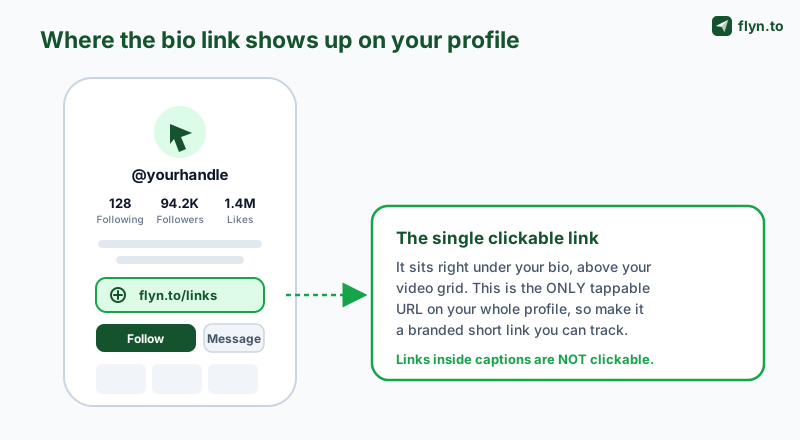
The single most common mistake is typing a URL into your bio text or a video caption and assuming people can tap it. They cannot. On TikTok, only the Website field renders as a real, clickable link. Everything else is plain text that a viewer would have to retype by hand, which almost nobody does. Get the link in the right place first, then make it work harder.
 Tap to enlarge
Why the bio link matters more on TikTok than anywhere else
On most platforms a link is one of several ways out. On TikTok it is almost the only way out, because the app keeps people inside the feed by design. That makes the bio link your entire bridge from "watched a video" to "bought, subscribed, or followed me elsewhere." A weak or missing link is a leak at the exact moment your audience is most motivated. Treat it like the conversion asset it is, not an afterthought. In the rest of this guide you will add the link in the app, unlock the field if it is missing, beat the one-link limit with a link-in-bio page, and track every tap with a branded short link.
How to Add a Link to Your TikTok Bio (Step by Step)
Here is the exact path on the TikTok mobile app. This is the only place the link can be added, so grab your phone even if you usually run your account from a laptop. The whole thing takes under a minute once the field is available to you.
The steps
- Open the TikTok app on your phone and tap Profile in the bottom-right corner.
- Tap "Edit profile." It sits just under your follower stats.
- Find the "Website" field. This is the field that becomes a clickable link. If you do not see it, your account is not eligible yet, which the next section fixes.
- Paste your URL. Use a clean, trustworthy link, ideally a branded TikTok short link rather than a long raw URL.
- Tap "Save." Your clickable link now appears under your bio, above your video grid, on every visit to your profile.
That is the entire process. The hard part is rarely the typing, it is getting the Website field to show up in the first place, and deciding what the link should point at. We cover both below.
Before you paste anything, create the link you actually want. A TikTok link shortener turns a long, messy URL into something like flyn.to/shop that fits the field, looks intentional, and quietly logs every tap. Set the destination once and you can change where it points later without ever touching your TikTok profile again.
Where the link shows up (and where it does not)
The saved link renders as a tappable row directly beneath your bio text and above your videos. It is the only tappable URL on your whole profile. To repeat the point because it trips up so many people: a link in your bio description is plain text, and a link in a video caption is plain text. Neither is clickable. The Website field is the one and only clickable slot, which is exactly why what you put there matters so much.
Why You Can't Add a Link (the 1,000-Follower Rule)
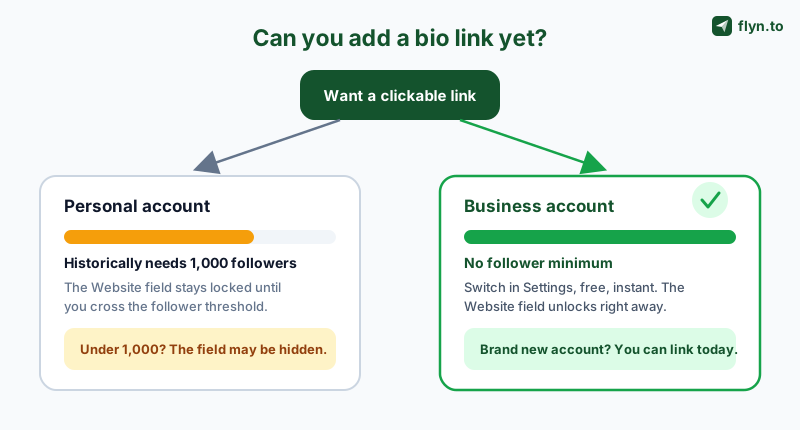
If you followed the steps above and there was no Website field, you are not doing anything wrong. TikTok gates the clickable bio link behind eligibility rules, and the most common one is a follower threshold. Historically, a personal account needs around 1,000 followers before the Website field appears at all. Under that number, the field is simply hidden, which is why so many smaller creators think the feature is broken or missing.
 Tap to enlarge
The two reasons the field is missing
- You are under the follower threshold. On a personal account, the Website field typically stays locked until you reach roughly 1,000 followers. This is the usual cause.
- Your account type does not expose it. The fastest fix, regardless of follower count, is to switch to a Business account, which removes the minimum. More on that in the next section.
There is a third, rarer cause worth ruling out: an outdated app or a region where the feature is rolling out unevenly. If you genuinely meet the criteria and still see nothing, update the TikTok app to the latest version, fully close and reopen it, and check again. TikTok also rolls features out gradually, so newer link options sometimes reach accounts on a staggered schedule.
TikTok changes these thresholds and feature names more often than almost any other platform. The 1,000-follower rule for personal accounts has been the long-standing norm, but treat any specific number as "current, not permanent." If your follower count is right at the edge, the safest move is to switch account type rather than wait, because that path does not depend on a follower minimum at all.
The Business Account Workaround (No Follower Minimum)
The cleanest way to get a clickable bio link without waiting to hit 1,000 followers is to switch to a TikTok Business account. It is free, it takes about thirty seconds, and it removes the follower minimum on the Website field, which means even a brand new account can add a real link the same day it is created. This is the single most useful trick in this entire guide for smaller creators and new brands.
How to switch to a Business account
- Go to your Profile, then tap the menu (the three lines) in the top-right corner.
- Tap Settings and privacy.
- Tap Account, then Switch to Business Account.
- Pick the category that best fits you, then confirm.
- Return to Edit profile, and the Website field should now be available regardless of your follower count.
The switch is reversible, so you can move back to a personal or creator account later if you want. For almost any account whose goal is to drive traffic somewhere (a shop, a service, a newsletter, another platform) the Business account is the obvious choice, and the unlocked bio link is only one of several reasons.
Business vs Creator vs Personal: which to pick
| Account type | Follower minimum for bio link | Best for |
|---|---|---|
| Personal | ~1,000 followers (historically) | Casual posting with no link goal |
| Creator | Subject to the same follower gating | Creators focused on content tools and growth |
| Business | No minimum | Anyone driving traffic to a shop, site, or offer |
If your only objective is unlocking the link as fast as possible, Business wins outright because it sidesteps the follower gate. Switch first, add your trackable TikTok link second, and you are live in two minutes.
The Mobile-Only Catch (and Other Gotchas)
Even once you are eligible, TikTok adds a few friction points that catch people off guard. None are dealbreakers, but knowing them up front saves a frustrating ten minutes of staring at a desktop screen that will not cooperate.
You can only add the link in the app
This is the big one. The TikTok desktop website lets you edit some profile details (your name, your bio text), but the Website field for adding a clickable link is mobile-only. If you manage your account from a computer, you still have to pick up your phone, open the app, and add or change the link there. There is no supported way to set the bio link from a browser. Plan for it rather than fighting it.
The TikTok in-app browser
When someone taps your bio link, it usually opens inside TikTok's in-app browser, not their phone's default browser like Safari or Chrome. That matters for two reasons. First, the in-app browser can interfere with some logins, cookies, and checkout flows, so test your destination by tapping your own link from inside TikTok, not just by pasting the URL into Safari. Second, because it is a sandboxed environment, your usual analytics may see it differently, which is one more reason to put a tracked short link in the middle that logs the tap before the in-app browser ever loads.
Some destinations behave oddly in any social app's in-app browser. If your link goes to a checkout, a login wall, or an app you want to deep link into, test the full journey from a real tap inside TikTok on both an iPhone and an Android device. For app destinations specifically, see how deep links open in native apps so taps land in the app, not a stripped-down web view.
Editing is the same path as adding
To change the link later, you follow the identical route: Profile → Edit profile → Website, replace the URL, and save. This is also why a short link with a swappable destination is so handy. If the underlying link is something like flyn.to/shop, you never have to edit your TikTok profile at all when a campaign changes. You just repoint the short link and every existing tap follows the new destination.
One Link, Many Destinations: The Link-in-Bio Move
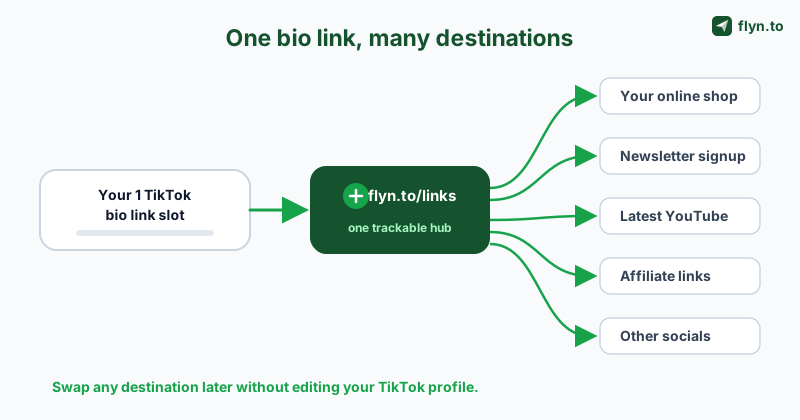
TikTok's one-link limit feels stingy, and it is, but it has a clean solution. Instead of burning your single slot on one destination and constantly swapping it, you point that slot at a link-in-bio page: a single short link that opens a tidy menu of all the places you actually want people to go. One link in TikTok, many destinations behind it.
 Tap to enlarge
What a link-in-bio destination solves
- The one-link ceiling. Promote a product launch, a newsletter, a YouTube video, and an affiliate offer at once instead of choosing one.
- Constant editing. Update the menu whenever a campaign changes, with zero trips back into your TikTok profile.
- Lost attribution. A single tracked hub tells you which of your destinations TikTok fans actually click, so you learn what your audience wants.
You have two solid ways to build this. The simplest is a branded short link that redirects to one primary destination you can change at any time, which is perfect if you mostly push one offer that rotates. The more flexible option is a dedicated link-in-bio landing page that lists several buttons. Our link-in-bio strategy for creators breaks down how to structure that page so it converts rather than just sitting there as a list.
Keep it consistent across platforms
If you are on more than one network, use the same branded short-link pattern everywhere so your audience recognizes it. A creator might run flyn.to/links on TikTok, an Instagram link in their Instagram bio, and the same hub in a YouTube description. Consistent, branded links build trust across channels and let you compare which platform actually drives the most engaged taps.
Use a Branded Short Link (Trust + Tracking)
Whatever you point your bio link at, do not paste a long raw URL. A link like yourstore.example.com/collections/summer-2026?ref=tiktok&variant=42 looks untrustworthy, gets truncated, and tells you nothing about who clicked it. A branded short link fixes all three problems at once, and it is the difference between a bio link you hope is working and one you can actually prove is working.
Why branded beats raw
- Trust and click-through. People tap links they recognize. A clean branded link signals "this is really me, it is safe," which lifts your tap rate. The data behind that is in why branded short links increase CTR.
- It fits the field. A short link sits neatly in the Website field instead of getting cut off mid-URL.
- You can change it later. Repoint the destination for a new campaign without ever editing your TikTok profile.
- It is trackable. Every tap is logged, which a raw URL can never do on its own.
A raw URL in your TikTok bio is a guess. You hope people are tapping it, you hope they are buying. A branded short link replaces the hope with a number: how many taps, from which countries, on which devices, every single day.
Make the short link look like an extension of you, not a random redirect. Pick a slug that says what it is (/shop, /newsletter, /links) so the destination is obvious before anyone taps. Create one in seconds with the TikTok link shortener, and if you also want to drive scans from print, packaging, or a pop-up, generate a matching QR code that points at the very same trackable link.
How to Track Every Tap on Your TikTok Link
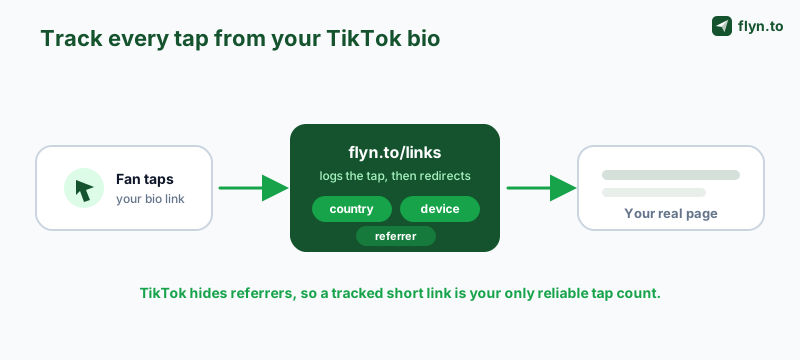
Adding the link is step one. Knowing what it does is where the real value is, and TikTok actively makes this harder than it should be. Social platforms strip or hide referrers, so your own website analytics often cannot even tell that a visitor came from TikTok. The fix is to put a tracked short link between the tap and the destination, so the click is logged the instant it happens, before TikTok's in-app browser or any referrer-stripping gets in the way.
 Tap to enlarge
What you can actually see
- Human and bot taps counted apart, so you know real volume, not just raw volume.
- Geography (country and city) to see where your TikTok audience really is, which often differs from where you think it is.
- Device and browser splits, which on TikTok skew heavily mobile and should shape your landing page.
- Referrer and timing so you can connect a tap spike to the exact video that drove it.
Read the data the way it deserves: not as a vanity number but as attribution. "400 taps, 70% from the US, peaking the night a specific video took off" tells you which content actually moves your audience to act. Our full guide on how to track clicks on a link goes deeper on reading the numbers without fooling yourself with bot traffic.
Use a distinct short link per platform so the link itself is the attribution. Run one link for your TikTok bio and a separate one for your Instagram bio. Even when the referrer is stripped, the link that got tapped tells you which platform sent the traffic, with zero guesswork.
Common tracking mistakes on TikTok
Two errors quietly ruin TikTok link data. First, reusing one link everywhere, which makes it impossible to tell TikTok taps from Instagram or YouTube taps. Use a separate trackable link per channel. Second, trusting raw website analytics alone, which under-counts TikTok because of referrer stripping and the in-app browser. A dedicated short link sidesteps both by owning the redirect and logging the tap directly.
Common Mistakes and What to Fix
Once your link is live, a handful of avoidable mistakes are what keep most TikTok bio links underperforming. Run through this list and you will already be ahead of the majority of accounts.
Putting the link in the wrong place
The number one error, worth saying a third time: a URL in your bio text or a video caption is not clickable. Only the Website field is. If your "link" is sitting in your bio description, move it to the Website field now and you will instantly recover every tap you were silently losing.
Sending traffic to a dead end
A link that opens a slow page, a broken checkout, or a logged-out wall wastes the hardest-won click on the internet. Test your destination from a real tap inside TikTok on both an iPhone and an Android. If it points to an app, make sure it opens in the native app rather than a stripped web view.
Flying blind with no tracking
If you cannot answer "how many taps did my bio link get this week," you are guessing at your own funnel. A free short link turns that guess into a tap count, and Pro adds the full geo and device dashboard. Pair it with the broader playbook in how to track clicks on a link.
Adding a clickable link to your TikTok bio is genuinely a two-minute job once you know the path: switch to a Business account if the field is locked, add a branded short link in the app under Edit profile, route it through a single hub so you are not capped at one destination, and read the taps to learn what your audience wants. Create a free Flyn account to make your first trackable TikTok link, browse the full link toolkit, and check the pricing when you are ready for branded domains and team features. You can also read more creator playbooks on the Flyn blog or start straight from the homepage.
Frequently Asked Questions
How do I add a link to my TikTok bio?
Why can't I add a link to my TikTok bio?
Do you need 1,000 followers to add a link to TikTok?
Can I add a link with a TikTok Business account?
How do I track clicks on my TikTok link?
Can I put more than one link in my TikTok bio?
Why isn't my TikTok bio link clickable?
Can I add or edit my TikTok bio link on a computer?
Free tools for this
Three Flyn tools that pair well with the strategy in this article, all free, no signup needed.
UTM Builder
Build campaign-tracked URLs in seconds.
Broken Link Checker
Scan any page for dead links and 404s.
Open Graph Checker
Preview how URLs unfurl on social.
Keep reading
Three related deep-dives from the Flyn blog.
QR Codes for Events: Tickets & Check-In
12 min read

Instagram Bio Link: How to Add One and Track Clicks
12 min read
YouTube Description Links: Add Clickable Links Fast
13 min read
Ready to try Flyn?
Free plan includes 25 links/month, full analytics, and access to all 30+ free tools above. No credit card required.
Already a member? Log in
Karan Bhakuni is the founder of Flyn. He writes about branded links, click analytics, and the link-management tooling growth teams and creators actually need, drawn from building Flyn and reading a lot of user feedback.
Find these guides useful? Add Flyn as a preferred source so more of them show up in your Google results.