How to Track Clicks on a Link (Free Guide)
A raw URL tells you nothing about who clicked it. Here are the three free ways to track clicks on any link, and how to read the data without fooling yourself with bot traffic.


Why a Plain URL Can't Be Tracked
You shared a link, in an email, a tweet, a WhatsApp message, and now you want one simple thing: how many people clicked it? Paste a raw URL like https://example.com/sale into a chat and you will never find out. A plain URL is a destination, not a measurement tool. There is no counter attached, no record of who opened it, nothing reporting back to you. The click happens entirely between the visitor's browser and the destination server, and you are not in the loop.
To track clicks on a link, you have to put something between the click and the destination that records each visit. That "something" is what every method in this guide has in common, whether it is a short link, a tagged URL your analytics can read, or your own server logs. Understand that one principle and choosing a method becomes easy.
What "tracking a click" actually records
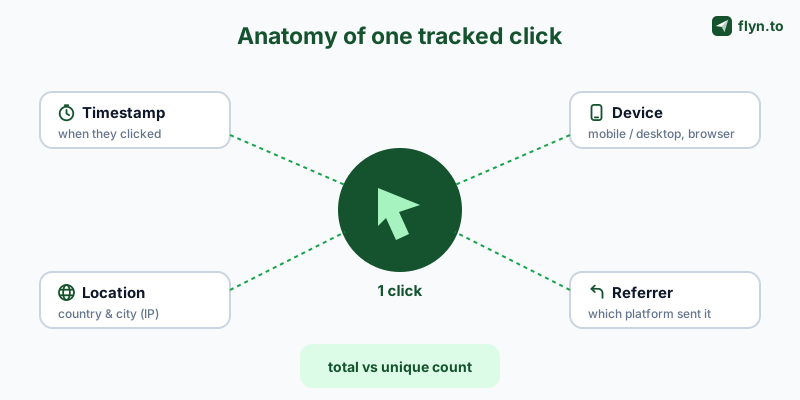
A click is not just a tally. A proper tracker captures the moment with context: the timestamp, the visitor's approximate country and city (from their IP), their device and browser, and the referrer, the page or app they clicked from. Stack thousands of those records together and you can finally answer the questions that matter: which channel drives traffic, when your audience is active, and which links are worth repeating. Those same click records are the raw material for retargeting people who click links you do not own, turning a tracked click into an ad audience you can advertise to again.
Clicks are a means to attribution, not a vanity number
"500 clicks" is a vanity metric on its own. "500 clicks, 80% mobile, 60% from Instagram, peaking at 9pm" is a marketing decision. The point of click tracking is not a bigger number, it is attribution: knowing which effort produced the result so you can do more of what works. Every method below gets you there; they differ in speed, cost, and what kind of link they can measure.
The 3 Ways to Track Clicks on a Link
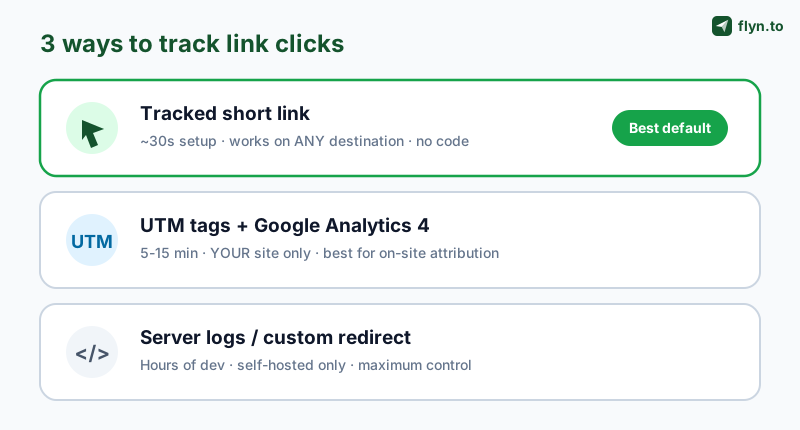
There are exactly three ways to insert yourself between a click and its destination. Each fits a different situation, and most marketers end up using more than one.
- A tracked short link, you shorten the URL, share the short version, and the shortener logs every click before redirecting. Works on any destination, even pages you don't own.
- UTM parameters + analytics, you tag the URL with
utm_*parameters that Google Analytics reads when the visitor lands. Works only for traffic to a site you control and have analytics on. - Server logs or a custom redirect, your own server records each request. Maximum control, but it is a developer job and only covers links pointing at your own infrastructure.
 Tap to enlarge
Which method should you use?
| Method | Setup time | Tracks links you don't own? | Best for |
|---|---|---|---|
| Tracked short link | ~30 seconds | Yes | Social, SMS, email, print, bios, anywhere you share a link |
| UTM + GA4 | 5-15 minutes | No (your site only) | Campaign attribution for traffic landing on your website |
| Server logs / redirect | Hours (developer) | No | Engineering teams that need raw, self-hosted control |
For most people the answer is the short link: it is the only method that works on links you don't own, needs zero code, and starts free. The other two complement it, pair a short link with UTM tags and you get the best of both, which we cover below. Browse every free link tool if you want to see the full kit.
Method 1: Track Clicks With a Short Link (Fastest, Free)
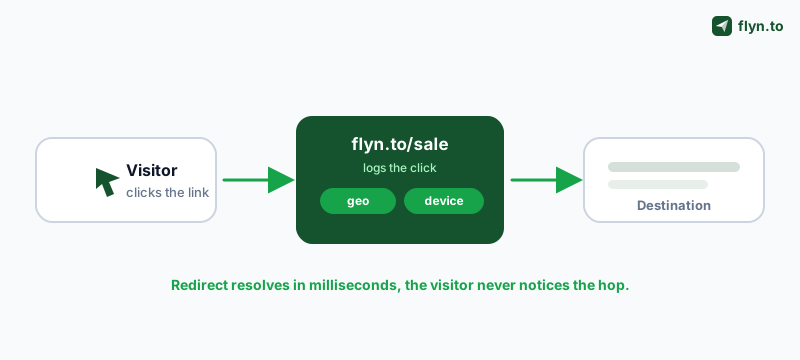
This is the quickest free way to track clicks on a link, and the only one that works no matter where the link points. The flow is simple: you give a shortener your long URL, it returns a short one like flyn.to/sale, and every time someone opens that short link the service records the click and instantly forwards them to the real page. The visitor notices nothing; you get a dashboard.
Step by step
- Paste your long URL and create the short link. With Flyn you can shorten and start tracking in seconds.
- Share the short link instead of the original, in your bio, email, post, ad, or QR code.
- Watch clicks roll in. Each one is logged in real time with country, device, browser, and referrer.
 Tap to enlarge
What you get that a raw link never could
- Total and unique clicks, raw volume plus de-duplicated reach (see unique clicks vs total clicks).
- Geography, country and city breakdowns to see where your audience really is.
- Device and browser, mobile vs desktop splits that should shape your landing page.
- Referrer, which platform or page actually sent the click, so you can credit the right channel.
Use a branded short link on your own domain (like go.yourbrand.com/sale) instead of a generic one. Branded links earn measurably higher click-through rates because people trust a name they recognize, so you generate more clicks to track, not just count the ones you already had.
Because the shortener owns the redirect, it can do things a raw link never could: A/B split traffic between two destinations, expire a link, password-protect it, or swap the destination after you've shared it. Developers can pull the same data programmatically, see the click analytics API docs.
Method 2: UTM Parameters + Google Analytics 4
If the link points to a website you own and have Google Analytics on, UTM parameters are the classic way to track clicks, and to connect them to what happens after the click. UTMs are short tags appended to a URL (?utm_source=newsletter&utm_medium=email&utm_campaign=spring_sale) that GA4 reads the moment a visitor lands, attributing the session to the exact source, medium, and campaign you specified.
Build them without typos
Hand-typing UTM strings is how data gets fragmented (Facebook vs facebook become two sources). Use the free UTM Builder to generate clean, consistent tags with platform presets, then the UTM Parser to double-check any link before it goes live. Our ultimate guide to UTM parameters covers every tag and naming convention in depth.
Where UTMs beat short links, and where they don't
UTMs shine at on-site attribution: once the visitor lands, GA4 can follow them all the way to a conversion and tie revenue back to the campaign. But UTMs have two hard limits. First, they only work on sites you control and have analytics on, you can't UTM-track a click to someone else's page. Second, never put UTMs on internal links within your own site; doing so resets the session and corrupts your source data. Strip stray tags with the URL Cleaner before they cause problems.
The strongest setup uses both: build a UTM-tagged URL, then shorten it. You get GA4's on-site attribution and the short link's own click log (geo, device, referrer), two independent data sources you can cross-check. A long UTM URL is also ugly in a tweet; shortening fixes that.
Method 3: Server Logs and Custom Redirects
If you run your own infrastructure, you can track clicks the original way: a redirect endpoint on your server that logs each request, then 301/302s the visitor onward. Every web server already writes access logs with IP, user agent, timestamp, and referer, the same raw ingredients a short link captures, just unprocessed.
When it's worth the effort
This route gives you total ownership of the data and no third party in the loop, which matters for strict compliance or very high volume. The trade-offs are real, though: you have to build the redirect, parse and store the logs, filter bots, and turn raw lines into geo/device/referrer reports yourself, effectively rebuilding what a shortener gives you out of the box. For teams that do go this way, a link shortener API usually wins: you get the redirect, logging, and dashboards via a few API calls instead of weeks of plumbing.
What Click Data Actually Tells You
Tracking clicks is only useful if you read the data correctly. Here are the metrics every method surfaces and the decision each one drives.
 Tap to enlarge
Total clicks vs unique clicks
Total clicks count every open, including the same person clicking twice. Unique clicks de-duplicate to estimate real reach. A big gap between them means either a few superfans clicking repeatedly or, more often, bot inflation. Always look at both.
Geography, device, and referrer
Geography tells you whether to localize or shift send times to another timezone. Device split decides whether your landing page must be mobile-first (for most social and SMS traffic, it must). Referrer is the attribution workhorse, it names the platform that sent each click so you can credit the channel that actually performed instead of guessing.
Time-of-day and trend
Clicks plotted over time reveal your audience's active hours and how long a link keeps pulling traffic after you post it. A link that spikes then dies wants reposting; one with a long tail is doing organic work. To go from clicks to revenue, see why branded short links increase CTR and pair the click data with conversion tracking.
How to Track Clicks by Channel
The right setup shifts slightly depending on where you're sharing the link. The short link works everywhere; here's how to get the cleanest data per channel.
Most email platforms report opens and clicks, but only for links inside their system. Drop a tracked short link (or a UTM-tagged one) into the email and you get an independent count plus device and geo data your ESP may not show. Add UTMs so GA4 attributes the on-site session to the campaign too.
Social media and bios
Social platforms strip or hide referrers, so a short link is often your only reliable click count. Use a per-platform link, a link for Instagram, another for your YouTube description, so the referrer and the link itself both tell you which channel drove the traffic. The same idea scales to many placements at once: give each placement its own short link and every pin, post, or profile reports separately.
SMS, WhatsApp, and chat
Texts have tight character limits, so shortening is mandatory, and chat apps rarely expose any analytics of their own, making the short link your sole source of truth. Build click-to-message links with the SMS Link Generator, click-to-call links, and the WhatsApp link generator, then shorten them with a WhatsApp link shortener to track every tap.
QR codes and print
A QR code is just a link in visual form, so it tracks the same way, encode a tracked short link and every scan becomes a logged click. For the scan-side detail (geo, device, and time per scan), see how to track QR code scans. The bonus: a short link behind the QR means you can change the destination after the flyer is printed. See dynamic QR codes for print and digital, and audit existing codes with the QR destination audit.
The Mistakes That Wreck Your Click Data
Click tracking is easy to set up and easy to misread. These are the errors that make people trust numbers that are quietly wrong.
Counting bots as humans
This is the big one. Search crawlers, link-preview bots (the ones that generate the thumbnail when you paste a link in Slack or iMessage), security scanners, and your own test clicks can inflate a count by 2-10x. A serious tracker fingerprints and excludes non-human traffic automatically; a naive log does not. If your "clicks" wildly exceed plausible reach, suspect bots first, our guide to click fraud prevention covers how to spot and stop it.
The fastest way to lose trust in your own analytics is to celebrate a number you never filtered. A click you didn't verify is a guess wearing a metric's clothes.
The internal-link UTM trap
Tagging links within your own site with UTMs restarts the analytics session and overwrites the original traffic source, so your homepage starts looking like a top "campaign." Reserve UTMs for external links only, and clean accidental ones with the URL Cleaner.
Privacy law applies to click data. IP addresses and device details can be personal data under GDPR. Use a tracker that anonymizes or hashes IPs and lets you stay compliant, don't roll your own logging that quietly stockpiles raw IPs against the rules.
Caching and shared links
Aggressively cached redirects can under-count, and a single short link shared by many people can't tell those audiences apart. When you need to compare sources, create a separate short link per channel rather than reusing one everywhere, and watch out for the deliverability hit covered in why short links get flagged as spam.
From Clicks to Conversions
Tracking clicks is the start, not the finish. The reason to know who clicked and from where is to do more of what converts and cut what doesn't. That means treating your links as a managed asset instead of disposable strings.
Put it all in one place
Stitching a free shortener, a spreadsheet of UTMs, and GA4 together works, until you have fifty links and no idea which is which. A dedicated link platform gives you branded short links, a real-time click dashboard, UTM building and parsing, QR codes, A/B testing, and link expiry in one workflow. Compare the options on our alternatives pages, or migrate an existing set of links over.
Start free
You can track clicks on your first link with a free Flyn account in under a minute, no credit card, real-time click counts with bot filtering on by default; the full geo/device/referrer breakdown is on Pro. When you're ready for branded domains and team features, the pricing scales with you. Track the link, read the data honestly, and let the numbers tell you where to spend your next hour. And when the click count stops being enough, tracking which posts actually drive sales is the next step up.
Frequently Asked Questions
How do I track clicks on a link for free?
Can I see who clicked my link?
How do I track clicks without a website?
Do short links slow down or change my destination?
How do I track clicks in an email?
Why is my click count higher than the number of real visitors?
What is the difference between total clicks and unique clicks?
Can I track clicks on a link I didn't create?
Free tools for this
Three Flyn tools that pair well with the strategy in this article, all free, no signup needed.
UTM Builder
Build campaign-tracked URLs in seconds.
Broken Link Checker
Scan any page for dead links and 404s.
Open Graph Checker
Preview how URLs unfurl on social.
Keep reading
Three related deep-dives from the Flyn blog.

How to Track Which Posts Drive Sales, Not Just Clicks
19 min read

Email Newsletter Click Tracking: Measure Your Real CTR
12 min read

How to Choose a Branded Short Domain for Your Links
13 min read
Ready to try Flyn?
Free plan includes 25 links/month, full analytics, and access to all 30+ free tools above. No credit card required.
Already a member? Log in
Karan Bhakuni is the founder of Flyn. He writes about branded links, click analytics, and the link-management tooling growth teams and creators actually need, drawn from building Flyn and reading a lot of user feedback.
Find these guides useful? Add Flyn as a preferred source so more of them show up in your Google results.