Email Newsletter Click Tracking: Measure Your Real CTR
Your open rate is inflated and a chunk of your clicks are scanners. Here is how to track newsletter link clicks properly, with short links, UTMs, and a bot-filtered click count you can actually report.


Your Open Rate Is Lying to You
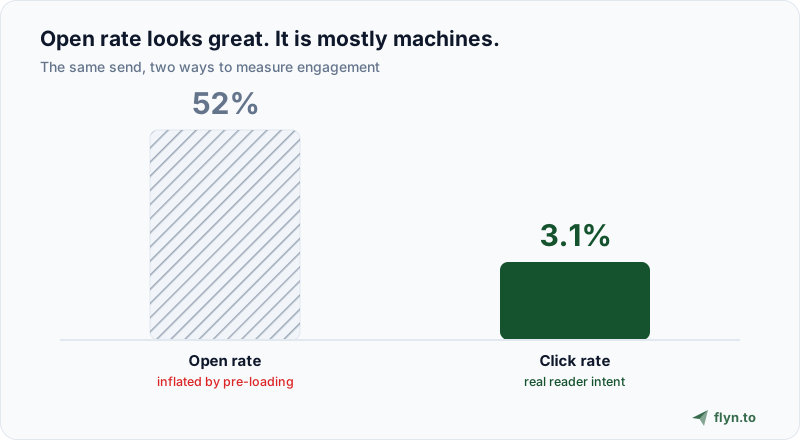
You send an issue, refresh the dashboard, and there it is: a 52 percent open rate. Feels great. It is also close to meaningless. In 2021 Apple shipped Mail Privacy Protection, which silently pre-loads the tracking pixel in every email for Apple Mail users whether or not they ever open the message. Since Apple Mail is one of the most common email clients, a large slice of your "opens" are Apple's servers, not people. Gmail and corporate gateways add their own image proxying and pre-fetching on top.
The result is that the open rate, the metric newsletters have leaned on for two decades, now measures a mix of real humans and machines you cannot separate. So stop grading yourself on it. The one action a reader takes that still means intent is a click. A click is a person (or, as we will see, sometimes a bot) choosing to leave the email and go somewhere. That is the signal worth tracking, and this guide is about tracking it properly.
 Tap to enlarge
None of this means email analytics are hopeless. It means you measure the right thing and you measure it in a way you control, instead of trusting a pixel that Apple decided to fire on your behalf.
What Your ESP's Click Tracking Actually Tells You (and What It Doesn't)
Every email service provider (ESP) tracks clicks. Mailchimp, ConvertKit, beehiiv, Substack, Ghost, and the rest all rewrite the links in your email so that a click passes through their servers first, gets counted, and then bounces the reader to the real destination. That much works. The problem is the shape of what you get back.
It is trapped inside one campaign
ESP click reports are almost always per-campaign. You can see that Issue 42 got 380 clicks. What you cannot easily see is how the same evergreen link performed across the last ten issues, or how your newsletter clicks compare to the clicks that same link earned on Twitter or your website. The link your ESP rewrote only exists inside that one send, so the data dies with the campaign.
The breakdown is shallow on most plans
Free and entry ESP tiers give you a total and maybe a click map. Geographic, device, and referrer detail is usually a higher-tier feature, and retention is short: many ESPs age out click data after a few months. If you want to answer "which city, which device, which issue" a year later, the raw event is already gone.
It only counts email
The biggest blind spot: ESP tracking only sees clicks that happen inside the email. Readers forward your issue, paste your link into Slack, or share it on LinkedIn. Every one of those clicks is invisible to your ESP because it never touched the rewritten link.
A short link you create yourself closes all three gaps. It lives independently of any single send, it carries its own analytics you own and keep, and it counts every click no matter where the link ends up. Here is the contrast:
| What you want to know | Your ESP alone | Short links plus Flyn |
|---|---|---|
| Clicks on this issue | Yes | Yes |
| Same link across many issues | No, per-campaign | Yes, one link, lifetime total |
| Clicks when shared outside email | No | Yes, tracks anywhere |
| Bot-filtered human count | Rarely | Yes, free on every link |
| Branded domain on the link | ESP's click domain | Your own domain |
| Geo, device, referrer breakdown | Higher tiers | Pro |
| Retention | Often months | Unlimited on Pro |
Short Links vs ESP Link Rewriting: Two Ways to Track a Click
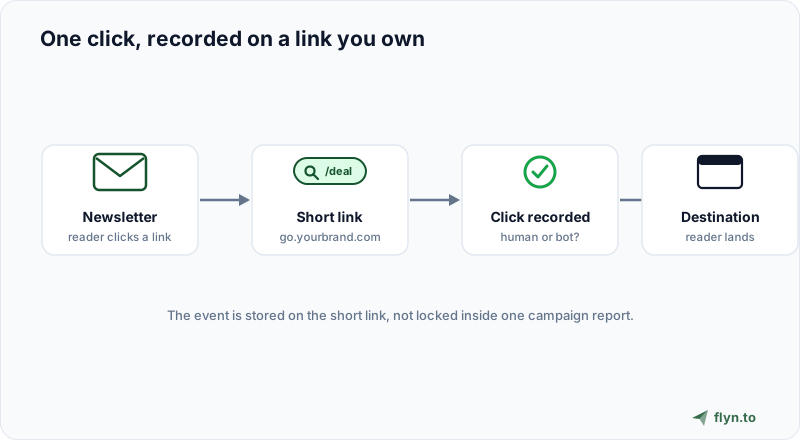
It helps to understand the mechanics, because they can collide. Both approaches work by redirecting: the reader clicks, hits a tracking hop that records the event, and then lands on the real page. Your ESP does this automatically to every link. A short link does it because that is what a short link is.
 Tap to enlarge
The practical difference is ownership and trust. When the ESP rewrites your link, the visible URL (on hover, or in plain-text emails) is the ESP's click-tracking domain, something like click.mail.example.com. That is generic, occasionally scary-looking, and tied to a shared domain whose reputation you do not control. A branded short link on your own domain reads like go.yourbrand.com/deal, which is recognizable and, in testing across the industry, tends to lift click-through because it looks trustworthy.
Do not stack two redirects by accident. If your ESP rewrites links AND you paste a short link, the reader hits the ESP hop, then your short-link hop, then the destination. It still works, but every extra hop is a chance to be flagged and a few milliseconds of delay. Either disable your ESP's click tracking (many let you) and rely on the short link, or accept the ESP hop and skip short links for that send. Do not double-wrap the same link.
Set Up Newsletter Click Tracking in Five Steps
This is the whole workflow. It takes about ten minutes the first time and two minutes per issue after that.
1. Shorten each important link on your own domain
Do not shorten every link, just the ones you actually want to measure: the main call to action, the sponsor link, the two or three articles you are promoting. Create each with Flyn on a branded domain so it reads as yours.
2. Tag each link with UTMs
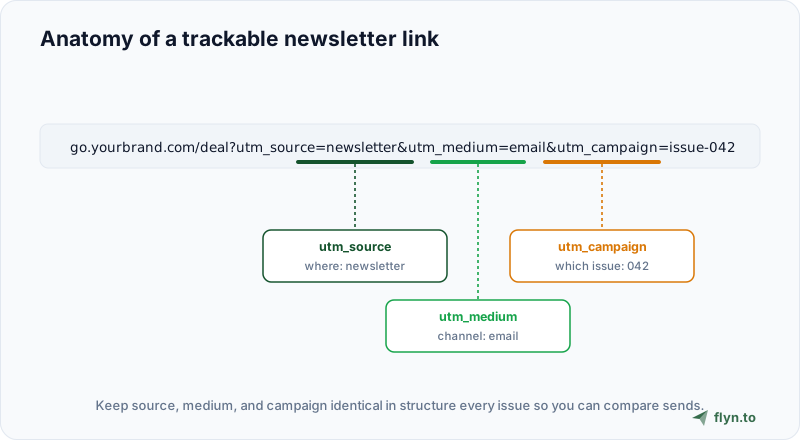
UTM parameters are how analytics tools know where a click came from. For a newsletter, a clean scheme is utm_source=newsletter, utm_medium=email, and utm_campaign=issue-042. Build them without typos using the free UTM Builder, and if you inherit a messy link, run it through the UTM Parser to see what is actually on it. The complete UTM guide covers the naming conventions in depth.
 Tap to enlarge
3. Name your issues consistently
The single habit that makes long-term tracking useful is a predictable campaign name. Pick a pattern and never break it: issue-042, or 2026-w30, or the-friday-brief-042. Consistency is what lets you chart clicks across a year of sends instead of a jumble of one-off labels.
4. Place the links and send
Drop the short links into your newsletter wherever the calls to action live. They work in every ESP because a short link is just a URL. They also work in plain-text emails, where ESP click rewriting often does not.
5. Read the report the next morning
Once clicks come in, open the link in Flyn and read the click report. Total clicks, the human-versus-bot split, and (on Pro) the geographic and device breakdown all sit on the link itself, ready to compare against your last issue.
The newsletters that grow are not the ones with the highest open rate. They are the ones whose owners know exactly which three links their readers actually click, and write more of that.
The Metrics That Actually Matter
Once you are tracking clicks properly, a handful of numbers do the real work. Ignore the vanity ones.
Click-through rate (CTR)
CTR is clicks divided by emails delivered. It is the honest top-line engagement number now that opens are unreliable. A typical newsletter CTR lands somewhere in the low single digits, but benchmarks vary wildly by niche and list quality, so the number that matters is your trend, not a blog's average.
Click-to-open rate (CTOR)
CTOR is clicks divided by opens. It used to be the gold standard for content quality, but because opens are now inflated by pre-loading, CTOR is distorted in the same direction. Watch it if you like, but do not make decisions on it alone.
Unique vs total clicks
Total clicks counts every click, including the same reader clicking twice. Unique clicks counts people. For CTR use unique; for "how much traffic did this link drive" use total.
Per-link distribution
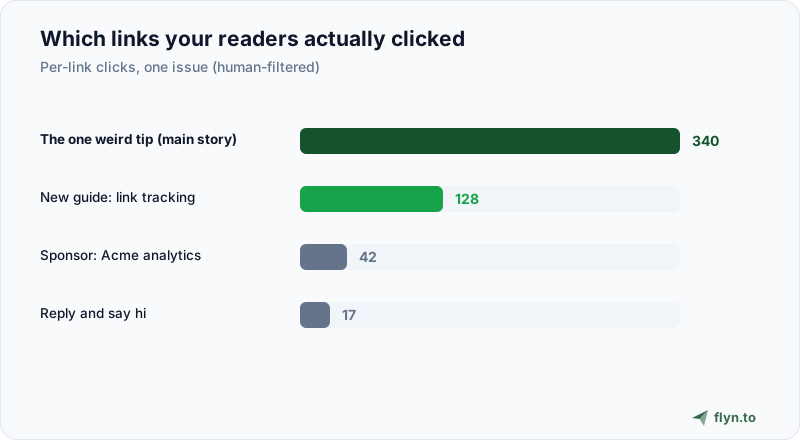
This is the one that changes what you write. When you tag each link separately, you learn that the sponsor got 12 clicks while the "one weird tip" link got 340. That tells you what your audience wants far more clearly than any open rate.
 Tap to enlarge
Give the same evergreen link (your best lead magnet, your product page) one short link and reuse it across issues instead of minting a new one each time. Its lifetime click total then becomes a running scoreboard of how much traffic your newsletter sends to the thing that matters most.
Bot Clicks Are Quietly Inflating Your CTR
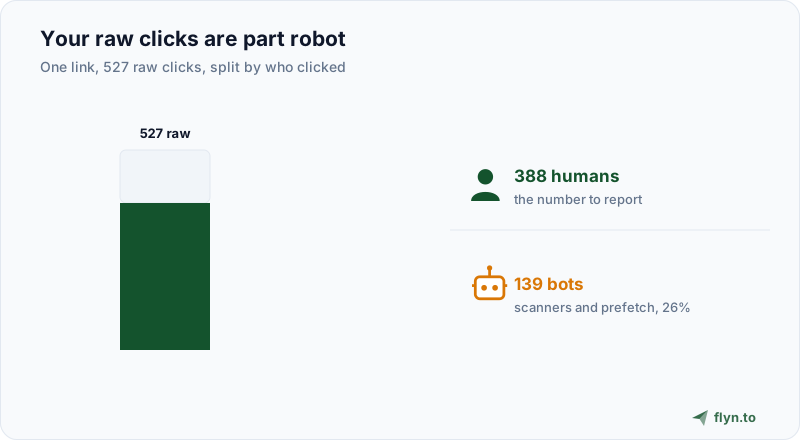
Here is the uncomfortable part nobody in the email-metrics conversation likes to mention: a meaningful share of newsletter "clicks" are not people. Corporate email security systems (Microsoft Defender SafeLinks, Barracuda, Mimecast, Proofpoint) pre-click every link in an incoming email to scan the destination for threats, before the human ever opens the message. Some inbox providers and apps also prefetch links. Every one of those machine visits looks like a click.
On lists heavy with corporate and Outlook recipients, this can inflate reported clicks by double digits. If you report a raw click number to a sponsor or your own dashboard, you are quietly reporting robots. The fix is to screen clicks by their request signals and separate humans from bots.
 Tap to enlarge
Flyn does this on every link: it inspects each request and buckets it as human or bot, and the bot-filtered human total is free on every plan. It even breaks out clicks that came from AI assistants like ChatGPT as their own channel. That is the number to put in your monthly recap, not the raw count your ESP shows.
Platform Notes: Substack, beehiiv, Mailchimp, ConvertKit, Ghost
Every newsletter platform handles links a little differently. Short links sit cleanly on top of all of them.
Substack
Substack gives you basic per-post click stats and rewrites links to its own tracker. It does not show a bot-filtered count or cross-post trends, so short links on a branded domain add the ownership and honesty layer. This pairs well with a link-in-bio strategy for the same audience.
beehiiv
beehiiv has stronger native analytics than most and a clean click map, but the data still lives inside beehiiv and inside each send. Use short links for the two or three links whose lifetime performance you want to own across issues and channels.
Mailchimp and ConvertKit
Both rewrite links and report per-campaign clicks. If you run automations and sequences, the same evergreen short link across every step gives you one combined number the ESP will never total for you. See the Mailchimp link workflow for the tagging setup.
Ghost
Ghost added native email click tracking, but retention and breakdown depth are limited. Short links extend both. In all cases the rule is the same: let the ESP do its per-send report, and use short links for the handful of links you want to measure for the long haul.
Where Clicks Stop and Conversions Begin
One boundary worth drawing before you build this. Click tracking tells you that a reader left your email and opened a page, and whether that click was a real human. On its own it does not tell you what happened next: whether they read the article, bought the product, or subscribed.
For most newsletters the click is exactly enough, because the decisions you make from a newsletter (which topics to write, which sponsors convert your audience, which call to action to lead with) all live at the click. If you do need the purchase joined to the link that earned it, that is conversion tracking, a Pro feature that adds one small tag to your site, and the placement guide walks through when it is worth the setup. The short link and the click count are the trustworthy first half: they tell you how many clicks were real, and which link earned them, without an inflated open rate or a pile of scanner bots muddying the number.
Start small. Shorten the three links in your next issue that you most want to understand, tag them with the UTM Builder (one of Flyn's free link tools), and read the human-filtered report the morning after. You will learn more about your readers from that one experiment than a year of open rates ever told you, and the same approach carries over to your SMS and text campaigns. When you are ready, create a free account and set it up in the time it takes to write your subject line.
Frequently Asked Questions
What is a good newsletter click-through rate?
Why is my email open rate so much higher than my click rate?
Do short links hurt email deliverability?
How do I track clicks for each newsletter issue separately?
Are clicks in my newsletter report from real people?
Can I track newsletter clicks without relying on my ESP?
What is the difference between CTR and CTOR?
Does Flyn tell me who bought after clicking my newsletter link?
Free tools for this
Three Flyn tools that pair well with the strategy in this article, all free, no signup needed.
UTM Builder
Build campaign-tracked URLs in seconds.
Broken Link Checker
Scan any page for dead links and 404s.
Open Graph Checker
Preview how URLs unfurl on social.
Keep reading
Three related deep-dives from the Flyn blog.

How to Track Which Posts Drive Sales, Not Just Clicks
19 min read

How to Choose a Branded Short Domain for Your Links
13 min read
Free URL Shorteners Without Ads or Interstitial Pages
15 min read
Ready to try Flyn?
Free plan includes 25 links/month, full analytics, and access to all 30+ free tools above. No credit card required.
Already a member? Log in
Karan Bhakuni is the founder of Flyn. He writes about branded links, click analytics, and the link-management tooling growth teams and creators actually need, drawn from building Flyn and reading a lot of user feedback.
Find these guides useful? Add Flyn as a preferred source so more of them show up in your Google results.