Which Clicks Came From ChatGPT (and Which Are Bots)
Your dashboard says 400 clicks. How many were real people, how many were bots and link previews, and how many came from ChatGPT and Perplexity? Here is how the three-way split works, why one blurry total misleads you, and how to read AI-assistant traffic honestly.

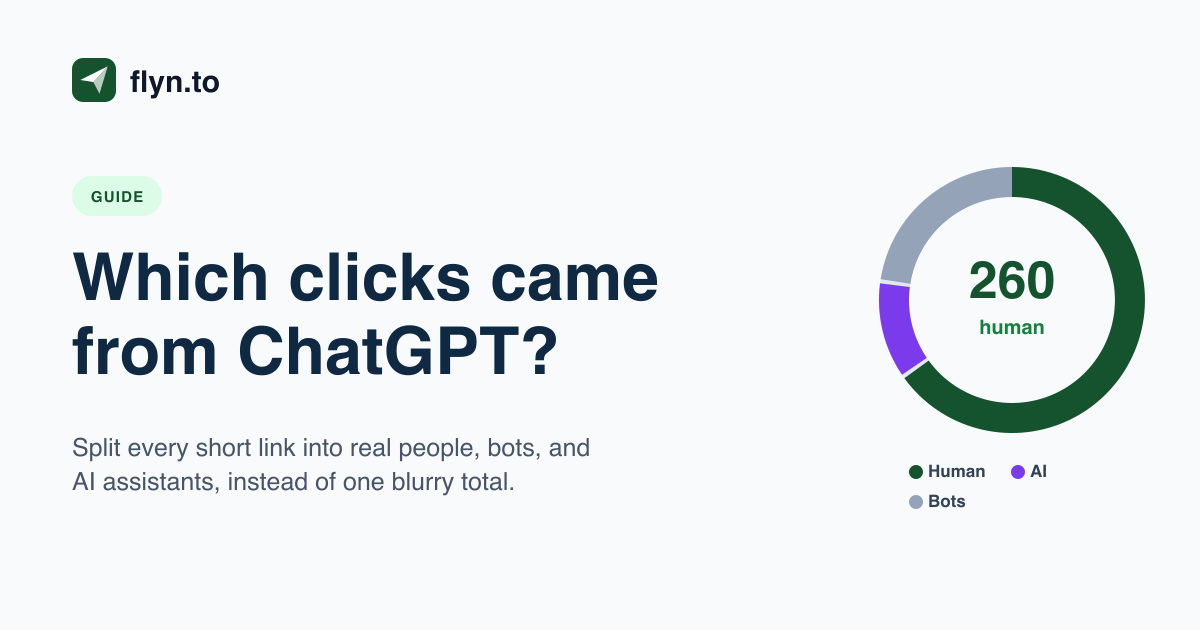
Your Report Says 400 Clicks. How Many Were Real?
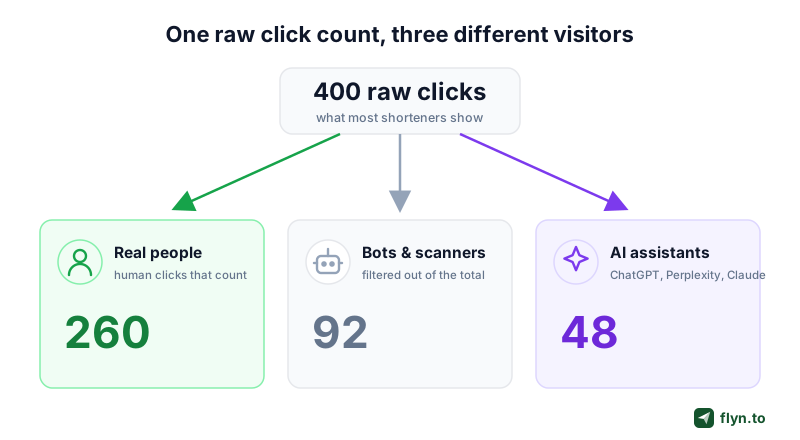
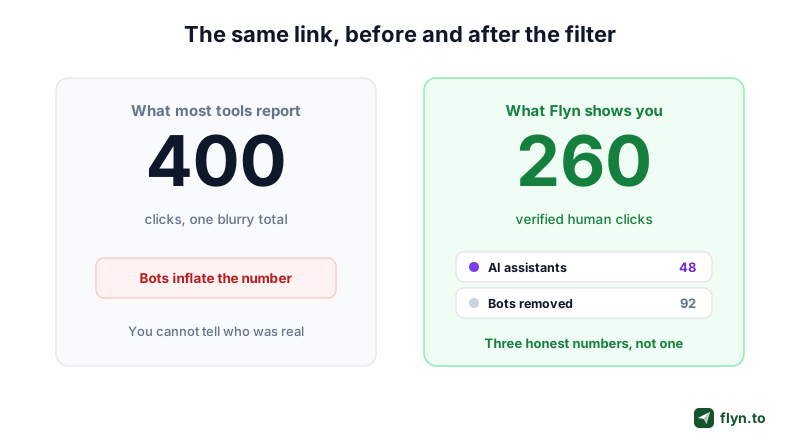
Your link report says 400 clicks. You screenshot it, you feel good, you move on. But pause for a second: how many of those 400 were real people? How many were a messaging app quietly fetching a preview card? How many were ChatGPT or Perplexity opening your page to answer someone else's question? Most link shorteners cannot tell you, and the standard click report only deepens the illusion: they hand you one number and let you assume it means 400 humans. It almost never does.
And the mix is shifting under your feet: the automated share of link traffic keeps climbing as more preview fetchers, security scanners, and AI agents crawl the open web, so the gap between your raw number and your real one is getting wider, not smaller. A short link is just a redirect, and everything that touches that redirect gets counted by a naive tool: real browsers, automated bots, email security scanners, and now a fast-growing wave of AI agents. If you make decisions on the raw total, you are budgeting, bragging, and optimizing on a figure that is partly fiction. The fix is not to distrust analytics, it is to split that total into the visitors that actually make it up.
 Tap to enlarge
What a raw click count actually contains
Every link you share in public gets automated traffic within minutes, often before a single human sees it. Post a link in a group chat and the app fetches it to build a preview thumbnail. Send it in an email and the recipient's security gateway pre-opens it to check for malware. Publish it anywhere crawlable and Googlebot, Bingbot, and a dozen social crawlers come knocking. None of those are customers, yet a shortener that counts raw hits files every one of them under "clicks". On a busy link, bots can easily outnumber people in the first hour.
The three-way split most tools never show
Once you accept that a raw number is a blend, the useful move is to separate it into three buckets: real people, automated bots and scanners, and AI assistants. The first is your actual audience. The second is noise you want removed. The third is genuinely new: clicks that originate from an AI tool answering a question, which behave like a referral channel of their own. Flyn now surfaces all three instead of mashing them into a single count, and the rest of this guide is about reading each one.
Meet the Three Kinds of Visitor
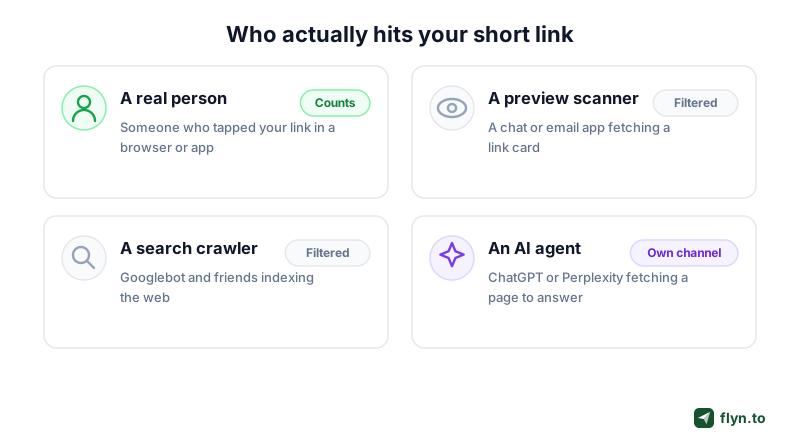
Before you can act on the split, it helps to know exactly who sits behind each bucket. These are not abstract categories, they are specific, identifiable kinds of request that hit your short link every day.
 Tap to enlarge
Real people, the number that matters
A real person is someone who tapped your link in a browser or an app and was sent to your destination. This is the number every other metric should be measured against. When we talk about a verified human click, we mean a request whose signals look like a genuine visitor rather than a known automated agent. It is the figure worth putting in a report, because it is the closest honest proxy for "someone actually saw this".
Bots, scanners, and link previews
This bucket is broad and mostly harmless, but it is not your audience. It includes link-preview fetchers (the bot that builds the thumbnail card in iMessage, Slack, WhatsApp, or Telegram), email security scanners that pre-open every link in an inbox, and search and social crawlers indexing the web. A few are malicious, most are routine plumbing, but all of them inflate a raw count. Our guide on click fraud prevention digs into the nastier end of this spectrum.
AI assistants, the new arrival
The newest kind of visitor is an AI agent: ChatGPT, Perplexity, Claude, Gemini, or Copilot fetching your page so it can cite or summarize it in an answer. Sometimes that is the AI browsing on a person's behalf in real time, sometimes it is the assistant collecting a source. Either way it is not a normal human visit and not quite a junk bot, so Flyn breaks it out as its own channel rather than lumping it in with either. That distinction is the whole reason "which clicks came from ChatGPT" is now a question you can answer.
| Visitor | What it is | How Flyn counts it |
|---|---|---|
| Real person | A human who tapped the link | Counts as a human click |
| Bot or scanner | Preview fetcher, security scanner, crawler | Filtered out of the human total |
| AI assistant | ChatGPT, Perplexity, Claude, Gemini, Copilot | Shown as its own referrer channel |
How Flyn Screens Every Click (and What It Cannot Promise)
Here is where honesty matters more than marketing. It is tempting to say a filtered number is "100 percent human" or "guaranteed real". It is not, and any tool that claims otherwise is overselling. What Flyn actually does is more modest and more defensible.
What the filter looks at
On every request, Flyn inspects the request signals, mainly the User-Agent string plus related headers, and matches them against a maintained list of known bots, crawlers, preview scanners, and AI agents. A request that identifies itself as Googlebot, or as a known preview fetcher, or as an AI crawler, is classified accordingly and kept out of the human total. Everything that does not match a known automated signature is counted as a human click. This runs inside the redirect, in a few milliseconds, on every link.
The honest limit: this is not identity verification
User-agent screening removes automated traffic at scale, and it is remarkably effective because the vast majority of bots identify themselves plainly. But it is not identity verification of any single visitor. A determined bot can spoof a browser user agent, and a privacy tool can strip headers from a genuine person. So the right way to read the human number is "clicks that were not identifiably automated", not "provably individual humans". That is a strong, useful signal for cleaning up your analytics. It is not a lie detector, and we will not pretend it is.
Do not treat the human click count as proof that a specific person visited, or use it where you need real identity (fraud disputes, legal evidence, per-person entitlement). It is a traffic-quality signal that screens out known automation, not a verified identity for each visitor. For anything that hinges on a real individual, use a method built for identity.
Reading Your Traffic Quality Split
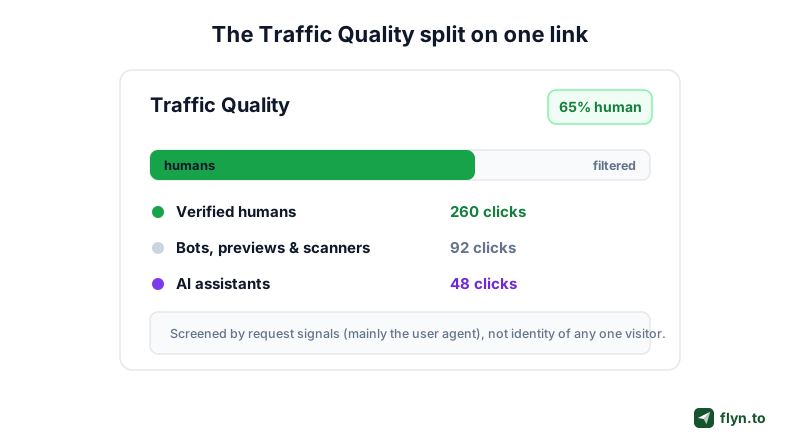
Flyn shows the split as a Traffic Quality view on your link. At a glance you see what share of the traffic was human, how much was filtered as automated, and how much came from AI assistants, instead of a single count you have to take on faith. For what a normal share looks like, we published the measured baseline across our own links.
 Tap to enlarge
The bot-excluded human total is free
The single most useful number, the human click total with bots removed, is free on every link, on every plan. You do not have to pay to stop counting robots. If all you want is a click count you can trust, our link click counter and the standard click analytics already give you the filtered figure rather than the inflated raw one.
The split is free too, the sources are Pro
The breakdown itself costs nothing. The exact human-versus-bot split, the bot-filtered analytics engine behind it, and the verified human clicks view are all on every plan, free included. What Pro adds is where that traffic came from: the AI Assistants channel and the geo, device, and referrer breakdowns. The rule of thumb: how many of your clicks were real is free, where the real ones came from is Pro.
| What you see | Free | Pro |
|---|---|---|
| Human click total (bots excluded) | Yes | Yes |
| Human vs bot split detail | Yes | Yes |
| AI Assistants referrer channel | No | Yes |
| Geo, device, and referrer breakdowns | No | Yes |
The AI Assistants Channel: Clicks From ChatGPT and Friends
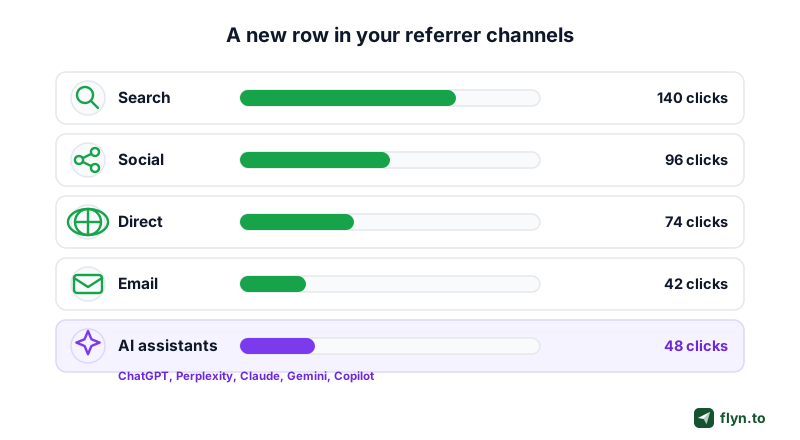
The part everyone wants to see: clicks that came from an AI tool. When someone asks ChatGPT or Perplexity a question and the assistant cites a page you shared, the request to your link carries signals that identify it as AI traffic. Flyn groups those into a single AI Assistants channel, sitting right alongside Search, Social, Direct, and Email.
 Tap to enlarge
Why AI referrals show up now
Two years ago this channel would have been a rounding error. Now a real share of research, shopping, and how-to queries start inside an assistant instead of a search box, and when the assistant hands back a link, the click lands on you. Before Flyn broke this out, those hits mostly disappeared into Direct traffic (the "we have no idea where this came from" bucket), which is exactly where useful signal goes to die.
Concretely: someone asks an assistant for the best tool for a job, or how to do something, and it hands back your page as part of the answer. That tap is an AI referral. It used to arrive with no fingerprint, indistinguishable from a pasted URL or an old bookmark. Now it has a name, a count, and a trend line you can actually manage.
What an AI-assistant click means, and does not
An AI-assistant click tells you your content or product is being surfaced inside AI answers, which is worth knowing and increasingly worth optimizing for. What it does not tell you is that a human definitely followed through: sometimes the agent is fetching your page to read it, not because a person clicked. Read the channel as a demand signal ("AI is putting me in front of people"), not a guaranteed visit, and watch its trend the way you would any referrer. If a particular guide or product page pulls steady AI traffic, that is a strong hint about what assistants consider a good answer, and a nudge to make more of it. Traffic is only half the relationship, too: the same assistants can create and re-point your links directly, which is what MCP for URL shorteners covers.
How to See Which Clicks on Your Links Came From ChatGPT, Perplexity or Other AI Assistants
There are two places to look, and they answer slightly different questions. Start with the link itself, because it is the one place that sees every click, then check Google Analytics 4 for the visits that land on a site you run.
On the link: Flyn's AI Assistants channel
Every time someone taps a Flyn short link, the redirect records the page they came from (the referrer) before sending them on. On Pro, open Analytics, pick all links or a single link, and look at Traffic Sources: clicks referred by ChatGPT, Perplexity, Claude, Gemini, Copilot, Grok, Meta AI, DeepSeek and other assistants (15 assistant domains in all) are filed under AI Assistants, next to Search, Social, Email and Direct. There is no tag to install and nothing to configure. The human-versus-bot split is free on every plan, so even without Pro you know how many of those clicks were real people; see verified human clicks.
One honest limit applies to every tool, Flyn included: the channel can only read a referrer the assistant actually sent. If an app opens your link without one, or a privacy setting strips it, the click lands in Direct, and no tool can recover where it came from after the fact. The reliable method is one short link per placement or per assistant, so the click count on that link names the source even when the referrer is missing.
On your site: Google Analytics 4
If the click ends on a site where you have GA4 installed, you can see the same traffic as sessions:
- In GA4, open Reports, then Acquisition, then Traffic acquisition.
- Keep the default primary dimension, Session default channel group. GA4 files visits from the assistants on its own list, such as ChatGPT, Gemini, DeepSeek, Copilot and Grok, into an AI Assistant row. Google's own AI Overviews and AI Mode are not part of it.
- To split that row by assistant, or to catch assistants GA4's list does not classify, change the primary dimension (the dropdown above the first column of the table) to Session source / medium, or to Session source for a shorter list.
- Click Add filter under the report title, choose Session source, set the match type to matches regex (or partially matches regex if it is offered, which also catches subdomains), and paste
chatgpt\.com|chat\.openai\.com|perplexity\.ai|claude\.ai|gemini\.google\.com|copilot\.microsoft\.com. - Apply the filter and pick a date range. Each assistant now shows as its own source row, with sessions, engagement and key events beside it. Add more domains to the pattern, separated by
|, as new assistants start sending you visits.
Why check both: GA4 counts sessions on your own site, and only when its tag loads. The short link counts every click at the redirect, including clicks that go to a marketplace, an app store, or any page where your analytics tag never runs. Use the link to see which placements AI assistants send people to, and GA4 to see what those people did once they arrived.
Why Raw Counts Lie, and What It Costs You
This is not a cosmetic cleanup. A count that is a third robots does real damage to the decisions you make on top of it, and the damage compounds quietly because the number still looks plausible.
 Tap to enlarge
Inflated numbers waste budget
If you judge a paid campaign by raw clicks, bots quietly pad your winners and your losers alike, and you scale spend toward whatever attracted the most automated noise. Strip the bots and the real cost per human click can look very different, sometimes dramatically so. The same applies to affiliate and creator deals priced on clicks: our affiliate link tracking guide and the Instagram ad tracking walkthrough both lean on the filtered number for exactly this reason.
They hide your real winners
Bots do not spread evenly. A link that got shared into a few big group chats can rack up hundreds of preview fetches, making a mediocre post look like a hit while a genuinely strong one that happened to dodge the scanners looks weak. Compare on real human clicks and the leaderboard reorders, often surprisingly.
A raw click count is not wrong so much as unreadable. Until you separate people from bots from AI, you are averaging three different stories into one number and calling it a result.
The inflated number does not stay in your dashboard, either. It goes in the report to your boss, the case study on your site, the screenshot in your pitch. Every place the raw figure travels, it carries the same fiction. Fixing it at the source, on the link, is the only way to keep the honest number honest all the way downstream.
What To Do About Your AI and Bot Traffic
Seeing the split is step one. Acting on it is where the value is. Here is what to do with each part once you can finally see it.
If AI assistants are sending you clicks
Lean in. A steady AI Assistants channel means your pages are being cited in answers, so make those pages easy to quote: clear headings, direct answers near the top, and facts an assistant can lift cleanly. Point your best "start here" content at a single tracked short link so you can watch the AI channel grow over time. This is the new, quieter cousin of SEO, and it rewards the same clarity.
If bots dominate a link
First, do not panic: most bot traffic is harmless preview and crawler activity, and the human total already excludes it. But if one link is drowning in automated hits, check where you shared it (mass email and big public channels attract the most scanners) and lean on the filtered number rather than the raw one for every decision. If you suspect genuinely abusive traffic, our click fraud prevention guide covers the next steps.
Pair the split with per-link tracking
The split gets sharper when each channel has its own link. Give every campaign, placement, or partner a distinct short link and add UTM parameters, and you can read Traffic Quality per source instead of in aggregate. Then you know not just that a link was 65 percent human, but which post, email, or Instagram placement brought the real people. Read side by side, a source that is 80 percent human beats one that is 55 percent human even at the same raw total, and the per-source view is the only place that gap shows up.
When you compare two channels or two creatives, always compare their human clicks, never the raw totals. A source with fewer raw clicks but a higher human share is often the better performer once the bots are stripped out. The raw number flatters the noisy channel.
Where This Fits: Clicks First, Conversions If You Want Them
One last piece of honesty, because it decides how to read these numbers. The three buckets here, human, bot, and AI, are click measurements: they tell you how many real people opened your link. What happened after the click is a separate question, and Flyn now answers that one too.
Clicks are the foundation, conversions are optional
If you need to tie a click to a purchase, a signup, or a dollar amount, enable conversion tracking (a Pro feature) on the link and add a small tag to your own site: each goal then reports back against the exact link that sent the visitor, counted against these same verified human clicks. Without it, Flyn stops at the click and does that part honestly. Either way, knowing which number you are looking at keeps your reports honest.
How to turn it on
There is nothing to configure. Shorten a link, share it, and open its stats: the human total is already bot-filtered, for free. Traffic Quality is not a separate product, it is a layer on every link you already make. A branded link on your own custom domain (a Pro feature), a cloaked affiliate link, a smart link with routing: each one gets the same human, bot, and AI split. Upgrade to Pro for the full breakdown, the AI Assistants channel, and the geo, device, and referrer detail, then create a free account and check the real number behind your next link. From there, tracking which posts drive sales takes the same honest click number and joins it to revenue.
Which Link Shorteners Actually Show You AI Traffic
Every shortener worth using filters bots. Almost none of them tell you what they filtered, and as of August 2026 only one competitor reports AI-assistant traffic at all, and it does so in a form most people will never find. We checked eight tools against their own public documentation, not against third-party reviews, and linked the source for every claim below.
The short version
Bots get removed almost everywhere. The differences that matter are whether you can see the number that was removed, and whether a visit referred by ChatGPT or Perplexity is treated as a category at all.
| Tool | Filters bots? | Shows you the bot count? | AI assistants as a channel? |
|---|---|---|---|
| Flyn | Yes, excluded from the count | Yes, shown beside the human total | Yes, a named channel |
| Bitly | Yes, excluded | No, removed silently | Not in the dashboard. A 90-day total via API |
| Linkly | Yes, excluded by default | Yes, filtered count shown | Not documented |
| TinyURL | Separates bot from human | Yes, both labelled | Not documented |
| Rebrandly | Yes, excluded | Not documented | Not documented |
| Short.io | Yes, excluded | Not documented | Not documented |
| Cuttly | Yes, excluded | Not documented | Not documented |
| T.LY | Crawlers excluded | Not documented | Not documented |
| Dub | Not documented | Not documented | Not documented |
"Not documented" means exactly that: the vendor does not describe the behaviour on its own pages. It is not a claim that the feature is missing.
Bitly deletes the answer to this question
This is the one worth reading twice, because Bitly is the best-known shortener and its behaviour here is the opposite of what you would guess. Bitly calls AI-assistant visits agentic traffic and defines it as "when an AI tool like Claude, ChatGPT, or Gemini visits a link while helping someone answer a question." Its help centre then asks whether that traffic is counted, and answers plainly:
"No. Bitly currently filters agentic traffic out of your click data, the same way we filter crawlers. The numbers on your Links page and your Analytics dashboards reflect visits from people."
Bitly help centre, What is agentic traffic?, updated 28 August 2026
That is a defensible engineering decision. An AI assistant fetching your page is not a customer, and counting it as one inflates your numbers. But it means the number is gone from the place you actually work. It is not gone entirely: Bitly added an agentic_traffic dataset to its API in August 2026, which its own tools reference describes as counting "clicks from AI agents and assistants" and which "always returns a fixed 90-day total". So you can retrieve one rolled-up number for a whole group, through the API or its MCP server, if you know it exists. What you cannot do is see it per link, watch it move over time, or find it anywhere in the dashboard.
Note the distinction Bitly draws, because it is easy to misread its marketing: Bitly ships plenty of AI integrations, including a GPT, a Claude connector and an MCP server. Those let an AI assistant create links. None of them let you measure clicks that arrived from one.
Where Flyn is genuinely different, and where it is not
Being straight about this matters more than winning the table. On showing the bot number, Flyn shows the filtered count beside the human total, but it is not unique. Linkly excludes bots by default and shows the filtered count alongside, and TinyURL separates bot from human clicks and labels both. Flyn also files AI-assistant traffic into its own channel, which neither of them documents.
On AI-assistant traffic as its own channel, Flyn identifies visits referred by ChatGPT, Perplexity, Claude, Copilot and Gemini and reports them as a named channel, next to a verified-human total and the count of what was filtered. That is the number this whole article exists to explain, and it is the one most shorteners either never collect or keep well out of sight. Bitly is the only other tool we found that measures it at all, and only as that single 90-day group total behind the API.
Before you switch anything, open your current tool and try to answer two questions: how many bot clicks did it remove last month, and how many visits came from an AI assistant? If you cannot answer either from the dashboard, you are making decisions on a number nobody has shown you the workings for.
Pricing and features on all of these move. Everything above was read from each vendor's own documentation in August 2026, with the source linked. Check the current page before you make a purchase decision on it, and tell us if you find something out of date.
Frequently Asked Questions
Which of my clicks came from ChatGPT?
How does Flyn know a click is a bot?
Is the human click count guaranteed to be real people?
Is the bot-filtered click count free?
What counts as an AI-assistant click versus a bot?
Why is my raw click count higher than my human count?
Does Flyn track conversions or just clicks?
Free tools for this
Three Flyn tools that pair well with the strategy in this article, all free, no signup needed.
UTM Builder
Build campaign-tracked URLs in seconds.
Broken Link Checker
Scan any page for dead links and 404s.
Open Graph Checker
Preview how URLs unfurl on social.
Keep reading
Three related deep-dives from the Flyn blog.

How to Track Which Posts Drive Sales, Not Just Clicks
19 min read

Email Newsletter Click Tracking: Measure Your Real CTR
12 min read

How to Choose a Branded Short Domain for Your Links
13 min read
Ready to try Flyn?
Free plan includes 25 links/month, full analytics, and access to all 30+ free tools above. No credit card required.
Already a member? Log in
Karan Bhakuni is the founder of Flyn. He writes about branded links, click analytics, and the link-management tooling growth teams and creators actually need, drawn from building Flyn and reading a lot of user feedback.
Find these guides useful? Add Flyn as a preferred source so more of them show up in your Google results.