MCP for URL Shorteners: Let Your AI Agent Ship Links
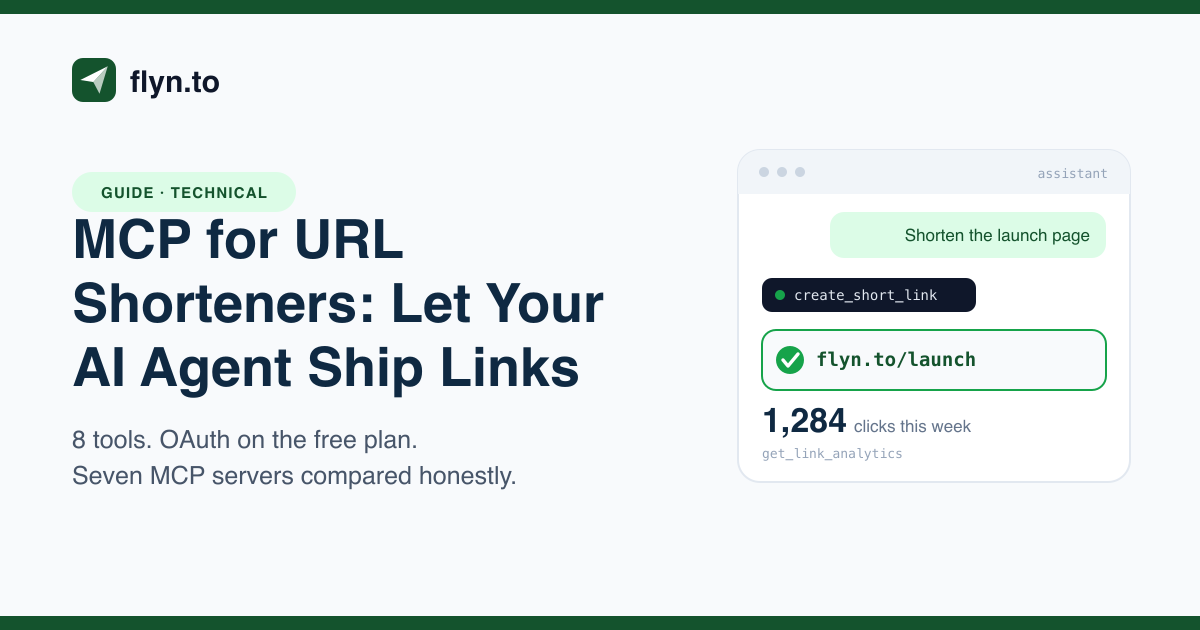
Your assistant can write the campaign, name the slug and describe the QR code, then it hands you a to-do list. An MCP server closes that gap. Here is how the shortener side of MCP works, what seven vendors actually ship, and how to connect Flyn to Claude Code in two minutes.

The Agent Writes the Campaign, Then Stops at the Link
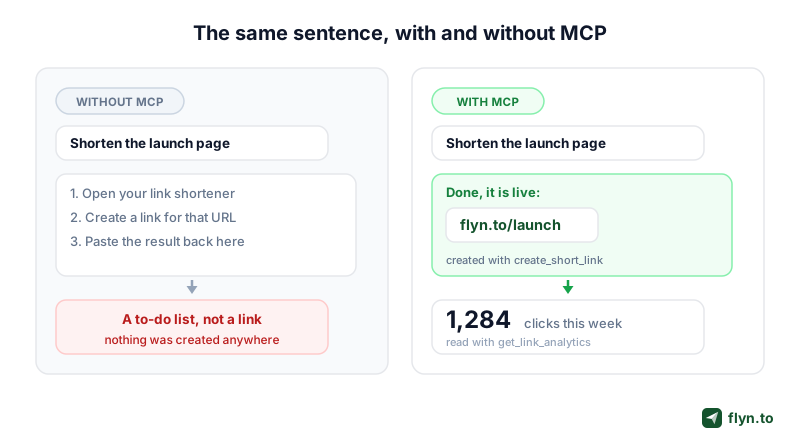
You ask your assistant to plan a product launch. It writes the announcement, drafts three social variants, suggests UTM tags, proposes a slug, and then it stops and tells you to go make the short link yourself. Every time. The one part of the job that is a single API call is the part that falls back on you, because your assistant has no hands.
That gap is what MCP closes. The Model Context Protocol is an open standard for connecting AI assistants to external systems, and it is why a chat window can now create a real short link, re-point a live one, and read back the click count without you opening a dashboard tab. If you have heard the acronym and never wired one up, this is the practical version: what travels over the wire, what the shortener vendors have actually shipped, and how to connect one in under two minutes.
Why a shortener is the awkward gap in agent workflows
Link creation is small, frequent and stateful. Small enough that nobody builds a custom integration for it, frequent enough that doing it by hand a dozen times a day is genuinely annoying, and stateful enough that the agent cannot fake it. A model can hallucinate a plausible-looking flyn.to/spring, but the link will not resolve unless something wrote it to a database. That is the difference between an assistant that drafts and an assistant that ships.
 Tap to enlarge
What an MCP Server Actually Does for a URL Shortener
 Tap to enlarge
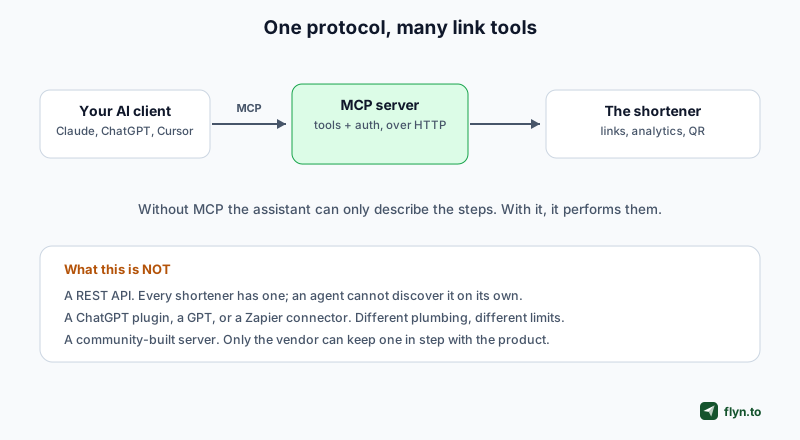
Strip away the marketing and MCP is a small, boring protocol, which is why it works. A client (Claude Code, Claude Desktop, Cursor, Windsurf, ChatGPT in developer mode, Perplexity) talks to a server that publishes a list of callable tools. The model reads the tool descriptions, decides which fits your sentence, fills in the arguments, and the client executes the call.
What actually travels over the wire
Flyn's server is a single HTTPS endpoint at https://www.flyn.to/mcp speaking JSON-RPC 2.0 over streamable HTTP. It is stateless: every tool call is a bounded request and response, so there is no long-lived session to keep alive and nothing to reconnect after your laptop sleeps. The handshake is three messages: initialize returns the protocol version and server info, tools/list returns the catalogue, and tools/call carries a tool name plus arguments and returns a result.
Tools, not endpoints
The design difference from a REST API is that a tool is written to be read by a model, not a developer. An MCP tool ships its own description, its own JSON Schema for arguments, and, if the vendor bothered, its own behavioural hints. That description is the whole interface. If it says "use this to re-point an existing short link without changing the printed URL", the model reaches for it at the right moment. If it says "updates a link", the model guesses.
Flyn's server also ships server instructions, a short paragraph the client feeds the model up front, spelling out the plan rules: click totals on every plan, breakdowns on Pro, 25 links a month on free. The assistant knows the limits before it tries something that will fail, which is a nicer failure mode than a 403 mid-sentence.
Remote servers versus local ones
Two shapes exist and the difference is setup pain. A local (stdio) server runs on your machine, usually launched with npx, holding credentials in a config file. A remote server is a URL your client connects to over HTTPS: nothing to install, nothing to update, and it can offer a browser sign-in instead of a pasted secret. Flyn, Bitly, Linkly and UseClick are remote. Go2 offers both. Short.io's documented setup bridges to a remote endpoint through the local mcp-remote helper.
MCP does not replace the REST API, it sits alongside it. Flyn's MCP tools call the same engine as the endpoints in the shorten docs and the links docs, with identical permissions and rate limits. Building a service rather than driving an assistant? The API is still the right surface, and our link shortener API guide covers it end to end.
Flyn's Eight Tools, and What Each One Is For
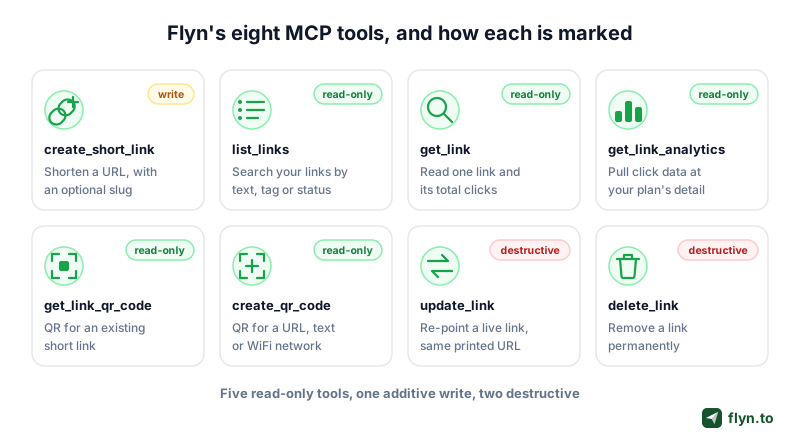
Eight tools is a deliberate number. Each maps to a job somebody actually asks for in a sentence, and none exist to pad a count.
create_short_link, shorten a URL, optionally with a custom slug and an expiry.list_links, search your links by text, tag or status.get_link, fetch one link with its destination, settings and total clicks.update_link, re-point a live link without changing the printed URL.delete_link, permanently remove a link.get_link_analytics, pull click events with whatever breakdown detail your plan allows.get_link_qr_code, render a QR for an existing short link, so the code survives a destination change.create_qr_code, make a static code for a URL, plain text or a contact card. WiFi codes carry the network password, so they are made in the dashboard QR builder instead and no Flyn tool takes the password.
The one that earns its place
update_link is the tool that changes how you work. Because it re-points a live link without changing the printed URL, a printed menu, a pressed vinyl sleeve or a scheduled newsletter can be corrected after it ships. We covered the pattern in updating links without changing the URL, and it is the reason to prefer get_link_qr_code over create_qr_code whenever the payload is a link: the dynamic version stays editable and every scan counts as a click. The static one does not, ever, which is why dynamic QR codes and the plain QR code generator are separate tools on the site.
 Tap to enlarge
Nine MCP Servers for Link Work, Compared Honestly
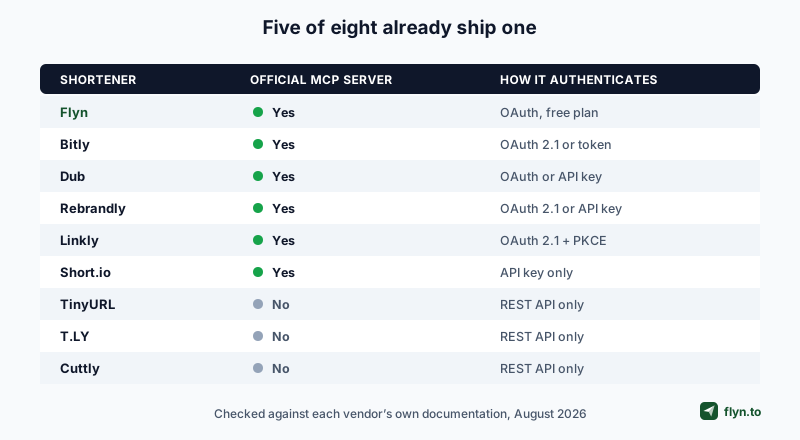
Flyn is not the only shortener with an MCP server, and not the biggest. Here is the landscape as documented by each vendor on its own live pages. Where a vendor does not state something, the table says so instead of guessing.
Worth saying plainly before the table: this is a crowded field, not an empty one. Of the eight major shorteners we re-checked in August 2026, five publish their own MCP server. The three that do not are TinyURL, T.LY and Cuttly, all of which offer a REST API and stop there.
 Tap to enlarge
| Server | How you authenticate | Tools (vendor stated) | Can it edit and delete links | MCP on the free plan |
|---|---|---|---|---|
| Flyn | OAuth 2.1 with PKCE, or a Bearer API key | 8 | Yes | Yes, via OAuth sign-in |
| Bitly | OAuth 2.1 recommended, API token as fallback | 27 | Yes | Not stated by Bitly |
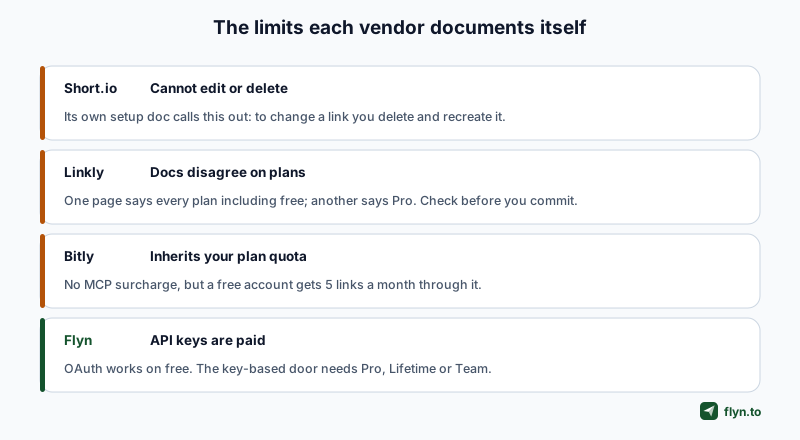
| Short.io | API key in an Authorization header | Not stated | No, their docs say editing and deleting is not possible | Not stated by Short.io |
| Rebrandly | OAuth 2.1, or an API key | 36 documented actions | Yes | Yes, free plan allows 10 links a month |
| Dub | OAuth, API key for headless clients | 32 links server, 25 partners server | Yes, plus bulk up to 100 | Yes, free plan allows 25 links a month |
| Linkly | OAuth 2.1 with PKCE only, API key path deprecated | 25, verified live | Yes | Their own pages disagree, one says every plan, another says Pro |
| Go2 | API key | 16 | Yes (update and revoke) | Yes, listed on their free plan |
| UseClick | API key as a Bearer token | 9 | Yes | Yes, their docs say MCP is on every plan including Free, with analytics queries rate limited |
| Zapier | Client-specific OAuth URL, Bearer token, or API key | 14 meta-tools | Via the app it brokers | Yes on their free tier, though calls consume Zapier tasks |
 Tap to enlarge
Where Flyn is genuinely ahead
Two things, and neither is a tool count.
First, the free OAuth door. There is no plan check on Flyn's OAuth path: add the URL, a browser window opens, you sign in with the account you already have, and the assistant is connected on a free plan. Of the shorteners, only Go2 and UseClick clearly document free-plan MCP access, and both get you there by issuing an API key you paste into a file. Zapier's free tier technically includes MCP, but every tool call bills 2 tasks against a shared 100-task monthly allowance, roughly 50 calls, and an agent's exploratory calls burn the same budget as real work.
Second, annotations on every tool, the part of the spec most vendors skip and the part that decides whether an agent asks before it deletes something.
Where Flyn is genuinely behind
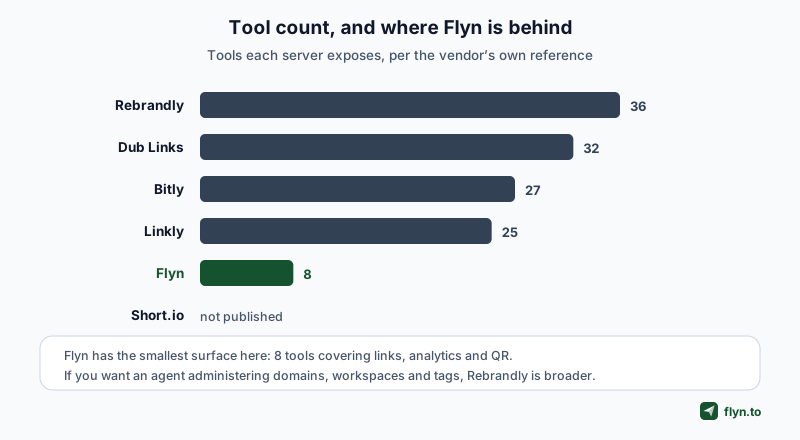
Being fair here is more useful than a scorecard. Bitly's MCP server is the deepest in the category. Their marketplace page states 27 tools, and the surface goes well past links into groups, organisations, custom domains, bulk CSV upload and data export. If you run link operations across many teams, that organisational tooling is real and Flyn does not match it. Bitly also documents OAuth 2.1 as its recommended path, so OAuth is not a Flyn differentiator against them.
Go2 has a capability Flyn simply does not have. Every link their MCP server mints is stamped with four fields, agent_id, agent_run_id, actor_id and tool_call_id, and every click writes them back, so a click traces to the exact agent run and tool call that created the link. If your question is "which of my agent's runs produced revenue", that is a genuine gap. Their free plan is $0 and lists the MCP server alongside 100 tracked links a month.
Linkly documents 20 tools, including domain management and webhook subscription tools Flyn's MCP surface does not expose (Flyn has webhooks and custom domains, they are just not MCP tools yet). UseClick spans two products in one server, link management plus cookie-free website analytics, so an agent can ask about the link and the site traffic behind it in one session. And Short.io's analytics depth over MCP is strong, covering geography, devices, browsers, referrers, UTM campaigns and time series.
Tool count is the vanity metric of the MCP era. What matters is whether the agent can tell a read from a write, and whether connecting cost you a secret in a plaintext file.
The Free Plan Is the Real Ceiling, Not the Protocol
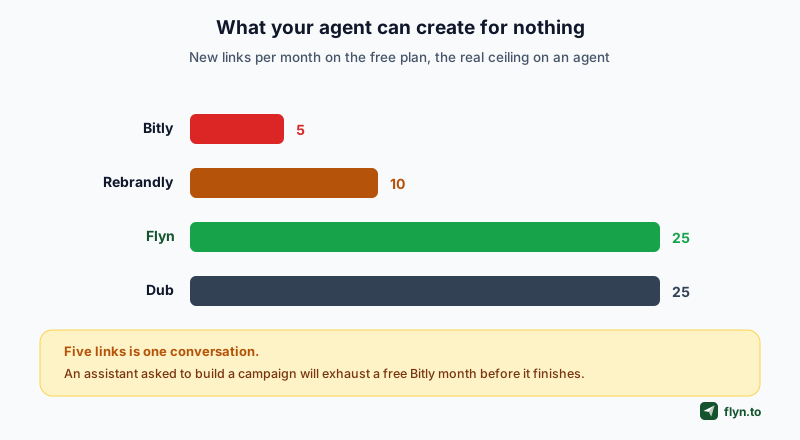
Every vendor here gives the MCP server away. Bitly's FAQ says "no additional subscription is required", and its blog notes the server "uses your existing permissions and plan limits". That reads as generous until you check what those limits are, because the quota is what actually stops an agent.
 Tap to enlarge
Five links is one conversation
Bitly Free is 5 links a month, with 2 QR codes and 1,000 API requests. Ask an assistant to build out a campaign and it will hit that ceiling before it finishes the job. Core at $10/month raises it to 100 links, and branded links start on Growth at $29/month. The protocol is free; using it for anything real is not.
Rebrandly has the widest tools and the tightest free plan
Rebrandly's free tier is 10 links a month with unlimited clicks, an odd shape for agent work: your assistant can read performance all day and barely create anything. Paid starts at $11/month for 250 links. Given it also has the broadest tool surface here, at 36 documented actions, Rebrandly is the clearest "budget for paid from day one" option.
| Server | Free links / month | Free-plan extras | First paid tier |
|---|---|---|---|
| Flyn | 25 | Analytics, QR codes, MCP over OAuth | Pro, $12/mo or $9 billed annually |
| Bitly | 5 | 2 QR codes, 1,000 API requests | Core, $10/mo for 100 links |
| Rebrandly | 10 | Unlimited clicks, 1 custom domain | Essentials, $11/mo for 250 links |
| Dub | 25 | 3 custom domains, 1K tracked events | Paid tiers above free |
The protocol is free everywhere. What you are really choosing is how many links your agent may create before someone has to reach for a card.
Before wiring an assistant to any of these, do the arithmetic on one real task. Count the links a single campaign needs, multiply by how often you run one, and check that against the free cap. That number decides the tool far more often than the tool list does.
Two clients add their own plan requirements on top of whatever the shortener charges. Bitly notes that MCP support in ChatGPT needs a Plus, Team, Enterprise or Edu plan, and that OAuth in Claude web needs workspace admin enablement on Team and Enterprise. A free shortener does not make the connection free.
What Bitly Changed in August 2026
One update deserves its own note, because it reverses a claim this article previously implied and that most comparisons still get wrong.
 Tap to enlarge
Bitly now reports AI-agent traffic, through the API
Bitly added an agentic_traffic dataset to its group analytics tool. Its own tools reference describes it as counting "clicks from AI agents and assistants", and says it "always returns a fixed 90-day total". So the number exists: group-level, one rolled-up figure, reachable through the API or the MCP server, and absent from the dashboard.
This sits alongside Bitly's separate statement that it filters agentic traffic out of the click data on your Links page and Analytics dashboards. Both are true at once, which is why loose phrasing like "Bitly throws the data away" is wrong. What you cannot do is see it per link, watch it move over time, or find it in the product. We cover how to read that split in which clicks came from ChatGPT.
Where that leaves the comparison
Flyn's advantage is the ungated OAuth door and per-link AI-channel reporting, not breadth: its eight tools are the smallest surface here. Bitly's is still the most mature server in the category, and its organisational tooling for groups, domains and bulk upload is real.
Worked Example: Connecting Flyn to Claude Code
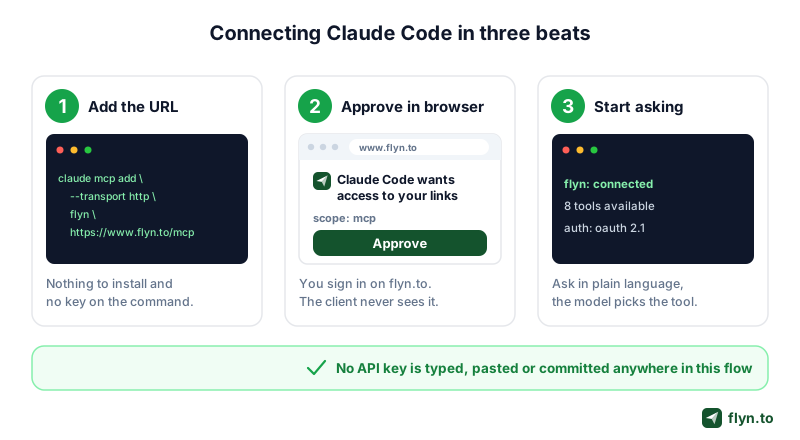
This is the whole setup. No package to install, nothing to keep updated.
One command, no key
In your terminal, add the server by URL:
claude mcp add --transport http flyn https://www.flyn.to/mcp
With no Authorization header supplied, the server answers the first request with a 401 carrying an RFC 9728 WWW-Authenticate header pointing at its protected-resource document. Your client reads that, discovers the authorisation server metadata at /.well-known/oauth-authorization-server, registers itself dynamically, and opens a browser window. You sign in, approve access, and the client stores a token. No key was ever typed, pasted or committed.
If you would rather use an API key (which needs Pro, Lifetime or Team), the header form is on the connector page:
claude mcp add --transport http flyn https://www.flyn.to/mcp --header "Authorization: Bearer flyn_sk_live_YOUR_KEY"
 Tap to enlarge
What you can then ask, in plain language
Once connected, the tool descriptions do the routing. You do not name tools, you describe outcomes:
- "Shorten this launch page and give me a slug I can say out loud in a video."
- "How many clicks did the launch link get this week, and where from?"
- "Re-point flyn.to/menu to the new autumn menu page."
- "List my links tagged pinterest, sorted by clicks."
- "Give me a printable QR for the menu link, and tell me the current scan count."
- "Make a plain-text QR with our opening hours for the shop door."
The last two are worth separating in your head. A QR "for the menu link" routes to get_link_qr_code, which encodes the short link, stays re-pointable, and counts every scan as a click in click analytics. A QR "with our opening hours" routes to create_qr_code, which is static and permanent by nature. The tool descriptions carry that distinction so the model does not have to infer it.
Put a naming convention in your project instructions, something like "all campaign slugs use the pattern launch-YYYYMM". The model follows it on every create_short_link call, and you get a greppable link list instead of eight variations on "spring-sale-final-2". Pair it with tags and list_links becomes a usable report.
Which Assistants Can Connect, Including the Chinese Ones
The walkthrough above uses Claude Code because it is the shortest path, but the question underneath it is usually "will this work in the assistant I already use?" Answering that needs one distinction that gets lost constantly: a model that can call tools is not the same thing as a client that speaks MCP. Tool calling is a model capability. MCP is a transport the application around the model has to implement. A model scoring well on function-calling benchmarks tells you nothing about whether the app on your desk can reach https://www.flyn.to/mcp.
A second distinction matters just as much. Flyn's server is remote, over streamable HTTP with OAuth. Many clients support MCP only as local stdio subprocesses, which is a different code path entirely. A client needs remote transport support before a hosted server is reachable at all.
Here is where the major clients stand, each row taken from that vendor's own documentation rather than from a directory listing:
| Client | Maker | Remote MCP over HTTP | How you connect Flyn |
|---|---|---|---|
| Claude Code, Claude Desktop | Anthropic | Yes | OAuth browser sign-in |
| ChatGPT, developer mode and connectors | OpenAI | Yes | Remote connector, OAuth |
| VS Code with GitHub Copilot | Microsoft | Yes | Server entry, OAuth |
| Cursor | Anysphere | Yes | Server entry, OAuth |
| Windsurf | Cognition | Yes, via serverUrl | OAuth, supported on all three transports |
| Gemini CLI | Yes | OAuth, configuration discovered automatically | |
| Qwen Code | Alibaba | Yes, httpUrl selects streamable HTTP | Server entry with an auth header |
| Kimi CLI | Moonshot AI | Yes | kimi mcp, browser OAuth, token cached |
| DeepSeek Harness | DeepSeek | Yes, streamable HTTP for remote | First-party MCP client plugin |
| ZCode | Z.ai, the GLM lab | Yes, stdio, HTTP and SSE | Server entry |
| Trae | ByteDance | Yes | Server entry |
Checked against each vendor's own documentation in August 2026. Client support in this space moves fast, so treat the table as a starting point rather than a guarantee, and check your client's current docs before you file a bug against ours.
The Chinese Side Is the Coding Agents, Not the Chat Apps
This part is worth saying plainly, because most English-language MCP writing skips it. The Chinese labs did not put MCP into their consumer chat products. There is no connector menu in the Doubao app or on the DeepSeek web chat the way there is in ChatGPT. What those labs shipped instead is MCP inside their terminal coding agents, and they shipped it fast.
Qwen Code picks its transport from the config key, where httpUrl routes to streamable HTTP, which is exactly the transport Flyn serves. Kimi CLI goes further than several Western clients and has a dedicated command for authorising an OAuth server, opening a browser and caching the token afterwards, the same flow Claude Code uses. DeepSeek Harness ships its own MCP client plugin and mounts one server per instance, stdio for local servers and streamable HTTP for remote ones. Z.ai's ZCode covers all three transports.
The practical upshot: if you work in Chinese-model tooling, link automation is available to you today, but through the CLI rather than through the chat app. The configuration is the same shape as the Claude Code walkthrough above, pointed at the same https://www.flyn.to/mcp endpoint, and the authentication docs apply unchanged. Flyn does not gate the MCP server by client, by region, or by plan, so an account on the free plan reaches the same eight tools from Kimi CLI as it does from Claude Desktop. One practical note: not every client implements an OAuth flow, and some pass static headers only. Flyn accepts either, so where a client cannot do the browser sign-in you authenticate with a Bearer API key against the same endpoint instead.
Tool Annotations: The Part Most Vendors Skip
MCP lets a server attach behavioural hints to each tool. They are advisory, not enforcement, and that is the point: they exist so the client can decide when to ask you first. Flyn sets them on all eight tools. Here is the honest map.
| Tool | readOnlyHint | destructiveHint | What that tells a client |
|---|---|---|---|
list_links | true | false | Safe to run unattended, changes nothing |
get_link | true | false | Safe to run unattended |
get_link_analytics | true | false | Safe to run unattended |
get_link_qr_code | true | false | Renders from an existing link, creates nothing |
create_qr_code | true | false | Renders an image, stores no record |
create_short_link | false | false | A write, but additive, nothing existing is harmed |
update_link | false | true | Overwrites a live destination, worth confirming |
delete_link | false | true | Irreversible, definitely worth confirming |
Reading the two marked destructive
delete_link being destructive is obvious. update_link is the more interesting call, and it is deliberate. Re-pointing is not additive: the old destination is gone, and if that link is printed on a thousand table cards or sitting in a scheduled email, an agent that quietly changed it has done real damage. The flag lets a client surface "this will change where flyn.to/menu sends people, continue?" before the call fires.
Why an advisory hint still matters
Nothing forces a client to honour an annotation. But the alternative is worse: with no annotations at all, a client can only distinguish a read from a wipe by parsing the tool name, which is the kind of guessing that produces a bad afternoon. Publishing the hints costs the vendor nothing and gives every client a real signal.
Annotations are hints, not permissions. If you are handing an agent access to a production link estate, do not rely on the client asking nicely. Connect with an account whose reach you are comfortable with, and remember that delete_link is permanent. There is no trash can to restore from.
Why OAuth Beats Pasting an API Key Into a Config File
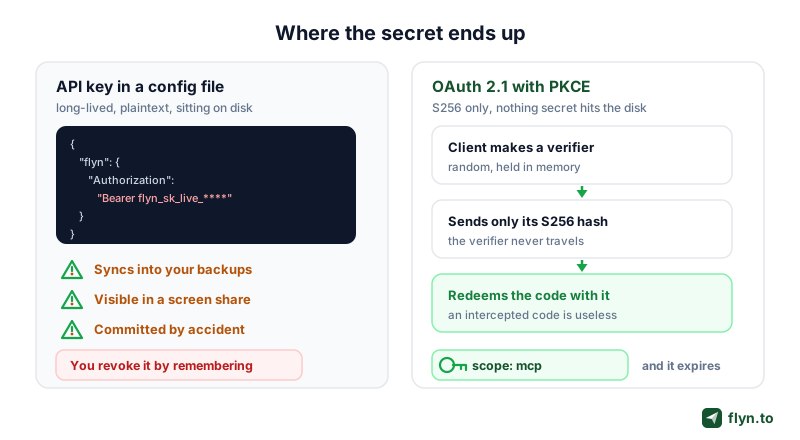
The security story of MCP is mostly a story about where secrets live. An API key in an MCP config is a long-lived credential sitting in plaintext on disk, in a file that is easy to sync, easy to screenshot during a screen share, and easy to commit by accident. It does not expire on its own and it carries the full reach of your account until you remember to revoke it.
What the OAuth flow does differently
Flyn implements OAuth 2.1 with PKCE, S256 only. In practice that means four things:
- You never handle the secret. You type your Flyn password into flyn.to, in a browser, on a page you can inspect. The client receives a token nobody had to tell it.
- The client proves it started the flow. PKCE has the client generate a random verifier, send only its SHA-256 hash up front, and present the original when redeeming the code. An attacker who intercepts the authorisation code cannot exchange it without the verifier. Flyn accepts
S256and nothing else, so the weaker plain method is off the table. - Registration is dynamic. The client registers itself at the registration endpoint: no per-client setup, no dashboard step, no client ID to copy around.
- Scope is narrow. The server supports a single
mcpscope, so a token minted for your assistant is an MCP token, not a general-purpose key to everything you own.
 Tap to enlarge
The API key route is still there, and still fine
None of this makes API keys bad. They are the right tool for a server-side script, a cron job or a CI pipeline where no human is present to click Approve, which is what the authentication docs cover. Paid plans can hold up to five keys at once, created and revoked from Settings. The point is narrower than "keys are insecure": for an interactive assistant on your own laptop, a browser sign-in is less to go wrong, and on Flyn it is also the door that does not need a paid plan.
Linkly reached the same conclusion from the other direction. Their hosted server uses OAuth 2.1 with PKCE and their own repo marks the older API-key, self-hosted path as no longer maintained. Two independent vendors landing on the same posture says something about where remote MCP auth is heading.
What an Agent Can and Cannot Do to Your Links
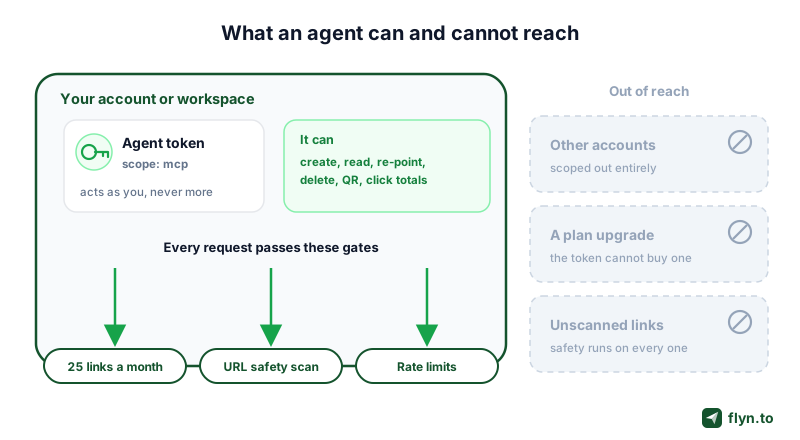
Connecting an assistant to your link estate is a real permission grant, so be precise about the blast radius.
It can
- Create links, up to your plan's monthly allowance. Free accounts get 25 links a month.
- List, search and read any link owned by your account or workspace.
- Re-point a live link, which is why that tool is flagged destructive.
- Delete a link permanently.
- Read click data. Totals on every plan, breakdowns by country, device and referrer on Pro.
- Render QR codes. Link and text codes on every plan; v-card, email, call and SMS codes, custom colours and SVG output on Pro.
It cannot
- Handle passwords. Link passwords and WiFi QR codes are set in the Flyn dashboard, and no Flyn tool accepts a password, so none has to pass through the chat.
- Reach anything outside your account or workspace. Every request is authenticated and scoped to the owning account, exactly like the REST API.
- Escape your plan. The token does not upgrade you. Ask for a referrer breakdown on a free plan and you get the totals your plan includes, not a partial answer dressed up as complete.
- Bypass safety scanning. Destinations created through MCP go through the same URL safety checks as anything created in the dashboard.
- Outrun the rate limits. The limits in the rate limits docs apply, so a looping agent gets throttled rather than amplified.
The one number worth watching
Agent traffic is now a measurable share of clicks and it does not behave like human traffic. Read which clicks came from ChatGPT next: the same analytics that tell you a campaign worked will start telling you which assistant sent the visitor. Flyn separates AI-assistant referrals from human clicks rather than lumping them into "direct", and how to track clicks on a link covers the reporting basics.
 Tap to enlarge
Registries, Directories, and What to Wire Next
Discovery is the unsolved half of MCP, and there are two different things people mean by "listed".
The official registry versus a client's directory
The official MCP registry is the vendor-neutral index of servers. Flyn is published there as to.flyn/mcp, pointing at the streamable-HTTP remote at https://www.flyn.to/mcp. Linkly is there too, as com.linklyhq/linkly. Go2 and UseClick are not, which matters if you build tooling that resolves servers by registry name rather than by hand-copied URL.
A client directory is different: one vendor's curated in-product list, like the connectors picker inside a chat app. Flyn is not in the Claude connectors directory yet, and we are not going to pretend otherwise. There you add Flyn as a custom connector with the URL instead. Claude Code, Claude Desktop custom connectors, Cursor, Windsurf, ChatGPT developer mode and Perplexity all work today.
What to wire next
If you have got this far, the useful next moves are small:
- Connect it. Start on the AI connector page, which has the exact command for each client. No account yet? Sign up free first, the OAuth flow needs one.
- Give the agent a slug convention and a couple of tags, so
list_linksreturns something readable. - Add webhooks if you automate downstream. MCP is pull, webhooks are push, most real workflows want both.
- Keep a non-agent path for bulk work. A hundred links belong in a CSV, not a chat window: bulk shortening from Google Sheets, or the create-many-links endpoint.
- Not ready for MCP? The same jobs run through Zapier, and the setup guide walks through it.
MCP is early enough that the comparison above will be stale within a year. What will not change is the shape of the problem: an assistant that can only describe the link you should make is doing half a job, and the fix is a protocol, not a plugin. Browse the rest of the free link tools to see what else is worth handing to an agent.
Frequently Asked Questions
Does Flyn's MCP server work with ChatGPT, Gemini and Copilot, or only with Claude?
Can I use Flyn with DeepSeek, Qwen, Kimi or GLM?
What is MCP, in plain English?
Do I need a paid Flyn plan to use the MCP server?
Which AI clients can connect to it today?
What does a destructive tool annotation actually do?
Is it safer to connect over OAuth than with an API key?
How does Flyn compare with the Bitly MCP server?
Can an agent delete my links by accident?
Does MCP replace the Flyn REST API?
Free tools for this
Three Flyn tools that pair well with the strategy in this article, all free, no signup needed.
UTM Builder
Build campaign-tracked URLs in seconds.
Broken Link Checker
Scan any page for dead links and 404s.
Open Graph Checker
Preview how URLs unfurl on social.
Keep reading
Three related deep-dives from the Flyn blog.
Postback URL Tracking: How S2S Conversion Tracking Works
17 min read
The Anatomy of a URL: Every Part Explained in Detail
15 min read

301 vs 302 Redirect: When to Use Each
14 min read
Ready to try Flyn?
Free plan includes 25 links/month, full analytics, and access to all 30+ free tools above. No credit card required.
Already a member? Log in
Karan Bhakuni is the founder of Flyn. He writes about branded links, click analytics, and the link-management tooling growth teams and creators actually need, drawn from building Flyn and reading a lot of user feedback.
Find these guides useful? Add Flyn as a preferred source so more of them show up in your Google results.