301 vs 302 Redirect: When to Use Each
A 301 tells browsers and Google a move is permanent; a 302 says it is temporary. Pick the wrong one and you can strand visitors on a cached redirect that is painful to undo.


What an HTTP Redirect Actually Is
The short answer: a 301 redirect tells browsers and search engines a page has moved permanently, so browsers cache the new address and Google transfers ranking signals to it. A 302 redirect says the move is temporary, so nothing is cached and the original URL stays indexed. Use a 301 for moves you will never undo, and a 302 for anything you might reverse.
| Situation | Code to use |
|---|---|
| Domain move or HTTPS migration | 301 |
| Renamed, merged, or retired page | 301 |
| A/B test or geo routing | 302 |
| Campaign page or maintenance window | 302 |
| Redirect that must keep a POST | 307 temporary, 308 permanent |
You move a page, ship a redirect, and everything looks fine. Six months later a form silently drops its submissions, rankings drift, and a URL you already fixed keeps sending visitors to the wrong place because their browsers memorized the old rule. Nearly every one of those failures traces back to one choice: 301 or 302. This guide gives SEOs, developers, and site owners a precise answer: what each status code tells browsers and search engines, where 303, 307, and 308 fit, and how to verify what your server actually sends with the free redirect checker.
The request and response flow
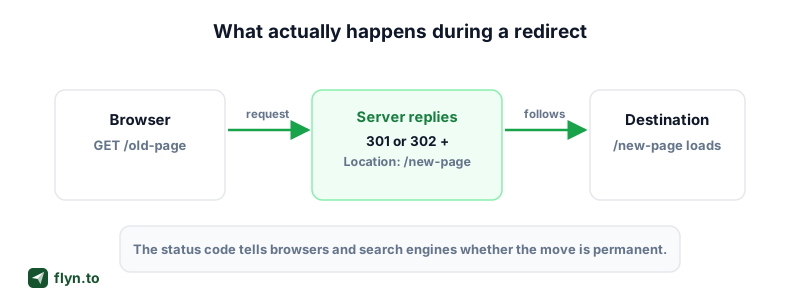
An HTTP redirect is an ordinary HTTP response that says "not here, go there," in four steps:
- Your browser requests
https://example.com/old-page. - The server answers with a 3xx status code and a Location header:
Location: /new-page. - The browser automatically fires a second request at the new URL.
- The server responds with the real content and a
200 OK.
 Tap to enlarge
Visitors land on the destination either way; they never see the difference. But three behaviors hinge entirely on the code you pick: caching (does the browser remember the redirect and skip your server next time), method preservation (does a POST stay a POST), and search signals (which URL Google treats as canonical).
301 vs 302: The Precise Difference
Both codes live in the 3xx block, both carry a Location header, and both move the visitor. The difference is a promise about the future.
301 Moved Permanently
A 301 Moved Permanently says the resource has a new home forever, and everything downstream may act on that permanence:
- Browsers can cache the redirect aggressively and stop asking your server about the old URL.
- Search engines transfer indexing signals to the destination and drop the old URL from results.
- Anything holding the old address (bookmarks, feeds, crawlers) is invited to update its records.
302 Found: the accidental default
A 302 Found (named Moved Temporarily in HTTP/1.0) says the resource is elsewhere right now, but the original URL remains the real address, so clients keep checking it on future visits and search engines keep it indexed.
The trap: 302 is the framework default almost everywhere. Express's res.redirect(), PHP's header('Location: ...'), and most CMS plugins emit a 302 unless you say otherwise, which is how thousands of permanent moves accidentally ship as temporary ones. The reverse mistake is worse: shipping a quick experiment as a 301 that browsers refuse to forget.
The one-line rule: a 301 is a promise, a 302 is a placeholder. Only promise what you will not take back.
303, 307, and 308: The Rest of the 3xx Family
Three more codes matter in practice, and all three exist to clean up one historical mess: method rewriting. Early browsers rewrote POST requests to GET when following a 301 or 302, the spec eventually surrendered to reality, and today a 301 or 302 may legally change your HTTP method. The newer codes remove that ambiguity.
303 See Other: always a GET
A 303 See Other explicitly instructs the client to fetch the destination with GET, whatever the original method was. It is the correct code for the POST-redirect-GET pattern: a form submits, the server processes it, and the browser lands on a results page that is safe to refresh without resubmitting.
307 Temporary Redirect: a 302 with discipline
A 307 Temporary Redirect means the same thing as a 302 with one hard guarantee: the client must not change the method or body. A POST stays a POST. If a redirect might ever sit in front of an API endpoint, a webhook receiver, or a form handler, 307 is the temporary code you want.
308 Permanent Redirect: a 301 with discipline
A 308 Permanent Redirect (RFC 7538) is the permanent twin: permanent like a 301, method-preserving like a 307. The whole family side by side:
| Code | Name | Permanence | Method preserved? | Cached by default? |
|---|---|---|---|---|
| 301 | Moved Permanently | Permanent | No, POST may become GET | Yes, aggressively |
| 302 | Found | Temporary | No, POST may become GET | Only with explicit cache headers |
| 303 | See Other | Temporary | No, always becomes GET | Only with explicit cache headers |
| 307 | Temporary Redirect | Temporary | Yes, always | Only with explicit cache headers |
| 308 | Permanent Redirect | Permanent | Yes, always | Yes, like a 301 |
For browser-facing pages, 301 and 302 work fine because page navigations are GETs. The moment a redirect can receive a POST, PUT, or DELETE, reach for 307 or 308.
Browser Caching: The 301 Gotcha
Caching is where 301 and 302 stop being interchangeable, and where most real-world redirect pain comes from.
Why 301s are so sticky
Under HTTP caching rules, a 301 (and a 308) is heuristically cacheable: a browser may store and reuse it even when the response carries no caching headers at all, and Chrome, Firefox, and Safari all do. After a single visit, the browser rewrites /old-page to /new-page locally and may never contact your server about the old URL again. A 302 or 307 is only cached with explicit freshness headers such as Cache-Control: max-age, so by default every visit re-checks the server.
A cached 301 behaves like a tattoo:
- Delete the rule from your server and returning visitors still get redirected; their browser never asks.
- Point a 301 at the wrong destination and the mistake is stored on devices you do not control.
- There is no remote flush. You cannot clear a visitor's cache from your side.
How to recover from a wrong 301
- Fix it at the destination. Misdirected visitors still reach the wrong target, so redirect that page onward to the correct one; cached browsers follow their stored 301 straight into your fix.
- Restore the original URL with a
200so new visitors and expired caches get the right page. - Give future redirects explicit cache headers like
Cache-Control: max-age=3600, so cached copies expire within an hour of a change.
Never prototype with a 301. Ship every new redirect as a 302 first, confirm it behaves in the Redirect Checker for a few days, then upgrade it to a 301 once you are certain. Downgrading a cached 301 costs weeks; upgrading a 302 costs nothing.
The SEO Impact: What Google Actually Does
The SEO folklore around 301 vs 302 is a decade out of date, so let's reset it against what Google has actually said.
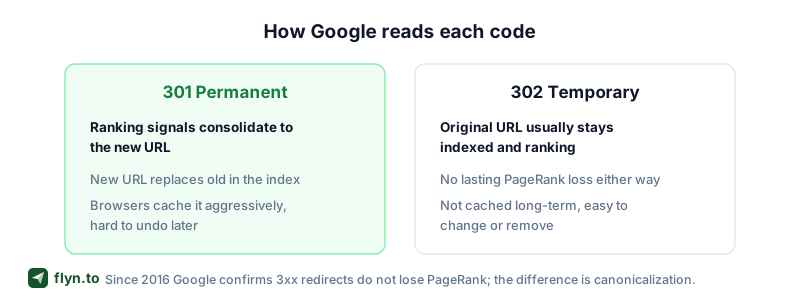
PageRank passes through every 3xx
For years SEOs treated 302s as a link equity leak and claimed even a 301 burned around 15 percent of PageRank, the damping a normal link applies. Google retired both ideas in 2016, when analyst Gary Illyes put it flatly:
30x redirects don't lose PageRank anymore. (Gary Illyes, Google, 2016)
John Mueller has since confirmed that Google forwards PageRank through 301s and 302s alike, and that long-running redirects of either type are treated "exactly the same." No redirect tax, no percentage haircut, whichever code you serve.
Canonicalization: the difference that remains
What still differs is canonicalization, meaning which URL Google chooses to index and display:
- A 301 or 308 strongly hints the destination is canonical: signals consolidate onto the new URL quickly and the old one drops out of the index.
- A 302 or 307 hints the source is still canonical, so Google tends to keep the original URL indexed at first.
- Leave a 302 up long enough and Google usually concludes the move is permanent and treats it like a 301 anyway.
 Tap to enlarge
Translation: you will not lose rankings by picking the "wrong" one, but a permanent move shipped as a 302 consolidates slower and can leave stale URLs lingering in results. During a site migration that ambiguity is the last thing you want; our website migration redirect guide is the full playbook. Also confirm redirects and canonical tags agree using the canonical URL checker: a redirect to page A plus a canonical tag pointing at page B hands Google contradictory hints.
Which One Should You Use? The Decision Guide
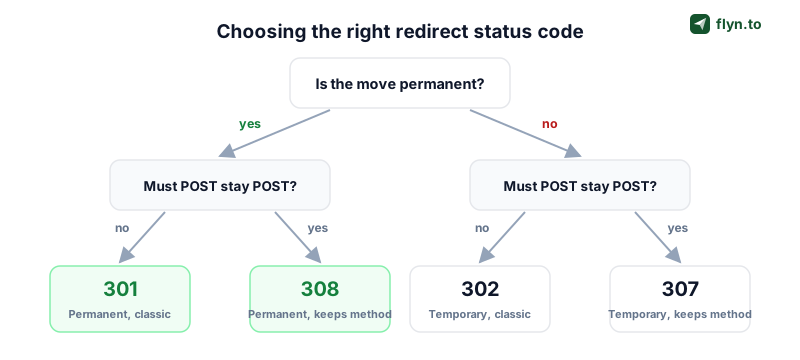
Strip away the folklore and the choice is mechanical. Ask two questions: is the move permanent, and does the HTTP method need to survive the hop?
 Tap to enlarge
Use a 301 (or 308) when the move is forever
- Domain migrations: oldbrand.com to newbrand.com, every URL mapped one to one.
- HTTPS migrations: http to https, the textbook permanent redirect (add HSTS once stable so browsers skip the hop entirely).
- Host consolidation: picking www or non-www and redirecting the loser.
- Renamed, merged, or retired content: old slugs to their successors.
- Normalization rules (trailing slashes, lowercase paths) that will never change.
Pick 308 over 301 only when the redirected traffic includes non-GET requests, such as a moved API path that still receives POSTs.
Use a 302 (or 307) when you will take it back
- A/B tests that send a share of visitors to a variant (a link rotator does this at the link layer, zero server config).
- Geo and device routing: German visitors to /de, Android users to the Play Store, the job smart routing performs for short links.
- Temporary campaigns: a Black Friday page that reverts in December.
- Maintenance windows and out-of-stock fallbacks.
When you genuinely cannot decide, choose 302. Google eventually treats a long-lived 302 as permanent anyway, and you keep the freedom to change your mind. The asymmetric risk sits entirely on the 301 side because of browser caching.
Implementing Redirects on Your Stack
The concept is identical everywhere; only the syntax changes. Here is the map, with a free generator for each stack.
Server level: Apache and Nginx
On Apache, one line in .htaccess covers most cases, Redirect 301 /old-page /new-page, with RewriteRule for pattern matches; the htaccess redirect generator writes the exact block, wildcards included. On Nginx, use return 301 /new-page; inside a location block or a rewrite directive for regex maps; the Nginx redirect generator outputs both forms. Server-level rules are fastest because they answer before any application code runs.
CMS and hosted platforms
- WordPress: a redirect plugin or hand-edited htaccess both work; the WordPress redirect generator covers both routes.
- Shopify: URL redirects live in Online Store settings, built for permanent moves like retired products; map them with the Shopify redirect generator.
- Webflow: project settings take old-path to new-path pairs, formatted by the Webflow redirect generator.
- Squarespace: URL mappings take one rule per line, in 301 or 302 flavor; the Squarespace redirect generator writes them correctly.
Watch the defaults: hosted platforms often assume every redirect is permanent. If yours only offers a 301, do not use it for anything you plan to reverse.
Meta refresh: the last resort
When you cannot touch server config at all, a meta refresh tag in the page head can stand in: <meta http-equiv="refresh" content="0;url=/new-page">. Google treats an instant (zero second) meta refresh as a permanent redirect signal, but it is slower for users and invisible to HTTP tooling. Treat the meta refresh generator as the fallback, never the first choice.
Debugging: Chains, Loops, and Verification
Redirect bugs are invisible in the browser, which silently follows whatever it receives. To debug, look at the raw responses.
Verify the status code you think you are serving
Never assume the code: frameworks default to 302, CDNs inject their own rules, and plugins fight each other. Two ways to see the truth:
- Run the URL through the free Redirect Checker to see every hop with its exact status code and headers.
- From a terminal,
curl -sIL https://example.com/old-pageprints each status line and Location header.
For a link whose destination you do not know, the URL expander unrolls the full path without you clicking it, and the short link safety checker flags dangerous endpoints along the way.
Chains and loops: every hop costs you
A redirect chain is a redirect pointing at another redirect: http to https to www to the new slug is already three hops. Users pay a round trip per hop, Googlebot abandons a chain after 10 hops, and long chains waste crawl budget. Three rules:
- Redirect straight to the final destination, collapsing intermediate rules.
- Update internal links to point at final URLs; a broken link checker pass finds the stragglers.
- Confirm every hop keeps your campaign tags with the UTM redirect preservation checker; a redirect that strips UTM parameters quietly destroys attribution.
A redirect loop, the dreaded ERR_TOO_MANY_REDIRECTS, means the chain never terminates: A points to B, B points back to A. The usual culprit is two layers fighting, classically a CDN forcing HTTPS while the origin redirects back to HTTP. Let exactly one layer own each rule.
Where Short Links Fit Into Your Redirect Strategy
Everything above assumes you control the server answering the request. A short link flips that model: a redirect hosted for you, managed from a dashboard instead of a config file. That changes the math in three ways:
- No deploys. Creating or changing a redirect through a URL shortener takes seconds: no server config, no htaccess, no CDN rules.
- Editable destinations. With dynamic links, a Flyn short link's target stays changeable after the link is printed, posted, or shipped. The QR code on ten thousand flyers can point somewhere new tomorrow, which no hardcoded server rule can offer.
- Measurement built in. Server redirects are blind unless you parse logs; a short link records every pass-through with click analytics: referrer, device, and country per click.
Flyn handles the redirect mechanics for you, so picking and maintaining status codes stops being your problem for campaign links, print, and bios. Use server rules for site structure (migrations, HTTPS, slug changes) and short links for distribution (campaigns, social bios, QR codes, print). For the structural half, the website migration guide is the deep dive; for the distribution half, create a free Flyn account and your first managed redirect is live in under a minute. Every generator and checker in this post lives on the free tools page.
Frequently Asked Questions
Is a 301 or 302 redirect better for SEO?
Do 301 redirects lose PageRank?
How long do browsers cache a 301 redirect?
How do I undo a 301 redirect that was a mistake?
What is the difference between a 302 and a 307 redirect?
When should I use a 308 instead of a 301?
How many redirects can I chain together?
Do short links hurt SEO because they add a redirect hop?
Free tools for this
Three Flyn tools that pair well with the strategy in this article, all free, no signup needed.
UTM Builder
Build campaign-tracked URLs in seconds.
Broken Link Checker
Scan any page for dead links and 404s.
Open Graph Checker
Preview how URLs unfurl on social.
Keep reading
Three related deep-dives from the Flyn blog.
Postback URL Tracking: How S2S Conversion Tracking Works
17 min read
The Anatomy of a URL: Every Part Explained in Detail
15 min read

Bulk Shorten URLs From a Spreadsheet: CSV vs Formulas
17 min read
Ready to try Flyn?
Free plan includes 25 links/month, full analytics, and access to all 30+ free tools above. No credit card required.
Already a member? Log in
Karan Bhakuni is the founder of Flyn. He writes about branded links, click analytics, and the link-management tooling growth teams and creators actually need, drawn from building Flyn and reading a lot of user feedback.
Find these guides useful? Add Flyn as a preferred source so more of them show up in your Google results.