Free Squarespace Redirect Generator
Build Squarespace URL Mappings rules (/old -> /new 301) for Settings → Developer Tools, paste straight in, save. Redirects fire immediately.
Squarespace supports 301 and 302 redirects in the URL Mappings panel. Wildcards ([slug] and {slug}) are available, edit the output below to add them by hand for the rare cases you need.
How to add in Squarespace
1. In Squarespace go to Settings → Developer Tools → URL Mappings. (On older accounts: Settings → Advanced → URL Mappings.)
2. Paste the output above into the textbox, one rule per line, exactly as shown.
3. Click Save. Redirects fire immediately, no republish needed.
4. Test one URL in an incognito window. If the redirect didn't fire, double-check the source path matches your live URL exactly (Squarespace is case-sensitive on paths).
Wildcards: Squarespace supports [slug] for capture and {slug} for re-use: /blog/[slug] -> /articles/{slug} 301
Need redirect destinations you can edit anywhere?
Squarespace URL Mappings strips query strings (UTMs lost). Point campaign URLs at Flyn short links, UTMs preserved, destinations editable from anywhere, full per-click analytics.
How to Create Squarespace Redirects in 3 Steps
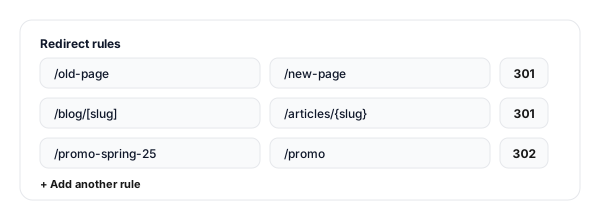
Enter your old and new URLs
Add rows of source path (old Squarespace URL) and destination (new URL or external). Pick 301 or 302 per rule. Add as many as you need.
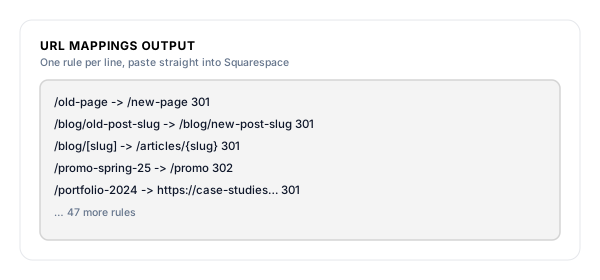
Copy the URL Mappings output
The tool generates one rule per line in Squarespace's URL Mappings syntax (/old -> /new 301), copy the whole block in one click.
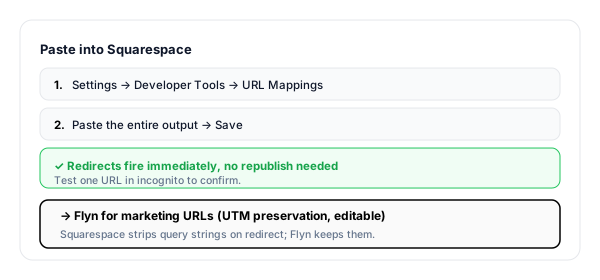
Paste into Squarespace and save
Settings → Developer Tools → URL Mappings. Paste the block, click Save. Redirects fire immediately, no republish needed.
Squarespace URL Mappings, Syntax and Rules
Squarespace handles redirects in Settings → Developer Tools → URL Mappings (older themes: Settings → Advanced → URL Mappings). The syntax is one rule per line, hand-typed:
/old-page                  ->  /new-page                  301
/blog/old-post-slug        ->  /blog/new-post-slug        301
/blog/[slug]               ->  /articles/{slug}           301
/promo-summer-25           ->  /promo                     302
/portfolio-2024            ->  https://case-studies.com   301
The format is strict: path starts with /, the arrow is exactly ->, the status code is at the end. Wildcards use [slug] to capture and {slug} to re-use, powerful for bulk slug migrations.
When to Add a Squarespace Redirect
Squarespace auto-redirects when you rename a standard page slug, but NOT blog posts, products, or deleted pages. Manual URL Mappings cover everything else:
| Situation | Why it matters |
|---|---|
| Renamed a blog post slug | Squarespace auto-redirects standard page slugs but NOT blog post slugs, old URLs 404 silently. Add manually every time. |
| Restructured your blog into a different page | Use a wildcard rule: /blog/[slug] -> /articles/{slug} 301 covers every post in one line. |
| Deleted a page or product | Send the deleted URL to the closest replacement page, Google soft-404s any redirect that lands on the homepage. |
| Moving from one Squarespace template to another | Template switches sometimes change URL structures, every old URL needs a redirect. |
| Migrating from a sub-brand site to the main Squarespace site | Bulk-redirect using wildcards where possible, keep the SEO equity from both domains. |
| Old marketing campaign URLs | Send /promo-spring-25 to /promo rather than letting it 404 after the campaign ends. |
Pro tip
Squarespace strips UTMs on redirect, terrible for ad campaign attribution. Route campaign URLs through a Flyn short link instead: Flyn preserves UTMs to the final destination, and you can change the destination anytime without touching Squarespace.
Squarespace Redirect Best Practices
Do
Don't
Always 301 a renamed blog post (Squarespace does NOT auto-redirect blog slugs)
Assume Squarespace handles every URL change
Use wildcards ([slug] / {slug}) for bulk prefix moves
Add 500 individual rules when one wildcard would do
Redirect to the closest topical page
Send everything to / (Google soft-404 risk)
Keep a master spreadsheet of all your rules
Trust the textarea as your only source of truth
Use Flyn for marketing URLs that change destinations
Hardcode campaign destinations into URL Mappings
Test in incognito immediately after save
Trust the cached browser view
Marketing Redirects Belong Outside Squarespace
Edit without Squarespace login
Point a Flyn link at any new destination from anywhere, no Squarespace login, no URL Mappings textarea to wade through, no risk of breaking other rules.
Real per-link analytics
See clicks by country, device, referrer, hour. Squarespace URL Mappings has no analytics, Flyn shows you everything.
UTMs preserved through redirect
Squarespace strips query strings on redirect. Flyn passes UTMs (and any params) through to the final destination intact.
Branded short URLs
go.yourbrand.com/launch instead of /promo-summer-25-cta-v3. Cleaner in emails, ads, packaging, influencer briefs.
Frequently Asked Questions
What format does Squarespace expect for redirects?
Where in Squarespace do I paste the rules?
How are Squarespace redirects different from WordPress / Shopify?
Do wildcards work in Squarespace URL Mappings?
When should I use 301 vs 302 in Squarespace?
Will Squarespace auto-redirect when I rename a page URL slug?
Can I redirect to an external URL (off my Squarespace site)?
How many redirects can Squarespace handle?
Are query strings preserved on Squarespace redirects?
Will my old URLs still rank after the redirect?
Can I track which old URLs are still being hit?
How do I migrate FROM Squarespace to another platform?
More Free Redirect & Audit Tools
Cover every CMS format and audit every step of the migration. New to this? Read the website migration redirect checklist.
WordPress Redirect Generator
Redirection plugin JSON imports + PHP snippets for functions.php / mu-plugins.
Shopify Redirect Generator
Shopify URL Redirects CSV for bulk import into Online Store → Navigation.
Webflow Redirect Generator
Old Path → Redirect to Path 301 rules with wildcard support for Webflow.
Redirect Checker
Confirm every Squarespace redirect resolves in one hop with the right status code.
Stop losing Squarespace traffic on renamed posts
URL Mappings keep your structural Squarespace SEO intact. Flyn keeps your marketing URLs editable forever, with full analytics on every campaign click.