Free Webflow Redirect Generator
Build Webflow 301 Old-Path → Redirect-to-Path rules with wildcard support, copy clean rules straight into Project Settings → Publishing.
Webflow only supports 301 Permanent redirects from Project Settings → Publishing. No bulk CSV import, paste rules in one at a time, or use the TSV output to paste into a spreadsheet first.
How to add in Webflow
1. In Webflow Designer go to Project Settings → Publishing → 301 Redirects.
2. For each row above, paste the Old Path and Redirect to Path into the two input fields, click + Add Redirect Path.
3. Webflow does not support bulk CSV import, you have to add rules one at a time in the UI. The TSV output above gives you a tracking sheet to mark each off as you add it.
4. Click Publish at the top right, redirects only take effect on the next publish.
Wildcard tip: /old/* → /new/* matches every URL under /old/ and forwards the captured segment to /new/. Without /* on the destination, the segment is dropped.
Tired of re-publishing Webflow to change one redirect?
Point campaign URLs at Flyn short links, edit destinations from anywhere, no Webflow login or re-publish required. Plus full per-click analytics every Webflow redirect lacks.
How to Create Webflow Redirects in 3 Steps
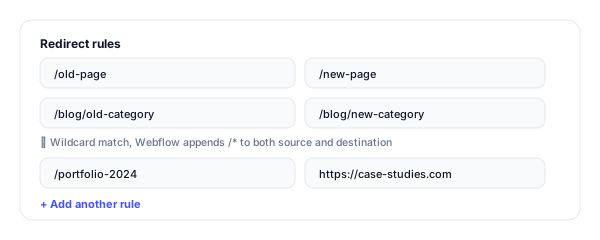
Enter your old and new paths
Add rows of Old Path and Redirect to Path. Tick wildcard match (/*) to forward every URL under a prefix to the equivalent new prefix.
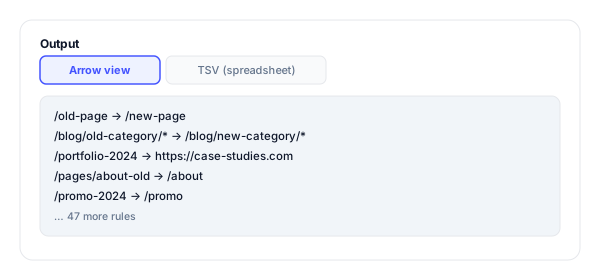
Copy the rules
Get the arrow-view for visual review or the TSV view for a spreadsheet checklist as you add each rule to Webflow.
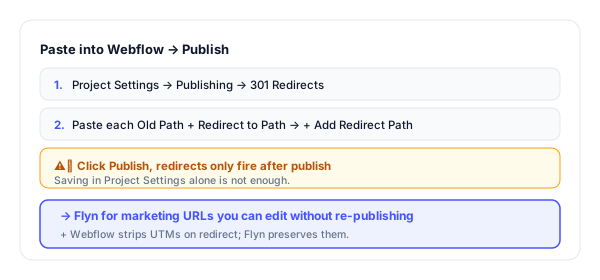
Paste into Webflow and Publish
Project Settings → Publishing → 301 Redirects. Paste each rule. Click Publish, redirects only fire after the next publish.
Webflow 301 Redirects: How They Work
Webflow stores 301 redirects under Project Settings → Publishing → 301 Redirects. Each rule is two fields: Old Path (the URL you want to redirect from) and Redirect to Path (where it goes). Always 301, there is no 302 / 307 option.
Two things every Webflow user gets wrong: (1) Webflow does NOT auto-redirect when you rename a page or CMS item slug, old URLs silently 404 until you add a redirect; (2) redirects only fire after you Publish, saving the rule is not enough.
Example Webflow rules:
/old-page              →  /new-page
/blog/old-category/*   →  /blog/new-category/*       (wildcard)
/portfolio-2024        →  https://case-studies.com   (external)
When to Add a Webflow Redirect
Because Webflow does not auto-redirect anything, you need a redirect for every structural change:
| Situation | Why it matters |
|---|---|
| Renamed a page slug or CMS item slug | Webflow does NOT auto-redirect when slugs change, old backlinks 404 silently. Add the redirect manually every time. |
| Restructured your blog CMS collection | Bulk move with a wildcard: /blog/* → /articles/* in one rule, covering thousands of posts. |
| Migrating from WordPress, Squarespace, or another platform to Webflow | Map every old URL to its new Webflow path before launching, protect every backlink. |
| Deleted a CMS item | Send the deleted URL to the closest replacement or to the parent category, never to the homepage (soft-404 risk). |
| Pages that exist in only one language | For localized sites, redirect missing language variants to the default locale instead of letting them 404. |
| Old marketing campaign URLs | Send /promo-summer-25 to /promo or /collections/sale rather than leaving as 404 after the campaign ends. |
Pro tip
Webflow strips query strings on redirect, UTMs are lost. For ad and email campaigns, route through a Flyn short link instead: Flyn preserves UTMs through the redirect, and the destination is editable without re-publishing Webflow.
Webflow Redirect Best Practices
Do
Don't
Always 301 a renamed slug (Webflow does NOT auto-redirect)
Trust the CMS to handle slug changes automatically
Use wildcards (/*) for bulk prefix moves
Add 500 individual rules when one wildcard would do
Click Publish, redirects do not fire until then
Save and forget, staging behavior differs from published
Redirect to the closest topical page
Send everything to / (Google soft-404 risk)
Use Flyn for marketing URLs that change destinations
Lock campaign destinations into Webflow redirects
Test in incognito after publish
Trust the cached browser view of the site
Marketing Redirects Belong Outside Webflow
Edit without re-publishing
Point a Flyn link at any new destination from anywhere, no Webflow login, no Publish click, no waiting for the publish queue.
Real per-link analytics
See clicks by country, device, referrer, hour. Webflow 301s give you zero visibility, Flyn shows you everything.
UTMs preserved through redirect
Webflow strips query strings. Flyn passes UTMs (and any params) through to the final destination intact.
302 / 307 when you need it
For temporary redirects (A/B tests, campaigns), Flyn supports every status code Webflow hides from you.
Frequently Asked Questions
What format does Webflow expect for redirects?
Can I bulk-import redirects into Webflow?
How do wildcard redirects work in Webflow?
When do Webflow redirects take effect?
Will Webflow auto-create redirects when I change a page slug?
Can I redirect from a Webflow URL to an external site?
How many redirects can Webflow handle?
Does Webflow strip query strings or pass them through?
Will the redirects affect SEO ranking?
How do I find which URLs need redirects in my Webflow migration?
Can I delete a Webflow redirect later?
Do Webflow redirects work for CMS Collection items?
More Free Redirect & Audit Tools
Cover every CMS format and audit every step of the migration. New to this? Read the website migration redirect checklist.
WordPress Redirect Generator
Redirection plugin JSON imports + PHP snippets for functions.php / mu-plugins.
Shopify Redirect Generator
Shopify URL Redirects CSV for bulk import into Online Store → Navigation.
Redirect Checker
Confirm every Webflow redirect resolves in one hop with the right status code.
Broken Link Checker
After publishing your Webflow migration, scan for any 404s your redirect list missed.
Webflow does not auto-redirect, you have to
Webflow 301 redirects keep your structural SEO intact through site changes. Flyn keeps your marketing URLs editable forever, with full per-click analytics on every campaign.