Free Shopify Redirect Generator
Build a Shopify-format URL Redirects CSV in seconds and bulk-import into Shopify Admin → Online Store → Navigation → URL Redirects.
Shopify only supports 301 permanent redirects via the Admin and CSV import, there is no 302/307 option in the platform.
How to import into Shopify
1. In Shopify Admin go to Online Store → Navigation → URL Redirects.
2. Click Import → Add a file, choose the downloaded shopify-redirects.csv.
3. Click Upload and continue, then Import redirects.
4. Shopify processes the file asynchronously and emails you the summary. Test one redirect in an incognito window to confirm.
Note: Shopify automatically creates a redirect when you change a product or collection URL. The CSV path is for bulk migrations and any redirects Shopify didn't auto-create.
Need redirect destinations you can edit anytime?
Shopify Admin requires a login to change every redirect. Point campaign URLs at Flyn short links, edit the destination from anywhere, no Shopify access needed, track every click by location and channel.
How to Create Shopify Redirects in 3 Steps
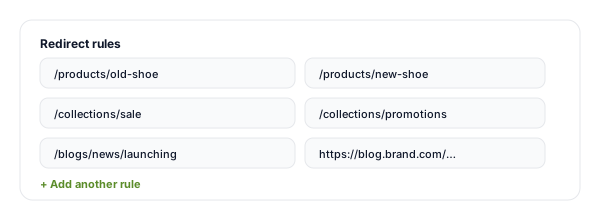
Enter your old and new URLs
Add rows of source path (old Shopify URL) and destination (new URL or external). Bulk-paste hundreds at once. No code, no spreadsheet wrangling.
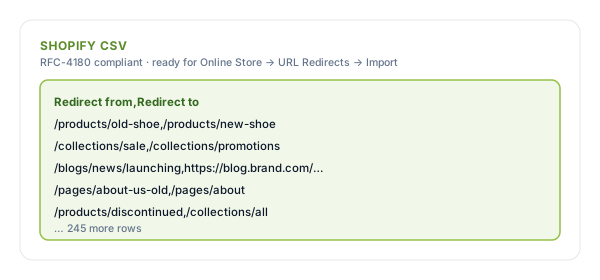
Copy or download the CSV
The tool instantly builds a Shopify-format URL Redirects CSV with the correct headers and quoting, copy it, or download as .csv ready to upload.
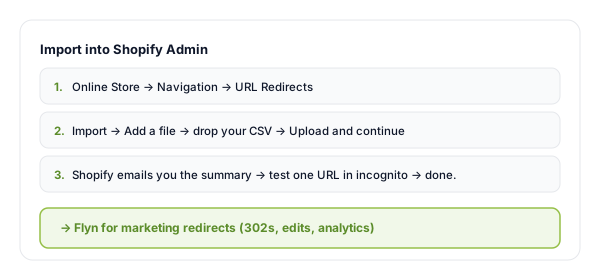
Import into Shopify Admin
Online Store → Navigation → URL Redirects → Import. Drop your CSV, Shopify processes asynchronously and emails the summary. Test in incognito.
Shopify URL Redirects, What Format and Why
Shopify exposes a built-in URL Redirects feature under Online Store → Navigation that supports bulk CSV import. The format is simple, two columns, Redirect from and Redirect to, but the column headers must be exact and the source path must start with /.
All redirects are 301 Permanent. Shopify does not expose 302/307 to merchants, for temporary redirects you need a third-party app If the mechanics behind all this are new, the URL redirect glossary entry explains status codes and Location headers in plain terms., or you point the URL at a Flyn link instead, which gives you full control over the redirect type, the destination, and per-click analytics.
Example Shopify CSV:
Redirect from,Redirect to
/products/old-shoe,/products/new-shoe
/collections/sale,/collections/promotions
/blogs/news/launching,https://blog.brand.com/launch
When to Use Bulk Redirect Import
Shopify auto-creates a redirect when you rename a product handle, but lots of moves don't trigger it. Bulk CSV import handles every case:
| Situation | Why it matters |
|---|---|
| Migrating from WooCommerce, Magento, or BigCommerce | Map every old product/category URL to its Shopify equivalent BEFORE switching DNS, protect every backlink. |
| Renamed a product handle (and Shopify did NOT auto-redirect) | If the auto-redirect was disabled or the product was deleted, the old URL 404s, lose ranking and backlinks. |
| Removed an app that created URLs | Apps like blog/landing-page builders often leave behind URLs after uninstall, redirect them manually. |
| Restructured collections (e.g. /collections/sale → /collections/promotions) | Bulk-redirect every product under the old collection path in one CSV import. |
| Sunsetting an old marketing campaign URL | Send /flash-sale-2025 to /collections/sale rather than letting it 404 after the campaign ends. |
| Moving from a sub-brand store to the main store | CSV import covers thousands of redirects in one go, manual entry would take a full day. |
Pro tip
Before any migration, export your URL list from Search Console → Performance → Pages and from your old platform's sitemap.xml. Every URL with traffic or backlinks needs a redirect, Shopify URL Redirects covers the structural migration, Flyn covers the marketing-URL layer.
Shopify Redirect Best Practices
Do
Don't
Redirect old URLs to topically similar new URLs
Redirect everything to the homepage (soft-404 risk)
Audit Google Search Console for URLs with traffic
Skip URLs with backlinks even if they have zero current traffic
Avoid redirecting /cart, /checkout, /admin paths
Touch Shopify's system routes
Run our Redirect Checker on a sample after import
Assume Shopify resolved everything in one hop
Use Flyn for marketing URLs that change destinations
Hardcode campaign URLs into the Shopify redirect table
Test one redirect in incognito after import
Trust the Shopify admin's self-reported success message
Marketing Redirects Belong Outside Shopify
Edit destinations on the fly
Point a Flyn link at any new destination from anywhere, no Shopify Admin login, no CSV re-import, no waiting for async processing.
Per-link click analytics
See clicks by country, device, referrer, hour. Shopify URL Redirects shows you nothing, Flyn shows you everything.
Branded short URLs
go.yourbrand.com/launch instead of /collections/spring-promo-2026. Cleaner in emails, ads, packaging, and influencer briefs.
302 / 307 when you need it
For temporary redirects (campaigns, A/B tests), Flyn supports every status code Shopify hides from you.
Frequently Asked Questions
What format does Shopify URL Redirects expect?
How do I import the CSV into Shopify?
Why only 301? Can I use 302 or 307 in Shopify?
Does Shopify auto-create redirects when I change a product URL?
Can I redirect to an external URL outside my Shopify store?
Will my old URLs still rank after the redirect?
Are there URLs I should NOT redirect in Shopify?
How many redirects can Shopify handle?
How do I find which URLs need redirects after a migration?
Will Shopify redirects work for international/multi-store?
What happens if I redirect a URL that already has a redirect?
Can I track which Shopify redirects are being hit?
More Free Redirect & Audit Tools
Cover every CMS format and audit every step of the migration. New to this? Read the website migration redirect checklist.
WordPress Redirect Generator
Redirection plugin JSON imports + PHP snippets for functions.php / mu-plugins.
HTAccess Redirect Generator
Server-level Apache .htaccess redirects, for headless Shopify or non-Shopify pages.
Redirect Checker
Confirm every redirect resolves in one hop, no chains, correct status code.
Shopify Add-to-Cart Links
Cart permalinks with variants, quantities and discount codes, straight to checkout.
Stop losing Shopify sales to 404s
URL Redirects keep your structural Shopify SEO intact. Flyn keeps your marketing URLs editable forever, with full analytics on every campaign click.