Free HTAccess Redirect Generator
Build clean Apache .htaccess redirect rules from a friendly form. 301, 302, 307, 308, regex RewriteRule, HTTPS-force, www toggle, trailing slash, all generated in real time.
Quick presets
Global rules
Site-wide canonicalization toggles. Applied before custom rules.
www handling
Pick one canonical hostname.
Trailing slash
Canonicalize URL endings sitewide.
Custom redirect rules
Each row generates one Redirect or RewriteRule directive.
Rule 1
Generated .htaccess
18 lines · 432 bytes
# Generated by Flyn HTAccess Redirect Generator
# https://www.flyn.to/htaccess-redirect-generator

<IfModule mod_alias.c>
  Redirect 301 /old-page /new-page
</IfModule>

<IfModule mod_rewrite.c>
  RewriteEngine On

  # Force HTTPS
  RewriteCond %{HTTPS} off
  RewriteRule ^(.*)$ https://%{HTTP_HOST}/$1 [R=301,L]

  # Force non-www
  RewriteCond %{HTTP_HOST} ^www\.(.+)$ [NC]
  RewriteRule ^(.*)$ https://%1/$1 [R=301,L]
</IfModule>
Paste this into the .htaccess file at your site's document root (usually /public_html/). Test the live redirects with the Flyn redirect checker after deploy.
Tired of redeploying for every redirect change?
Branded Flyn short links are editable from a dashboard, track every click, and survive domain migrations, no SSH or .htaccess edits required.
How to Generate .htaccess Redirects in 3 Steps
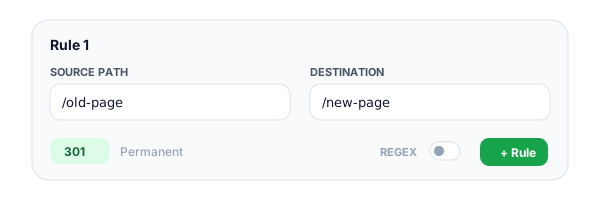
Add your redirect rules
Enter each source URL or pattern, its destination, and a status code (301, 302, 307, or 308). Toggle regex mode if your source needs pattern matching.
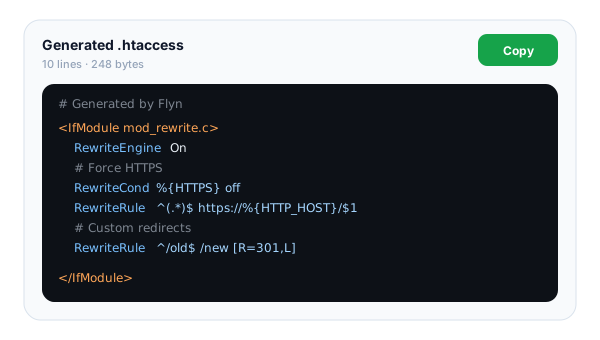
Configure global rules
Flip switches for force-HTTPS, force-www (or non-www), and trailing-slash policy. The .htaccess block regenerates as you type, no submit button.
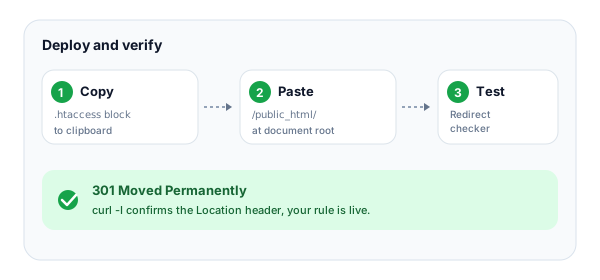
Copy and deploy
Copy the generated block and paste it into your site's .htaccess file at the document root. Verify the live redirects with our free redirect checker.
What Is an .htaccess Redirect?
.htaccess is a per-directory configuration file used by the Apache HTTP Server. Drop it in your site's document root and Apache reads it on every request, applying any directives it contains. The most common use is redirects, sending a request for one URL to a different URL with a status code that tells the browser (and search engines) what the move means.
Apache offers two main directives for redirects: Redirect from mod_alias (simple literal matching) and RewriteRule from mod_rewrite (regex-powered, with flags and conditions). This generator builds both, pick the right tool for the job and copy the output straight into your .htaccess file. Just remember: every rule lives or dies by Apache's AllowOverride setting, so if your rules silently do nothing, that's where to look first.
The 4 Core Redirect Directives
Apache gives you several ways to write a redirect. Each has a niche.
Redirect (mod_alias)
The simplest directive. Syntax: "Redirect 301 /old-path https://example.com/new-path". Matches the URL prefix literally, no regex. Use for one-to-one moves where the source is a specific path you control. Fastest option for static rules.
RewriteRule (mod_rewrite)
The flexible workhorse. Syntax: "RewriteRule ^old/(.*)$ /new/$1 [R=301,L]". Uses PCRE regex with backreferences, supports flags like [R] (redirect), [L] (last), [QSA] (preserve query), [NC] (case-insensitive). Requires "RewriteEngine On" at the top.
RewriteCond
Conditional logic that gates the next RewriteRule. Common pattern: "RewriteCond %{HTTPS} off" before the HTTPS-force rule, or "RewriteCond %{HTTP_HOST} !^www\." to detect missing www. Multiple conditions stack as AND; add [OR] flag for boolean OR logic.
RedirectMatch
The regex sibling of Redirect. Syntax: "RedirectMatch 301 ^/blog/(.*)$ https://blog.example.com/$1". Less powerful than RewriteRule (no flags, no conditions) but simpler when you only need pattern-based redirects without other logic.
301 vs 302 vs 307 vs 308, Quick Reference
Picking the wrong status code can quietly bleed SEO authority for months. Here's when to use each. For the deeper decision tree, including browser caching gotchas and the 307/308 strict variants, read the 301 vs 302 guide.
| Code | Meaning | When to use |
|---|---|---|
| 301 | Moved Permanently | Permanent moves. Transfers SEO authority. Cached aggressively. |
| 302 | Found (Temporary) | Short-term moves, A/B tests, maintenance. No SEO transfer. |
| 307 | Temporary Redirect | Like 302, but preserves the HTTP method (POST stays POST). |
| 308 | Permanent Redirect | Like 301, but preserves the HTTP method. Rarer in practice. |
Common .htaccess Redirect Patterns
The redirect setups every site needs sooner or later.
Force HTTPS for all traffic
Use RewriteCond %{HTTPS} off followed by a RewriteRule that redirects to the same path on https://. This is the bedrock of any modern site, pair it with HSTS for full protection.
Force non-www (or www)
Pick one canonical hostname and stick with it. Mixed www/non-www splits link equity, breaks analytics, and confuses HSTS. Most modern sites prefer non-www for cleaner URLs.
Trailing slash policy
Decide whether /page or /page/ is canonical and 301-redirect the other to it. Without a policy, /page and /page/ are technically different URLs and can both rank, diluting SEO authority.
Domain migration
When moving from olddomain.com to newdomain.com, redirect every URL to its new equivalent with the path preserved. Use RewriteRule ^(.*)$ https://newdomain.com/$1 [R=301,L].
Trailing slash policy
Pick one, adding a trailing slash on all URLs or removing all trailing slashes. Either is fine, but inconsistent slashing creates duplicate-content issues that hurt SEO.
Removing query strings
Strip campaign parameters or session IDs from the canonical URL with RewriteRule combined with RewriteCond %{QUERY_STRING}. Pair with rel="canonical" tags in HTML for belt-and-suspenders.
Common .htaccess Mistakes to Avoid
The five mistakes that break almost every first-time .htaccess deployment.
Forgetting "RewriteEngine On"
Without this line at the top, every RewriteRule and RewriteCond is silently ignored. Apache won't warn you, your rules just don't run. Always include it as the first directive inside the <IfModule mod_rewrite.c> block.
Wrong AllowOverride setting
If the main Apache config sets AllowOverride None for your directory, .htaccess files are entirely ignored. Check with your host, most shared providers allow All, but managed VPS setups often lock this down for performance reasons.
Missing [L] flag
Without the [L] (Last) flag, Apache keeps processing rules after a match, the rewritten URL is fed back through the rule list. This can cause infinite loops or unexpected behavior. Add [L] to every terminal redirect.
Forgetting to escape dots
In regex, "." matches any character, so "example.com" matches "examplexcom" too. Always escape with a backslash: "example\.com". A missing escape is the #1 cause of accidental over-matching.
Hardcoding domain in destination
Writing "RewriteRule ^old$ https://www.example.com/new" works for one site, but moving to a staging/dev environment breaks. Use %{HTTP_HOST} or relative paths where possible to keep rules portable across environments.
Edit-Anywhere Redirects with Flyn
Use .htaccess for site-internal canonicalization. Use Flyn short links for every redirect you might want to change later, no SSH or redeploy required.
Edit from a dashboard
Change a destination in two clicks. No SSH, no FTP, no waiting for the next deploy window.
Sub-50ms redirects
Global edge delivery makes Flyn redirects faster than most origin .htaccess setups.
Click analytics built-in
Every redirect logs device, country, referrer, and time. .htaccess just rewrites, Flyn measures.
Survives domain migrations
When you move domains, change the destination once, every shared short link keeps working.
Frequently Asked Questions
What is an .htaccess file?
Where do I put my .htaccess file?
What is the difference between Redirect and RewriteRule?
When should I use 301 vs 302 redirects?
What regex syntax does RewriteRule use?
Why aren't my .htaccess redirects working?
How is .htaccess different from nginx config?
Do .htaccess redirects hurt performance?
How do I test my htaccess redirects?
Can I redirect to an external URL with htaccess?
What if multiple rules match the same URL?
Why use Flyn short links instead of htaccess redirects?
More Free SEO Tools
Free tools to pair with your redirect setup, test, audit, and clean your URLs. Moving a whole site at once? The redirect map generator builds the entire htaccess block from two URL lists.
Redirect Checker
Trace 301/302 chains, detect loops, and verify your .htaccess rules on the live site.
NGINX Redirect Generator
Same rules for nginx, return 301, HTTPS server blocks, www/non-www toggles.
WordPress Redirect Generator
For managed WP hosts where .htaccess is disabled, Redirection plugin JSON or PHP snippet.
Shopify Redirect Generator
Shopify URL Redirects CSV for bulk import, no .htaccess access on Shopify.
Webflow Redirect Generator
Webflow Old Path → Redirect to Path 301 rules with wildcard support.
Squarespace Redirect Generator
Squarespace URL Mappings 301/302 (/old -> /new 301) with wildcard capture.
URL Cleaner
Strip UTM and tracking parameters from any URL before deploying canonical redirects.
Canonical URL Checker
Audit rel="canonical" tags against your redirect rules to prevent duplicate-content issues.
Broken Link Checker
Scan a page for dead links, including ones your new redirect rules might have orphaned.
Want redirects without redeploys?
.htaccess is great for site-internal canonicalization. Flyn branded short links are better for everything you might want to change later, with click counts, QR codes, and edit-anytime URLs on the free plan; full analytics and custom domains on Pro.