Free Redirect Map Generator
Paste your old and new URLs and get a complete 301 redirect map, with automatic pairing, chain and loop detection, and one-click export to Apache, Nginx, Next.js, Cloudflare and CSV.
Line 1 of the left box pairs with line 1 of the right box, and so on. Blank lines and lines starting with # are ignored.
Used when your old URLs are paths only: Cloudflare Bulk Redirects need a hostname on the source side.
Everything runs in your browser. No URL list is uploaded, and nothing is stored beyond the saved maps in your own localStorage. Nothing here is paywalled, and the only limits are the ones that keep the browser responsive: 2,000 rows per map, and 600 URLs per list in auto-match, which compares every old URL against every new one.
Migrating? Your short links should survive it.
A server redirect fixes the URLs you own. It does nothing for the links already printed on packaging, pasted in old emails or sitting in someone's bio. Flyn short links point wherever you say, and you can edit the destination after launch on every plan, including free.
How to Build a Redirect Map in 3 Steps
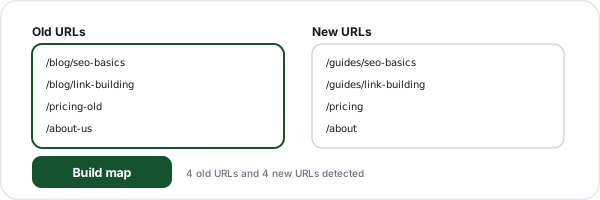
Paste your URL lists
Two lists matched line by line, a single column of "old,new" pairs pasted from a spreadsheet, or an old list and a new list of different lengths for auto-matching. Blank lines and comment lines starting with # are ignored.
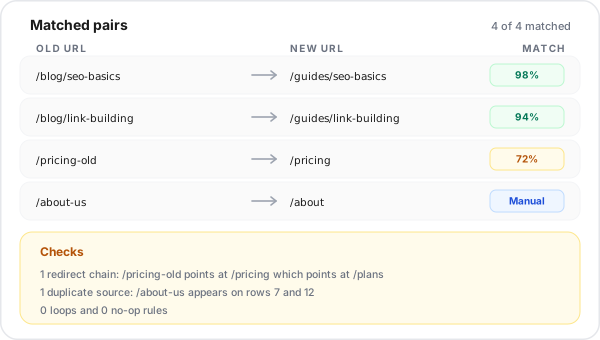
Review the matches and the findings
Every auto-matched row shows a confidence percentage and a dropdown of runner-up destinations you can switch to. The checks panel groups chains, loops, duplicate sources, no-op rules, trailing-slash mismatches and host drift, and tells you exactly which rows are affected.
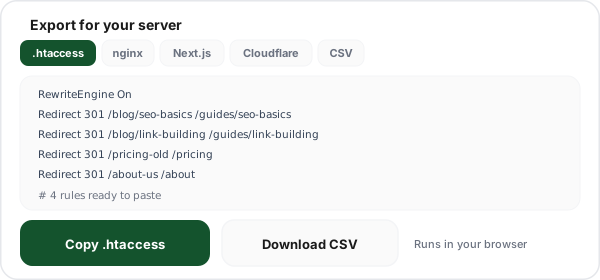
Export for your server
Switch between Apache, Nginx, Next.js, Cloudflare Bulk Redirects and plain CSV. Regex metacharacters are escaped correctly for each target, and the flagged rows are summarised in the file header so whoever reviews the pull request sees them too.
What Is a Redirect Map?
A redirect map is the complete inventory of every URL on the old version of a site, paired with the URL that replaces it on the new one. It is the single artifact a migration lives or dies by. Everything else, the .htaccess file, the Nginx block, the Cloudflare list, is just a rendering of that table into a syntax a particular server understands.
Single-rule generators, including the two we publish ourselves, handle one rule at a time. That is fine when you rename a page. It is useless when you replatform a 4,000-page catalogue, because the errors that sink a set of bulk 301 redirects are not syntax errors in a single rule, they are relationships between rules: two rows claiming the same source, a destination that is itself a source, a pair that quietly points at each other. Those only become visible when the whole map is in one place, which is exactly what a real redirect mapping tool has to do.
The other reason to write the map before you write any config: it is reviewable. A product manager can read a two-column table and tell you that /pricing should not be going to the blog. Nobody reviews a thousand lines of RewriteRule. Build the map, get it signed off, then let the generator produce the server syntax. For the wider strategy around launch day, see our guide to website migration redirects.
How to Create a Redirect Map for a Site Migration
The order matters. Skipping step two is the single most common reason a migration loses traffic.
- 1
Export every old URL, from more than one source
A crawl of the old site catches what is linked. Your XML sitemap catches what you meant to publish. The Search Console Pages report and your server access logs catch the orphaned URLs that still earn traffic and links but are no longer linked from anywhere. Merge all four lists and dedupe. Crawl-only exports routinely miss 10 to 20 percent of the URLs that actually matter.
- 2
Prioritise by traffic and links, not alphabetically
You will not hand-review 4,000 rows. Sort by sessions, then by referring domains, and hand-review the top few hundred. Everything in the long tail can safely take an automatic match, because the cost of getting a zero-traffic page slightly wrong is close to zero.
- 3
Export the new URL list from staging
Crawl the staging or preview environment the same way you crawled production. If staging is behind basic auth, export the routes from the CMS or the framework instead. What you need is a plain list, one URL per line.
- 4
Pair them, then challenge the pairs
Identical paths match themselves. For the rest, use the auto-match mode above: it scores every old URL against every new one and shows you the confidence. Anything below high confidence gets a human look, and anything that would land on the homepage gets a second look, because bulk homepage redirects are treated as soft 404s.
- 5
Validate the map as a graph, not as a list
Run the checks. Chains, loops, duplicate sources and no-op rules are all properties of the map as a whole, and none of them are visible while you are staring at individual rows in a spreadsheet.
- 6
Deploy, then verify from the outside
Export the config, ship it, then request the old URLs and confirm each one returns a single 301 straight to a 200. Our free redirect checker traces the full hop chain for a URL so you can spot a chain that only appears once the rules are live.
Verify the deployed rules with the free redirect checker, and read 301 vs 302 redirects before you pick the status code.
The Seven Ways a Redirect Map Breaks
Every one of these is checked automatically the moment you build the map above.
| Problem | What it looks like | What it costs | Fix |
|---|---|---|---|
| Redirect chains | A points to B, and B is itself a source pointing to C. | Two round trips per visit, and crawlers abandon long chains before reaching the live page. | Rewrite the earlier rules so every old URL targets the final destination directly. |
| Redirect loops | A points to B while B points back to A, or a row points at itself. | The browser gives up with ERR_TOO_MANY_REDIRECTS and the content is completely unreachable. | Break the cycle: one of the two URLs has to be the permanent home. |
| Duplicate sources | The same old URL appears in two rows with different destinations. | Only the first matching rule fires. The second is dead config that looks deployed but does nothing. | Decide which destination is correct and delete the loser before you ship. |
| No-op rules | Source and destination normalize to the same URL. | On most servers this is an instant infinite loop rather than a harmless no-op. | Delete the row. If the URL is not moving, it does not belong in the map. |
| Trailing-slash mismatches | The map lists /pricing and /pricing/ as separate sources, or a rule only toggles the slash. | A double redirect at best, and a loop when the server canonicalizes in the opposite direction. | Pick one canonical form for the whole map and let the server handle the other. |
| Protocol and host drift | An HTTPS source pointing to an HTTP destination, or sources spread across several domains. | HSTS blocks the downgrade outright, and a single server block can only serve one host. | Normalize to HTTPS, and split the export per source host. |
| Missing or unparseable paths | An empty destination cell, a bare domain with no path, or a value with a stray space. | The rule is silently dropped, so the old URL keeps returning 404 after launch. | Fill the gap, or deliberately return 410 Gone for content that is not coming back. |
Nothing here blocks an export. If you know a chain is intentional, or the duplicate source is going in a different server block, download the map anyway. The findings summary is written into the header comment of the Apache, Nginx and Next.js exports so the next person who opens the file sees what was flagged.
Redirect Map Formats: Apache, Nginx, Next.js, Cloudflare
The same map, rendered five ways. A bulk redirect generator is only as good as its escaping, and every target has its own rules, which is exactly where hand-written maps break.
Apache .htaccess.htaccess
RewriteRule patterns with every regex metacharacter escaped, plus a RewriteCond when the source carries a query string. The leading slash is dropped because Apache strips it before matching inside a per-directory file. A mod_alias Redirect variant is available for simple prefix moves.
Nginxredirects.conf
Exact location = blocks by default, which is the safest shape for nginx bulk redirects: no regex, no escaping, and each one is evaluated before any prefix or regex location. Switch to escaped rewrite rules when you want the regex form: 301 emits the permanent flag, 302 emits redirect, and because nginx has no rewrite flag for 307 or 308, those are written as regex locations with an explicit return, so the file always carries the code you picked.
Next.jsnext.config.js
A redirects() array of source, destination and status. Because permanent: true emits 308 rather than 301, the export switches to statusCode when you pick 301 or 302, and escapes the path-to-regexp characters ( ) { } : * + ? in every source.
Cloudflare Bulk Redirectscloudflare-bulk-redirects.csv
Source, target, status and the four boolean columns written out explicitly as false, with no header row, which is the shape Cloudflare documents for a Bulk Redirect list. Query strings are stripped from the source side because Cloudflare rejects them, and a host is added from your old-domain field when the sources are paths only. The format belongs to Cloudflare, so check their current docs before a very large import.
Plain CSVredirect-map.csv
old, new, status. The format to attach to the migration ticket, hand to a client for sign-off, or feed into a redirect manager that takes its own CSV import.
The escaping trap, in one example
Take a single ordinary source path: /products.php. Here is what happens to it in each target when nobody escapes anything.
| Target | Naive rule | What actually happens |
|---|---|---|
| Apache RewriteRule | ^/products.php$ | The dot is a wildcard, so /productsXphp matches too. The leading slash never matches at all inside a per-directory .htaccess, because Apache strips it first. |
| Nginx rewrite | rewrite ^/products.php$ ... | Same wildcard dot, and the rule is evaluated for every request in the block rather than being resolved by an exact location lookup. |
| Next.js source | '/products:id.php' | A literal colon in a path becomes a named parameter. Next.js documents that ( ) { } : * + ? must be backslash-escaped when used literally. |
| Cloudflare CSV | /products.php?id=4,... | The import is rejected: Bulk Redirect source URLs cannot contain a query string, and the file must not have a header row. |
Need a single rule rather than a whole map? Use the htaccess redirect generator, the nginx redirect generator, or the meta refresh redirect generator when you have no server config at all.
How Auto-Matching Works, and When to Override It
The URL mapping here is deliberately simple and explainable, because a score you cannot reason about is a score you cannot overrule with confidence. There is no model and no crawl involved: the only inputs are the two lists you paste, and the whole calculation is written out below, so you can predict what it will do before you run it.
Each URL is reduced to its path, lowercased, with the file extension and any index.html stripped and the trailing slash removed. That path is then split into words. Every old path is scored against every new path on two things: how many words the two paths share (measured as the overlap between the two word sets), and how many single-character edits it would take to turn one path into the other. A small bonus is added when the last meaningful word matches exactly, because that word is usually the slug. The final score is a weighted blend, shown as a percentage next to each row.
Assignment is greedy and one-to-one: the highest-scoring pair in the whole grid is locked in first, then the next highest pair that does not reuse either URL, and so on. That is what stops fifteen old blog posts all claiming the same new landing page. Old URLs that run out of candidates come back with an empty destination and get flagged, which is the honest answer: that page needs a human decision, or it needs to return 410 Gone.
Override anything. Each row keeps its runner-up candidates in a dropdown, and the destination field is a plain text input, so you can paste a URL that was never in either list. The moment you edit a row the confidence badge disappears, because the number described the machine's guess and it no longer applies to your decision.
Redirect Map Template: the Columns That Actually Matter
If you are keeping the map in a spreadsheet before it reaches this tool, these are the columns worth having. The CSV export writes the first three.
| Column | Why it earns its place |
|---|---|
| old | The full old URL, including protocol and host. Paths alone are ambiguous the moment more than one domain is involved. |
| new | The full destination. Leave it empty rather than guessing: an empty cell is flagged, a wrong guess is not. |
| status | 301 for permanent moves. Keeping it as a column means the exceptions (a genuine 302 for a seasonal page) are visible. |
| sessions | Last 12 months of traffic from analytics. This is what you sort by when deciding which rows get hand-reviewed. |
| referring domains | Backlinks pointing at the old URL. A page with 40 referring domains deserves a precise destination even if it gets no traffic. |
| decision | redirect, keep, or gone. Not every old URL should be redirected, and writing the decision down stops it being relitigated. |
| owner | Who signed off on the pairing. Invaluable three weeks after launch when someone asks why /pricing-old goes where it goes. |
Paste the first two columns straight into the "Pasted pairs" mode above. The parser skips a header row, ignores comment lines, and reads comma, tab, semicolon or space separators, so a raw crawler export usually works without editing.
301, 302, 307 or 308 in a Migration Map
| Code | Meaning | Use it in a migration map when |
|---|---|---|
| 301 | Moved Permanently. Cached aggressively by browsers. | Almost always. This is the default for a replatform, a rename or a consolidation. |
| 302 | Found, temporary. The old URL stays indexed. | You genuinely intend to restore the old URL, for example a seasonal page swap. |
| 307 | Temporary, and the request method must not change. | The old URL accepts POST and you need the body to survive the hop. |
| 308 | Permanent, and the request method must not change. | Same as 301 for SEO, but you also need POST preserved. This is what Next.js emits for permanent: true. |
The 308 detail catches people out on modern stacks. Next.js documents that permanent: true emits 308 and permanent: false emits 307, precisely so the HTTP method is preserved across the hop. For search engines this is fine, 308 consolidates the same way 301 does. But if a compliance checklist, a client, or an old HTTP client specifically demands a 301 on the wire, you need the statusCode property instead. This generator switches to statusCode automatically when you select 301 or 302, so the export always emits the code you actually picked.
How long do you keep the redirects? At minimum a year. Search engines need a few crawls to swap the URL in the index, but backlinks, bookmarks, QR codes on printed material and links inside old email campaigns take far longer, and some of them never update. If a redirect is cheap to keep, keep it. Deleting a map after six months is how sites quietly lose the link equity the migration was designed to preserve.
The Links You Cannot Redirect With a Server Rule
A redirect map fixes the URLs on domains you control. Flyn short links fix the ones you do not: the URL printed on a box, pasted into a Slack thread two years ago, or living in an affiliate's bio. Here is what is free forever, and what Pro adds.
Edit the destination, free
Change where a short link points at any time, on every plan including free. No redeploy, no server rule, no waiting for a crawl. 25 new links per month on the free plan.
Click counts, free
Every link counts its clicks at no cost, and the count is already bot-filtered. The human versus bot split is an account-wide Traffic Quality card. Country, device and referrer breakdowns are the Pro upgrade.
Branded domains, Pro
Put your own domain on your short links from $9 a month billed annually, or $12 month to month, so a migration never has to change the link people already have.
Routing rules, Pro
Send iOS and Android to deep links, route by country, split traffic for an A/B test, cap clicks with a fallback URL, or password-protect a link.
Full breakdown on the pricing page, or read about custom domains.
Frequently Asked Questions
What is a redirect map?
How do I create a redirect map for a website migration?
What is a redirect chain and why does it matter?
How do I find redirect loops before I deploy?
Can I just redirect all old URLs to the homepage?
Should a redirect map use 301 or 302?
Does permanent: true in Next.js give a 301 redirect?
Which characters need escaping in htaccess redirect rules?
Is location = or rewrite better for bulk Nginx redirects?
What CSV format does Cloudflare Bulk Redirects need?
How accurate is automatic redirect matching?
Does this redirect map generator upload my URL list?
More Free Link Tools
Build the map here, verify it after deploy, and keep an eye on every link that points into your site.
Redirect Checker
Trace the full hop chain for a single URL after you deploy the map, and catch chains that only appear live.
Link Inspector
Unwrap a link end to end: every hop, the final status, and what the destination actually returns.
htaccess Redirect Generator
Single Apache rules with HTTPS, www and trailing-slash canonicalization presets.
Nginx Redirect Generator
Single Nginx server-block rules when you do not need a whole migration map.
Affiliate Link Checker
Confirm affiliate links still carry your ID after every redirect hop.
Postback URL Tester
Fire a test server-to-server postback and read exactly what the network returns.
Branded Domain Finder
Find a short domain worth migrating your links to, before you rewrite them all again.
Bulk Link Health Checker
Paste a list of links and see which ones are dead, slow or redirecting somewhere unexpected.
Also useful during a migration: URL expander, URL cleaner, campaign URL QA checker, or browse all free tools.
We give the whole migration map away free
No crawl credits, no account, and no paywall on a single row: the map takes up to 2,000 rows, and auto-match compares 600 URLs per list. If that is what the free tool does, imagine what the product does: short links you can re-point after launch, bot-filtered click counts on every link at no cost, and branded domains, country routing and conversion tracking from $9 a month billed annually, or $12 month to month.