Free Link Inspector
Paste any short or unknown link to see where it really goes: the true destination, every hop along the way, what the page calls itself, and a plain safety read. Inspected on our server, never opened on your device.
We open the link on our server, never in your browser, so your IP and device stay out of it. Nothing is clicked on your behalf.
Tired of links nobody can verify? Make yours the readable one.
Shorten a link with Flyn for free and it lands in one hop, on HTTPS, with a bot-filtered click count you can check. No card, no trial timer, 25 new links every month on the free plan.
How to Inspect a Link in 3 Steps
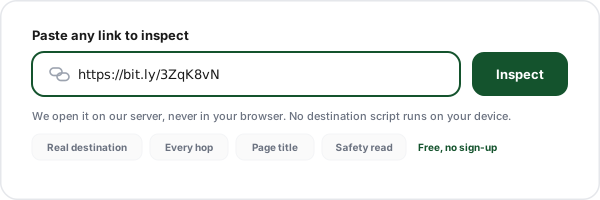
Paste the link
Copy the link you are unsure about, from an email, a DM, a QR scan, or an ad, and paste it in. You do not need the protocol, and private or internal addresses are refused before any request is made.
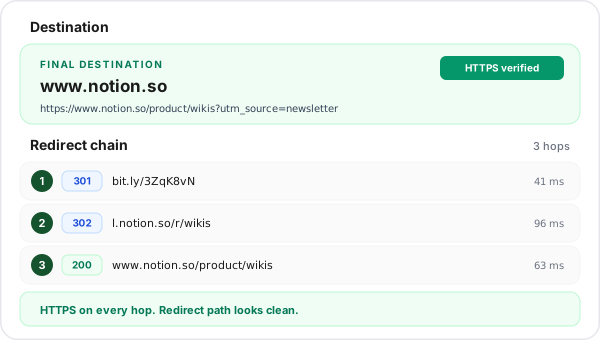
Read the destination and the chain
The real destination host is printed first, then the full URL, the page title, every numbered hop with its status code and response time, and the query parameters that survived the journey.
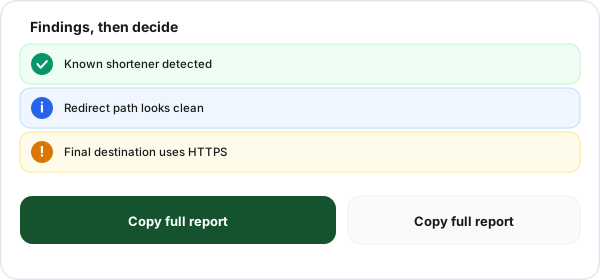
Decide, then copy the report
Use the findings list to judge the link, then copy the whole inspection as plain text for a ticket or a colleague. Your recent inspections stay in your browser so you can re-run them later.
What a Link Inspector Actually Shows You
A link is a promise about a place. Inspecting one means checking the promise before you act on it, and that takes more than a single line of output. Here is everything this tool puts in front of you for one paste.
The real destination host
The host that actually answers at the end of the chain, printed large and separate from the full URL. This is the single fact most people are hunting for, and burying it inside a long query string is how other tools lose readers.
Every hop, numbered, with status codes
Each request in the chain with its HTTP status, its response time in milliseconds, and the exact Location header it pointed at next. You can see which service handed the click to which, in order.
What the destination page calls itself
The title and meta description of the final page, pulled from its HTML. A host name tells you where you land, a title tells you what you land on, which is the difference between "shop.example.com" and "Reset your password".
The parameters riding along
The query parameters that survive to the destination, listed key by key, up to the first fourteen. When there are more than that the panel says so, in the form "showing first 14 of 31", so you always know whether you are seeing the whole set.
A plain safety read
A structural score built from transport security, final status, chain length, raw IP hosts, embedded credentials, punycode lookalikes, and redirect-style parameters. Signals, in English, not a scary red badge with nothing behind it.
A copyable report
One button turns the whole inspection into plain text you can paste into a ticket, a Slack thread, or an email to your security team. Sharing a finding should not require a screenshot.
How to Check a Link Before Clicking, on Phone and on Desktop
The standard advice, hover over the link and read the status bar, was written for a mouse. Most links are now opened on a phone, where there is no hover and no status bar, which is why so much of the guidance you find is quietly useless on the device where it matters. Here is what each method actually gives you.
| Method | Where it works | What it shows | The catch |
|---|---|---|---|
| Hover and read the status bar | Desktop browsers only | The first URL, before any redirect | Does not exist on phones and tablets, and shows nothing about where that first URL forwards to. |
| Long-press the link on mobile | iOS and Android | The first URL in a preview sheet | Same blind spot as hovering: a shortener looks harmless because the shortener domain is all you see. |
| Shortener preview features | Some shorteners only | The destination for that one service | Every service has a different trick (an appended character, a prefixed word), and coverage is inconsistent and rarely documented. |
| Open it in a private window | Any browser | Everything, by actually visiting | You have already fired the click, loaded the scripts, and told the destination your IP and user agent. |
| Paste it into an inspector | Any device with a browser | Destination, chain, status codes, title, parameters | Server-side only, so JavaScript redirects and device-specific routing can still differ from what you would see. |
The mobile routine worth memorising
Long-press the link, choose Copy link address (iOS) or Copy link (Android), switch to this page, and paste. It takes about six seconds and it is the only method on a phone that shows you the whole chain rather than the first URL. If the link arrived as a QR code, point your camera at it, then copy the URL from the scan preview instead of tapping Open.
A Worked Example: Reading a Four Hop Chain
Raw output is only useful if you can read it. This is the shape of a very common chain, an affiliate link shared on social, and what each line is telling you about who touched the click.
| Hop | Status | Host | How to read it |
|---|---|---|---|
| 1 | 301 Moved Permanently | bit.ly | The public shortener resolves the code and hands the click on. Anonymous: anyone can create one of these in seconds. |
| 2 | 302 Found | go.partner-network.com | An affiliate or ad network stamping the click with its own identifier. This is the hop that explains why a click ID appeared out of nowhere. |
| 3 | 302 Found | track.brand.com | The brand runs its own tracker here, usually setting a cookie and appending campaign parameters before releasing the visitor. |
| 4 | 200 OK | brand.com | The destination finally answers with a page. Read the title here: this is what the person actually sees. |
Four hops is not a scandal, it is how a lot of the internet is wired. What matters is whether the hosts make sense together. A beauty brand link that passes through a payments domain, or a bank alert that ends on a free hosting subdomain, is a mismatch worth stopping on. If you are the one publishing that link, every hop you remove is latency you win back and one fewer party in the middle. Our guides on 301 versus 302 redirects and affiliate link tracking go deeper on both sides of that.
Why a Link Might Not Reveal Its Real Destination
Honest tools tell you where they stop. Server-side inspection reads HTTP, which covers the overwhelming majority of real redirects, but there are six situations where the answer you get is incomplete. Knowing them is what turns output into judgement.
The page redirects with JavaScript
Some landing pages return a normal 200 and then move the visitor with a script once the page loads. HTTP inspection stops at the 200 because that is genuinely where the HTTP conversation ends, so the reported destination is the launch pad, not the final page.
A meta refresh tag does the work
An old-school forwarding technique that lives in the HTML head rather than in a response header. Browsers honour it, HTTP clients do not, so a meta refresh chain will look like a single hop that ends on a nearly empty page.
The destination routes by country or device
A link can legitimately answer differently for an iPhone in Jakarta and a desktop in Berlin. Our request comes from a data centre, so if the link uses geo or device routing, you may see the fallback URL rather than the one you would get.
A bot filter refuses the request
Plenty of sites answer automated clients with a 403 or a 429 rather than the real page. That is a legitimate defensive choice, not proof of anything sinister, and the hops captured before the block are still useful.
The link is deliberately cloaked
Malicious operators sometimes serve a clean page to anything that smells like a scanner and the real payload to a human on a phone. If the destination looks suspiciously boring for the story that came with the link, that mismatch is itself a signal.
The link is already dead
Shortener codes get disabled, campaigns end, and hosts disappear. A 404, 410, or an unreachable host at the end of the chain usually means you are looking at a link that has outlived whatever it pointed to.
Who Does This Short Link Belong To?
Once you have the chain, the next question is always the same: whose link is this? You cannot answer it from the shortened form, because the shortener host belongs to the shortener. You answer it by reading the hosts in the chain, and there are six habits that make that reading reliable.
Read the host from right to left
The registrable domain is the last two labels before the first slash. In secure.login.brand-verify.com the owner is brand-verify.com, and everything to the left of it is a subdomain that owner chose freely, including the word "brand".
A branded short domain has an owner
When the shortener host is something like go.brand.com or brnd.link, someone registered and configured that domain deliberately. That is a meaningful accountability signal, and it is why a branded link is easier to trust than an anonymous code on a public shortener.
A public shortener code has none
On a public shortener the code itself tells you nothing about who made it, because anyone can make one. In that case the only identity in the chain is the destination host, so read that instead of the thing you were sent.
Watch for punycode and lookalikes
Hosts starting with xn-- are internationalized domains rendered in ASCII. They are often completely legitimate, and they are also the classic way to build a domain that looks like a brand you trust in a font you cannot inspect.
Credentials in the URL are a red flag
A URL shaped like https://[email protected]/ does not go to brand.com at all: everything before the @ is a username. Modern browsers hide or block this, but it still shows up in emails and chat messages.
A raw IP address instead of a name
Legitimate businesses buy domain names. A destination that ends on something like http://203.0.113.10/login has skipped the one step that would have left a paper trail, and it is worth treating with real suspicion.
This is the whole argument for branded short domains: a link on your own domain carries your name through every share, so the person receiving it can answer the ownership question without any tooling at all. If you are choosing one, we wrote how to choose a branded short domain and a setup walkthrough in connect a custom domain.
Go Deeper With Three Companion Tools
This inspector is the general-purpose first look. When you already know which specific question you are asking, one of these three does that job in more depth, and all three are free.
URL Expander, when you only need the destination
Strips the question down to one answer: what does this shortened link expand to? Use it when you are working through a batch of links and the chain detail is noise.
Redirect Checker, when you own the redirect
Built for the SEO and migration side of the problem: permanent versus temporary status codes, chains that should be flattened, and loops that never resolve.
Link Safety Checker, when the question is trust
Leads with the risk verdict rather than the anatomy, which is what you want when someone forwards you something that smells like phishing and wants a yes or no.
Migrating a site rather than vetting a link? Start with website migration redirects and the redirect map generator.
Free Forever, and What Pro Actually Adds
We give this inspector away because links you cannot verify are bad for everyone, including us. If you like how it reads, here is exactly where the free line sits on the product itself, with nothing dressed up.
This tool: free, no account
Inspect as many links as you like, about eight a minute, without signing up. No credit card, no trial clock, no gated results behind an email form.
Free plan: real click counts
25 new links a month, and the click count on every link is already bot-filtered, so the number you read is human clicks. Link editing is on every plan, including free.
Pro adds the breakdowns
Pro starts at $9 a month billed annually ($108 a year), or $12 a month month to month, with lifetime at $249 once. It adds country, device, and referrer breakdowns, custom branded domains, and password-protected links.
Pro adds the routing
Country-level geo routing, iOS and Android device routing with deep links, A/B split testing, click limits with a fallback URL, retargeting pixels, and conversion tracking with server-to-server postbacks.
To be straight about the limits: Flyn routes by country, not by state, city, or radius, and there is no deferred deep linking or link-in-bio page builder. Full detail on pricing and in geo targeting, custom domains, and conversion tracking.
Frequently Asked Questions
How do I see where a link goes without clicking it?
What is actually behind a short link like bit.ly or t.co?
Can I check a link before clicking it on my phone?
Is this the same as the URL Inspection tool in Google Search Console?
What do 301, 302, and 307 mean in the redirect chain?
How many redirects is too many?
Can a link inspector tell me if a link has a virus?
Why does the inspector show a different destination than my browser?
Who does this short link belong to, and how can I tell?
Why did the inspector return an error or a blocked status?
Does the inspector follow JavaScript and meta refresh redirects?
Do you store the links I inspect?
More Free Link Tools
The rest of the link toolkit, all free and all instant, no sign-up required.
Affiliate Link Checker
Verify that your affiliate tag survives every hop to the merchant.
Postback URL Tester
Fire a test server-to-server postback and read exactly what came back.
Redirect Map Generator
Turn an old-to-new URL list into a clean redirect map for a migration.
Branded Domain Finder
Find a short domain that carries your name through every share.
Bulk Link Health Checker
Check a whole list of links for broken destinations at once.
QR Destination Audit
Inspect where a printed QR code actually sends the person scanning it.
Campaign URL QA Checker
Catch broken UTM tagging before a campaign goes live.
URL Cleaner
Strip tracking junk out of a URL before you share it onward.
Also useful: UTM parser, UTM builder, link extractor, deep link tester, link cloaker, and the full free tools directory.
Now make the links you send worth trusting
You just inspected someone else's link. Flyn is how you build ones that survive the same inspection: one hop, HTTPS, and a click count you can actually check. Free plan is 25 new links a month with bot-filtered click counts, forever, and nothing here needs a card.
Questions first? Read the deep link docs or browse the help centre.