Free Link Extractor
Extract every link from any web page. See internal, external, nofollow, and dofollow links with anchor text. Open the ones you pick in new tabs, up to 10 per click, or export as CSV.
Extracts up to 200 links from the page. Shows internal, external, nofollow, and anchor links.
Auditing links? Turn the ones you share into data.
Create Flyn short links with click analytics built in: every click counted free, and Pro shows from where and on what device. Every link becomes a measurable data point.
How to Extract Links in 3 Steps
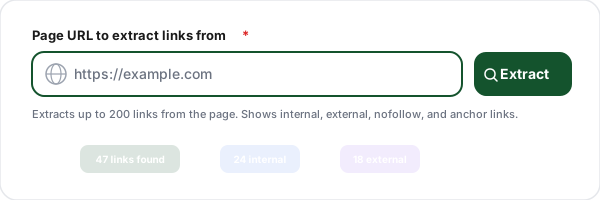
Enter a URL
Paste the URL of any page you want to analyze. The tool fetches the page and extracts every hyperlink, internal, external, anchor, mailto, and tel links.
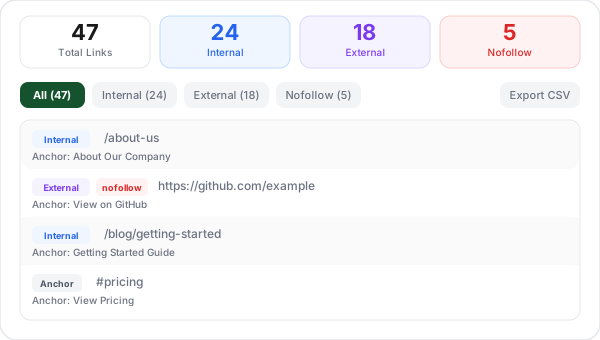
Review extracted links
See all links categorized by type with color-coded badges. Each link shows anchor text, rel attributes (nofollow, ugc, sponsored), and target attributes.
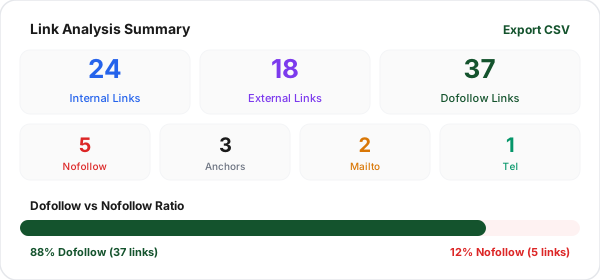
Filter and export
Filter by internal, external, or nofollow links. Tick the links you want (or select all in the current filter) and open them in new tabs in batches of up to 10 (allow pop-ups for flyn.to to open more than one per click), send them to the Bulk URL Opener, copy individual URLs, or export the entire list as a CSV file for your SEO audit.
What Is Link Extraction and Why Does It Matter?
Link extraction is the process of scanning a web page and identifying every hyperlink on it. This includes internal links (to other pages on the same site), external links (to other websites), anchor links (same-page navigation), and special links like mailto and tel. For SEO professionals, link extraction is the foundation of any site audit.
Understanding the link profile of any page tells you how it distributes ranking power, which pages it prioritizes, and whether its outbound links are helping or hurting its SEO. A page with 50 internal links and zero external links sends a very different signal than a page with 5 internal links and 30 external links. Link extraction gives you the data to make those assessments quickly.
Internal vs External Links: What You Need to Know
Feature
Internal Links
External Links
Points to
Same domain
Different domain
SEO purpose
Distribute link equity within site
Cite sources, build trust
Crawling
Helps Google find your pages
Sends crawler to another site
Control
Full control (your site)
No control over destination
Ideal ratio
70-80% of total links
20-30% of total links
Nofollow use
Rarely (login pages, etc.)
Sponsored, UGC, untrusted
Nofollow vs Dofollow: When to Use Each
Dofollow (default)
All links are dofollow by default. These pass ranking power (link equity) to the destination page. Use for editorial links, internal navigation, and any link you genuinely endorse.
rel="nofollow"
Tells search engines not to pass link equity. Use for untrusted content, comment sections, and links you do not want to endorse. Originally created to combat spam.
rel="sponsored"
Identifies paid or sponsored links. Google introduced this in 2019 as a more specific alternative to nofollow for affiliate and advertising links.
rel="ugc"
Identifies user-generated content links (forum posts, comments, profile pages). Helps Google understand that the site owner did not create these links.
rel="noopener noreferrer"
Security attributes, not SEO attributes. noopener prevents the linked page from accessing window.opener. noreferrer prevents the browser from sending a Referer header. Use on all target="_blank" links.
Internal Linking Best Practices
Use descriptive anchor text
Instead of "click here" or "read more," use anchor text that describes the destination page. "See our UTM builder" is more valuable for SEO than "click here to build UTM links."
Link from high-authority pages
Pages that receive the most backlinks have the most link equity to pass. Link from your strongest pages to important pages that need a ranking boost.
Keep link depth shallow
Every page should be reachable within 3 clicks from the homepage. Deep pages that require 5+ clicks to reach may not get crawled frequently by search engines.
Fix orphan pages
An orphan page has no internal links pointing to it. Search engines may never discover it. Use a link extractor to find pages that are not linked from any other page on your site.
Avoid excessive links per page
Google can handle many links per page, but each additional link dilutes the equity passed per link. Focus on linking to the most relevant pages rather than linking to everything.
Update old content with new links
When you publish new content, go back to relevant older pages and add internal links to the new page. This helps search engines discover new content faster and distributes equity from established pages.
Link Extractor + Link Shortener: Better Together
Analyze your link profile with the extractor, then create trackable Flyn short links that give you full control and analytics for every link you share.
Track every click
Every Flyn short link counts each click as it happens; Pro adds device, country, referrer, and time-series breakdowns.
Branded links
Pro lets you use your own domain for short links. Build trust and increase CTR with branded URLs.
Editable destinations
Change where your short links point anytime. No more broken links when URLs change.
Instant redirects
Flyn redirects complete in under 50ms globally. Your users never notice the redirect.
Frequently Asked Questions
What is a link extractor?
What is the difference between internal and external links?
What does nofollow mean?
How do internal links affect SEO?
What is anchor text and why does it matter?
How many internal links should a page have?
What is the difference between dofollow and nofollow?
Can I export the extracted links?
How do I open all links on a page?
Is this link extractor free?
Does the extractor pick up JavaScript-rendered links?
Are mailto, tel, and anchor links included?
How many links can I extract per scan?
More Free SEO Tools
Explore other free tools from Flyn to audit and improve your site. Working with raw text instead of a live page? Use the URL Extractor. New to rel attributes? Start with the nofollow vs dofollow guide. Need the domains behind the links? Paste them into the URL to Domain Extractor.
Broken Link Checker
Scan any page for broken links, 404s, and dead URLs.
NoFollow Link Checker
Audit every rel="nofollow", sponsored, and UGC link on any page, SEO compliance.
Outbound Link Checker
Audit every external link on any page, rel attributes, tabnabbing detection, unique domains, CSV export.
Internal Link Checker
Audit internal link structure on any page, path depth, duplicates, nofollow audits, anchor diversity.
Ready to take control of your links?
Extract and analyze links for free, then create trackable short links with Flyn: free click counts and QR codes, analytics breakdowns and branded domains on Pro, all in one platform.