Free NoFollow Link Checker
Audit every rel="nofollow", "sponsored", and "ugc" link on one page, or check up to 10 URLs in bulk. Flags page-level robots nofollow that other checkers miss. CSV export. Built for SEOs, affiliate marketers, and content reviewers.
Manage your own outbound links?
Use Flyn to create short links that count every click free; Pro adds device, country, and referrer breakdowns. Every link becomes a tracked data point, perfect for affiliate, sponsored, and outbound link campaigns.
How to Audit NoFollow Links in 3 Steps
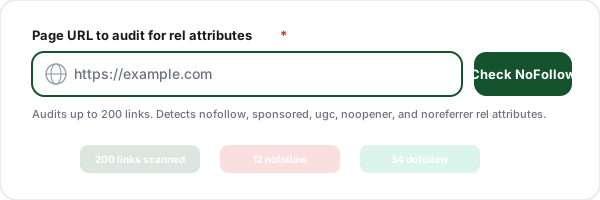
Paste any URL
Enter the URL of any public web page. The tool fetches the page and parses every <a> tag including its rel attribute.
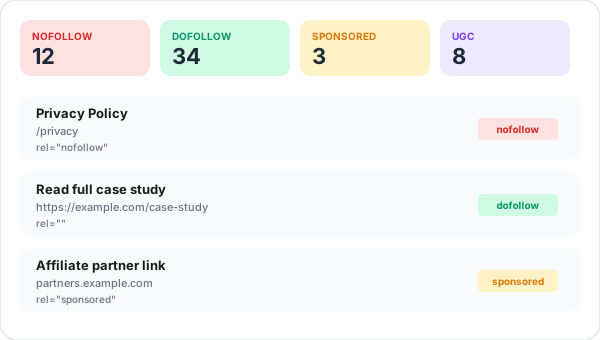
Review color-coded results
Every link is labeled with a colored rel badge: red for nofollow, green for dofollow, amber for sponsored, purple for ugc, gray for noopener/noreferrer.
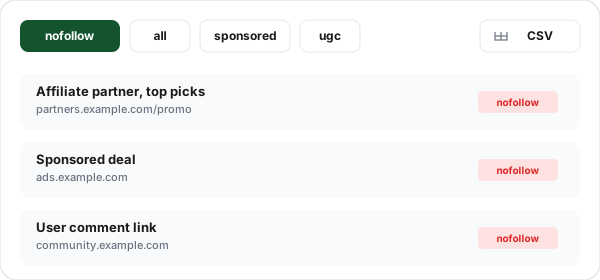
Filter and export
Toggle to just nofollow (or any rel type) and export the result as CSV. Includes URL, anchor text, type, and all rel flags.
What Is a NoFollow Link?
A nofollow link is an HTML hyperlink with the attribute rel="nofollow". The attribute tells search engines like Google not to pass ranking signals (sometimes called "link equity" or "PageRank") from the source page to the destination. It was introduced by Google in 2005 to combat blog-comment spam, and has since evolved into the foundation of how search engines understand which outbound links a site editorially endorses.
In 2019 Google split the original nofollow into three more specific attributes: nofollow, sponsored (for paid/affiliate links), and ugc (for user-generated content). Google now treats all three as "hints" rather than strict directives, meaning a nofollow link may still be crawled and indexed, just without full ranking equity. This tool detects all three plus security-related noopener and noreferrer attributes so you can audit pages comprehensively.
New to rel attributes? Our complete guide to nofollow vs dofollow links walks through how link equity flows, when to use each attribute, and the most common mistakes, the ideal companion read to this checker.
Bulk Checks and Page-Level NoFollow Detection
Bulk mode audits up to 10 URLs in one pass: paste a list of pages (one per line) and get a per-page card with nofollow, dofollow, sponsored, and ugc counts, plus a Combined CSV that includes a sourcePage column. It is the fastest way to sweep an entire blog section after an affiliate-compliance change, or to vet a list of link-building prospects before outreach. Pair it with the free Canonical URL Checker on the same URL list when the sweep is part of a wider on-page audit, clean rel attributes cannot help a page whose canonical tag points somewhere else entirely.
Page-level nofollow detection is the check most tools skip. A page can nofollow every one of its links at once through a <meta name="robots" content="nofollow"> tag or an X-Robots-Tag response header. When that happens, a per-link rel audit looks perfectly clean while in reality nothing on the page passes equity. This tool reads both signals on every check and shows a warning banner when a page-wide nofollow is in force, so a backlink that looks dofollow never fools you. To fix the markup on links you find, generate the exact tag with the free Rel Attribute Generator.
The 5 rel Attributes You Need to Know
rel="nofollow"
Original 2005 attribute. Signals "do not pass ranking equity." Used historically for comment spam prevention, paid links, and untrusted content. Google now treats it as a hint, not a directive.
rel="sponsored"
Introduced 2019. THE correct attribute for paid, affiliate, and sponsored links. Using plain nofollow on paid links is now outdated, sponsored is more specific and Google-preferred.
rel="ugc"
Introduced 2019. Marks user-generated content links (blog comments, forum posts, profile-page links). Tells Google "the site owner did not editorially create this link."
rel="noopener"
Security attribute, not SEO. Prevents the new tab from manipulating the source page via window.opener. Must be on every target="_blank" link.
rel="noreferrer"
Privacy attribute, not SEO. Prevents the browser from sending a Referer header to the destination. Common on target="_blank" alongside noopener.
When to Use Each rel Attribute
Affiliate or referral links
Use rel="sponsored" (best) or rel="sponsored nofollow" (most conservative). Plain nofollow alone is now outdated for paid links, Google's updated link policy specifically calls out sponsored as the correct attribute.
Sponsored blog posts and ads
Use rel="sponsored". Required by Google's link spam policies. Sites that fail to label paid placements face manual action under "unnatural outbound links."
Blog comments and forum posts
Use rel="ugc" or rel="ugc nofollow". Most major comment systems (Disqus, WordPress core) apply ugc automatically. Audit your forum or comments section to ensure compliance.
Untrusted external content
Use rel="nofollow". Suitable for screenshots of malicious sites, archived links to dubious sources, or any link you must include but don't want to endorse.
Internal site navigation
Do NOT use nofollow. Your internal navigation should flow link equity throughout your site. Adding nofollow to navigation prevents PageRank distribution and hurts your own SEO.
Editorial outbound citations
Do NOT use nofollow. When you link to legitimate sources, leave them dofollow, passing equity to authoritative sources is a normal trust signal and Google rewards sites that link out responsibly.
NoFollow Audit + Branded Shortening: Better Together
Audit your link profile here, then create Flyn short links for every affiliate, sponsored, or outbound link you share, with free click counts, editable destinations, and country, device, and referrer breakdowns on Pro.
Track every click
Every Flyn short link counts clicks from the first share; Pro adds device, country, referrer, and time-series breakdowns.
Branded URLs
With custom domains on Pro, flyn.to/affiliate becomes yourbrand.com/affiliate. Branded URLs build trust.
Editable destinations
Swap the destination URL anytime. Change an expired affiliate offer without re-sharing anywhere.
Sub-50ms redirects
Flyn redirects complete globally in under 50ms. Your users never notice the redirect.
Frequently Asked Questions
What is a nofollow link?
How is nofollow different from dofollow?
Does nofollow still matter in 2026?
When should I use rel="nofollow"?
What is the difference between rel="nofollow", rel="sponsored", and rel="ugc"?
Can nofollow links still rank or be indexed?
How do I find all nofollow links on a page?
Should affiliate links be nofollow or sponsored?
Does Google penalize sites with too many nofollow links?
Why are noopener and noreferrer in the rel attribute?
Can I check multiple URLs at once?
What is the difference between a nofollow link and a nofollow meta tag?
Can I export the nofollow audit results?
Does this work on JavaScript-rendered pages?
More Free SEO Tools
Continue your link audit with these complementary free tools from Flyn.
DoFollow Link Checker
Find every link that passes ranking equity, link-building opportunity audits.
Link Extractor
Pull every link from any page with internal/external classification and CSV export.
Outbound Link Checker
Audit external links, tabnabbing detection, unique-domain count, anchor diversity.
Rel Attribute Generator
Build rel="nofollow sponsored ugc noopener" tags after you spot links to fix.
Take control of your link profile
Audit nofollow attributes for free, then use Flyn to create short links that count every click (analytics breakdowns and branded domains on Pro). Free plan includes 25 links/month, no credit card required.