Free Rel Attribute Generator
Build correct rel="nofollow sponsored ugc noopener" anchor tags in seconds, with one-click presets for affiliate, paid, comment, and external links.
Quick presets
rel values
Tip: combine values freely, e.g. an affiliate link is usually rel="sponsored nofollow".
Cloaking affiliate links?
Pair the right rel value with a clean branded short link, Flyn cloaks ugly affiliate URLs and tracks every click, while you keep full ad disclosure.
How to Add a Rel Attribute in 3 Steps
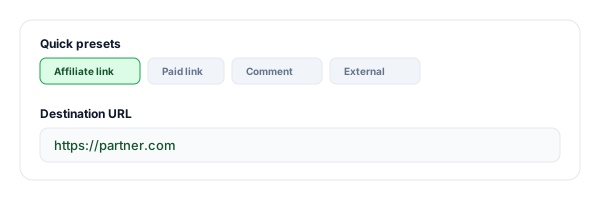
Pick a preset or enter your link
Start from an affiliate, paid, comment, or external preset, or paste your own URL and link text.
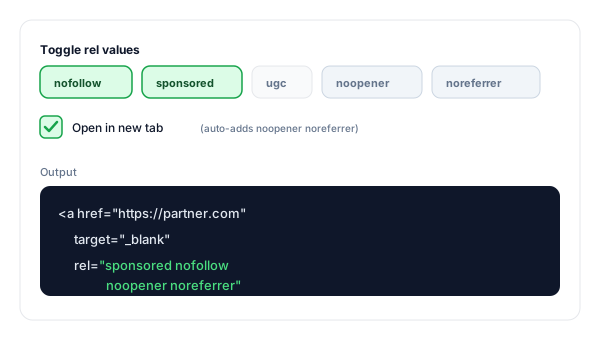
Toggle the rel values
Turn on nofollow, sponsored, ugc, noopener, or noreferrer. Opening in a new tab auto-adds noopener noreferrer for security.
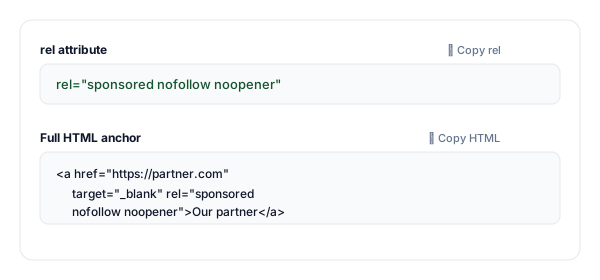
Copy the rel or full anchor
Copy just the rel="…" attribute to paste into an existing link, or grab the complete HTML anchor tag.
What Is the Rel Attribute?
The rel attribute ("relationship") sits inside an HTML anchor tag and tells search engines and browsers how to treat the link. It controls whether ranking credit flows to the destination, flags paid or user-submitted links, and adds security when a link opens in a new tab. For the full story of how equity flows through each value, and why Google downgraded nofollow to a hint in 2019, read our nofollow vs dofollow guide.
A link with rel attributes:
<a href="https://partner.com" target="_blank" rel="sponsored nofollow noopener">Our partner</a>Which rel Value Should Your Link Use?
Short answer: use rel="sponsored" for paid or affiliate links, rel="ugc" for user-generated content, rel="nofollow" for links you cannot vouch for, and no rel for links you genuinely endorse. Use the first case that fits.
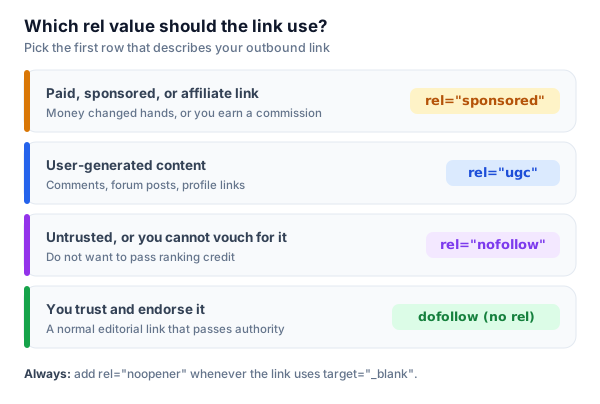
Every Rel Value Explained
These are the rel values that matter for links you create. Combine them freely, the generator keeps the syntax correct.
| rel value | What it does | Category |
|---|---|---|
| nofollow | Don't pass ranking credit. Use for links you don't editorially endorse. | SEO hint |
| sponsored | Paid, affiliate, or advertising links. Required by Google for paid placements. | Required for ads |
| ugc | User-generated content, comments, forum posts, profiles. | SEO hint |
| noopener | Stops a new-tab page from controlling your window. Anti-tabnabbing. | Security |
| noreferrer | Hides the Referer header; also implies noopener. | Privacy + security |
Which Rel Value for Which Link?
A quick cheat sheet for the most common cases. Each row maps to a one-click preset in the tool above.
| Link type | rel | Opens in |
|---|---|---|
| Affiliate / commission link | sponsored nofollow | new tab |
| Display ad / paid placement | sponsored | same tab |
| Blog comment / forum link | ugc nofollow | same tab |
| External link (trusted) | noopener noreferrer | new tab |
| Untrusted / unknown source | nofollow noopener | new tab |
Pro tip
After you add rel attributes to a page, verify them live with our free NoFollow Link Checker and Outbound Link Checker, they flag any missing noopener or undisclosed paid links. For affiliate links specifically, see how to disclose affiliate links the right way.
Why Use Flyn's Rel Attribute Generator?
All 5 rel values
nofollow, sponsored, ugc, noopener, and noreferrer, combine any of them correctly.
One-click presets
Affiliate, paid, comment, and external presets apply the right combo instantly.
Safe new tabs
target="_blank" auto-adds noopener noreferrer so you never ship the tabnabbing footgun.
rel-only or full anchor
Copy just the rel="…" for an existing link, or the complete HTML anchor tag.
Frequently Asked Questions
What is the rel attribute on a link?
What does rel="nofollow" do?
When should I use rel="sponsored"?
What is rel="ugc"?
Can I combine multiple rel values?
What rel value should an affiliate link use?
Do I need rel="noopener" with target="_blank"?
What is the difference between nofollow, sponsored, and ugc?
Does rel="nofollow" stop a page from being indexed?
What does rel="noreferrer" do?
Where do I put the rel attribute in the HTML?
Is the rel attribute case-sensitive?
How do I audit the rel attributes already on my pages?
More Free Link & SEO Tools
Generate links correctly here, then audit and brand them with the rest of Flyn's free toolkit.
Hyperlink Generator
Build a full HTML anchor tag or Markdown link with text, target, and rel options.
NoFollow Link Checker
Audit every nofollow, sponsored, and ugc link on any page, with CSV export.
DoFollow Link Checker
Find every dofollow link passing equity and spot link-building targets.
Outbound Link Checker
Audit external links, rel attributes, tabnabbing risks, and unique domains.
Disclose, protect, and track your links
The right rel value keeps you compliant and safe, a Flyn short link adds clean branding and real click analytics on top.