Disclose Affiliate Links: rel=sponsored & FTC
Affiliate links carry two obligations most creators only half-meet: a visible notice your readers can see, and a rel attribute Google can read. Skip either and you risk a fine or a ranking hit. Here is how to do both, correctly.


Why affiliate links carry two obligations
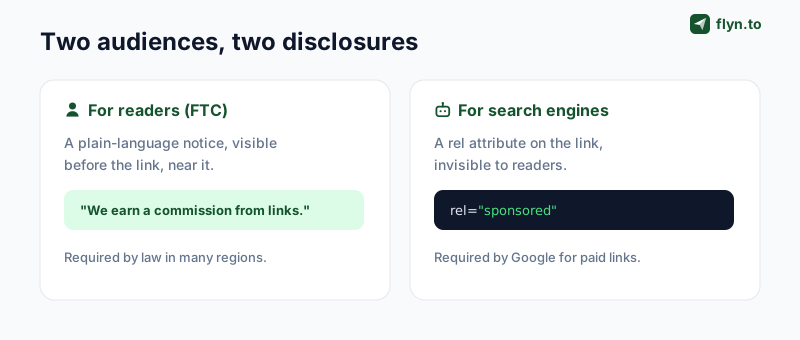
Every affiliate link you publish has two different audiences, and each one needs to be told the link is paid, in its own language. Most creators handle one and forget the other, which is how you end up either technically penalized by Google or legally exposed to the FTC, sometimes both, without realizing it.
The reader's side
The first audience is your reader. Consumer-protection regulators, the FTC in the US, and equivalents elsewhere, require that you tell people, clearly and up front, when you'll earn a commission from a link. That's a visible disclosure: words on the page a human can see before they click.
The second audience is the search engine. Google requires that paid and affiliate links be marked with a rel attribute so they don't pass ranking credit (link equity) to the merchant, otherwise affiliate links become a way to manipulate rankings. That's an invisible disclosure: an attribute in the HTML that only crawlers read.
 Tap to enlarge
Why one doesn't cover the other
A rel="sponsored" attribute is invisible to readers, so it can never satisfy the FTC's "clear and conspicuous" requirement. And a visible "this is an affiliate link" note does nothing for Google's crawler, which reads HTML, not prose. They solve different problems for different audiences, which is exactly why you can't substitute one for the other.
The rel attribute: sponsored, nofollow, or both
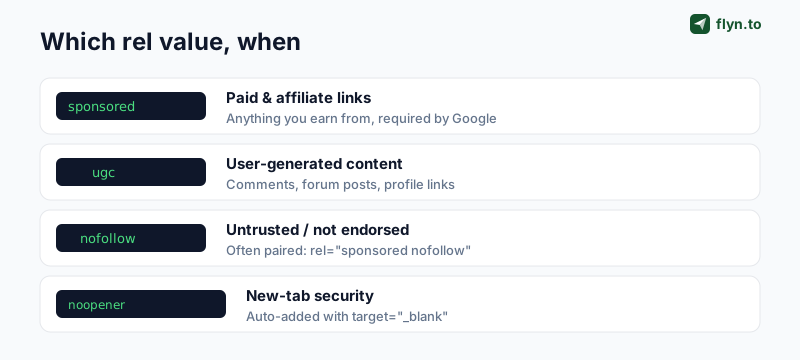
Google introduced rel="sponsored" in 2019 specifically for paid and affiliate links. Before that, everyone used rel="nofollow" for everything, and that still works as a fallback, but sponsored gives Google clearer context about why the link shouldn't pass equity.
 Tap to enlarge
What to use for an affiliate link
rel="sponsored", the correct, specific value for any link you're paid for or earn a commission from. Use this on every affiliate link, full stop.rel="sponsored nofollow", many publishers combine the two for belt-and-braces safety. It's redundant for ranking purposes but harmless, and it covers you if a tool only understandsnofollow.rel="ugc", not for your own affiliate links, but for affiliate links your users drop in comments or forum posts. Combine withnofollowthere.
The exact difference between these values, and why nofollow stopped being a strict directive in 2019, is covered in depth in our nofollow vs dofollow guide. For building the markup, the free Rel Attribute Generator has a one-click "Affiliate link" preset that outputs rel="sponsored nofollow noopener noreferrer" and the full anchor tag, so you never hand-type it.
If your affiliate links open in a new tab, most do, pair target="_blank" with rel="noopener noreferrer" so the merchant's page can't access or redirect your original tab. The Rel Attribute Generator and the Hyperlink Generator both add this automatically when you tick "open in a new tab," so you never ship the tabnabbing footgun.
The FTC disclosure readers actually see
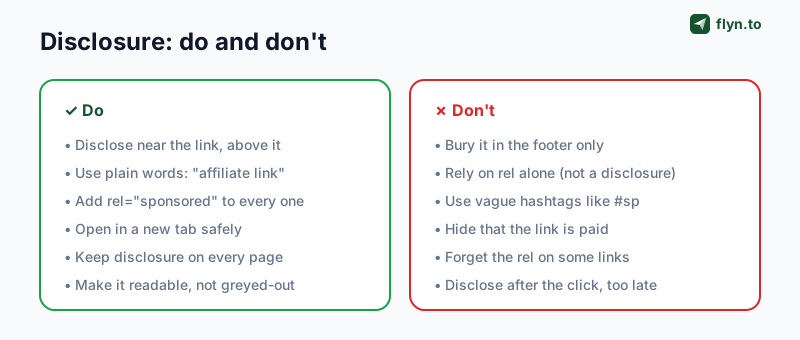
The legal side is simpler than people fear, and stricter than they hope. The FTC's standard is that a disclosure must be clear and conspicuous, which in practice means three things: it's in plain language, it's close to the link, and it appears before the reader engages.
What "clear and conspicuous" means
- Plain words. "I earn a commission from links in this post" works. Cryptic tags like
#spor#affdon't, the FTC has explicitly said abbreviations many readers won't understand aren't enough. - Near the link, before the click. A disclosure at the top of the relevant section, or immediately around the link, qualifies. One buried in the footer or on a separate "disclosures" page generally doesn't, because the reader sees the link first.
- Readable. Not greyed-out, not tiny, not hidden behind a "more" toggle. If a reasonable person could miss it, it isn't conspicuous.
 Tap to enlarge
The test the FTC actually applies is simple: would an ordinary reader notice the disclosure, read it, and understand it, before they act on the link? A footer line fails that test even though it's technically "present."
Disclosure obligations follow the content, not the page. If your affiliate links get shared, embedded, or syndicated, the disclosure has to travel with them, which is one more reason to put it in the body near each link rather than relying on a sitewide footer that a syndicated excerpt strips away.
Clean URLs without losing the commission
Affiliate URLs are ugly, long merchant domains stuffed with tracking parameters and a cryptic affiliate ID. Readers distrust them, they're a nightmare to share verbally, and they break across line wraps in emails. The fix is to cloak them: hide the raw URL behind a clean, branded short link.
 Tap to enlarge
How cloaking works
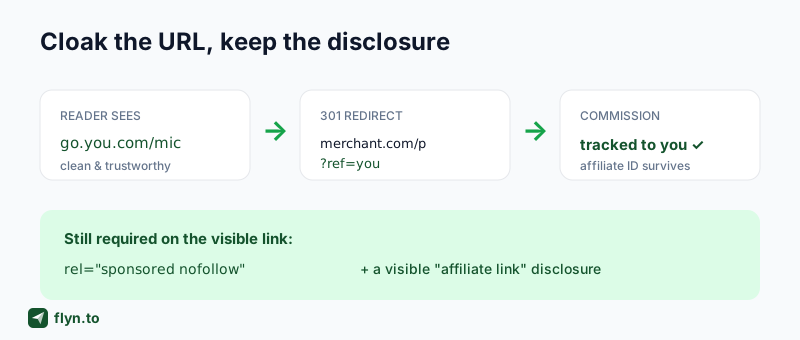
A cloaked link is just a 301/302 redirect: the reader clicks go.yoursite.com/best-mic, which instantly forwards to the merchant URL with your affiliate ID attached. The commission tracks exactly as if they'd clicked the raw link, but what they see and share is clean and on-brand. The free Link Cloaker builds these, and the deeper mechanics are in our affiliate link tracking guide.
Cloaking is not a substitute for disclosure
This is the trap. Cloaking changes what the URL looks like; it does not change what it is. A cloaked affiliate link is still an affiliate link, so it still needs rel="sponsored" on the visible anchor and a visible FTC disclosure nearby. Cloaking actually makes the disclosure more important, because a clean go.yoursite.com/mic link gives the reader no visual hint that it's monetized, only your disclosure does.
Some publishers worry that cloaking looks deceptive. It isn't, as long as you disclose: branded redirects are a standard, program-permitted practice (the same mechanism behind any short link). What crosses the line is hiding the commercial nature of the link, which is a disclosure failure, not a cloaking one.
A repeatable workflow for every affiliate link
Put the pieces together and you get a four-step routine that takes seconds per link and keeps you compliant on both fronts. Do it the same way every time and disclosure stops being something you remember and starts being something you can't forget.
The four steps
- Cloak the URL. Run the raw affiliate link through the Link Cloaker (or shorten it with a branded short link) so readers see a clean URL and your affiliate ID survives the redirect.
- Build the anchor with the right rel. Use the Rel Attribute Generator's affiliate preset to produce
rel="sponsored nofollow"plus a safe new-tab, copy the finished tag. - Add a visible disclosure at the top of the section, in plain language, before the first affiliate link.
- Verify before publishing, that the rel is present, the disclosure is visible, and the link actually lands on the right merchant page.
Audit what you've already published
If you have a back catalog of posts, don't assume they're compliant, audit them. The free NoFollow Link Checker lists every link on a page with its rel attributes, so you can spot affiliate links missing sponsored; the Outbound Link Checker flags external links and missing noopener; and the DoFollow Link Checker catches affiliate links that are still passing equity they shouldn't. Run them across your top-earning posts first.
Disclosure across different platforms
The two-part rule, visible notice plus machine-readable signal, stays the same everywhere, but how you implement it shifts by platform. The rel attribute only exists on web pages you control; off-site, the visible disclosure does all the work.
On your own blog or website
This is the full setup: a visible disclosure near each link and rel="sponsored" on every affiliate anchor. You control the HTML, so there's no excuse to skip the rel, generate it with the Rel Attribute Generator and keep URLs clean with the Link Cloaker.
In email and newsletters
There's no SEO crawler reading your email, so rel is irrelevant, but the FTC disclosure absolutely is not. Disclose in the email body, near the links, in plain language. Cloaking matters more here too, since raw affiliate URLs break across line wraps and look like spam; a branded short link renders cleanly in every client. The same link-hygiene principles apply to SMS sends.
On social media and YouTube
You don't own the HTML, so there's no rel to add, the platform handles link attributes. Your job is the visible disclosure: in the caption (above the "more" fold), spoken aloud in a video, or with the platform's built-in "paid partnership" label. Vague hashtags like #sp still don't satisfy the FTC, even on social. For creators routing followers to offers, a clean link-in-bio setup with disclosure is the standard.
What happens if you skip it
It's worth being concrete about the downside, because "you should disclose" lands differently when you see what non-disclosure actually costs on each front.
| If you skip… | The risk | Who enforces |
|---|---|---|
The rel="sponsored" | Manual action / lost rankings; the whole site can be affected | Google Search |
| The visible disclosure | FTC enforcement, fines, and reputational damage | FTC / regulators |
| Both | Compounding: penalized and exposed, plus reader distrust | Everyone |
| Program terms | Account termination and clawed-back commissions | The affiliate network |
The affiliate program angle people forget
Beyond Google and the FTC, there's a third enforcer: the affiliate program itself. Amazon Associates and most major networks require compliant disclosure in their terms, and they do terminate accounts and reverse commissions for violations. So disclosure isn't just legal hygiene, it's the condition of keeping the income at all.
The upside framing
Flip it around and disclosure is genuinely good for you. A clear "I only recommend things I'd use myself, and I earn a small commission" note builds trust rather than eroding it, readers respect the honesty, and surveys consistently show disclosure doesn't reduce click-through. Done right, you're compliant with Google, clean with the FTC, in good standing with your network, and more credible with your audience. That's the whole point of doing it properly instead of hoping nobody checks.
Start with the markup: the Rel Attribute Generator for the rel, the Link Cloaker for clean URLs, and a visible disclosure in your own words. For the tracking and revenue side, the affiliate link tracking guide and how to track clicks on a link close the loop (and once you are tracking, retargeting those clickers is the next lever), and you can create a free Flyn account to brand and measure every link you publish.
Frequently Asked Questions
Do affiliate links need rel="sponsored" or rel="nofollow"?
Is rel="sponsored" enough to disclose an affiliate link?
Where do I have to put an FTC affiliate disclosure?
What is the difference between rel="sponsored" and rel="nofollow"?
Does cloaking an affiliate link remove the need to disclose?
Can not disclosing affiliate links hurt my SEO?
How do I add rel="sponsored" to all my affiliate links?
Do affiliate programs require disclosure in their terms?
Free tools for this
Three Flyn tools that pair well with the strategy in this article, all free, no signup needed.
Open Graph Checker
Preview how URLs unfurl on social.
Meta Tag Generator
Generate full SEO meta tags.
Anchor Text Analyzer
Audit anchor text distribution.
Keep reading
Three related deep-dives from the Flyn blog.

NoFollow vs DoFollow Links: The Complete SEO Guide
17 min read

Internal Linking SEO Strategy: Best Practices
14 min read

How to Audit Outbound Links: 9-Point SEO Checklist
13 min read
Ready to try Flyn?
Free plan includes 25 links/month, full analytics, and access to all 30+ free tools above. No credit card required.
Already a member? Log in
Karan Bhakuni is the founder of Flyn. He writes about branded links, click analytics, and the link-management tooling growth teams and creators actually need, drawn from building Flyn and reading a lot of user feedback.
Find these guides useful? Add Flyn as a preferred source so more of them show up in your Google results.