Link-in-Bio Strategy for Creators: Beyond Linktree
Your bio link is the only clickable real estate Instagram, TikTok and Threads give you. A generic link-in-bio page wastes it. Here is the playbook serious creators use instead.


Your Bio Link Is the Most Valuable URL You Own
Here is the uncomfortable truth most creators never sit with: Instagram, TikTok, Threads and YouTube give you exactly one clickable link in your profile. Every follower who wants to buy your course, join your newsletter, watch your latest video or tip you on Ko-fi passes through that single URL. It is the narrowest point in your entire funnel, and most creators hand it to a free tool that was never built to convert.
That bio link is not a "links page." It is the highest-intent real estate you own. A follower who taps it has already decided you are worth a click. They have left the infinite scroll. They are leaning in. What happens in the next two seconds decides whether that intent turns into an email subscriber, a sale, or a bounce back to the feed.
Why "just use Linktree" stopped being good advice
Linktree, Beacons and Stan solved a real 2018 problem: platforms only allowed one link, and creators had five things to promote. Stacking buttons on a page was a clever hack. But the creator economy grew up. You are not just "promoting things" anymore, you are running a business with a newsletter, a shop, sponsorships and a content calendar. A generic link-in-bio page treats all of that as an undifferentiated list of buttons and gives you almost no data about what is working.
The shift: from a links page to a routing layer
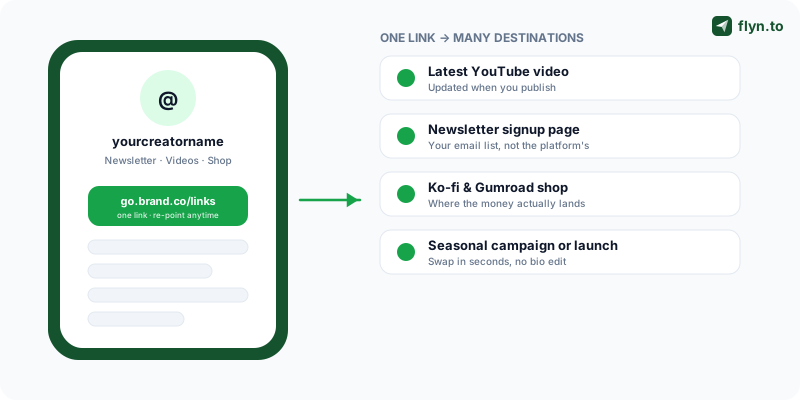
The modern approach is not a prettier links page. It is a routing layer, a single branded short link that sits between your bio and wherever you want fans to land, that you fully control and fully measure. You stop thinking "which buttons go on my page" and start thinking "where should this click go right now, and how do I know it worked." That reframe is the whole playbook. The rest of this article is the tactical build.
 Tap to enlarge
Where Generic Link-in-Bio Pages Quietly Lose You Money
Generic link-in-bio pages are not evil. They are just a compromise tool sold as a destination. The problems are subtle, which is exactly why they go unfixed for years. Let us name all four.
The four hidden costs, in plain terms
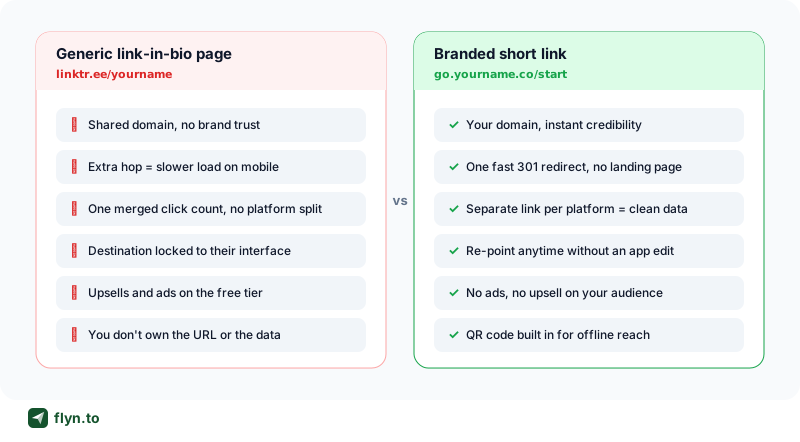
First, the extra hop slows you down on mobile. A link-in-bio page is a full web page: HTML, fonts, profile image, every button image, often tracking scripts and an ad pixel. Your follower taps your bio, waits for that page to render on a patchy 4G connection, then taps again to reach the actual destination. That is two loads and two taps for one outcome. A branded short link is a single 301 redirect, effectively instant, straight to where the fan wanted to go. On mobile, where most of your audience lives, every avoidable second of latency costs conversions.
Second, a shared domain costs you brand trust. When your bio reads linktr.ee/yourname or beacons.ai/yourname, the most prominent word in your own link is somebody else's brand. A follower scanning your profile sees a generic domain shared by millions of accounts, including spammers and scammers who also use free link-in-bio tools. A branded short link on your own domain, like go.yourname.co/start, reads as you. We dug into the numbers behind this in why branded short links increase CTR: branded URLs measurably out-click generic ones because they signal a real, trustworthy destination.
Third, one merged click count is not analytics. Here is the data failure that should bother you most. A generic link-in-bio page tells you "your page got 4,000 visits and the shop button got 600 clicks." It cannot tell you whether those visits came from Instagram, TikTok, YouTube or Threads, because every platform points at the same URL. You are flying blind on the single most important creator question: which platform actually drives action?
Fourth, you never really control the destination. Your link-in-bio page lives on someone else's infrastructure, inside their interface, subject to their pricing changes, their ads on the free tier, their downtime and their feature roadmap. If they paywall a feature or get acquired, your bio link is hostage. With a branded short link you own the URL and the redirect logic. The page can never be "discontinued" out from under you.
Many free link-in-bio tools inject their own branding, upsell banners or even ads onto your page on the free plan. Your hard-won audience attention gets monetized by the tool, not by you. If a follower taps your bio and the first thing they see is "Make your own [Tool] page," you just paid that company in your own traffic.
The Branded Short Link Playbook
A branded short link is a short, memorable URL on a domain you control that redirects to any destination you choose. It is the single most underrated tool in a creator's stack, and it fixes every problem above at once.
One link, infinite destinations, zero re-edits
The killer feature is the re-point. Put go.yourname.co/now in your bio once. When you drop a new video, point that link at the video. When your course goes on sale, point it at the sales page. During launch week, point it at the launch. The URL in your bio never changes, so it never breaks, never needs an app edit, and never suffers the propagation lag of editing your profile on four platforms. You change the destination from a dashboard in five seconds.
This is impossible with a raw destination URL and clumsy with a generic link-in-bio page. It is the native behavior of a branded short link.
Pick a domain that reads as you
You have three good options, in rough order of polish:
- A custom domain,
go.yourname.cooryourname.link. Maximum trust, maximum brand. This is a Flyn Pro feature and worth it the moment you take your business seriously. More on this below. - A shared branded domain,
flyn.to/yourname. Still far cleaner and faster than a link-in-bio page, and free to start. - A vanity slug, whatever domain you use, make the slug human:
/start,/shop,/newsletter, not/x7Kp9q. People do read URLs.
The whole build is faster than designing a link-in-bio page. Create a free account at flyn.to/signup, paste your destination, name the slug, copy the link into your bio. Done. If you want to route to several places, create one short link per destination and decide which goes in the bio. Flyn's full tool suite covers the surrounding jobs, QR codes, UTM tagging, link health checks, so you are not stitching five products together.
Reserve a short, brandable slug like /start as your permanent bio link and treat it as your "front door." Then point it wherever your current priority is. Your audience learns one URL, you keep total flexibility, and you never burn a follower on a dead link because you forgot to update your profile.
Generic Link-in-Bio Page vs Branded Short Link
Put the two approaches side by side and the gap is not subtle. This is the comparison every creator should run before deciding where their bio link points.
| Feature | Generic link-in-bio page | Branded short link |
|---|---|---|
| Domain in your bio | Shared, third-party (linktr.ee/...) | Your own (go.yourname.co/...) |
| Speed to destination | Full page load, then a second tap | One instant 301 redirect |
| Per-platform click data | One merged number | Separate link & stats per platform |
| Change the destination later | Edit the page, layout shifts | Re-point in seconds, URL unchanged |
| QR code for offline use | Often paywalled or absent | Generated with every link |
| Ads / upsells on your traffic | Common on free tiers | None, it is your link |
| UTM tagging for GA4 | Limited or manual | Auto-appended at the redirect |
| Who owns the URL & data | The platform | You |
 Tap to enlarge
When a link-in-bio page still makes sense
Honesty matters. If you genuinely have eight equally important destinations and no single priority, say you are a multi-hyphenate juggling a podcast, a band, a shop and a charity, a links page is a reasonable menu. But even then, the link to that page should be a branded short link so you get the domain trust and the per-platform tracking. The two approaches are not mutually exclusive: a branded short link can point at a list-style page if you really need one. If your audience spans countries, geo-targeting your bio link can send each follower to the right regional store or page from the same URL.
Track Which Platform Actually Drives Clicks
This is the section that changes how you spend your time. Most creators post everywhere and have no idea which platform pays them back. A branded-link setup answers that question with a number.
One short link per platform
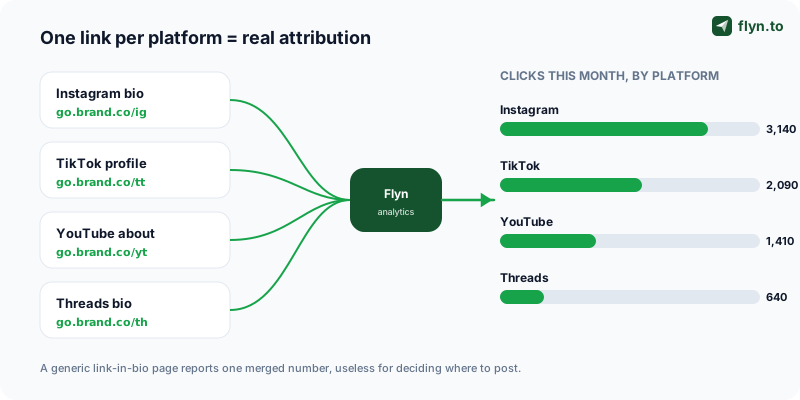
The move is simple: do not put the same link on every profile. Create a distinct short link per platform, all pointing at the same destination:
go.yourname.co/igon your Instagram biogo.yourname.co/tton your TikTok profilego.yourname.co/ytin your YouTube channel descriptiongo.yourname.co/thon your Threads biogo.yourname.co/lion your LinkedIn profile (and read how LinkedIn treats links in posts before promoting it there)
All five send fans to the same place. But your dashboard now shows five separate click counts. Suddenly you can see that Instagram sends 3,000 clicks a month and Threads sends 600, and you can decide where the next ten posts go based on evidence, not vibes.
 Tap to enlarge
Layer UTM parameters for full-funnel attribution
Click counts tell you reach. UTM parameters carry that source information downstream into Google Analytics so you can connect a platform to actual conversions and revenue. Tag each destination with utm_source=instagram, utm_medium=bio and a campaign name using the free UTM Builder, Flyn appends them at the redirect, so the visible link stays short and clean. For the full convention, our affiliate link tracking guide walks through naming UTMs so they never fragment your reports.
The creators who grow fastest are not the ones posting on the most platforms. They are the ones who measured which platform actually drives clicks, then stopped wasting time on the ones that do not.
Read the data and reallocate every month
Once a month, open your link analytics and ask three questions: which platform link gets the most clicks, which gets the highest click-to-conversion rate, and which is flat despite your effort. Then move your energy toward what works. This is the entire point of instrumenting your bio link, it converts gut feeling into a concrete reallocation decision, and over a few months it compounds into meaningfully faster growth.
Route Fans Straight to Where You Make Money
A bio link that points at a links page asks your fan to make a decision. A bio link that points straight at your highest-value destination makes the decision for them. During a launch or a promo, directness wins.
Wire up your monetization destinations
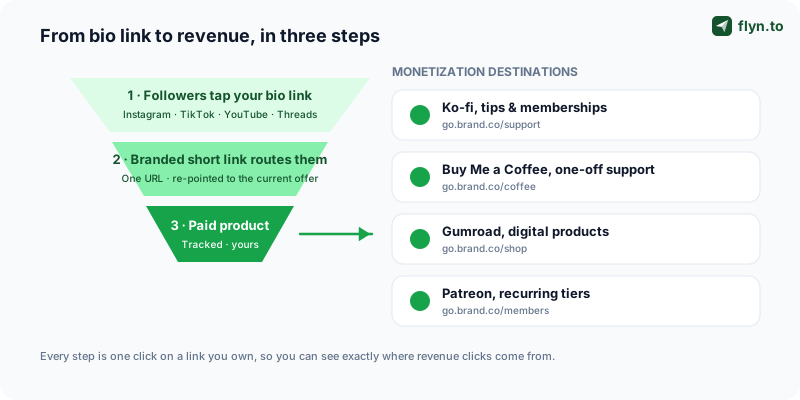
Set up a dedicated branded short link for each place you actually earn, so you can both route to it and measure it:
- Tips and small support, a Ko-fi link or a Buy Me a Coffee link for one-off appreciation from fans who are not ready for a subscription.
- Digital products, a Gumroad link for your ebook, preset pack, Notion template or course. This is usually your highest-margin destination.
- Recurring revenue, a Patreon link for membership tiers and your most committed audience.
Each gets a clean slug, /support, /coffee, /shop, /members, and each gets its own click stats. Now you know not just that you made sales, but which platform's audience clicked the buy link.
 Tap to enlarge
Don't send revenue traffic to a links page
When you mention your product in a video or post, the call to action should be "tap my bio link" and that link should go directly to the product, not to a page where the buy button competes with seven other buttons. Every extra choice you put between intent and checkout leaks conversions. Re-point your bio link to the offer for the duration of the push, then point it back.
Capture the email, your only owned audience
Followers are rented; an email list is owned. One of the smartest bio-link destinations is a newsletter signup page. A platform can change its algorithm overnight and erase your reach. Your email list cannot be de-ranked. Rotate your bio link to your newsletter signup regularly, track the clicks per platform, and you are building an asset no algorithm can touch.
Running a product launch? Read the Product Hunt launch playbook, the same per-channel branded-link discipline that wins a launch also tells you, afterwards, which channel actually converted so you can double down next time.
QR Codes and Custom Domains: The Pro Layer
Two upgrades separate a casual setup from a professional one. Neither is complicated, and both compound over time.
QR codes bridge your offline audience
Your audience is not only online. You speak on panels, run a market stall, print merch, hand out cards, appear on physical packaging. Every one of those is a place a QR code turns an offline moment into a tracked click. Flyn generates a QR code for every short link automatically, put it on a slide, a sticker, a business card, a product insert. Because it resolves to your branded short link, you can re-point the destination later and the printed code still works. Our QR codes marketing strategy covers placement, sizing and the scan-tracking setup in depth.
The same per-platform logic applies offline. Give every placement its own short link, your conference talk one slug, your packaging insert another, your business card a third. Then your dashboard shows whether the SaaStr talk or the product insert actually drove scans, real attribution for spend that is normally invisible.
A custom domain is the trust multiplier
The single biggest upgrade is a custom domain: go.yourname.co instead of a shared shortener domain. It is a Flyn Pro feature, and it does three things at once, it makes every link unmistakably yours, it raises click-through because the domain signals a safe destination, and it future-proofs you, because the domain is an asset you own outright. We made the full case in custom domains and branded link trust. For any creator treating content as a business, a custom domain is not a luxury line item, it is table stakes.
Do not change a slug once it is printed on physical material or live in your bio across platforms. Changing /shop to /store breaks every QR code, every screenshot and every saved link pointing at the old slug. Re-point the destination freely; treat the slug as permanent once it is in the wild.
Your 7-Day Link-in-Bio Upgrade Plan
Strategy is worthless without execution. Here is the exact sequence to move from a generic link-in-bio page to a professional, measured setup, one focused step a day.
The day-by-day checklist
- Day 1, Create a free Flyn account and, if you are ready, connect a custom domain. Decide your permanent bio slug,
/startis a solid default. - Day 2, List every destination you currently promote: latest content, newsletter, shop, tip jar, top sponsor. Create one branded short link for each, with human-readable slugs.
- Day 3, Create a distinct per-platform link for each profile (
/ig,/tt,/yt,/th,/li) so click data separates cleanly by platform. - Day 4, Add UTM parameters to every destination with the UTM Builder so conversions trace back to a platform in Google Analytics.
- Day 5, Update the bio on every platform, Instagram, TikTok, YouTube, Threads, LinkedIn, to its dedicated short link. Generate QR codes for any offline use.
- Day 6, Test every link on a real phone. Confirm each redirect lands correctly and fast, and run them through Flyn's link tools to catch any broken or slow destination.
- Day 7, Open your analytics dashboard, note your baseline numbers, and set a recurring monthly reminder to review platform performance and reallocate effort.
The mindset that makes it stick
Treat your bio link like the business asset it is. Review the data monthly. Re-point it to whatever matters most that week. Give every platform and every offline placement its own link so nothing about your reach stays a mystery. Do that consistently and your single bio link stops being a passive list of buttons, it becomes the most accountable, highest-converting square inch of your entire creator business. The companion piece, tracking which posts drive sales, covers how to rank those placements by revenue rather than clicks.
Frequently Asked Questions
What is the best Linktree alternative for creators?
Why use a branded short link instead of a link-in-bio page?
How do I track which social platform drives the most bio link clicks?
Can I change where my bio link points without editing my profile?
How should creators route fans to monetization links like Ko-fi or Gumroad?
Do I need a custom domain for my bio link?
How do QR codes fit into a link-in-bio strategy?
Free tools for this
Three Flyn tools that pair well with the strategy in this article, all free, no signup needed.
UTM Builder
Build campaign-tracked URLs in seconds.
Open Graph Checker
Preview how URLs unfurl on social.
Broken Link Checker
Scan any page for dead links and 404s.
Keep reading
Three related deep-dives from the Flyn blog.

Short Links in SMS Marketing: The Complete Guide
11 min read

Geo-Targeting Links by Country: One URL, Every Market
11 min read

Why Short Links Get Flagged as Spam (and Fixes)
14 min read
Ready to try Flyn?
Free plan includes 25 links/month, full analytics, and access to all 30+ free tools above. No credit card required.
Already a member? Log in
Karan Bhakuni is the founder of Flyn. He writes about branded links, click analytics, and the link-management tooling growth teams and creators actually need, drawn from building Flyn and reading a lot of user feedback.
Find these guides useful? Add Flyn as a preferred source so more of them show up in your Google results.