How to Launch on Product Hunt: Link Playbook
Most Product Hunt launch guides obsess over the listing copy and the maker comment. They skip the part that tells you what actually worked: the links. This is the playbook for prepping, tracking, and reusing every launch-day link.


Why the Link Layer Decides Your Launch
You have read the Product Hunt launch guides. They all cover the same things: pick a Tuesday or Wednesday, write a punchy tagline, line up a strong first comment, prep your gallery images, hunt at 12:01 AM Pacific. That advice is fine. It is also the advice everyone else has read, which is why following it perfectly still leaves you ranking #7 with no idea why.
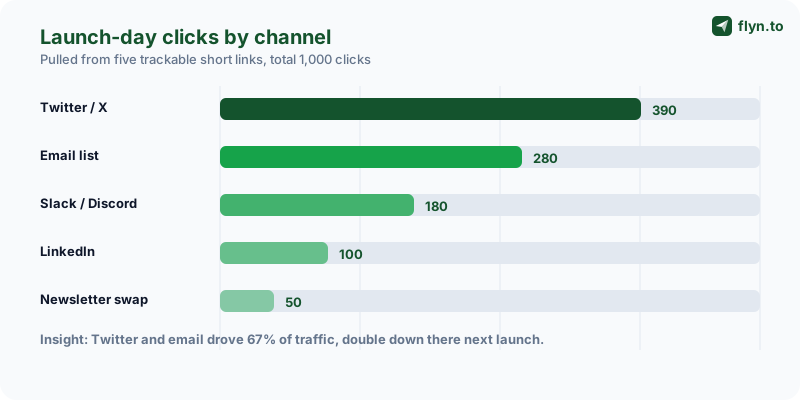
The part those guides skip is the link layer — the system of trackable URLs that carries traffic from every place you promote into your Product Hunt listing, and tells you afterward which of those places actually mattered. Get the link layer right and a launch stops being a coin flip. You learn that your email list drove 280 of your 1,000 visitors and your LinkedIn post drove 14, so next time you spend your launch-morning energy accordingly.
This is a tactical playbook for founders, indie hackers, and makers. It assumes you already know the basics of running a launch and focuses entirely on the links and the measurement. Three ideas anchor everything that follows:
- Prep beats improvisation. Every link you will share on launch day should exist, be tested, and be saved somewhere you can copy-paste from at 6 AM.
- One link per channel. If Twitter, LinkedIn, your newsletter, and your Slack communities all share the same URL, your analytics collapse into one useless number.
- Links outlive the launch. A launch lasts 24 hours. The tweets, comments, and emails you wrote for it live for years — if the link inside them still works.
If you have ever launched something on a community platform before, you already know how unforgiving the link rules can be. Our Reddit link-posting playbook covers the extreme end of that. Product Hunt is friendlier, but the discipline is the same: treat your launch links as infrastructure, not afterthoughts.
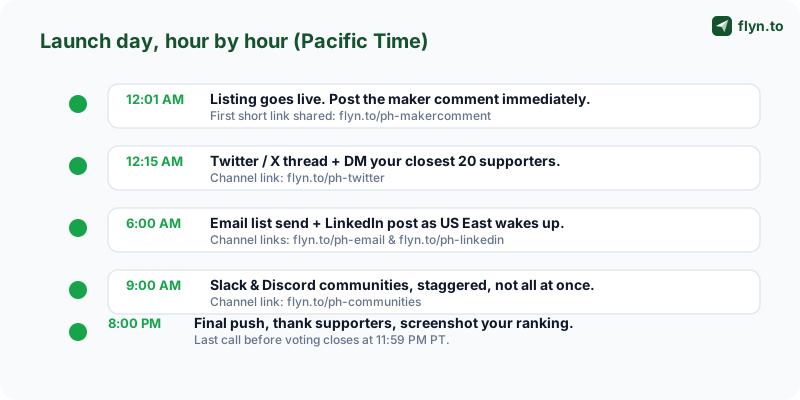
Prep Your Launch-Day Links the Night Before
Launch day is a terrible time to make decisions. You will be running on four hours of sleep, refreshing your ranking every ninety seconds, and answering comments in real time. Any task that can be done the night before must be done the night before. Building your links is at the top of that list.
 Tap to enlarge
Build the links before you have the live URL
The catch with Product Hunt is that you do not get your final listing URL until the post is live. You can work around this. Create your short links the night before pointing at your Product Hunt profile or a placeholder, then edit each one's destination to the real listing URL the moment it goes live. Because a short link's destination is editable, you can prepare the entire link set in advance and "arm" them with one round of edits at 12:01 AM. A dedicated Product Hunt link shortener exists for exactly this workflow — the slug stays fixed, the destination swaps.
Name your slugs so future-you understands them
Use descriptive, evergreen slugs: ph-twitter, ph-email, ph-linkedin, ph-communities, ph-newsletter. Avoid dates or campaign codes in the slug itself — you may reuse these links long after launch day, and a slug like ph-launch-may ages badly. Keep date and campaign detail in your UTM parameters instead, where it belongs. Build those UTM-tagged destinations with the free UTM Builder so GA4 attribution works alongside your click data.
The pre-launch link checklist
Run this list the evening before. It takes fifteen minutes and prevents the most common launch-morning panics:
- Every channel link created and saved in one document you can copy from.
- Each destination tested — click every short link and confirm it lands where you expect, with no redirect chain. The Redirect Checker does this in one step.
- UTMs validated on every destination — run them through the UTM Parser to catch a stray uppercase letter or typo.
- A full campaign QA pass with the Campaign URL QA Checker so a broken link cannot quietly cost you a hundred visitors.
- Your QR code generated and printed if any part of your launch happens in person.
Create a sixth short link — ph-bio — and swap it into your Twitter, LinkedIn, and Instagram bios the night before. People who hear about your launch and check your profile get a one-tap path to the listing. After the launch, this is the first link you will re-point.
One Trackable Short Link Per Promotion Channel
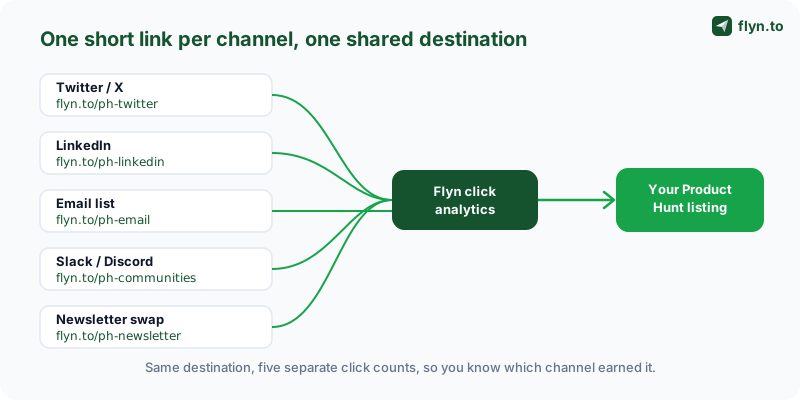
This is the single most important idea in the playbook, so it gets its own section. If you remember nothing else: never share the same URL across two channels. The moment your tweet, your LinkedIn post, and your newsletter all point at the same link, you have destroyed your ability to learn anything from the launch.
 Tap to enlarge
Why one shared link ruins the data
Product Hunt's own analytics tell you how many people visited your listing and how many upvoted. They do not tell you where those people came from. If you shared one link everywhere, Product Hunt shows "600 visitors" and you are done — no breakdown, no lesson. Referrer headers will not save you either: most are stripped by email clients, Slack, Discord, and in-app browsers, so the bulk of your launch traffic shows up as direct. The only reliable per-channel signal is a distinct short link per channel, each counting its own clicks.
The channel link map
Here is the link set most launches need. Map every place you plan to post to its own slug before launch day:
| Promotion channel | Short link slug | What it tells you |
|---|---|---|
| Twitter / X thread | ph-twitter | Reach of your X audience & thread |
| LinkedIn post | ph-linkedin | Whether LinkedIn is worth the effort |
| Email list / newsletter | ph-email | Your most owned, highest-intent channel |
| Slack & Discord communities | ph-communities | Community goodwill converting to clicks |
| Newsletter swap / partner | ph-newsletter | ROI of a cross-promotion deal |
| Profile bios (X, LinkedIn, IG) | ph-bio | Passive discovery traffic |
| Personal DMs to supporters | ph-dm | How much your inner circle moved |
Seven links. Fifteen minutes to build. The payoff is a launch you can actually learn from. Going deeper, you can run two competing links to the same channel — two tweet variants, two subject lines — and compare the clicks each one earned, the technique covered in our guide to A/B testing short links.
Keep the underlying URL clean
Each short link should redirect to your Product Hunt listing with consistent UTMs attached behind the scenes — utm_source set to the channel, utm_medium to something like launch, and a shared utm_campaign like product-hunt. The visitor sees a clean flyn.to/ph-twitter; your analytics receive the full tagged payload. If a generic shortener has ever made your links look untrustworthy, our piece on why short links get flagged as spam explains why a branded domain matters here too.
The Maker vs Hunter Link Strategy
Product Hunt launches involve two roles, and they should not share a link. The hunter is the person who posts your product (sometimes you, sometimes a well-followed community member). The maker is you — the person who built it and shows up in the comments. Each one drives a different slice of traffic, and conflating them costs you a real insight.
Why split the maker and hunter links
If you are hunted by someone with a large following, that person's notification to their followers is doing work you did not do. You want to know how much. Give the hunter a dedicated link — ph-hunter — to use in their own promotion, and keep your maker links separate. After the launch you can compare the hunter's click count against your owned channels and answer a question worth real money: does being hunted by a big account actually move the needle, or is it your own audience doing the lifting?
The maker comment link
Your first comment on the listing — the maker comment — is prime real estate. It is also a place to drop a link, usually to your homepage or a launch-day offer. Make it a tracked short link: ph-makercomment. People who read all the way to your comment and click are your highest-intent visitors of the day. Knowing how many converted is worth more than the raw upvote count.
The upvote number is the vanity metric. The number that compounds is "which channel sent people who actually clicked through and signed up" — and you only get that number if every channel had its own link.
Coordinating links with your supporters
You will ask friends, teammates, and supporters to share the launch. Do not let them grab the link from your tweet — that pollutes your ph-twitter count with their reach. Give organized supporter groups their own link, or at minimum a shared ph-supporters link, so the traffic they drive is visible and separable. The same logic governs a smart link-in-bio strategy: every distinct audience gets its own measurable entry point. Manage all of these from one dashboard — the full list of free helpers is on the tools page, and you can create an account to keep launch links organized in one place.
QR Codes for In-Person and Conference Launches
Not every launch happens at a laptop. If you are launching during a conference, a demo day, a meetup, or even from your coworking space, you have a room full of people whose attention you can convert — but only if you give them a frictionless path to your listing. That path is a QR code.
Where a launch QR code earns its keep
A QR code turns physical attention into a trackable scan. The placements that consistently produce scans during a launch:
- Your laptop lid or phone case — a sticker at a conference table starts conversations and gets scanned.
- A slide in your demo deck — if you are presenting on launch day, the final slide should be a QR code to the listing with "Live on Product Hunt right now."
- Conference badges and lanyard inserts — a small printed card with the code and one line of context.
- A standee or table tent at a booth — "Scan to upvote us today" beats "visit our website" every time.
Make the QR code dynamic and tracked
Generate the QR code from a short link, not from the raw Product Hunt URL. Two reasons. First, it is dynamic: when the launch ends you re-point that one link and every printed code keeps working. Second, it is tracked: scans land in your click analytics as their own channel, so you can prove the conference was worth the trip. Use a slug like ph-conf or ph-irl. Before you print anything, run the destination through the QR Destination Audit to catch a redirect chain or a page that loads slowly on mobile data — a QR code that resolves slowly on conference wifi is a wasted print run.
Never encode the raw Product Hunt listing URL directly into a QR code. It is a static code — the destination is baked into the dots. The moment your launch ends, every printed code points at a dead listing instead of converting. Always generate launch QR codes from a short link whose destination you can edit.
QR codes are not just for conferences. A creator launching to an audience can drop a QR card into a video or a physical mailer. The mechanics are the same as any other channel: one link, one slug, one trackable count.
What to Measure During the Launch
Launch day generates a flood of numbers. Most of them are noise. Knowing which three or four to actually watch — and what each one is telling you — keeps you from making panicked, data-free decisions at 2 PM when your ranking dips.
 Tap to enlarge
The metrics that matter
Watch these, in roughly this priority order:
- Clicks per channel link — your real-time pulse on which channel is performing. If
ph-twitteris flat two hours after you posted the thread, the thread underperformed and it is time to re-share or pivot effort. - Click-to-upvote ratio — total clicks across all links versus your upvote count. A healthy launch converts a meaningful share of visitors into upvotes; a low ratio means your listing copy or gallery is not landing.
- Geography and time-of-day — click analytics show when each region wakes up, so you can time your second and third pushes.
- Downstream signups — the metric that actually pays your bills. Upvotes are a means; signups are the end.
The launch-day dashboard you actually need
You do not need anything elaborate. One browser tab on your Product Hunt link dashboard showing live click counts per slug, and one tab on the Product Hunt listing itself. That is the whole setup. The click dashboard answers "what is working?" and the listing answers "where do I rank?" — together they are enough to steer the day.
Reading the result the day after
The morning after, the click breakdown becomes your launch retrospective. Sort your channels by clicks. The top two are where your audience genuinely lives — invest there for every future launch. The bottom two either need a different approach or are not worth your launch-morning energy. This is the entire reason you built separate links: not for launch-day theatre, but for a clear-eyed retrospective that makes the next launch better. For the deeper attribution mechanics behind this, the UTM parameters guide is the companion read.
The Post-Launch Move That Pays Off for Years
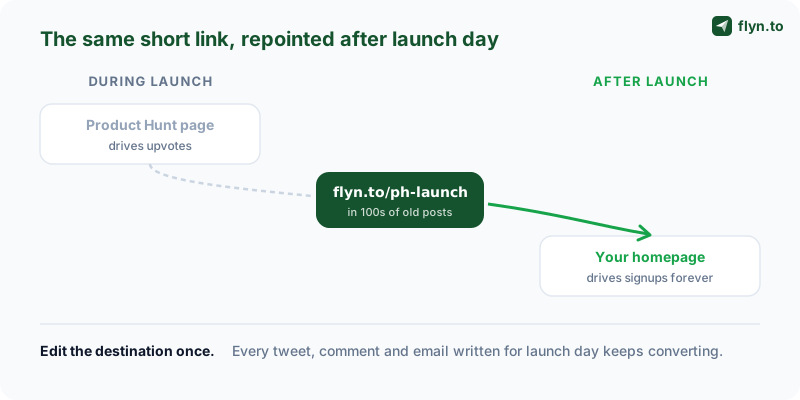
Here is the move almost no launch guide mentions, and it is the highest-ROI thing in this entire playbook. When your launch ends — voting closes at 11:59 PM Pacific — re-point your launch short link from the Product Hunt page to your homepage.
 Tap to enlarge
Why this matters so much
Think about everything you published for the launch: the Twitter thread, the LinkedIn post, the maker comment, the newsletter, the messages in five community channels. Every one of those contains a link. The day after launch, all of those links point at a Product Hunt listing that is no longer ranking and no longer relevant. People still find those old posts — via search, via your profile, via someone resurfacing the thread — and they still click. With a raw Product Hunt URL, that click is wasted on a stale page.
Because you used a short link, you fix this with one edit. Change the destination of flyn.to/ph-launch from the Product Hunt page to your homepage, and instantly every old post becomes an evergreen homepage funnel. You wrote that content once; with one destination swap it keeps converting for years.
What to re-point each link to
You do not have to send everything to the same place. A smarter mapping:
| Original launch link | Re-point it to | Why |
|---|---|---|
ph-twitter, ph-linkedin | Homepage | Cold-ish traffic — let them discover the product |
ph-email | Pricing or signup page | Warm audience — send them deeper |
ph-makercomment | A launch recap or changelog | Curious visitors want the story |
ph-conf / ph-irl | Signup with a launch offer | Met you in person — convert the goodwill |
ph-bio | Homepage or current campaign | Your bio link should always point at "now" |
Keep measuring after the swap
The links keep counting clicks after you re-point them. Months later you can see that your launch-day Twitter thread still sends a trickle of traffic every week — proof that launch content has a long tail, and a reason to keep it polished. This is the difference between treating a launch as a one-day event and treating it as a permanent, measurable asset. Paid plans let you re-point unlimited links and add a custom domain — see pricing for the details.
Put a calendar reminder for the morning after launch titled "re-point launch links." It is a ten-minute job and it is incredibly easy to forget in the post-launch haze. Founders who skip it leave months of compounding homepage traffic on the table.
Your Pre-Launch Link Checklist
Pull everything together into one repeatable routine. Run this the week of your launch and you will walk into launch day with the link layer completely handled — free to focus on comments, community, and ranking.
One week out
- Map your channels. List every place you will promote and assign each one a slug.
- Decide your maker and hunter links. Confirm who is hunting and give them a dedicated link.
- Build your UTM convention. One
utm_campaignvalue, consistentutm_sourceper channel — locked with the UTM Builder.
The night before
- Create all short links on your Product Hunt link shortener, pointing at a placeholder for now.
- Generate and print your QR code if any in-person moment is planned.
- QA every link through the Campaign URL QA Checker and confirm clean redirects with the Redirect Checker.
- Save the link list in one copy-paste-ready document.
Launch morning
- Arm the links. The moment your listing is live, edit every short link's destination to the real Product Hunt URL.
- Open your two tabs: click dashboard and the listing.
- Post on schedule — each channel gets its own link, staggered across the day.
The day after
- Pull the click breakdown and write your one-paragraph retrospective.
- Re-point every launch link to its evergreen destination per the mapping above.
- Keep the links live — they are now permanent homepage funnels.
That is the whole playbook. The listing copy and the maker comment get all the attention in launch guides because they are visible. The link layer gets none because it is invisible — but it is the part that tells you the truth about your launch and the part that keeps paying you after launch day ends. Browse the full set of free link tools on the tools page, and when you are ready, create a free account to build your launch link set. A great launch is not luck. It is preparation you can measure.
Frequently Asked Questions
What day and time should I launch on Product Hunt?
How do I track which channel drove the most upvotes?
Should the maker and the hunter use the same link?
ph-hunter) and keep your own channel links separate. After the launch you can compare the hunter's click count against your owned channels and answer whether being hunted by a large account actually moved the needle, or whether your own audience did the lifting. That answer shapes how you plan your next launch and whether a high-profile hunter is worth pursuing.Can I prepare my launch links before the listing is live?
Do I need QR codes for a Product Hunt launch?
What should I do with my launch links after the launch ends?
How many upvotes do I need to rank on Product Hunt?
Is it against Product Hunt rules to ask people to upvote?
Free tools for this
Three Flyn tools that pair well with the strategy in this article, all free, no signup needed.
UTM Builder
Build campaign-tracked URLs in seconds.
Broken Link Checker
Scan any page for dead links and 404s.
Open Graph Checker
Preview how URLs unfurl on social.
Keep reading
Three related deep-dives from the Flyn blog.
QR Codes for Events: Tickets & Check-In
12 min read

How to Add a Link to Your TikTok Bio
12 min read

Instagram Bio Link: How to Add One and Track Clicks
12 min read
Ready to try Flyn?
Free plan includes 25 links/month, full analytics, and access to all 30+ free tools above. No credit card required.
Already a member? Log in
Karan Bhakuni is the founder of Flyn. He writes about branded links, click analytics, and the link-management tooling growth teams and creators actually need, drawn from building Flyn and reading a lot of user feedback.
Find these guides useful? Add Flyn as a preferred source so more of them show up in your Google results.