Instagram Bio Link: How to Add One and Track Clicks
Instagram finally lets you stack up to 5 bio links and add a link sticker to any Story. Here is exactly how to add yours, plus the honest answer to whether you can see who clicked.


How to Add a Link to Your Instagram Bio (the 20-Second Version)
You have an audience on Instagram and exactly one job: get them off the app and onto your thing, your shop, your newsletter, your latest video. The bottleneck is the same for every creator and brand: Instagram does not let you put clickable links in captions or comments. The only reliable doorway out is your Instagram bio link, and most people set it once, never optimize it, and never find out whether anyone actually taps it.
This guide fixes all of that. You will learn the exact taps to add a bio link, how to use all 5 bio link slots Instagram now gives you, how to add a tappable link sticker to a Story, and the honest answer to the question everyone asks: can I see who clicked? (Short version: not by name, but you can track every tap with the right link.)
The steps, exactly
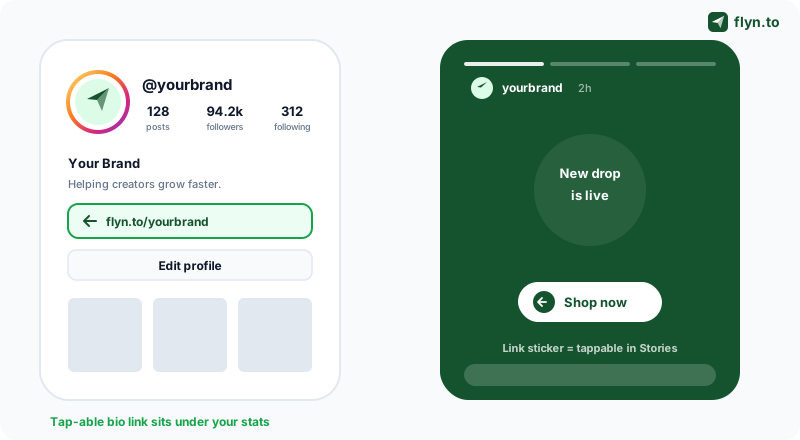
Here is the full flow on the current Instagram app. It is the same on iOS and Android:
- Open your profile and tap Edit profile.
- Tap Links (older versions show a single Website field instead).
- Tap Add external link.
- Paste your URL into the link field. Use a short, branded link like
flyn.to/shoprather than a long messy one. - Add an optional Title so the link reads as "Shop the new drop" instead of a raw address.
- Tap Done, then Done again to save your profile.
 Tap to enlarge
One detail that changes everything: shorten the link first
The URL you paste is the URL Instagram tracks for you, which is to say not at all. Instagram shows you zero data about who taps your bio link. So before you paste anything, run it through an Instagram link shortener. You get a clean flyn.to/... address that looks trustworthy in your bio, and every tap is logged with country, device, and referrer. We come back to tracking in detail below, but the decision happens here, at paste time.
You Can Now Add Up to 5 Links to Your Instagram Bio
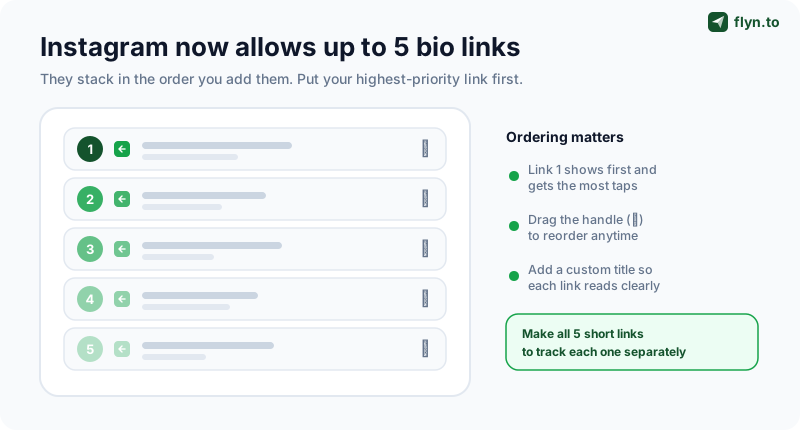
For years, the Instagram bio held exactly one link, which is why the entire "link in bio" industry exists. That limit is gone. Instagram now lets you add up to 5 links to your bio, stacked vertically, each with its own optional title. For most creators this removes the need for a third-party landing page entirely.
How the 5 links behave
A few things matter once you have more than one link:
- They show in the order you add them. The first link sits at the top and gets the most taps. Treat slot one as prime real estate.
- You can reorder them. Drag the handle next to each link in the Edit links screen to rearrange. Reorder seasonally as your priorities change.
- Titles do the selling. "New album, out now" beats a bare URL every time. Write the title like a button label.
- Only the first link is visible by default on some layouts, with the rest behind a "and X more" tap. So your top link still carries the most weight.
 Tap to enlarge
The smart play: a separate short link per slot
If you use all five slots but point them at raw URLs, you have five doorways and zero idea which one people use. Make each bio link its own short link instead. Now your dashboard shows you that 70% of taps go to the shop and almost nobody taps the podcast, which is a real content decision you could never make otherwise. This is the same logic as tracking any campaign: one link per source. Our guide on how to track clicks on a link walks through the principle in full.
Five links vs a link-in-bio page
So do you still need a dedicated link-in-bio landing page? It depends:
- Use the 5 native links if you have a handful of stable destinations and want the fastest path out of the app with no extra page to load.
- Use a link-in-bio page if you have more than five things, want a branded mini-site, or need rich layouts, embeds, and email capture.
Many creators do both: native links for the top few priorities, a single short link to a fuller page for everything else. We break the trade-offs down in our link-in-bio strategy for creators.
How to Add a Link to Your Instagram Story
Your bio link is permanent. Story link stickers are how you drive taps in the moment, the second someone watches your content. The best news: the old restrictions are gone. There is no longer a 10,000-follower minimum, and the "swipe up" gesture has been replaced by a sticker any account can use.
Adding the link sticker, step by step
- Create your Story as usual (photo, video, or a plain background).
- Tap the sticker icon at the top of the screen.
- Choose the Link sticker.
- Paste your URL (again, a short link, so you can track the taps).
- Optionally tap Customize sticker text to replace the raw URL with a call to action like "Shop now" or "Read the post."
- Place and resize the sticker, then post your Story.
Customize the sticker text. A link sticker that says "Get 20% off" earns far more taps than one showing flyn.to/xk29q. Pair a clear sticker label with a short branded link and you win on both trust and clarity. The destination is a tracked Instagram short link, so you also see exactly how many times people tapped.
Stories are where link tracking pays off most
Stories disappear in 24 hours, which makes them impossible to measure unless the link itself does the counting. Drop a tracked short link behind every Story sticker and you build a record of which Stories actually drove taps, even after the Story is gone. Compare a "behind the scenes" Story against a "new product" Story and let the tap counts settle the debate. The same trick works on other platforms: a TikTok link shortener does the identical job for your TikTok bio and captions.
Can You See Who Clicked Your Instagram Link? The Honest Answer
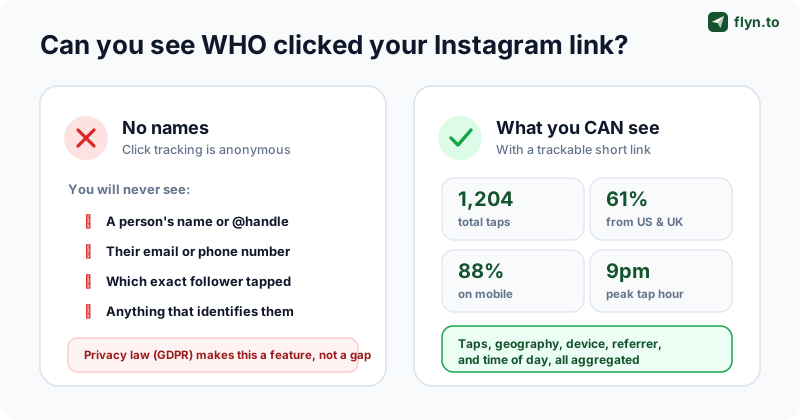
This is the most-searched question about bio links, so let us be completely straight about it. No, you cannot see the name, handle, email, or identity of anyone who taps your Instagram link. Not through Instagram, not through any link tool, not through any "secret" method. Anyone selling you a way to see which follower clicked is either lying or breaking privacy law.
 Tap to enlarge
Why "who" is off the table
Click data such as IP addresses and device details can count as personal data under GDPR and similar laws. Reputable trackers anonymize or hash that data precisely so you stay compliant. The anonymity is the point. You should not want a tool that quietly stockpiles identifiable data about your followers, because that is a liability waiting to happen.
What you absolutely can see
Route your bio link through a trackable short link and you unlock a surprising amount of insight, all of it aggregate and anonymous:
- Total taps, with bots counted apart, so you know real volume.
- Geography, the countries and cities your audience taps from.
- Device and browser, almost always mobile-heavy, which should shape your landing page.
- Referrer, confirming the tap came from Instagram versus another channel.
- Time of day, revealing when your audience is actually active.
You will never know that Sarah tapped your link. You will know that 1,200 people did, that 88% were on a phone, and that taps peak at 9pm. That is not a consolation prize. That is exactly the data that should shape what you post next.
How to Track Clicks on Your Instagram Link
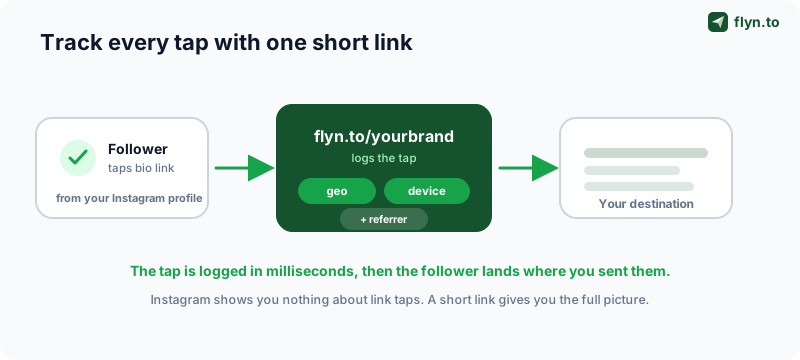
Instagram gives you nothing on bio-link or sticker taps, so the tracking has to live in the link itself. The mechanism is a short link: you put it between the tap and the destination, it logs the tap, then it forwards the visitor on in milliseconds. They notice nothing; you get a dashboard.
 Tap to enlarge
Set it up in under a minute
- Shorten your destination URL with an Instagram link shortener (or sign up for a free account to keep all your links in one dashboard).
- Paste the short link into your bio (or a Story link sticker) using the steps above.
- Watch the taps roll in, logged in real time with geo, device, and referrer.
Add UTM tags if the link goes to your own site
If your bio link points to a site you own and have analytics on, layer on UTM parameters so Google Analytics 4 attributes the visit to Instagram and follows it all the way to a purchase. Build clean tags with the free UTM Builder, then shorten the tagged URL so it still looks tidy in your bio. You end up with two independent data sources: the short link's own tap log and GA4's on-site attribution. Our complete guide to tracking link clicks covers the combination in depth.
Use a separate link per placement
Make one short link for your bio, a different one for Story stickers, and another for any link you put in a Reel caption or DM. Now your dashboard tells you whether your bio or your Stories actually drive traffic, instead of lumping every tap together. Browse the full kit of free link tools if you want to build out a proper tracking setup.
Why a Branded Short Link Beats a Raw URL in Your Bio
Tracking is the practical reason to shorten your bio link. Trust is the reason it makes you more money. The link in your bio is a tiny ad, and people decide whether to tap it in a fraction of a second based largely on how it looks.
The trust gap is measurable
Compare these three bio links:
| Bio link | How it reads | Tap appeal |
|---|---|---|
flyn.to/shop | Short, branded, obviously yours | High |
bit.ly/3xK9qZr | Generic, random, "could be spam" | Low |
yourstore.com/?ref=ig&utm_source=... | Long, messy, scary on mobile | Low |
A branded short link on your own domain (like go.yourbrand.com/shop) reads as trustworthy because it carries your name, so more people tap it. You are not just measuring the taps you already had, you are generating more of them. That is the rare optimization that improves the metric and the result at the same time.
Branded links survive a redesign
Because the short link owns the redirect, you can change the destination after you have set it in your bio. Launch a sale, swap flyn.to/shop to point at the sale page, and the link in your bio updates instantly without you touching Instagram. When the sale ends, point it back. The link in your bio becomes a permanent, reusable slot rather than something you rewrite every week.
Pair your bio link with a QR code for offline reach. A QR code on a flyer, a business card, or a product insert can point at the same trackable short link, so a scan and a bio tap both feed the same dashboard. One link, every channel.
The In-App Browser Caveat (and Other Gotchas)
One Instagram-specific quirk trips up a lot of creators: when someone taps your bio link, it usually opens inside Instagram's in-app browser, not their normal browser like Safari or Chrome. This matters more than it sounds.
Why the in-app browser bites
- Logins do not carry over. A visitor who is signed in to your site in Safari arrives logged out in the in-app browser, which can hurt conversions on gated content or checkouts.
- Some scripts behave differently. Certain analytics, payment, or cookie-consent scripts act up inside the embedded browser.
- Attribution can fragment. The in-app browser is a different environment, so some tools see it as a separate session.
A good short link handles the redirect cleanly regardless of which browser opens it, and most users can tap "Open in browser" from the in-app menu. Still, design your destination page to work for a logged-out mobile visitor, because that is who is arriving.
There is a measurement upside hiding in this quirk too. Because the in-app browser reports Instagram as the referrer, a tracked short link can confirm that a tap genuinely came from Instagram rather than somewhere else you pasted the same link. If you ever wonder whether your bio is pulling its weight versus your email or your TikTok bio, the referrer data settles it. That is one more reason the tracking belongs in the link, not in Instagram, which will never hand you any of this.
Other common mistakes
A few more traps to avoid:
- A broken or expired link. If your bio link 404s, every tap is wasted. Test it from a phone after every change, and avoid links with an expiry date in the bio.
- Reusing one link everywhere. If your bio, Stories, and Reels all share a single link, you can never tell which placement performs. Use a separate tracked link per placement.
- Leaving the URL ugly. A raw, untitled URL in your bio looks careless. Add a title and shorten it.
- Ignoring the data. Tracking only helps if you read it. Check which link wins each month and reorder your slots accordingly.
Do not trust raw tap counts blindly. Link-preview bots and crawlers can inflate the number, sometimes meaningfully. A serious tracker filters non-human traffic automatically, so look for one that reports unique taps and excludes bots, rather than a naive counter that treats every hit as a real person.
Put It All Together: Your Bio Link Checklist
You now know more about the Instagram bio link than 99% of accounts. Here is the whole thing distilled into a workflow you can run today.
The five-minute setup
- Shorten every destination with an Instagram link shortener, one short link per placement.
- Add up to 5 bio links via Edit profile → Links, highest priority first, each with a clear title.
- Add link stickers to Stories, with customized text, not raw URLs.
- Layer UTM tags (from the UTM Builder) on any link pointing to a site you own.
- Check the dashboard weekly, then reorder slots and adjust content based on which links actually get tapped.
Why one platform beats stitched-together tools
You can run all of this with a free shortener and a spreadsheet, until you have a dozen links and lose track of which is which. A dedicated link platform gives you branded short links, a real-time tap dashboard, UTM building, QR codes, and the ability to swap destinations after posting, all in one place. See how the options compare on our alternatives pages.
Start tracking your bio link today
You can create your first tracked Instagram link with a free Flyn account in under a minute, no credit card, with total tap tracking and bot filtering on by default. When you are ready for full geo and device analytics, a branded domain, and team features, Pro starts at $9/mo (or $249 lifetime). Set the link, read the taps honestly, and let the numbers tell you what your audience actually wants. Want more tactics like this? Browse the Flyn blog or jump straight to the homepage to shorten your first link.
Frequently Asked Questions
How do I add a link to my Instagram bio?
Can I add more than one link to my Instagram bio?
How do I add a link to my Instagram Story?
Can I see who clicked my Instagram link?
Why isn't my Instagram bio link working?
How do I track clicks on my Instagram link?
Do I need a link-in-bio page or just the bio links?
Does a short link in my bio increase clicks?
Free tools for this
Three Flyn tools that pair well with the strategy in this article, all free, no signup needed.
UTM Builder
Build campaign-tracked URLs in seconds.
Broken Link Checker
Scan any page for dead links and 404s.
Open Graph Checker
Preview how URLs unfurl on social.
Keep reading
Three related deep-dives from the Flyn blog.
QR Codes for Events: Tickets & Check-In
12 min read

How to Add a Link to Your TikTok Bio
12 min read
YouTube Description Links: Add Clickable Links Fast
13 min read
Ready to try Flyn?
Free plan includes 25 links/month, full analytics, and access to all 30+ free tools above. No credit card required.
Already a member? Log in
Karan Bhakuni is the founder of Flyn. He writes about branded links, click analytics, and the link-management tooling growth teams and creators actually need, drawn from building Flyn and reading a lot of user feedback.
Find these guides useful? Add Flyn as a preferred source so more of them show up in your Google results.