Free Affiliate Link Cloaker
Turn ugly affiliate URLs into clean, branded short links. Cloak any affiliate link, track every click, and boost your conversions, all with your own custom domain.
What you get with Flyn link cloaking
Custom domain
Use your own branded domain
Click analytics
Real-time clicks, location, device
A/B testing
Test different landing pages
Link expiration
Set auto-expire dates
See how Flyn cloaks popular affiliate networks
Before
https://click.linksynergy.com/deeplink?id=AbC1dEf2GhI&mid=24366&murl=https%3A%2F%2Fwww.merchant.com%2Fwireless-earbudsAfter
go.yourbrand.com/wireless-earbudsBefore
https://www.awin1.com/cread.php?awinmid=12345&awinaffid=678901&ued=https%3A%2F%2Fwww.merchant.com%2Fhosting-dealAfter
links.yourbrand.com/hosting-dealBefore
https://hop.clickbank.net/?affiliate=myid&vendor=product123&cbpage=salespage&tid=campaign01After
go.yourbrand.com/fitness-guideWorks with any affiliate link, but some programs restrict shorteners or, like Amazon, pay no commission on redirected clicks, so check each program's terms first.
How to Cloak an Affiliate Link in 3 Steps
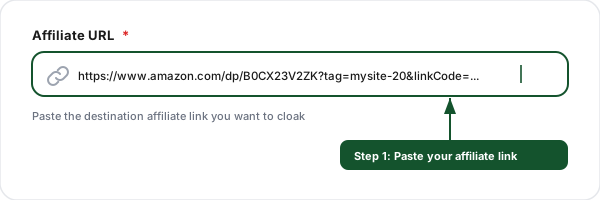
Paste your affiliate link
Enter the long affiliate URL from Rakuten Advertising, ClickBank, or another network that allows redirecting short links.
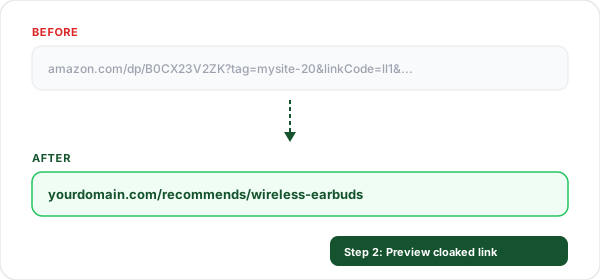
Preview the cloaked link
See how your ugly affiliate URL transforms into a clean, branded short link with your custom domain.
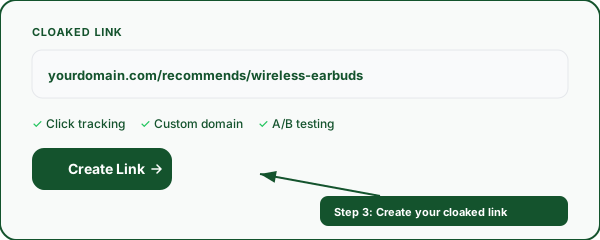
Create your cloaked link
Sign up for free to create the cloaked link with click analytics and real-time click counts.
Before & After: See the Difference
Your audience clicks branded links they trust, not strings of random characters and tracking codes.
Before (raw affiliate URL)
https://click.linksynergy.com/deeplink?id=AbC1dEf2GhI&mid=24366&murl=https%3A%2F%2Fwww.merchant.com%2Fwireless-earbudsAfter (cloaked with Flyn)
go.yourbrand.com/wireless-earbudsBefore (raw affiliate URL)
https://www.awin1.com/cread.php?awinmid=12345&awinaffid=678901&ued=https%3A%2F%2Fwww.merchant.com%2Fhosting-deal&clickref=blogpostAfter (cloaked with Flyn)
links.yourbrand.com/hosting-dealBefore (raw affiliate URL)
https://hop.clickbank.net/?affiliate=myid&vendor=product123&cbpage=salespage&tid=campaign01After (cloaked with Flyn)
go.yourbrand.com/fitness-guideEverything You Need to Cloak Affiliate Links
Flyn is a full link management platform, link cloaking is built in. No extra plugins or tools required.
Custom branded domains
Use your own domain like go.yourbrand.com for every cloaked link. Build trust and boost click-through rates by up to 39%.
Click analytics
Track every click in real time, see location, device, browser, referrer, and more. Know exactly which affiliate links perform best.
Link masking
Hide ugly affiliate parameters behind clean URLs. Visitors see your brand, not a string of tracking codes and session IDs.
One-click cloaking
Paste any affiliate URL and get a branded cloaked link in seconds. No coding, no plugins, no WordPress required.
No redirect penalty
Standard links are a plain server-side 302 redirect in one hop. The iframe mask is a separate Pro switch that stays off unless you turn it on for a link.
API access for bulk
Cloak hundreds of affiliate links programmatically with our REST API. Perfect for large affiliate sites and comparison pages.
Why Affiliate Marketers Cloak Their Links
Raw affiliate links are long, messy, and filled with tracking parameters that look suspicious to your audience. When someone sees a URL packed with random characters, session IDs, and affiliate tags, their instinct is to not click. Cloaked links solve this by replacing the raw URL with a clean, branded domain that visitors recognize and trust. Under the hood a cloaked link is an ordinary URL redirect: the visitor requests your branded link and the server forwards them to the affiliate destination in one hop.
Beyond trust, link cloaking gives you control. If a merchant changes their affiliate program or URL structure, you update the destination once in your Flyn dashboard and every cloaked link across your entire site updates instantly, no need to find and replace URLs in hundreds of blog posts. This single benefit has saved affiliate marketers thousands of hours. New to this? Our step-by-step guide on how to cloak affiliate links without a website walks through the whole process and, importantly, which networks allow it. Choosing a platform? Our comparison of link shorteners with cloaking shows that only four of eight major tools offer it at all.
Cloaking also protects your commissions. Some users know how to strip affiliate tags from URLs before purchasing, which means you do the work of driving the sale but earn nothing. A cloaked link hides the affiliate parameters, making it much harder for anyone to bypass your tracking.
Cloaking is also the first step toward a bigger win: because your affiliate links now run through a redirect you control, you can attach an ad pixel to them and retarget everyone who clicks, even though the merchant page belongs to someone else. That turns one-time clicks into an audience you can advertise to for months. The same move works for any link you do not own.
URL Cloaking vs URL Masking
Most people use URL cloaking and URL masking for the same goal: the link you share hides a long affiliate or tracking URL. Flyn does it two ways.
Redirect (the default on every Flyn short link): your short link sends the visitor on to the destination. The long URL never appears in your post, email or video description, but the browser shows the real page address after the click. It works on the free plan.
Full mask (Flyn Pro): the destination loads inside a full-page frame, so the address bar keeps showing your short link. Turn it on per link. Some sites refuse to be framed; Flyn checks for that and sends those visitors on with a normal redirect instead.
Affiliate programs set their own rules: some that allow a redirect draw the line at a mask, and some restrict shorteners altogether. Check each program's terms before you shorten or mask an affiliate link; our guide on how to cloak affiliate links covers the major networks.
Frequently Asked Questions
What is link cloaking?
Why should I cloak my affiliate links?
Is affiliate link cloaking allowed by Amazon Associates?
Does link cloaking affect SEO?
What is the difference between link cloaking and link shortening?
Can I use my own custom domain for cloaked links?
How do I track clicks on my cloaked affiliate links?
Can I cloak links in bulk?
What happens if I delete a cloaked link?
Is link cloaking the same as link masking?
More Free Tools
Explore other free tools from Flyn to optimize your links and track performance. Cloaking an affiliate link? Confirm your tag still reaches the merchant with the affiliate link checker.
UTM Builder
Build campaign tracking URLs with UTM parameters for Google Analytics.
SMS Link Generator
Build sms: click-to-text links with pre-filled message and international phone numbers.
OG Checker
Check OG tags and preview how your links appear on social media.
Link Rotator
Split one link across multiple destination URLs with weighted rotation, for A/B tests and ad rotation.
Stop losing affiliate commissions to ugly links
Join thousands of affiliate marketers who use Flyn to cloak, brand, and track their affiliate links, with custom domains, real-time analytics, and A/B testing.