Free Link Rotator
Build one link that splits traffic across multiple destination URLs. Set custom weights, preview the split, and get a self-hosted HTML file, no sign-up required.
The rotator picks one URL per visit. Higher weight = picked more often. Equal weights = even split.
Add 2 or more destination URLs, then generate your rotator HTML.
Want a rotator you don't have to host?
On a paid plan, Flyn keeps the rotation for you: one branded short link, up to 12 weighted destinations, edited from the dashboard. No HTML file to upload anywhere.
How to Create a Link Rotator in 3 Steps
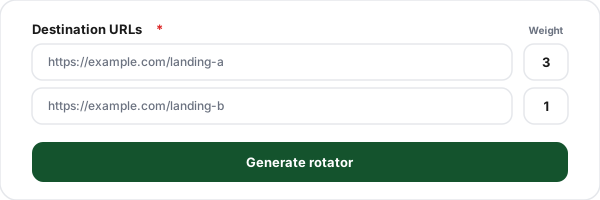
Add your destination URLs
Enter two or more destination URLs you want to split traffic between. Add a row for each destination, up to 12.
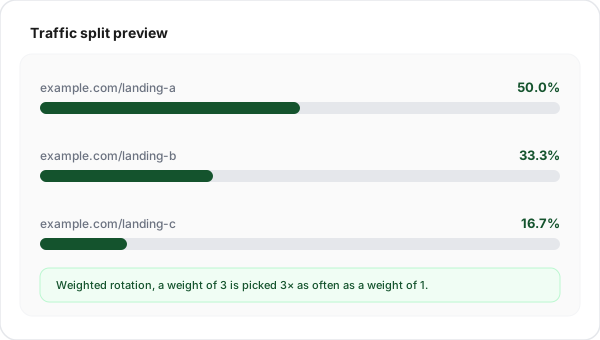
Set rotation weights
Give each destination a weight. Equal weights split traffic evenly; a higher weight gets a bigger share. The live preview shows the exact percentage each URL will receive.
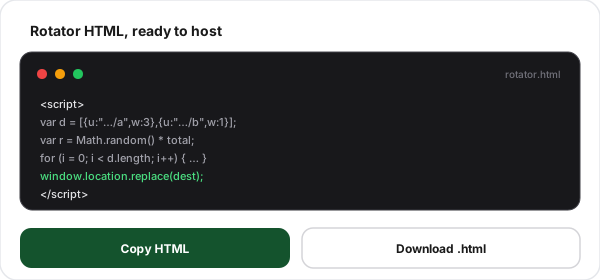
Copy or download the HTML
Generate the rotator, then copy the HTML or download the ready-to-host file. Upload it anywhere and share its URL, visitors are split across your destinations.
What Is a Link Rotator?
A link rotator is a single link that fans out to several destination URLs. Instead of always sending visitors to the same page, it picks one destination on every visit, either evenly or weighted toward the destinations you favor. It is the simplest way to point one ad, one bio link, or one campaign URL at multiple landing pages at once. You will also see it called a URL rotator or a traffic rotator.
This tool generates the rotator as a small, self-contained HTML file. The rotation logic, a weighted random pick, runs in the visitor's browser, so there is nothing to install and no server to run. You host the file wherever you like and share its URL. The trade-off is that the destinations are frozen into the file: changing one means regenerating it and re-uploading. A hosted rotating link on Flyn, which needs a paid plan, keeps the same short URL while you edit the destinations and weights whenever you like. If you instead want several separate short links that all point to the same page, that is creating multiple short links for one URL. And if you are choosing a rotation tool, our comparison of the best link rotators covers which of eight shorteners can actually split traffic by percentage.
Weighted vs. Even Rotation
Every destination has a weight, a number that controls how often it is picked. The rotator adds up all the weights, picks a random point in that range, and selects whichever destination the point lands in. The bigger a destination's weight, the bigger its slice of traffic. Weights are relative, not percentages: 3 and 1 splits traffic the same way 75 and 25 does.
Example: three destinations
Set every weight to the same number (for example, all 1) for an even split. Use unequal weights to push most traffic to a proven page while testing a smaller slice on an experiment. Each visit is an independent random pick, so these are the shares traffic settles on over volume, not a strict one-after-another cycle.
What People Use Link Rotators For
One link, many destinations, here is where a rotator earns its keep.
A/B landing page tests
Send 50% of traffic to version A and 50% to version B from one link, then compare which page converts better.
Ad creative & offer rotation
Point one ad link at several creatives or promos so you can rotate offers without rebuilding the campaign.
Affiliate offer rotation
Alternate between several merchant offers behind a single link to spread risk and test which pays best.
Load distribution & mirrors
Spread visitors across mirror pages or regional servers so no single destination takes all the traffic.
Lead distribution
Spread inbound leads or demo bookings across several reps, evenly or weighted toward whoever has capacity.
Geo & seasonal swaps
Weight a regional or seasonal landing page heavily for a campaign, then shift the weights as the season changes.
Where to Host Your Rotator File
The generated HTML is a normal static file, host it anywhere that serves static pages.
GitHub Pages
Commit the file as index.html in a repo, enable Pages in settings, and your rotator is live at a github.io URL within a minute, free forever.
Netlify or Cloudflare Pages
Drag the HTML file onto a Netlify or Cloudflare Pages deploy. You get an HTTPS URL instantly and can attach a custom domain.
Your own site or S3
Upload the file to any directory on your web server or an S3 / object-storage bucket. The rotator URL is just the path to that file.
Client-Side Rotator vs. Hosted Rotation
This free tool builds a working rotator in seconds and you host the file. A Flyn short link holds the same rotation on a paid plan, so the URL you share never has to change.
Capability
This free tool
Flyn hosted, paid
Up to 12 destinations
Weighted traffic split
Even split (equal weights)
Edit destinations without re-hosting
Per-destination click reporting
Hosting included
Clean branded short link
Price
Per-destination reporting is the row where the two really part ways. The generated file splits traffic blind: it runs in the visitor's browser and reports nothing back. A Flyn short link records which destination served each click, and the link's own analytics page lists every destination with its click count, its actual share, and the share its weight intended, removed destinations included. That is clicks on that one link, not conversions. To compare what people did after they landed, give each destination URL its own utm_content value and compare them in the analytics you already run on those pages.
What a Hosted Rotating Link Adds
Build a free rotator here and host the file yourself, or put the same rotation on a Flyn short link with a paid plan. The hosted link also reports itself: each destination's clicks and actual share sit next to the share its weight intended, on that link's analytics page.
Nothing to host
Flyn serves the rotation. No HTML file, no static host, no re-upload when something changes.
Edit destinations live
Change URLs and weights from the dashboard. The next click follows the new list.
Up to 12 destinations
Weight each one however you like, or give them all the same weight for an even split.
Branded short link
One clean branded URL on your own domain instead of a raw .html file path.
Frequently Asked Questions
What is a link rotator?
Is a URL rotator the same as a link rotator?
How does a link rotator work?
What is a link rotator used for?
What is the difference between weighted and even rotation?
Do I need to host the HTML file myself?
Does the free rotator track which destination each visitor got?
Is a link rotator bad for SEO?
Can I use a link rotator for A/B testing?
Can I change the destinations after I generate the file?
Is link rotation allowed by ad networks and affiliate programs?
How is a link rotator different from a URL shortener?
Is this link rotator free? Do I need an account?
More Free Link Tools
Explore more free link tools from Flyn, instant, no sign-up required.
App Store Link Generator
One link that routes iOS to the App Store and Android to Google Play.
Expiring Link Generator
Build a link that auto-expires after a set time or number of clicks.
Deep Link Tester
Test iOS Universal Links and Android App Links for correct configuration.
Link Cloaker
Cloak affiliate links with clean branded URLs to increase trust and CTR.
Ready to rotate links the smart way?
Build a free rotator above with no account at all, or put the rotation on a Flyn short link: up to 12 weighted destinations you can edit any time, on any paid plan.