How to Create Multiple Short Links for One URL
You have one page, one blog post, one product, and you want to promote it in fifty places. Point one short link at it and every click blurs into a single number. Point fifty unique links at it and you finally know which pin, post, and placement worked. Here is how, plus the honest truth about what it does and does not do on Pinterest.


Why one destination sometimes needs many links
You wrote one blog post. You have one product page. You are going to promote it in fifty different places: a dozen Pinterest pins, a handful of Facebook posts, an email, three partner sites, your bio. So you shorten the link once and paste that same short link everywhere. A week later you check the stats: 1,204 clicks. Great. From where? No idea.
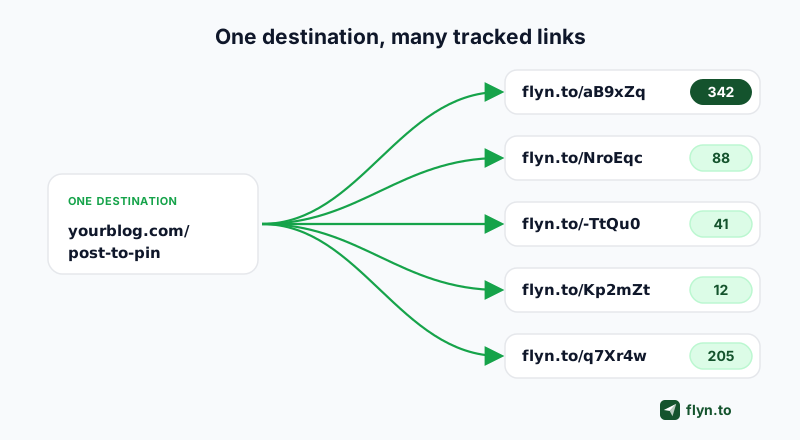
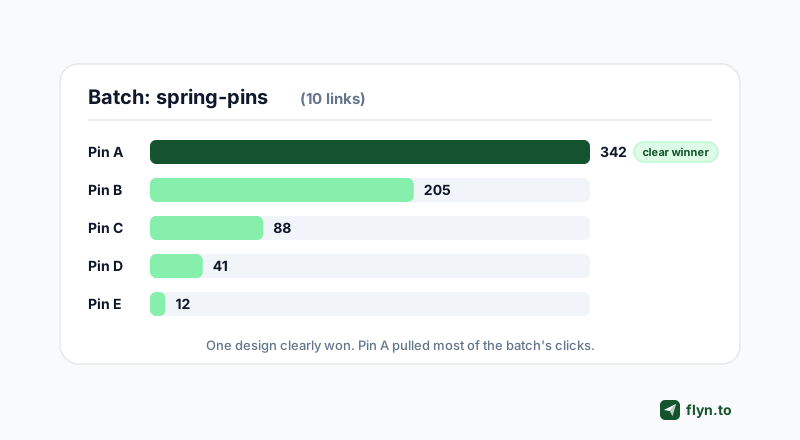
That is the problem a single short link creates. It counts total clicks beautifully and tells you nothing about which effort earned them. The fix is almost embarrassingly simple: create multiple short links for one URL, one per placement, all redirecting to the same destination. Ten pins, ten links. Now the numbers separate, and the pin that pulled 342 clicks stops hiding behind the nine that pulled nine each.
This guide covers when to do that, how to do it fast instead of one link at a time, and, because the question comes up constantly, the honest truth about what multiple links do and do not do for you on Pinterest. The short version: they are a measurement tool, not a reach hack, and anyone selling you the second story is wrong. And while Pinterest is the headline example, the same one-URL-many-links move powers affiliate tracking, ad-creative testing, multi-channel campaigns, influencer deals, and offline QR codes, all covered below.
Who actually needs this
- Pinterest and Tailwind pinners who pin one URL many times and want to know which pin worked.
- Affiliate marketers dropping the same offer across posts, videos, and stories.
- Social and email marketers running one promotion across several channels.
- Anyone A/B testing creative that all points at a single landing page.
Many links to one page vs one link to many pages
Before anything else, clear up a naming collision that sends people to the wrong tool. Two opposite things get described with almost the same words, and mixing them up wastes an afternoon.
| What you want | What it means | The tool |
|---|---|---|
| Many links to one page | Several distinct short links that all redirect to the same destination, each tracked separately | Create many (this guide) |
| One link to many pages | A single short link that sends different visitors to different destinations | A link rotator |
| Many different pages at once | A batch of short links, each pointing to a different destination | A bulk URL shortener |
 Tap to enlarge
This guide is about the first row: many short links, one shared destination, separate analytics. Want one link that splits traffic across several destinations (an even split, or a weighted A/B of landing pages)? That is a link rotator, a different tool. Shortening many different URLs at once instead? See bulk shorten from a spreadsheet.
The Pinterest "fresh pin" question, answered honestly
If you found this guide through Pinterest, you probably heard some version of "give every pin a unique URL so Pinterest sees it as fresh." It is not true, and it is worth understanding why before you build a workflow on a myth.
What "fresh" actually means to Pinterest
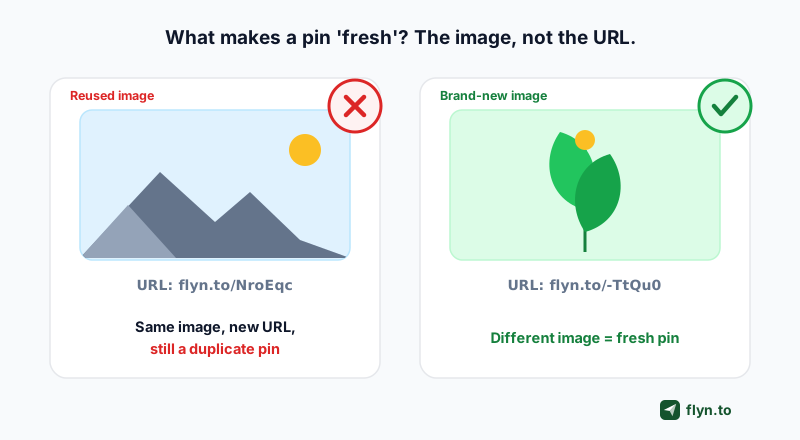
Pinterest defines a fresh pin as an image or video it has not seen before. Freshness lives in the visual, not the link. You can point unlimited pins at one URL and Pinterest is perfectly happy, as long as each image is genuinely different. Change only the URL (or only the title or description) and Pinterest still sees the same pin. As Pinterest educator Cara Chace puts it, it is "not about creating new content, it is about creating new pins for the content you have," and "new" means a new image.
 Tap to enlarge
What counts as a duplicate
A duplicate pin uses an image Pinterest has already seen, regardless of the URL, title, or description. Scheduling tools like Tailwind are explicit about this: swapping the title, description, or URL is not enough to make a pin fresh. A real difference in the image (new photo, new layout, different text overlay, different background) is. So a unique short link on the exact same graphic does not buy you freshness. It buys you one thing only, and it is a good thing: a separate click count.
Do not try to fool the algorithm with tiny, imperceptible tweaks to an image just to register it as "new." Reputable Pinterest sources warn against it, and it wastes the pin. If you want fresh pins, make genuinely different designs. If you want to know which design won, give each one a unique link. Those are two separate jobs.
So why give each pin its own link? Measurement, not freshness
Once you accept that unique links are not a freshness trick, their real value gets obvious. They answer three questions a single shared link cannot:
- Which pin design actually works. Pinterest ranks by image, so you are already making several different graphics for one URL. Put a unique link on each and the click counts tell you which design earned the traffic, turning "make different pins and hope" into a real A/B test.
- Which channel pulled its weight. One link for Pinterest, one for Facebook, one for your email, and each channel's contribution stops blurring into a single total.
- Which partner or placement converted. Hand every affiliate, creator, or guest post its own link and you can see exactly where the clicks came from.
A unique link does not make a pin fresh. It makes the pin measurable. Those are different jobs, and only one of them lasts: measurement, done honestly, keeps paying you back long after the hacks stop working.
Every one of those is the same underlying move: one destination, many links, separate analytics. The mechanics are identical whether you are pinning, posting, or running affiliates. What changes is only what each link represents.
Unique short link or UTM parameter per pin?
You may already tag links with UTM parameters. These are not either/or, they layer. The unique short link is what you hand to the pin, and it carries its own click count in Flyn. The UTM rides inside the destination and carries the source into Google Analytics. Use a unique short link per pin to read clicks at a glance, and add a matching utm_content per pin if you also want the split inside GA. Short version: the short link for speed, UTMs when you live in analytics.
How to create multiple short links for one URL
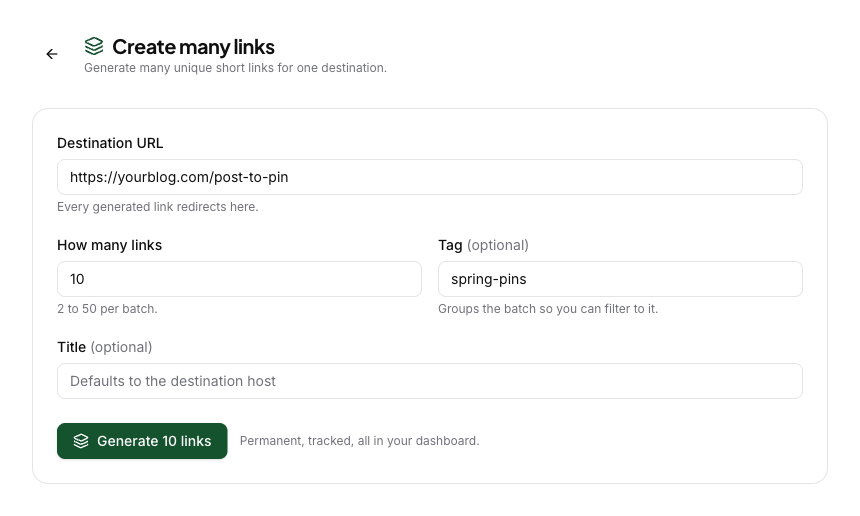
- Open Create many on the Links page.
- Paste your one destination URL.
- Choose how many links you want (2 to 50).
- Add a batch tag so the whole set stays grouped.
- Click Generate.
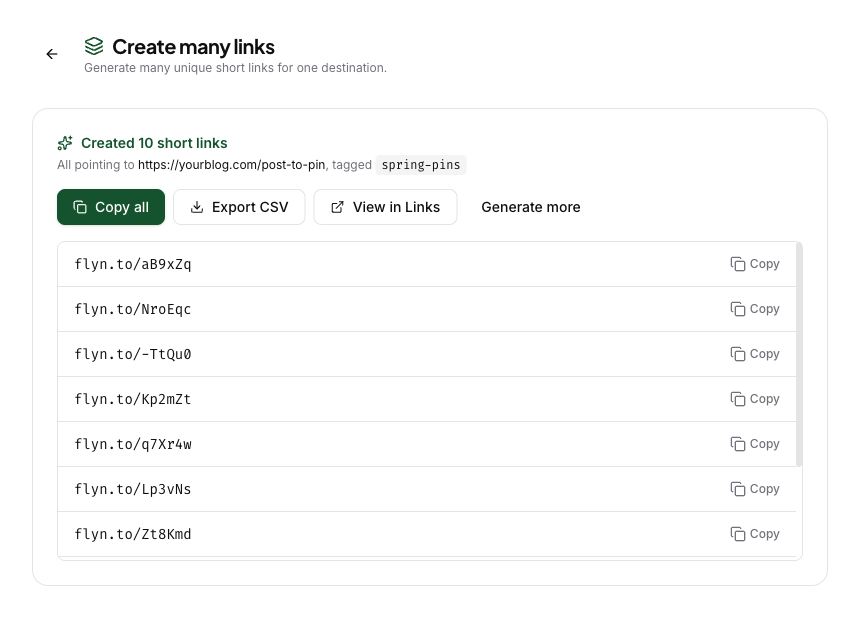
- Copy all the links, or Export CSV.
The manual way, and why it drags
You can always do this by hand: open your shortener, paste the destination, save the link, then repeat. For two or three links, fine. For the ten to fifty pins a Pinterest campaign needs, you are pasting the same URL dozens of times, inventing names, and hoping you can still tell the batch apart next week. It works. It is just tedious and easy to get wrong.
The fast way: Create many
Flyn has a built-in tool for exactly this. On the Links page, click Create many, paste your one destination, choose how many links you want (anywhere from 2 to 50), and hit generate. You get that many unique short links in a second, all pointing at your URL, all auto-grouped under one tag so the whole batch stays together. Then Copy all or Export CSV to drop them straight into Tailwind, a scheduler, or a spreadsheet.
 Tap to enlarge
 Tap to enlarge
Under the hood, each link is a normal, permanent short link: editable, safety-scanned, and tracking its own clicks, geo, and device. There is nothing throwaway about them. The full mechanics (limits, the API, behavior) live in the Create many documentation, and it is a Pro feature.
The links come with random back-halves (like flyn.to/aB9xZq), so you tell the batch apart by its shared tag, not the slug. Need more than 50 at once? Run Create many again, each run is its own tagged batch, or call the API.
Give the batch a descriptive tag when you generate it (like spring-sale-pins). Every link inherits the tag, so later you can filter your dashboard to that one campaign, see its combined clicks, or drill into any single link.
The Pinterest and Tailwind workflow, end to end
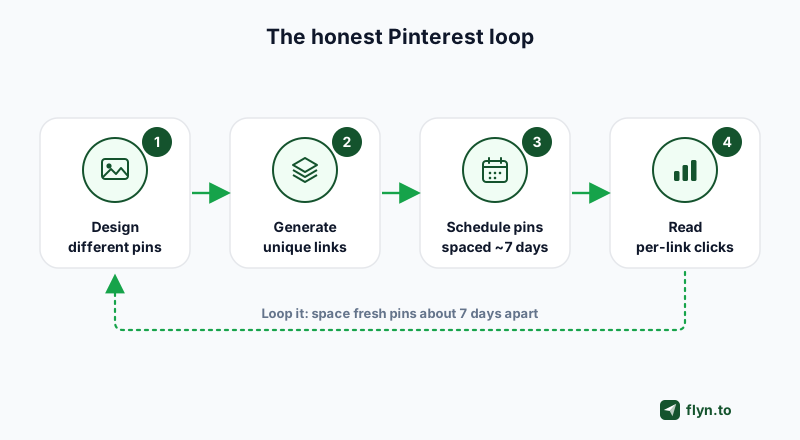
Here is the whole loop for a Pinterest campaign done honestly, combining fresh images for reach with unique links for measurement:
 Tap to enlarge
- Design genuinely different pins. Make several real variations of the graphic for your one URL: different photos, layouts, and text overlays. This is what earns freshness and reach.
- Generate one link per pin. Use Create many to mint a unique short link for each pin from the single destination, and export the batch to CSV.
- Attach one link per pin, and space them out. In Tailwind, give each pin its own link from the CSV. Space pins that share a URL several days apart, Tailwind recommends around seven days between same-URL pins, so you do not look spammy.
- Read the per-link clicks. After a couple of weeks, compare each link's clicks. The winning design is now obvious, and you make more like it.
Branded, on-domain short links tend to earn more trust and clicks than raw generic ones. Marketers report meaningful click-through lifts from branded links, though the exact figure varies by audience, so treat the percentages vendors quote as directional. If you pin at volume, consider putting the batch on a branded domain.
Beyond Pinterest: where multiple links to one URL really pay off
Pinterest is where this trick is most famous, but the underlying move, one destination, many tracked links, separate analytics, works anywhere you push the same link through more than one door. If you only ever pin, skip ahead. If you market anywhere else, these are the payoffs, and several of them matter more than the Pinterest case.
| Use case | What each link represents | The question it answers |
|---|---|---|
| Affiliate marketing | A placement (post, video, story, email) | Which placement actually sent buyers? |
| Paid ads | An ad creative or audience | Which creative earned the clicks? |
| Multi-channel campaigns | A channel (social, email, SMS) | Which channel deserves more effort? |
| Influencer and partner deals | A person or partner | Who actually drove the traffic? |
| Sales outreach | A prospect or sequence step | Who is warm enough to call? |
| Print and QR codes | A flyer, location, or event | Which offline spot works? |
| Podcasts and video | An episode or video | Which episode converts? |
Affiliate marketing
Affiliate tracking works by giving each link a unique identifier that gets recorded on click. Drop the same merchant offer into a blog post, a YouTube description, an Instagram story, and a newsletter, each with its own short link, and you can see which placement sent the buyers, not just that "affiliates" did. Say the YouTube link pulls 240 clicks and the newsletter pulls 30: you now know to make more videos, not more emails. Pair the links with UTM parameters for a second attribution layer, and read the full playbook in our affiliate link tracking guide. If the raw affiliate URL looks scary, a link cloaker hides it behind the clean short link.
Paid ads and A/B testing creative
Pinterest ranks by image, but so does every ad platform, and you are already making several creatives per campaign. Point a different link at the same landing page from each ad, and the click counts tell you which creative won before you even open the ad dashboard. Two Facebook images, one URL, link A at 300 clicks and link B at 40 is a decision, not a guess. It also gives you a clean, platform-independent number to sanity-check against Meta or TikTok's own reporting, which routinely overcounts link clicks.
Multi-channel campaigns
Running one promotion across Pinterest, Facebook, X, email, and SMS? One link per channel turns a single blurred total into a clean per-channel breakdown. When the email link shows 210 clicks and the SMS link shows 14, you know exactly where to spend next time. This is UTM tagging at the link level, and the two combine: tag each channel link and the split shows up in your web analytics too.
Influencer and partner deals
You do not need a full affiliate platform to know which creator delivered. Hand each influencer, newsletter sponsor, or referral partner their own short link to your page, and their click count becomes their scorecard. When it is time to renew or pay a flat fee, you negotiate from real numbers instead of screenshots. It is the lightest possible partner attribution: no coupon codes, no signup, no dashboard access to hand out.
Sales and cold outreach
In outreach, a click is a buying signal. Give each prospect, or each step of a sequence, a distinct link to the same demo page or case study, and a click tells you who is warm enough to follow up with, and which subject line or touch earned it. It is a quiet, no-pixel way to prioritize a list. Our guide on tracking clicks on a link covers the mechanics.
Print, QR codes, and offline
Offline is where attribution usually dies. Give each flyer, store location, event booth, or QR code its own link to one landing page, and you can finally see which physical spot drove scans. Because Flyn links are editable, you can repoint the whole campaign after it is printed, so a menu change or a sold-out offer becomes a dashboard edit, not a reprint.
Podcasts, videos, and long-form
Point one link per episode or video at the same "start here" page, and you learn which episode actually drives signups, the one metric podcast and video dashboards hide. A unique YouTube or podcast link in each description turns "the show gets downloads" into "episode 14 drove three times the signups of any other," which tells you exactly what to make more of.
Reading the data: turning 50 links into one clear answer
Fifty links are only useful if you can read them as one story. Here is how to keep it simple.
 Tap to enlarge
Group by the batch tag
Because Create many tags the whole batch, you can filter your dashboard to that one campaign. See the batch's combined clicks at a glance, then sort the individual links by clicks to find the winner and the duds.
Export and compare
Export the batch (or your click data) to CSV and drop it in a sheet next to your pin designs or channel names. One column of click counts against one column of creatives is usually all the analysis you need to decide what to make more of.
Kill what does not work
The point of measuring is to act. When one pin design or one channel clearly wins, make more like it and stop pouring effort into the ones that flatlined. That single feedback loop, make, measure, double down, is the entire reason to bother with unique links.
Common mistakes and myths to avoid
- Thinking unique URLs make pins "fresh." They do not. Freshness is a new image. Unique links are for measurement.
- Using identical images with different links. On Pinterest that is still a duplicate pin. Change the image, not just the link.
- Over-pinning the same URL. Space same-URL pins several days apart (about seven, per Tailwind) instead of blasting them the same day.
- Treating the links as an SEO play. These are redirect links for attribution. They do not pass ranking signal to your destination, and they are not meant to.
- Losing the batch. Always tag it (Create many does this for you) so you can find all fifty links again in a month.
Do it right and the payoff is real: the same effort you were already spending, now with a clear read on what actually worked. Create a free Flyn account to try it, or read the Create many docs for the full mechanics. It is a Pro feature, and it pays for itself the first time it tells you which pin to stop making. The method for reading those links once the data arrives is in how to track which posts drive sales.
Frequently Asked Questions
Do you need a different URL for each Pinterest pin?
Does a unique link make a pin "fresh" on Pinterest?
How many pins can you create for the same URL?
Can I create multiple short links that point to the same destination?
How do I track which pin or placement actually got the clicks?
How often can I pin the same URL without looking spammy?
Is making multiple short links for one URL bad for SEO?
What is the fastest way to generate many unique links at once?
Will pinning the same URL many times get my Pinterest account suspended?
Can I create multiple short links for one URL for free?
Can I see which Pinterest pin drove clicks in Google Analytics?
What can I use multiple short links for besides Pinterest?
Free tools for this
Three Flyn tools that pair well with the strategy in this article, all free, no signup needed.
UTM Builder
Build campaign-tracked URLs in seconds.
Broken Link Checker
Scan any page for dead links and 404s.
Open Graph Checker
Preview how URLs unfurl on social.
Keep reading
Three related deep-dives from the Flyn blog.

How to Track Which Posts Drive Sales, Not Just Clicks
19 min read

Email Newsletter Click Tracking: Measure Your Real CTR
12 min read

How to Choose a Branded Short Domain for Your Links
13 min read
Ready to try Flyn?
Free plan includes 25 links/month, full analytics, and access to all 30+ free tools above. No credit card required.
Already a member? Log in
Karan Bhakuni is the founder of Flyn. He writes about branded links, click analytics, and the link-management tooling growth teams and creators actually need, drawn from building Flyn and reading a lot of user feedback.
Find these guides useful? Add Flyn as a preferred source so more of them show up in your Google results.