How to Make a Link That Expires After X Clicks
You promised the first 50 buyers a deal, or one code per lead, or a link that dies when the ad budget does. A calendar date cannot enforce any of that, but a click limit can. Here is how to cap a link at a set number of real clicks, where to send everyone after, and the honest limits of the trick.


Why "Expires After X Clicks" Beats a Calendar Date
You told your email list the first 50 buyers get 40 percent off. You promised one discount code per customer. You set a paid ad live with a fixed budget and a landing page that should stop taking traffic the moment the money runs out. None of those promises are about a date. They are about a number. And a calendar expiry, the only kind most link shorteners offer, cannot enforce a number to save its life.
A click limit can. It caps a short link at a set number of clicks, and once the link has been opened that many times, it stops sending people to the original page. Everyone who arrives after the cap is redirected to a fallback URL you choose, or to a clean "no longer available" page if you leave the fallback blank. One link, a hard ceiling, and a graceful landing for the stragglers.
What a click limit actually is
Think of it as an odometer with a cutoff. Every real visit ticks the counter up by one. While the counter sits below your limit, the link behaves normally and forwards to the destination. The instant it reaches the limit, the link flips: new visitors no longer see the offer, they see wherever you decided to send the overflow. You never touch it again, because the link enforces its own ceiling.
Date expiry and click expiry are not the same tool
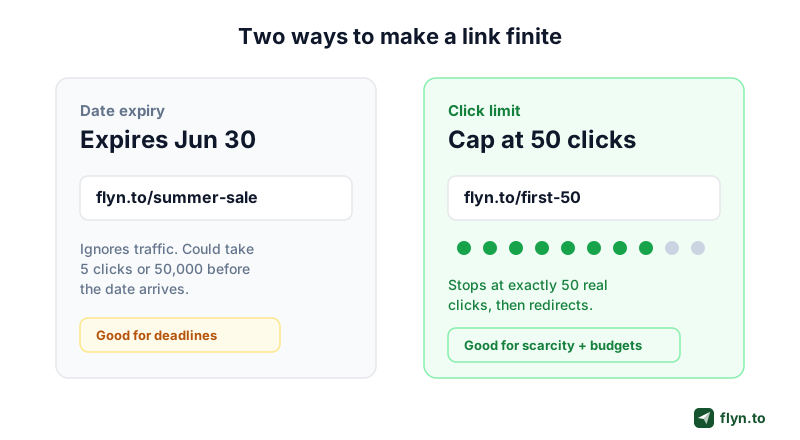
It is worth being precise, because the two get muddled. Date-based expiry turns a link off at a specific time regardless of how many people clicked. Click-based expiry turns a link off after a specific number of clicks regardless of when they happen. Our expiring link generator handles the date case, and this guide is about the click case, which Flyn enforces on the short link itself.
| Trait | Date expiry | Click limit |
|---|---|---|
| Turns off when | A time you set arrives | A click count you set is hit |
| Depends on | The clock | Actual demand |
| Best for | Deadlines, embargoes, event windows | Scarcity, quotas, budgets, single use |
| Risk if misjudged | Expires before anyone sees it | Runs out faster or slower than the clock |
| What overflow sees | A closed page | A fallback URL you pick |
 Tap to enlarge
When each one wins
Reach for a date when the deadline is the point: a webinar link that should die when the session ends, an embargoed press page, a flash sale that runs Friday to Sunday. Reach for a click limit when the quantity is the point: the first 50 people, one redemption per lead, a beta capped at 200 seats. If you find yourself writing "first N" or "while supplies last" in the copy, you want a click cap, not a countdown.
How a Click-Limited Link Actually Works
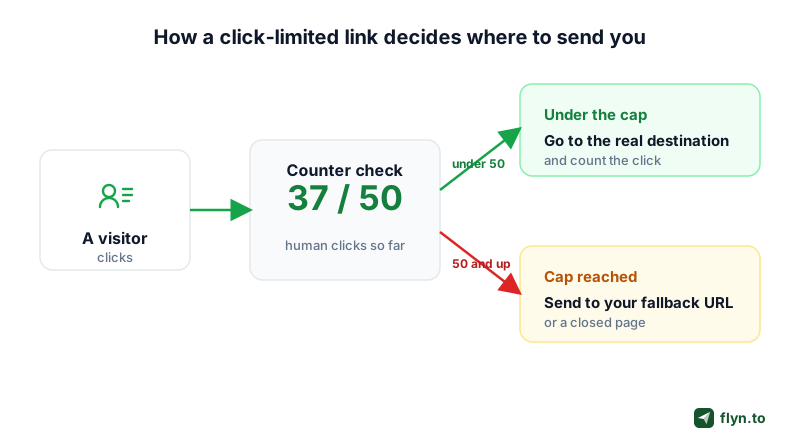
Under the hood, a click-limited link makes one small decision on every visit: is the counter below the limit or not? That single check is what routes the visitor, and it happens in the redirect itself, in a few milliseconds, before the browser ever loads a page.
 Tap to enlarge
The counter and the two exits
Every link with a cap has exactly two exits. While the human click count is below the limit, the redirect goes to your real destination and records the click in analytics. The moment the count reaches the limit, the redirect switches to your fallback. There is no in-between state and nothing to toggle by hand.
The cap is checked before any password
If you also password-protect the link, the cap is enforced first. That matters: a shared password cannot be used to sneak past a link that has already hit its limit. Someone who knows the password still lands on the fallback once the cap is reached, not the protected destination. It is the difference between a real ceiling and a soft suggestion.
The fallback is a real, checked destination
Your fallback URL is not a throwaway. Flyn treats it like any other destination: it is validated and scanned against Google Safe Browsing on every save, so overflow traffic never gets pushed toward something unsafe. And because it is a full redirect, appended parameters carry through to it too, so a ?utm_source= tag on the short link still reaches the fallback page.
The click counter is the same bot-filtered number that powers your dashboard, not raw server hits. More on why that matters in the section on bots below.
Six Jobs a Click Cap Does Well
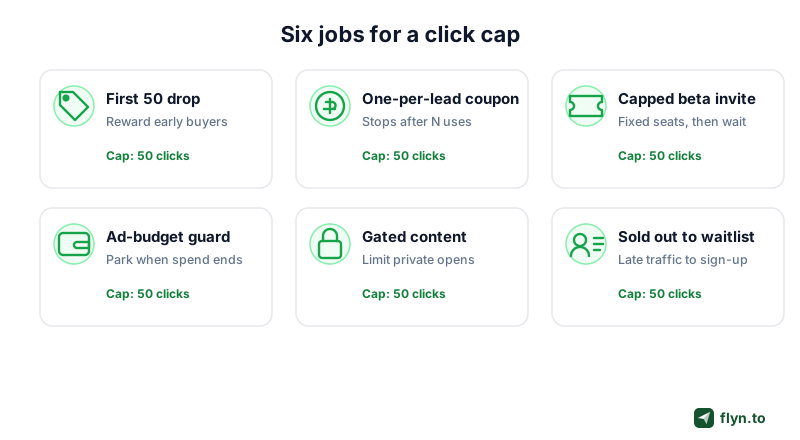
Once you have a hard ceiling on a link, a surprising number of everyday marketing promises become enforceable instead of aspirational. Here are the six that come up most.
 Tap to enlarge
Scarcity that actually holds
"First 50 people" only converts if it is true. Set the cap to 50 and the link enforces the promise for you, then redirects buyer 51 to a waitlist or the full-price page. This is the affiliate and creator move: our affiliate link tracking guide covers pairing a capped drop with per-link analytics so you know which channel sent the 50. It also pairs naturally with a launch-day playbook where the first slice of traffic gets a better deal.
One code per lead
Hand every new lead a unique short link to a single-redemption coupon, cap each at one click, and the code cannot be forwarded around a Slack channel and drained by a hundred people. When it is used, the link quietly points at your standard pricing page instead.
Capped invites and beta seats
Running a closed beta or a limited cohort? Cap the invite link at your seat count and route the overflow straight to a waitlist form. No manual "sorry we are full" edit at 2am, and no risk of over-admitting because the announcement traveled further than you expected.
A budget guard for paid ads
Put a click ceiling on the destination link behind a paid campaign as a backstop. If a creative goes unexpectedly viral or a bid gets mispriced, the link parks itself at your ceiling instead of pouring budget into a page that is out of stock. It is a cheap insurance policy against a runaway spend.
A calendar tells your link when to stop. A click limit tells it how many people to let in. For anything sold by the unit, the second number is the one that keeps your promise.
Single-Use Links, and What This Is Not
Set the cap to 1 and you have a single-use link: it works for exactly one person, then redirects. That is genuinely useful for a one-time confirmation, a personal invite, or a per-recipient reward. But the phrase "single-use link" collides with a totally different tool, and mixing them up leads to the wrong choice.
The marketing single-use link
In a marketing context, a single-use link is just a click cap of one on a normal short link. It still redirects to a real destination, still tracks the click, and still lets you set a fallback for anyone who tries the link after it is spent. That is what this guide is about.
This is not a self-destructing secret tool
Search "one-time link" or "self-destructing link" and you mostly find encrypted secret-sharing apps, the kind that let you send a password or an API key that is destroyed after a single view. Those are a different category built for confidentiality, and Flyn is not one of them. If you need to share a credential that self-erases, use a dedicated secret-sharing tool. If you need a marketing link that stops after a number of opens and redirects the rest, that is a click limit.
Do not use a click-limited redirect to share genuine secrets like passwords or keys. It is a redirect, not encrypted storage, and the destination still exists after the cap. For real secrets, reach for a purpose-built self-destructing note service.
How to Set a Click Limit in Flyn
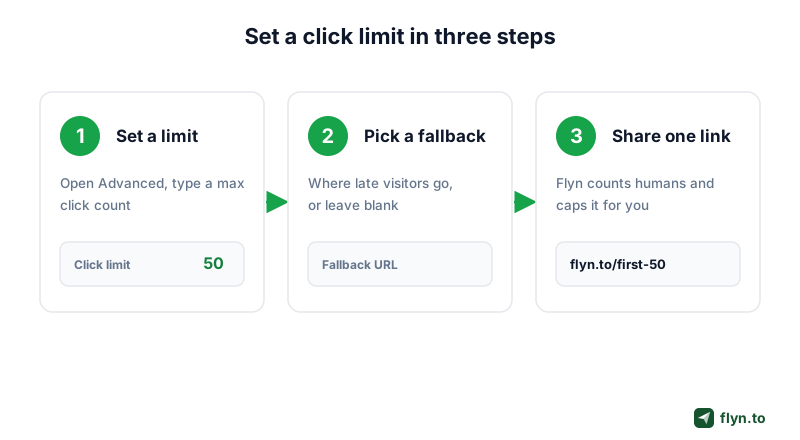
The whole thing takes about a minute. It lives under the Advanced options when you create or edit a link, alongside routing and password settings.
 Tap to enlarge
Three steps
- Set a limit. Open the Advanced tab on a new or existing link and enter the maximum number of clicks it should allow. Any whole number works, from a cap of 1 to tens of thousands.
- Pick a fallback. Add the URL that late visitors should land on: a waitlist, the next drop, a sold-out page, or your homepage. Leave it blank to show a clean "no longer available" page instead.
- Share one link. Post the same short link everywhere. Flyn counts each real human click and, the moment the cap is reached, starts forwarding new visitors to your fallback automatically.
Change it later without changing the link
Caps are editable. Raise the number for a restock, lower it to close a drop early, or swap the fallback to point at the next campaign, all without changing the short URL. The link you already printed, posted, or turned into a QR code keeps working while the rules behind it update. That editability is the whole point of a smart link: the address is stable, the behavior is yours to tune.
Give each channel its own capped link instead of one shared cap. A per-channel cap plus UTM tags tells you not just that the drop sold out, but which post, email, or pin drove the clicks that spent it.
Choosing the Right Fallback URL
The fallback is where a click limit goes from a blunt "link off" switch to an actual conversion tool. The overflow crowd already showed intent by clicking. Where you send them decides whether that intent is captured or wasted.
Good fallbacks, ranked by intent
- A waitlist or email capture, the best default, because you keep the lead for the next drop.
- The next offer or restock page, when there is a logical "you just missed it, here is what is next."
- A sold-out or closed page with a clear message, honest and on brand.
- Your homepage or a category page, a safe catch-all when nothing better fits.
Or leave it blank on purpose
If there is genuinely nowhere useful to send people, leave the fallback empty and Flyn shows a clean, branded "this link is no longer available" page. That is better than pointing overflow at a broken or irrelevant destination just to have something there.
A capped link with no fallback and no thought is a dead end for everyone who arrives late. Always decide the fallback before you share the link, not after the cap is already spent and the traffic is already bouncing.
Why Bots Do Not Burn Your Cap
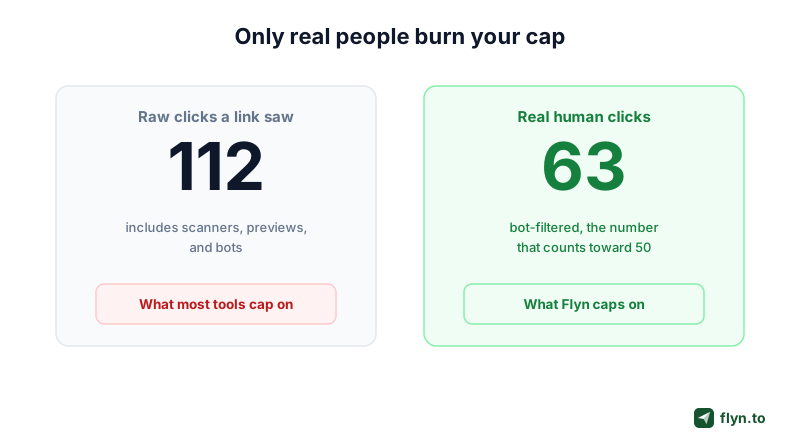
Here is the detail that separates a click cap you can trust from one you cannot: what counts as a click. If a link that is supposed to serve 50 real people gets drained to zero by link-preview bots and security scanners before a single customer arrives, the feature is worse than useless. It is a broken promise.
 Tap to enlarge
Raw clicks lie
Every link you share gets hit by automated traffic: messaging apps that fetch a preview, email security gateways that pre-open links, search and social crawlers. On a busy link those can easily outnumber real people in the first minutes. A shortener that caps on raw hits would spend your "first 50" allowance on robots before your audience woke up.
What counts as a human click
Flyn's cap runs on the same bot-filtered click count that powers your analytics, so scanners and previews do not eat into your allowance. If you have never looked closely at the gap between raw hits and real people, our guide on how to track clicks on a link and our work on click fraud prevention both dig into why the filtered number is the only one worth acting on. The honest limit worth stating plainly: the cap counts clicks, human versus bot, so it limits people who opened the link, not people who bought. Whether a click became a sale is a separate question, answered by conversion tracking.
Click Limit, Date Expiry, or Rotation: Which to Reach For
A click cap is one of several ways to make a link do something other than forward forever. Picking the right one saves you from bolting three features together when one would do.
| You want to | Use |
|---|---|
| Stop a link after a number of real clicks | Click limit plus fallback |
| Stop a link at a specific date or time | Date expiry |
| Spread clicks across several destinations | Link rotation |
| Send different people to different pages | Smart routing |
| Require a password to open | Password protection |
| Hide the destination behind your brand | Link cloaking |
They stack
These are not mutually exclusive. A private product drop might be a capped, password-protected, branded link on your own custom domain, all at once. A link can even carry a date expiry and a click limit together and stop at whichever it reaches first. Start with the one control the promise actually needs, the cap for a "first 50," the date for a "Friday only," and add the others only if the use case calls for it. If you are weighing Flyn against another shortener for this, our Short.io and Bitly comparisons cover how expiry and routing differ across tools.
The bigger picture
The link shortener landscape keeps shrinking the "set and forget forever" model. Google shut down its own URL shortener and Firebase Dynamic Links in August 2025, and the tools that replaced it compete on exactly this kind of control: expiry, routing, and honest analytics. A click limit is a small feature, but it is the one that turns "please only take 50" into a rule the link keeps for you. Ready to try it? Click limits live on Flyn Pro, and you can start free to set your first one.
Frequently Asked Questions
How do I make a link that expires after a number of clicks?
Do bots and link previews count toward the click limit?
What happens when a click-limited link reaches its limit?
Can I change the click limit after I share the link?
Is a click limit the same as a one-time or self-destructing link?
Is setting a click limit free or a paid feature?
What is the difference between click expiry and date expiry?
Free tools for this
Three Flyn tools that pair well with the strategy in this article, all free, no signup needed.
UTM Builder
Build campaign-tracked URLs in seconds.
Broken Link Checker
Scan any page for dead links and 404s.
Open Graph Checker
Preview how URLs unfurl on social.
Keep reading
Three related deep-dives from the Flyn blog.

How to Track Which Posts Drive Sales, Not Just Clicks
19 min read

Email Newsletter Click Tracking: Measure Your Real CTR
12 min read

How to Choose a Branded Short Domain for Your Links
13 min read
Ready to try Flyn?
Free plan includes 25 links/month, full analytics, and access to all 30+ free tools above. No credit card required.
Already a member? Log in
Karan Bhakuni is the founder of Flyn. He writes about branded links, click analytics, and the link-management tooling growth teams and creators actually need, drawn from building Flyn and reading a lot of user feedback.
Find these guides useful? Add Flyn as a preferred source so more of them show up in your Google results.