What Are Smart Links? The Complete Guide to Dynamic URLs
A smart link looks at who is clicking and picks the right destination on the spot. Here is how that works, when to use one, and how the six big smart link tools compare on routing rules and price.


What Is a Smart Link?
You have one link to share: in an app-install ad, an email, a bio, a printed flyer. But your audience is not one person. Some are on an iPhone, some on Android, some on a laptop. Some are in Berlin, some in São Paulo. A normal short link ignores all of that and sends everyone to the exact same page. A smart link does the opposite: it looks at who is clicking and picks the destination that actually fits them, the instant they tap.
Formally, a smart link (also called a dynamic link or smart URL) is a single short URL whose destination is decided at click time by a set of rules instead of being fixed when you create it. One link in, many possible destinations out. The visitor sees flyn.to/get-app; behind that, the link is quietly choosing between your App Store listing, your Google Play page, and a web fallback based on the device in their hand.
One naming trap before we go deeper: the phrase covers two different product families. Music smart links (Feature.fm, Linkfire, Hypeddit) give a song release one landing page with a button per streaming service. This guide is about the other family, routing smart links, where the URL itself redirects each visitor by rules. We compare the routing tools later in this guide; if a fan link page is what you actually need, the music platforms above are the right shelf.
Static link vs dynamic link
The difference comes down to when the destination is chosen. A static short link binds to one target the moment you make it (you can edit that target later, but it is still one target for everyone). A dynamic smart link leaves the destination open and resolves it per click, so two people clicking the same URL at the same second can land in two different places.
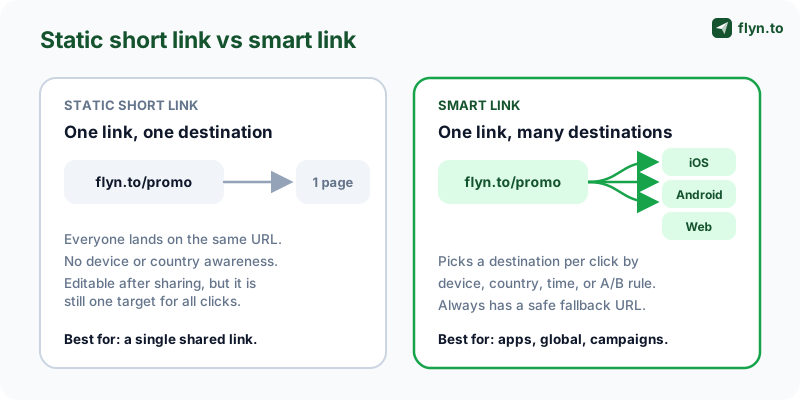 Tap to enlarge
This is possible because every short link already sits in the middle of the click: the visitor hits the short URL, the service decides where to send them, then forwards them on. A static link makes a trivial decision (always go here). A smart link makes a real one, reading signals from the incoming request before it forwards. That is the whole trick: the redirect step you already trust to be fast is also the perfect place to make a routing choice, and it is the same step that records every click for your analytics.
How Smart Links Work: Rules Evaluated at Click Time
A smart link is a small ordered rulebook attached to one URL. When someone clicks, the service reads a few facts about the incoming request, walks your rules from top to bottom, and sends the visitor to the destination of the first rule that matches. If none match, a mandatory fallback fires. The whole evaluation happens in a few milliseconds, before the redirect, so the visitor never sees it.
The signals a smart link can read
The routing decision is only as good as the signals available on the request. The common, privacy-safe ones are:
- Device and operating system from the user agent (iOS, Android, Windows, macOS) for app-store, desktop-download, and app-vs-web routing.
- Country or region from the visitor IP for geo targeting (localized pages, currencies, regional stores).
- Time and date for scheduled routing, so a link can change destination on a launch date or after an offer ends.
- A random bucket for weighted A/B splits, so a set share of clicks goes to variant A and the rest to B.
- Language from the browser, useful as a softer alternative to country-based routing.
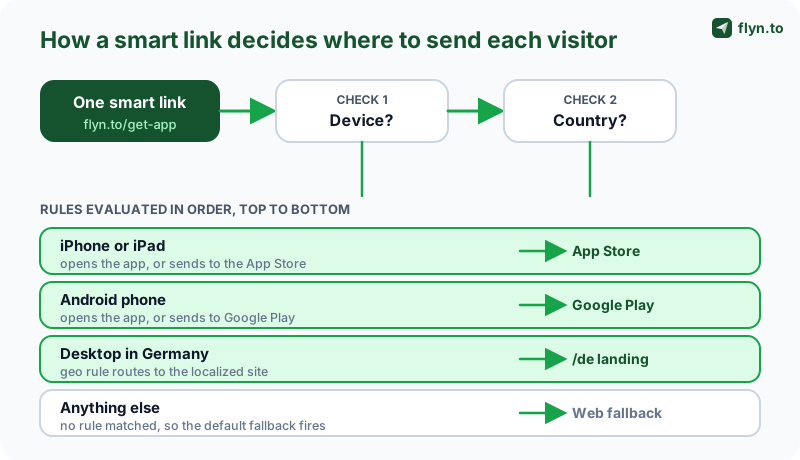 Tap to enlarge
First match wins, and the fallback catches the rest
Because rules are evaluated in sequence, the order you put them in is part of the logic. Put your most specific rule first (say, "Android users in Canada") and broader rules below it ("any Android user"). If you reverse them, the broad rule swallows the click before the specific one ever runs. Most builders let you drag rules to reorder, and a good one shows you a live preview of what a given device or country would resolve to. Flyn keeps the order fixed instead: device rules, then country rules, then an A/B split if the link has one, then the fallback, and each rule matches a device or a country, not both.
The single most important rule is the last one: the fallback. It is the destination for any visitor no other rule matched, and it guarantees the link always resolves to something sensible (usually a plain web page that works on every device). A smart link without a fallback can leave a visitor stranded, which defeats the entire purpose. Treat the fallback as the foundation you build the clever rules on top of.
Smart Link Use Cases
Smart links earn their name in a handful of repeatable situations. Once you see the pattern, you start spotting places a static link is quietly costing you clicks.
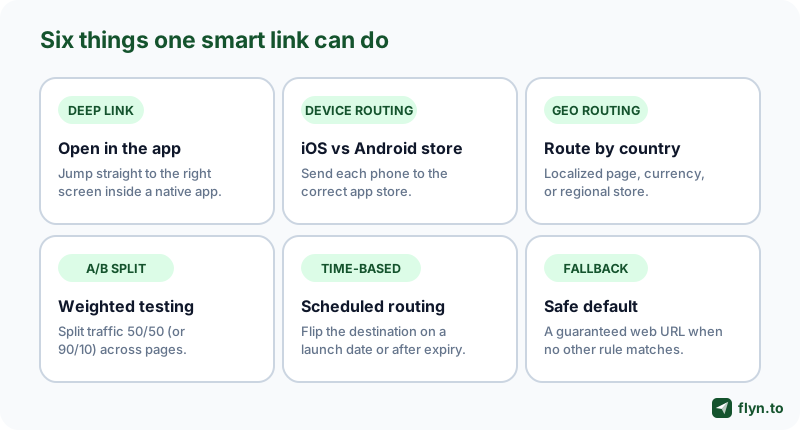 Tap to enlarge
Open in a native app with a deep link
This is the flagship use case. A deep link opens your mobile app directly on the relevant screen (a specific product, a chat, a playlist) instead of dumping the user on a generic home screen or a web page. Flyn deep links open 18 supported apps, such as YouTube, Instagram and Spotify, and fall back to the web page; sending people who lack the app to the store is an app-attribution feature. We cover the mechanics in depth in how deep links open native apps.
Send iOS and Android to the right store
One link in your "Download our app" button should send iPhones to the App Store and Android phones to Google Play, with a desktop fallback that shows a QR code or a "text me the link" form. Hard-coding one store link means half your audience hits the wrong one. Build the store-aware version with the app store link generator.
Route visitors by country
Global campaigns rarely want one page for the whole world. Geo routing sends each country to its localized site, regional store, currency, or language without you maintaining a different link per market: a single go.yourbrand.com/shop can point German visitors at /de, US visitors at /us, and everyone else at a default. On Flyn Pro this lives on the Routing tab as geo rules: pick a country, give it a URL, and visitors from unmatched countries fall back to the default destination. The rules are country-level, so if your campaign needs state or city granularity or on-page geo popups, a dedicated Geotargetly-class geo redirect service is still the deeper tool. The strategy side is covered in geo targeting links by country, the decision framework with accuracy numbers and SEO caveats is in geo-targeted links vs standard redirects, and the geo redirect tools roundup compares the dedicated platforms.
Test, rotate, and schedule destinations
Point one link at two (or more) landing pages and split traffic by weight: 50/50 to compare two pages fairly, or 90/10 to safely trial a new page on a slice of traffic. For spreading clicks evenly across a pool of destinations (mirrors, affiliate offers, regional reps), a dedicated link rotator handles the split, and A/B testing short links covers the measurement side.
Time-based routing is the same idea on a clock. A launch link can point at a teaser before go-live, flip to the real product page at a set time, then switch to an "out of stock" or "next drop" page after the sale. Flyn covers this pattern without a scheduler: destination editing works on every plan, so you re-point the link at the moment you choose and the URL never changes, and a Pro click limit with a fallback URL flips the link automatically once a cap is spent. Pair it with an expiring link when the offer should hard-stop entirely.
Deep Links: The Most Powerful Smart Link
Deep linking deserves its own section because it is where smart links create the most value and where they are easiest to get wrong. A deep link is a smart link whose job is to open a native app at a precise location, falling back gracefully when the app is missing.
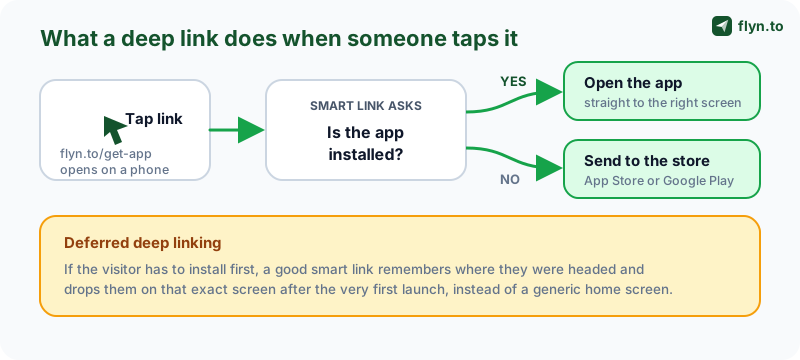 Tap to enlarge
App installed vs not installed
When a visitor taps a deep link, the link tries to hand off to the app via its custom scheme or a universal/app link. If the app is installed, it opens straight to the target screen. What happens when it is not depends on the tool. App-attribution platforms built for app-install campaigns detect the missing app and send the visitor to the store listing. Flyn does not detect installs: its deep links cover 18 supported apps, such as YouTube, Instagram and Spotify, and if the visitor is still on the page about 2 seconds after the handoff, Flyn sends them to the web page instead.
Deferred deep linking and where deep links break
Deferred deep linking closes the gap for first-time installers. If someone taps a link to a specific product but has to install the app first, a deferred deep link remembers where they were headed and drops them on that exact screen after the first launch, instead of a blank home screen. It is the difference between a confused new user and one who lands exactly where your ad promised. It is an app-attribution feature that usually needs an SDK inside your own app, and Flyn does not offer it.
Deep links are also fragile in predictable ways: in-app browsers (tapping a link inside Instagram or TikTok) can swallow the hand-off, iOS and Android handle schemes differently, and a misconfigured association file silently breaks universal links. The fix is a smart link layer that detects these contexts and falls back to the web instead of leaving the visitor stuck. On Flyn, a tap on iPhone inside the Instagram, Facebook, Messenger, TikTok, Snapchat, LINE or LinkedIn in-app browser gets a page with a button to open the app; if the visitor is still there about 2 seconds later, the page adds that app's menu step out to the system browser and a link to the website. Other phone taps usually get the standard page, which tries the app and moves to the web page after about 2 seconds.
Always test a deep link on a real device in both states: app installed and app removed. The two paths use different mechanisms and fail in different ways. Run the link through the deep link tester first, then verify on a physical phone, before you put it in a paid ad. Developers building this into a product should read the deep links API docs.
Smart Link vs Short Link vs QR Code
These three get conflated constantly, so it is worth being precise. They are not competitors; they stack. A QR code can encode a smart link, and a smart link is a kind of short link. Here is how they actually relate.
| Type | Destination | Click tracking? | Best for |
|---|---|---|---|
| Plain short link | One fixed URL for everyone | Yes | A single page shared anywhere |
| Smart link | Chosen per click by rules (device, geo, time, A/B) | Yes | Apps, global campaigns, testing |
| QR code | Whatever link it encodes (often a smart link) | Only if it encodes a tracked link | Print, packaging, offline to online |
A smart link is a short link with a brain, and a QR wraps either
Every smart link is a short link first: it has the short slug, the redirect, and the click analytics (country, device, browser, referrer). The "smart" part is the routing rulebook layered on top. So you never trade away tracking to get routing; you get both. If a plain short link is all you need today, you can add rules to it later without changing the URL you already shared.
A QR code, in turn, is just a link rendered as a scannable image, so it inherits whatever the link does. Encode a smart link behind a QR on a poster and a scan from an iPhone opens your app while a scan from a desktop webcam opens the web page. The QR never changes, but the destination adapts and the scan is tracked. Audit existing codes with the QR destination audit to confirm they still point where you think.
The mistake is treating these as a menu to choose from. The strongest setup is all three at once: a branded short link, made smart with routing rules, and exposed as a QR code where you need an offline-to-online jump. One destination, measured everywhere.
The Best Smart Link Tools Compared
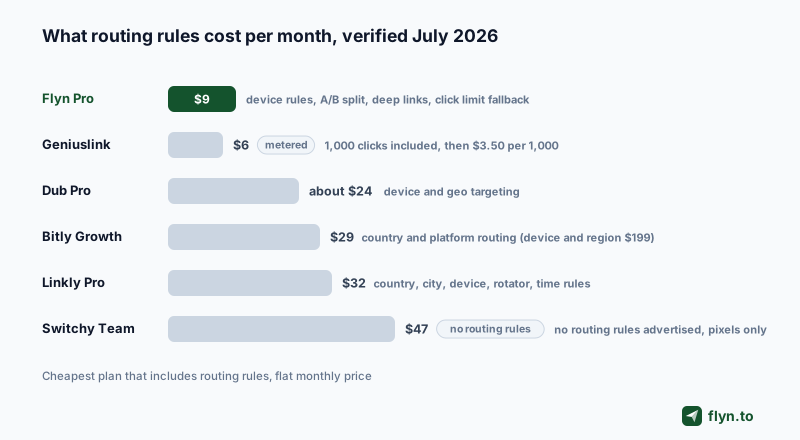
Six platforms serve the routing sense of "smart link" seriously, and their pricing pages tell a clearer story than their homepages. We compared them on four things: which routing rules you actually get, the cheapest plan that includes them, what the free tier does, and how click tracking is gated. All prices below were verified on each vendor's own pages in October 2026 and are monthly prices on annual billing, except Geniuslink, which bills monthly by the click. A freshness note while you shop: smartURL is dead. The old smarturl.it domain now redirects to Linkfire, so any listicle still recommending it is stale. And if you are choosing a general-purpose shortener rather than a routing specialist, start with our roundup of the best URL shorteners instead.
 Tap to enlarge
| Tool | Routing rules included | Cheapest plan with routing | Free plan |
|---|---|---|---|
| Flyn | Device (iOS, Android, Windows, Mac), country-level geo, A/B split, deep links, click limit with fallback URL | Pro, $9/mo or $249 lifetime | 25 new links/mo, click counts included |
| Geniuslink | Amazon storefront localization; language, device, OS, country and time-of-click rules; A/B split | $6/mo metered: 1,000 clicks, then $3.50 per extra 1,000 | None (14-day trial, card required) |
| Dub | Device and geo targeting on paid tiers, A/B from Business | Pro, $27/mo annual ($30 monthly) | 25 links/mo, 1,000 events, 30-day data |
| Bitly | Country and platform routing from Growth; device, region, and deep links on Premium | Growth, $29/mo annual ($199/mo for device and region) | 5 links/mo |
| Linkly | Geo and device redirect rules, link rotators, click-limited and time-limited links | Pro, $32/mo annual | 100 links/mo, 500 tracked clicks |
| Switchy | Country redirects, A/B rotator | Team, $39/mo annual (plans differ by clicks, domains and users) | None listed on its pricing page |
Where Flyn wins, and where it does not
Flyn tops this table for one measurable reason: it is the cheapest complete routing bundle of the six. One Pro tier at $9/mo (or $249 lifetime) carries device routing, the A/B split, iOS and Android deep links, click limits with a fallback URL, password protection, up to 3 branded domains, and conversion tracking, features Dub and Bitly split across two tiers. The free plan is honest too: 25 new links a month with total click counts on every plan, while the geo, device, and referrer breakdowns sit on Pro. The routing rules cover device, country-level geo, and A/B split on one Routing tab, so a single Pro link can send iPhone users to the App Store, German visitors to a /de store, and everyone else to the default. The honest limit: geo rules stop at the country level, so for state or city targeting, a dedicated geo redirect service such as Geotargetly, which lists state and city redirects, is the deeper tool.
The other five, honestly
- Dub puts device and geo targeting on every paid tier, from Pro at $27/mo annual, and saves conversion tracking and A/B testing for the pricier Business tier, so its entry price is three times Flyn Pro's.
- Bitly starts routing two tiers up, at Growth ($29/mo annual), device and region rules cost $199/mo on Premium, analytics retention is only 30 days on the $10/mo Core plan, and destination edits are metered (5 a month on Core).
- Linkly puts geo and device redirect rules, link rotators, click-limited and time-limited links and tracking pixels on Pro at $32/mo annual, and free-plan links pause once the 500-click monthly quota is spent.
- Switchy is built around retargeting pixels, and its help center also documents country redirects and an A/B rotator. Its cheapest plan is Team at $39/mo annual ($47 monthly), its plans differ by clicks, domains and users, and its pricing page lists no free plan.
- Geniuslink centers on Amazon affiliate links: automatic storefront localization, routing by language, device, operating system, country and time of click, and A/B splits. The $6/mo base includes 1,000 clicks, each extra 1,000 costs $3.50, and a custom domain is a $50/mo add-on.
How to Build a Smart Link (Step by Step)
Building a smart link is less work than it sounds, because the platform handles the request parsing. Your job is to describe the routing in plain rules. Here is the repeatable flow.
1. Set the fallback first, then add device rules
Start with the destination everyone should reach if no rule matches (usually your main web page). Building the fallback first guarantees the link is never broken while you add cleverness on top. Create the base link in a free Flyn account and point it at that URL. If this is an app link, the device rules are the Pro step: iOS goes to the App Store path, Android to Google Play, Windows and Mac to their own pages if you set them, and other desktops to the fallback or a QR page. Use the deep link generator to produce the app-opening URLs and the matching store fallbacks.
2. Layer the A/B split, then brand and test
Add a weighted split if you are testing two landing pages (the A/B split lives on the same Pro tier as the device rules), and remember that a scheduled change needs no rule at all: edit the destination on launch day, on any plan, and the URL you shared keeps working. For pure rotation across a pool, reach for the link rotator instead. There is no rule order to manage on Flyn: device rules are checked first, then country rules, then the A/B split for the visitors no rule matched. Then put the link on your own domain so it reads as go.yourbrand.com/app rather than a generic slug: branded short links earn higher click-through rates because people trust a name they recognize. Finally, verify every branch: run it through a deep link tester, and tap it on a real iPhone and a real Android before it goes anywhere public. Browse the full link toolkit if you need a companion tool for any step.
You do not have to start smart. A great pattern is to ship a plain short link today, then convert it to a smart link later by adding rules, all without changing the URL you already printed or posted. The slug stays; only the routing behind it grows.
Pitfalls and How to Avoid Them
Smart links are powerful, which means a misconfigured one fails in more interesting ways than a plain link. These are the traps worth knowing before you ship.
Cloaking and policy compliance
Routing different visitors to different destinations is legitimate, but showing one thing to a platform's reviewer or crawler and another to real users is cloaking, and it violates the rules of Google Ads, Facebook, and the app stores. The line is intent: device and geo routing to genuinely improve the visitor's experience is fine; deceiving a reviewer to sneak through approval is not. Keep your routing honest and your fallback representative of the real offer. Our link cloaker page explains the safe, disclosed use of redirection.
Broken link previews
When you paste a link into iMessage, Slack, or a tweet, a preview bot fetches it to build the thumbnail. If your smart link routes that bot somewhere odd (or to an app scheme it cannot follow), the preview breaks or looks wrong. A good platform serves a proper preview to bots while routing humans normally. If previews matter for your channel, confirm they render before you blast the link.
Routing logic can leak personal data if you are careless. Country and device come from the IP and user agent, which can be personal data under GDPR. Use a platform that anonymizes or hashes IPs and never build routing that quietly stockpiles raw visitor data. Smart does not have to mean invasive.
Losing tracking and attribution
If you stitch routing together with a pile of raw redirects, you can lose the unified click data that makes a link worth measuring. Keep the routing and the click tracking in one place so every branch still reports geo, device, and referrer back to the same dashboard. And when you tag links with campaign parameters, do not let them get mangled: validate them with the UTM Builder and clean stray tags with the URL Cleaner so attribution survives the redirect.
Are Smart Links Worth It?
Smart links are worth it the moment your audience is not monolithic, which is almost always. If you ship a mobile app, run campaigns in more than one country, test landing pages, or share anything where iPhone and Android users deserve different destinations, a static link is leaving conversions on the table.
When a plain link is still fine
Be honest about the cases that do not need routing. A link to a single blog post, one universal web page, or an internal doc is perfectly served by a plain short link. Reaching for routing you do not need just adds surface area to misconfigure. Start simple, and upgrade to smart when a real second destination appears.
The real payoff is consolidation. Instead of one tool for deep links, another for rotation, a spreadsheet for A/B, and a separate analytics tab, a link platform gives you branded short links, the smart routing rules, and a real-time click dashboard in one place. Compare the options on the alternatives pages, or migrate an existing set of links over.
You can create the underlying short link on a free Flyn account in under a minute, then upgrade to Pro (from $9/mo, or $249 lifetime) to point it at multiple destinations, add a device rule or an A/B split, set a fallback, and watch the routed clicks roll in. Pro also unlocks branded domains, deep linking at scale, and team features. One link, the right destination for everyone, measured from a single dashboard.
Frequently Asked Questions
What is a smart link?
What is the difference between a smart link and a short link?
How do smart links work?
What are the best smart link tools with click tracking and routing analytics?
Which smart URL tools work for multi-region campaigns?
What is a smart link alternative to a generic link shortener?
Are smart links free?
Do smart links hurt SEO?
Free tools for this
Three Flyn tools that pair well with the strategy in this article, all free, no signup needed.
UTM Builder
Build campaign-tracked URLs in seconds.
Broken Link Checker
Scan any page for dead links and 404s.
Open Graph Checker
Preview how URLs unfurl on social.
Keep reading
Three related deep-dives from the Flyn blog.

How to Track Which Posts Drive Sales, Not Just Clicks
19 min read

Email Newsletter Click Tracking: Measure Your Real CTR
12 min read

How to Choose a Branded Short Domain for Your Links
13 min read
Ready to try Flyn?
Free plan includes 25 links/month, full analytics, and access to all 30+ free tools above. No credit card required.
Already a member? Log in
Karan Bhakuni is the founder of Flyn. He writes about branded links, click analytics, and the link-management tooling growth teams and creators actually need, drawn from building Flyn and reading a lot of user feedback.
Find these guides useful? Add Flyn as a preferred source so more of them show up in your Google results.