Best Geo Redirect Tools for Country Targeting Compared
Eight tools can route US, UK, and EU visitors to different pages from one link. Here is what each one really costs in August 2026, the granularity you actually get, and the honest pick for each job.

Routing US, UK, and EU Visitors to the Right Page
You sell into five countries, and every ad click, bio tap, and QR scan lands on the same US page: wrong currency, wrong storefront, wrong shipping promise. Geo redirect tools fix that by reading the visitor's IP address at click time and sending each country to the page you actually built for it. This roundup compares the eight tools that do that job as of August 2026, ranked on geo capability first and price honesty second, every number from the vendors' own pricing and help pages.
Scope note up front: this is the geography edition of our comparison series. The general ranking across every use case is the best URL shorteners guide, and the device edition (iOS, Android, Windows and Mac) is the device routing comparison, and if you are still deciding whether you need geo routing at all, start with geo-targeted links vs standard redirects. Geo routing is one flavor of smart links: URLs that pick a destination per visitor instead of sending everyone to the same place.
Where country targeting pays for itself:
- Ecommerce storefronts: one link sends US buyers to the .com store and UK buyers to the .co.uk store, with the right prices, VAT, and delivery dates.
- Paid ads: one creative, one final URL, country-specific landers behind it, so quality scores and compliance pages both survive.
- Affiliate offers: networks cap offers by geography, and a click from the wrong country is revenue thrown away unless something reroutes it.
- Multi-country campaigns: a printed QR code or a bio link cannot know who scans it, so the link behind it has to do the sorting.
 Tap to enlarge
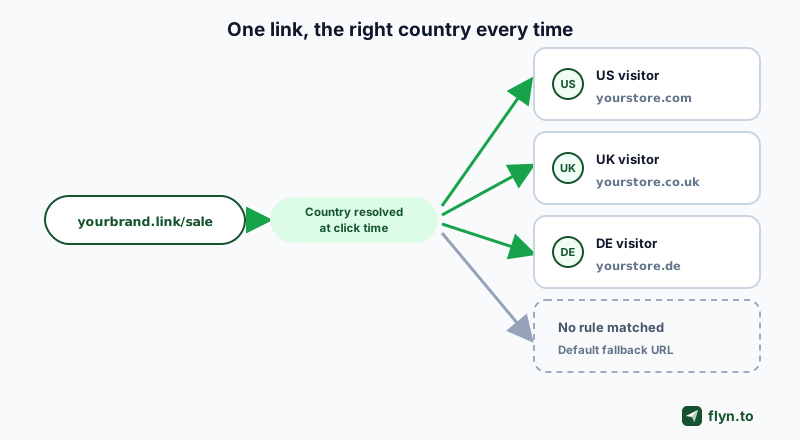
Under the hood, every tool here works the same way: the server looks up the click's IP in a geolocation database and the matching rule fires a 302 redirect, with a default fallback URL catching everyone else. Hold on to that fallback idea; it separates good setups from support tickets.
How We Compared These Geo-Routing Tools
We pulled each vendor's live pricing page and help center in August 2026 rather than trusting review-site summaries. Two structural facts shaped the ranking, and most buyers discover both too late.
Hosted geo links vs on-site redirect scripts
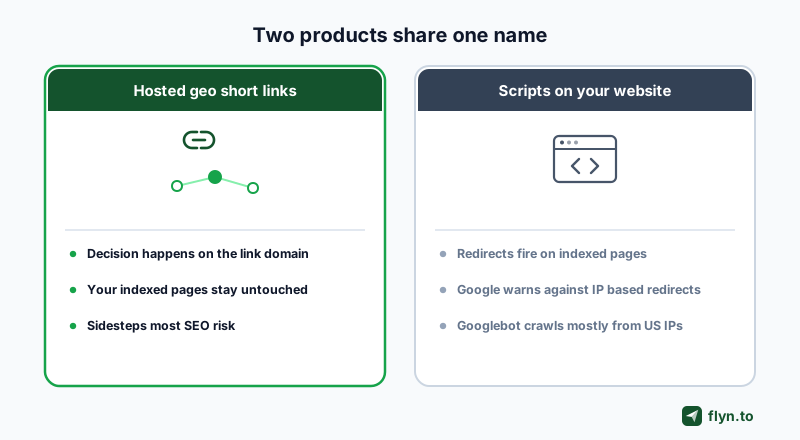
Two different products share the geo redirect name:
- Hosted geo links: Geotargetly's Geo Link, GeoSwap's GeoLink, GeoRedir, Geo Smart Links, and the shortener tier. The country decision happens on the vendor's edge before your site is involved.
- On-site redirect scripts: Geotargetly's Geo Redirect, GeoSwap's GeoRedirect, and GeoPlugin's snippet. A tracking code on your own pages redirects the visitor after your page starts loading.
The difference is not cosmetic, it is SEO exposure. Google's international SEO documentation tells site owners to avoid automatically redirecting users between country or language versions of indexed pages, to prefer separate URLs with hreflang, and specifically not to use IP analysis to adapt content. Googlebot also crawls mostly from US IP addresses, so a forced US redirect can hide your regional pages from indexing entirely.
Google's geo-redirect warnings are aimed at pages you want indexed. A geo short link is not trying to rank: the routing decision happens on the link domain, off your site, which is why link-level geo sidesteps most of the SEO risk that on-site scripts inherit.
If you must redirect on-site, do three things: offer a choice (a permission popup that remembers the answer), keep the redirect a 302 rather than a 301 (the destination varies per visitor, and browsers cache a 301 hard), and verify what your chain returns with the free redirect checker.
 Tap to enlarge
What we scored
- Granularity: country only, or state, city, radius, and IP-list targeting on top.
- Delivery: hosted links, on-site scripts, or both, plus real fallback support.
- Price to unlock: the cheapest plan where country routing actually works, and the billing meter underneath it.
- Honesty: whether accuracy and pricing claims survive the vendor's own documentation.
VPNs, proxies, corporate networks, and mobile carrier IPs can all place a visitor in the wrong country. Every setup in this guide needs a default fallback URL. A geo link without a fallback is not targeting, it is a dead end waiting for its first VPN user.
Where Flyn Fits (and Where It Does Not)
We build Flyn, so this section sits outside the ranking on purpose: read it as a labeled disclosure, not a review. Flyn is a URL shortener with country-level geo rules in the link editor, not a dedicated geo platform, and both halves of that sentence matter.
What Flyn does on a multi-country campaign
- Geo targeting (Pro): per-country destination rules on any short link, with your default URL as the automatic fallback. Setup is covered step by step in our country targeting guide. Country-level only, by design.
- Device routing and deep links (Pro): iOS, Android, Windows and Mac URLs live on the same Routing tab, and device rules resolve before geo rules, so an app split and a country split can share one link.
- A/B testing (Pro): split traffic between two destinations behind the same routed link.
- Editable destinations on every plan: repoint any link, including the QR code already printed on packaging, without changing the URL.
- Branded domains (Pro) and free QR codes: a geo campaign ships on your own name instead of a shared rotating domain, the weakness Geotargetly itself flags on Geo Link.
- Click limits with a fallback URL (Pro) and conversion tracking (Pro): cap a promo per market and tie clicks to revenue, on top of free click analytics (country breakdowns on Pro). Every Pro item here is one $9 a month plan billed annually; the split is on the pricing page.
When you do not need Flyn
- You need state, city, radius, or IP-list targeting: Flyn stops at country level. That job belongs to Geotargetly.
- You need whole-site redirects, geo popups, currency swaps, or content personalization: those are on-site suite features (Geotargetly, GeoSwap, GeoPlugin). Flyn has no on-site script at all.
- You need VPN and proxy detection: Geotargetly sells it as Geo Block; Flyn does not offer it.
- You need two free country links and nothing else: GeoSwap or Geo Smart Links will do that for $0, and you do not need Flyn at all.
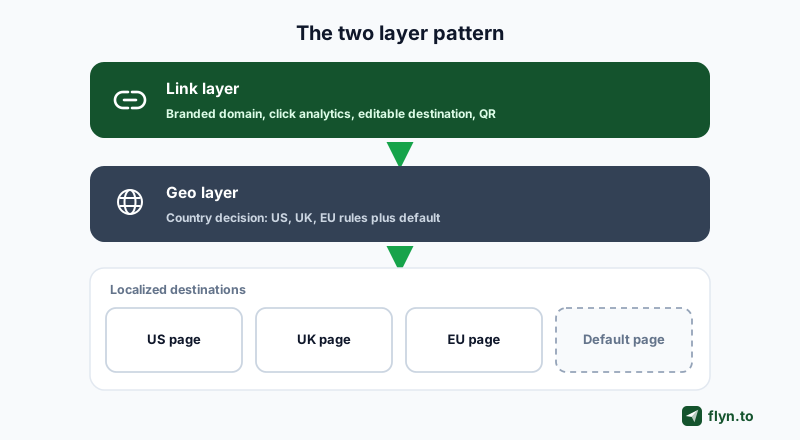
That is the line, stated plainly: Flyn's geo rules stop at country level, on short links. Anything finer, and anything on-site, belongs with the dedicated tools below. The pairing case is where it earns a place: teams front an on-site geo setup with a branded short link anyway, because the link layer is where editing, QR codes, and click counting live no matter which tool decides the country.
 Tap to enlarge
1. Geotargetly: The Category Incumbent
Among the eight tools ranked here, the research supports an unfashionable conclusion: the incumbent leads. Geotargetly has the deepest targeting granularity, the widest toolkit, and, rare in this market, help docs that are honest about accuracy limits.
What you get
- Geo Link: hosted short links that redirect by location, with rules per country, state or region, city, radius around a point (50 miles minimum), or specific IP addresses. Links ride rotating shared domains by default; Geotargetly itself strongly recommends a custom domain.
- Geo Redirect: the on-site script: redirect a whole site, a subdirectory, or a single page, with an optional permission popup that remembers the visitor's choice.
- Personalization and compliance: Geo Content, Geo Image, Geo Popup, Geo Bar, Geo Currency, and Geo Translate for on-page swaps, plus Geo Block (which detects VPN and proxy users) and Geo Consent for location-aware cookie banners.
Geotargetly pricing, August 2026
There is no free tier: a 14-day trial with no card, then paid. Plans meter by monthly pageviews: Dev $12, Startup $24, Growth $49, Business $99, High Traffic $199, and Enterprise from $349 per month, with annual billing saving 20 percent (entry drops to $9 a month). The redeeming detail: every plan includes every product, all targeting levels, unlimited domains, and segment analytics: you are buying volume, not features.
Where it falls short
- No free tier at all: the exact opening the challenger below built its pitch on.
- Pageview metering makes a traffic spike a forced upgrade, even if your geo rules never changed.
- Its own help center recommends against targeting finer than major cities, whatever the radius slider implies.
 Tap to enlarge
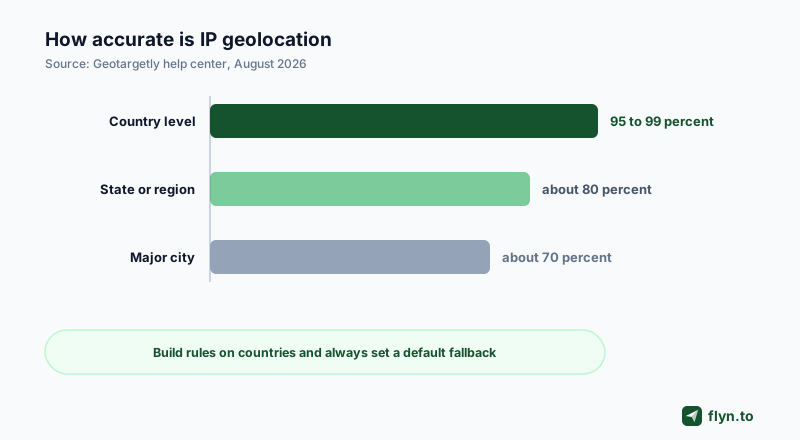
Read every accuracy claim in this market against the incumbent's published ladder: 95 to 99 percent at country level, about 80 percent at state, about 70 at major city. Build on country rules, treat anything finer as best effort, and always set the default destination for visitors who resolve wrong.
2. GeoSwap: The Free Challenger
GeoSwap is the price disruptor: ten geo tools, no tiers, unlimited pageviews, free, with a claimed 2,500+ businesses on board. It also positions itself as the category's AI-first option, keeping canonical content visible to AI crawlers while humans get redirected. If Geotargetly is the department store, GeoSwap is the same floor plan with the tills removed.
What free actually includes
- GeoRedirect: country, state, and city redirects with SEO framing the others skip: 302 redirects and automatic hreflang handling.
- GeoLink: a free short-link service with geo routing, click analytics by country and device, custom domains, and an A/B split option.
- The rest of the suite: GeoContent element swaps, GeoBar, GeoPopup, GeoCurrency, GeoConsent, GeoBlock, GeoRoute, and GeoScript for running JavaScript by country, plus audience segments and real-time analytics.
The fine print to read twice
- The business model is a promise. Everything is free today; the stated plan is paid add-ons later (priority support, SLAs). Free forever with no revenue attached is a dependency risk to price in before a launch rides on it.
- Its comparison tables are marketing. GeoSwap's pricing page quotes rival prices (Geotargetly at $29 a month, for instance) that do not match those rivals' own current pages, where entry is $12.
- Bot transparency cuts both ways. Serving crawlers the canonical page while humans get redirected is pitched as SEO-safe, but giving bots different treatment than users is the exact pattern Google's cloaking guidance warns about.
Never cite a vendor's comparison table as fact, in this category or any other. We checked GeoSwap's quoted rival pricing against those rivals' own August 2026 pricing pages and the numbers disagreed. The only pricing worth trusting sits on the vendor's own page, with a date on it.
3. GeoRedir and 4. Geo Smart Links: The Affiliate Pair
Affiliates feel wrong-country clicks as missing money, not a UX papercut, and two tools are built squarely for them.
GeoRedir: edge redirects with affiliate plumbing
GeoRedir runs on Cloudflare's edge (300+ locations, 195+ countries, sub-200ms redirects, 99.9 percent uptime claimed) and stacks affiliate features on top of country rules: device, OS, and browser routing, A/B testing with chi-squared significance and an automatic winner, click-fraud detection with 40+ bot patterns, and conversion tracking via postback URLs with Facebook CAPI and Google Ads server-side events. Its August 2026 tiers:
- Free: 3 smart links, 1,000 clicks a month, geo targeting with fallback, 7-day analytics retention, shared-domain links only.
- Pro, $19 a month: 100 links, 100K clicks, 5 custom domains, 90-day retention, every rule type, A/B testing, bot protection, API access.
- Business, $49 a month: unlimited links, 500K clicks, conversion tracking, webhooks, 1-year retention; Scale is $149 for 2M clicks and an SLA.
Telling detail: GeoRedir benchmarks itself against ClickMagick ($97) and Voluum ($199), affiliate trackers rather than link shorteners. That is the buyer it wants, and $19 undercuts that market hard.
Geo Smart Links: country routing at TinyURL simplicity
Geo Smart Links positions itself as TinyURL with a per-country destination, and that is the whole, honest product: country-level rules plus a default fallback, click analytics, bulk CSV import, and free per-marketplace Amazon Associates link builders covering all 20 Amazon affiliate programs. Links live on the short gsl.li domain. The free plan is 5 links and 500 clicks a month with full country redirection included; paid tiers add links, clicks, and team seats, but the pricing page published no plan numbers when we checked in August 2026, which costs it points in a comparison built on checkable prices.
5. GeoPlugin: The Build-It-Yourself API
GeoPlugin comes at the problem from the developer's end: it is an IP geolocation API first (country, region, city, currency, timezone, and ASN lookups, claiming 100K+ active users and over a billion API requests a month) and a redirect tool second. The redirect, content swap, local pricing, and traffic-blocking add-ons are snippets you drop on your own site. There is no hosted short link product at all.
Pricing is friendlier than the incumbent's: a free account with an instant API key and no card, then Basic $10, Starter $25, Professional $50, Business $100, and Enterprise $200 a month, with annual billing from $8. Quotas meter API requests per month (the exact quota numbers render in a page slider, so check the page), and every plan carries country, state, and city data plus currency fields and unlimited domains.
When the API tier makes sense
- You have a developer and want custom logic: currency switching, localized pricing tables, or country-aware feature flags, not just redirects.
- You want geo data inside your own stack instead of a third-party dashboard.
- You are pairing it with a link layer you already run, since GeoPlugin does not host links.
One reading note: the homepage advertises 99.9 percent accuracy. Interpret that as a country-level claim; the incumbent's own docs put state and city accuracy far lower.
The Shortener Tier: Linkly, Bitly, and Dub
Prefer geo rules inside a link manager you already use? Three general-purpose shorteners sell country routing as a feature. The capability is thinner (country-level only, no on-site tools, no radius or IP targeting), and each one charges a plan-gate toll.
Linkly: geo rules on the Pro plan
Linkly treats geo as a headline feature with a dedicated feature page and tutorials. The routing is country-level (one blurb also mentions city), sitting alongside device redirects and a link rotator, and the company claims 380K+ users and a billion clicks tracked. The catch is the gate: the free plan (100 links, 500 clicks a month) includes country analytics but not routing, Starter at $15 lacks it too, and geo plus device rules start on Pro at $32 a month billed annually with 10,000 tracked clicks and overage packs that purchase themselves. Full teardown on our Linkly alternatives page.
Bitly: Dynamic Routing behind the Growth gate
Bitly calls its version Dynamic Routing, and its own pricing table splits it in two: country and platform rules arrive on Growth at $29 a month billed annually ($35 monthly), while region and device rules wait for Premium at $199 a month billed annually ($300 monthly). That makes Bitly's cheapest country routing about $348 a year, and the finer tier about $2,388 a year: the strongest price anchor in the landscape. A second quota matters for geo campaigns: destination changes are capped per plan (5 a month on Core, 20 on Growth, 110 on Premium), so editing where a link points is itself a metered resource. The wider picture is on our Bitly alternatives page.
Dub: a geo field in the link builder
Dub documents geo targeting as a first-class feature: add country-to-URL pairs in the link builder, or set a geo object through the API using ISO country codes, country-level only. It is not on the free plan (25 new links a month); geo and device targeting sit in the advanced link features starting on Pro. Dub animates its prices with JavaScript, so attribute accordingly: third-party captures in August 2026 put Pro around $24 to $25 a month. See how it compares on our Dub alternatives page.
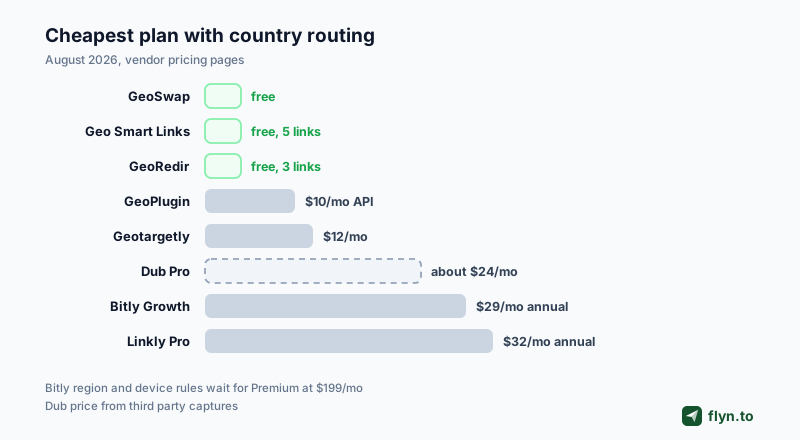
In the shortener tier, geo routing is never just the sticker price: it is a plan gate plus a meter. Linkly meters links and tracked clicks with auto-purchased overage packs, Bitly caps destination edits on top of the plan gate, and Dub meters tracked events. Price the meter you will actually hit, not the headline number.
 Tap to enlarge
Capability Matrix and Pricing Compared
Two tables settle most decisions in this category: what each tool can actually do, and what the doing costs.
Capability matrix
| Tool | Hosted geo link | On-site script | Granularity | Free tier |
|---|---|---|---|---|
| Flyn | Yes (Routing tab) | No | Country, plus device rules | Yes, without geo routing |
| Geotargetly | Yes (Geo Link) | Yes (Geo Redirect) | Country, state, city, radius, IP | No, 14-day trial |
| GeoSwap | Yes (GeoLink) | Yes (GeoRedirect) | Country, state, city | Everything free |
| GeoRedir | Yes | No | Country, plus device, OS, browser rules | 3 links, 1,000 clicks/mo |
| Geo Smart Links | Yes (gsl.li) | No | Country | 5 links, 500 clicks/mo |
| GeoPlugin | No (API and snippets) | Yes | Country, region, city data | Free API account |
| Linkly | Yes | No | Country (city mentioned in one blurb) | Yes, without geo routing |
| Bitly | Yes (Dynamic Routing) | No | Country and platform on Growth; region and device on Premium | Yes, without geo routing |
| Dub | Yes (geo field) | No | Country | Yes, without geo routing |
What geo routing costs, August 2026
| Tool | Cheapest geo unlock | Billing meter |
|---|---|---|
| Flyn | Pro $9/mo annual | Flat plan, unlimited links |
| GeoSwap | $0, everything free | None today; paid add-ons planned |
| Geo Smart Links | $0 (5 links, 500 clicks/mo) | Links and clicks; paid tiers unpublished |
| GeoRedir | $0 free tier; Pro $19/mo | Links and clicks per month |
| GeoPlugin | Free API key; Basic $10/mo ($8 annual) | API requests per month |
| Geotargetly | Dev $12/mo ($9 annual) | Monthly pageviews |
| Dub | Pro, about $24 to $25/mo (third-party captures) | New links and tracked events |
| Bitly | Growth $29/mo annual ($35 monthly) | Plan gate plus destination-edit caps |
| Linkly | Pro $32/mo annual | Links and tracked clicks, auto overage packs |
The tables teach one thing: among the eight ranked tools, the dedicated tier gives you more geo for less money. The three general-purpose shorteners (Linkly, Bitly, Dub) charge more for country-only rules than Geotargetly charges for its whole suite; the only good reason to pay them is consolidation. Flyn's country rules cost the same $9 a month billed annually as Geotargetly's entry plan.
Which Geo Redirect Tool Should You Pick?
One honest decision list, by job:
- Country rules on a branded, editable short link: Flyn. Per-country destinations with a default fallback, and device routing on the same link, on one Pro plan at $9 a month billed annually.
- Multi-region brand personalizing a whole site: Geotargetly. Deepest granularity, every product on every plan, honest accuracy docs.
- Zero budget, eyes open: GeoSwap. All free today; reread the fine print before betting a launch on it.
- Affiliate running paid traffic: Flyn Pro pairs country and device rules with conversion tracking; GeoRedir is the dedicated option, with country plus device rules, fraud filtering, and postbacks from $19 a month.
- Amazon associate on a zero budget: Geo Smart Links. Country routing and the marketplace link builders are free at small scale.
- Developer building custom logic: GeoPlugin. API first, snippets second, bring your own link layer.
- Already paying for Linkly, Bitly, or Dub: do the gate math above: all three charge more for country-only rules than the dedicated tier charges for a full suite.
The Flyn section above covers where Flyn fits, and where it does not.
Whichever tool wins, run the same three tests before spending money: click the link from a VPN endpoint in each target country, confirm the default fallback catches an unmatched country, and trace the chain with the free redirect checker or URL expander to make sure nothing upstream cached a stray 301.
Country targeting is unglamorous plumbing that quietly decides conversion rates and ad account health in every market you sell into. Pick the granularity you can trust, set the fallback, and keep per-country tags consistent with the free UTM builder. For the neighboring decisions, the sibling roundups cover the best URL shorteners overall and the best device-routing shorteners.
Frequently Asked Questions
What is the best geo redirect tool for country targeting?
What is the difference between a geo short link and an on-site geo redirect script?
How accurate is IP-based country targeting?
Should a geo redirect use a 301 or a 302?
Do Bitly, Dub, or Linkly include geo routing on their free plans?
Can Flyn send visitors to different pages by country?
Do geo redirects hurt SEO?
Free tools for this
Three Flyn tools that pair well with the strategy in this article, all free, no signup needed.
UTM Builder
Build campaign-tracked URLs in seconds.
Broken Link Checker
Scan any page for dead links and 404s.
Redirect Checker
Trace 301/302 redirect chains.
Keep reading
Three related deep-dives from the Flyn blog.

Best Link Rotators for A/B Testing and Traffic Splitting
16 min read

Best Link Shorteners for Affiliate Marketers Who Need Cloaking
16 min read

Best URL Shorteners That Filter Bot Clicks From Analytics
15 min read
Ready to try Flyn?
Free plan includes 25 links/month, full analytics, and access to all 30+ free tools above. No credit card required.
Already a member? Log in
Karan Bhakuni is the founder of Flyn. He writes about branded links, click analytics, and the link-management tooling growth teams and creators actually need, drawn from building Flyn and reading a lot of user feedback.
Find these guides useful? Add Flyn as a preferred source so more of them show up in your Google results.