Best URL Shorteners That Filter Bot Clicks From Analytics
Nearly every shortener filters bots. The question worth asking is whether it will tell you how many it removed, and what it does with the fast-growing fourth category: AI assistants fetching your link on someone's behalf.

Your Click Count Is Four Things Wearing One Number
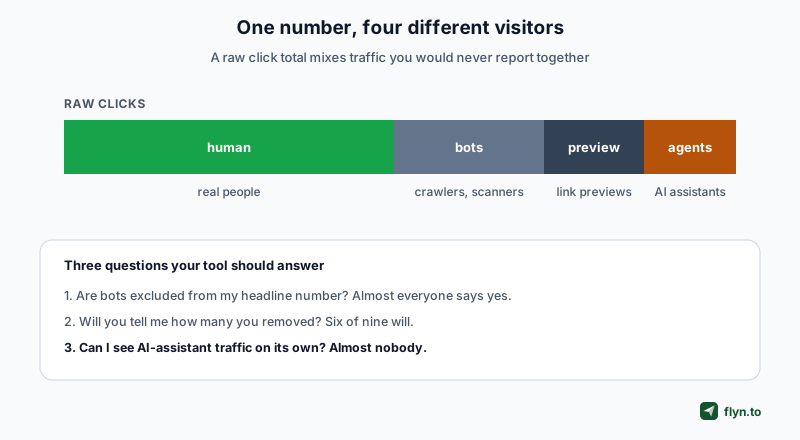
A short link reports 400 clicks. That number is a blend of at least four populations that behave nothing alike, and the useful question is not how big it is but what it is made of.
 Tap to enlarge
Real people
The population you actually want. Everything else is noise dressed as signal, and a safety checker hitting your link counts as noise too.
Crawlers and scanners
Search engine bots, security scanners checking whether your link is malicious, uptime monitors, and scrapers. These arrive fast, often in bursts, and can outnumber humans entirely on a link that has been posted somewhere public.
Link previews
Slack, WhatsApp, iMessage, Discord and Twitter all fetch a URL to build a preview card the moment someone pastes it. One person sharing your link in a busy channel can generate dozens of fetches before a single human clicks.
AI assistants
The newest category and the one nobody had to think about two years ago. An assistant fetching your page to answer somebody's question is not a visitor, but it is also not a crawler indexing you. It represents a person who asked about your thing, which makes it genuinely interesting rather than merely noise.
This is signal-based screening, everywhere. Every vendor here classifies by user agent and request pattern, and none can promise certainty about any single visitor. Bitly says so plainly, warning that its reports "may still contain some clicks generated by bots". Treat all of these numbers as good at scale rather than exact.
Everyone Filters. Fewer Will Show You the Number
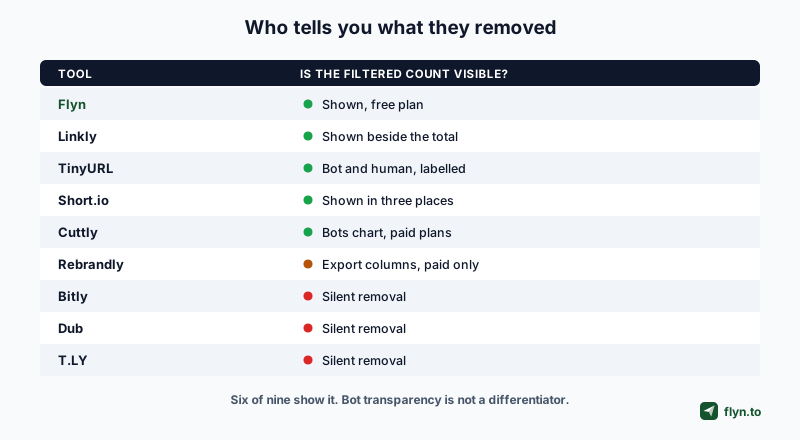
We checked nine shorteners against their own documentation in August 2026. All of them filter. The interesting split is disclosure.
 Tap to enlarge
| Tool | Filters bots | Shows the filtered count | Where |
|---|---|---|---|
| Flyn | Yes | Yes, on the free plan | Per link, plus an all-time human share (measured population share) |
| Linkly | Yes | Yes | Beside the click total, plus a Robots tab by bot name |
| TinyURL | Labels rather than removes | Yes | Bot Clicks and Human Clicks as separate metrics |
| Short.io | Yes | Yes | Three separate places in the product |
| Cuttly | Yes | Yes, paid plans | A Bots chart, one bar per bot type |
| Rebrandly | Yes | Paid exports only | Human and bot columns in custom reports |
| Bitly | Yes | No, silent | Not documented anywhere |
| Dub | Yes | No, silent | Stated only in a 2023 changelog entry |
| T.LY | Yes | No, silent | Filters crawlers, publishes no count |
We were wrong about this being rare
Worth stating outright, because we had it in our own notes as a differentiator: showing the bot count is common. Linkly puts it directly beside the total. TinyURL treats bot and human as two labelled metrics rather than filtering at all. Short.io surfaces it in three places. If a comparison tells you only one vendor does this, it has not checked.
TinyURL's approach is different in kind
TinyURL labels rather than removes: it captures Bot Clicks and Human Clicks as separate metrics and exposes a per-click flag through its API. That is arguably more honest than filtering, since nothing is discarded, and it does mean the headline total on a TinyURL link includes bots unless you read the split.
A filtered number you are never shown is just a smaller number you still cannot verify.
The Gap That Actually Exists
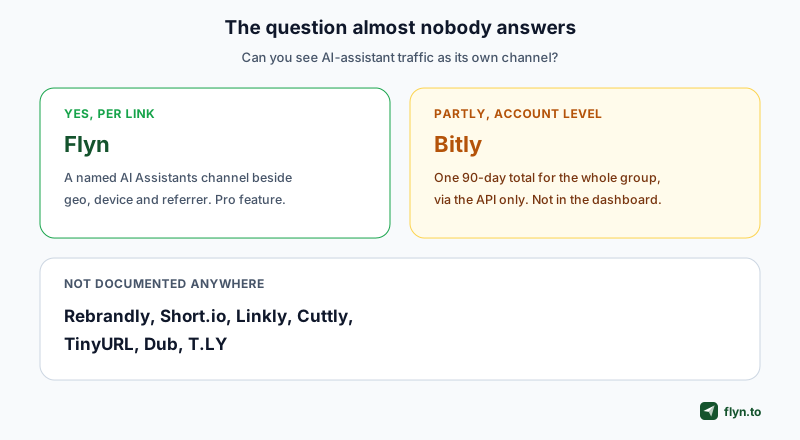
If bot disclosure is common, what is not? Treating AI-assistant traffic as its own thing.
 Tap to enlarge
Why it is worth separating
An assistant fetching your link is a signal about demand, not just noise. Somebody asked a question, an AI went to your page to answer it, and no human ever saw your analytics-tracked visit. Lumped into "direct traffic" that is invisible. Filtered out entirely, it is deleted. Named as its own channel, it is a measurement of how often you are the answer.
What Flyn does
The bot-excluded human count is the headline number on every plan including free, and the traffic-quality view showing human beside filtered-bot is free too. Pro adds the AI Assistants channel alongside the geo, city, device, OS, browser and referrer breakdowns, so assistant traffic sits in the same report as everything else rather than being thrown away.
| Tool | AI-assistant traffic | Granularity | Where you read it |
|---|---|---|---|
| Flyn | Named channel | Per link | In the analytics report, Pro |
| Bitly | A 90-day total | Whole group, one figure | API or MCP only, not the dashboard |
| Rebrandly | Not documented | n/a | n/a |
| Short.io | Not documented | n/a | n/a |
| Linkly | Not documented | n/a | n/a |
| Cuttly | Not documented | n/a | n/a |
| TinyURL | Not documented | n/a | n/a |
| Dub | Not documented | n/a | n/a |
| T.LY | Not documented | n/a | n/a |
What the rest do
Rebrandly, Short.io, Linkly, Cuttly, TinyURL, Dub and T.LY do not document AI-assistant traffic as a category anywhere. That is not an accusation of a missing feature; it means the vendor does not describe it, so do not buy expecting it.
Bitly Is More Interesting Than the Simple Version
Bitly deserves its own section because the easy summary is wrong, and we published the easy summary ourselves before checking properly.
 Tap to enlarge
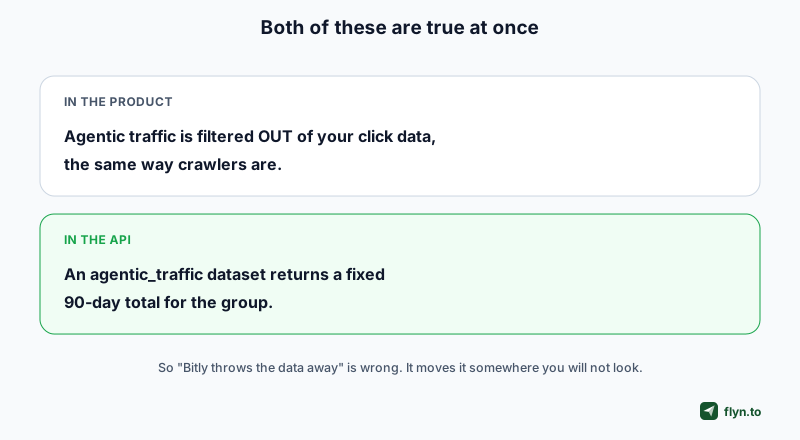
In the product, it is gone
Bitly's help centre is direct: agentic traffic is filtered out of your click data the same way crawlers are, and the numbers on the Links page and Analytics dashboards reflect visits from people.
In the API, it is a number
Bitly also added an agentic_traffic dataset to its group analytics, described in its own tools reference as counting clicks from AI agents and assistants, always returning a fixed 90-day total. So the data exists: group-level, one rolled-up figure, reachable through the API or its MCP server.
What you can and cannot say about it
You cannot say Bitly discards AI traffic, because it does not. You can say you will not find it per link, over time, or anywhere in the dashboard. We corrected our own article on which clicks came from ChatGPT for exactly this, and the correction is worth more than the original claim was.
Vendor behaviour in this area is changing quickly and most third-party comparisons are stale. Bitly's agentic dataset landed in August 2026. Anything written before that describes a different product. Check the changelog, not the listicle.
What Bot Traffic Does to Decisions
The reason any of this matters is that unfiltered numbers change what you do, usually in the direction of wasting money.
A/B tests break first
Bots do not distribute evenly across a weighted rotation. A scraper that hammers one branch will hand you a winner that is not a winner. If your rotator reports per destination but your click count includes crawlers, the comparison is between one real page and one crawled page.
Affiliate campaigns look better than they are
Affiliate links attract scrapers, and a click count inflated by them makes a poor offer look promising. This is why cloaked affiliate links deserve a filtered count underneath them.
Paid campaigns get scaled on fiction
If you judge a channel by clicks and a share of those clicks are automated, you will scale spend into a number that cannot convert. Our guide to click fraud prevention covers the diagnostics for spotting it.
Do one audit before you trust any tool's numbers: post a fresh link into a busy Slack or WhatsApp group and click it exactly once yourself. If the tool reports more than one human click, its preview filtering is not working, and every number after that is suspect.
Choosing on This Criterion
 Tap to enlarge
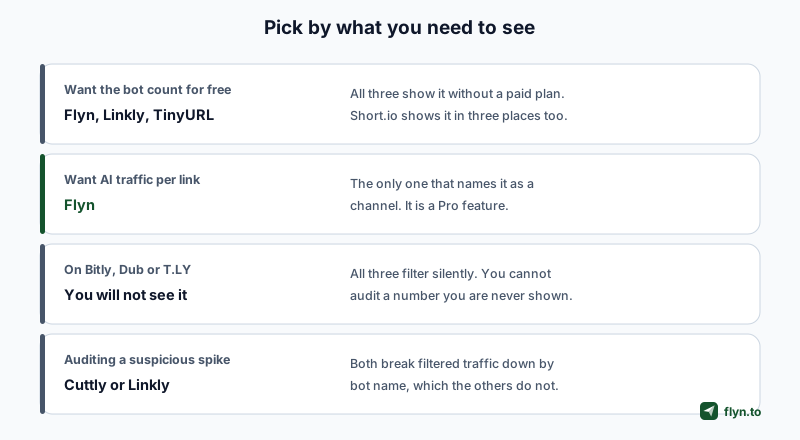
If you just want the number, free
Flyn, Linkly and TinyURL all show it without a paid plan, and Short.io surfaces it in three places. Any of these is a reasonable answer, and we are not going to pretend ours is the only one.
If you need to audit a suspicious spike
Start with the split Flyn shows per link, human beside filtered bot, on every plan: a sudden change in the bot share is the signal. Cuttly and Linkly go one step further and break filtered traffic down by bot name, which the others do not. If you are trying to work out whether one scraper is responsible, that breakdown is the one feature here Flyn does not have.
If AI traffic is the question
This is the one place we would argue Flyn is genuinely ahead: a named channel, per link, sitting in the same report as your other breakdowns. It is a Pro feature at $12/month, or $9 billed annually. You can start on the free plan and see the human-versus-bot split before deciding.
If you are on a silent filterer
Bitly, Dub and T.LY all filter without showing you the number. That is a defensible engineering choice and it does mean you have no way to sanity-check the total. If your traffic looks strange, you will have nothing to check it against.
Reading a Traffic-Quality Report Properly
Once you can see the split, a few habits make it useful rather than decorative.
Watch the ratio, not the count
Bot volume rises with exposure, so a growing bot count on a link that is being shared more is normal. A sudden change in the share is the signal. Judge it against a real baseline rather than a feeling: across registered Flyn links the median runs 7.7% bots and the noisiest tenth sits above 75%, so a link that doubles off its own median has been found by something. The full distribution gives you the percentiles to compare against.
Expect previews to spike at publication
The first minutes after you post a link are dominated by preview fetchers. Judging a campaign on its first hour of raw clicks will always flatter it.
Do not chase zero
No filter reaches zero, and a vendor claiming it does is overselling. The goal is a number stable enough to compare week over week, not a perfectly clean one.
Keep the human number as your reported number
Whatever you put in a report to a client or a manager should be the filtered human count, with the bot figure available if anyone asks. That is the whole reason disclosure matters more than filtering: you can defend a number you can decompose. Our guide to tracking clicks covers the rest of the reporting surface, and the clicks API returns the same split programmatically.
Frequently Asked Questions
Do all URL shorteners filter bot clicks?
Which shorteners show how many bot clicks they removed?
Does Bitly show AI or agentic traffic?
What counts as a bot click?
Why does bot filtering matter for A/B testing?
Can I trust a filtered click number?
How do I check whether my shortener filters link previews?
Which shortener is best for clean analytics?
Free tools for this
Three Flyn tools that pair well with the strategy in this article, all free, no signup needed.
UTM Builder
Build campaign-tracked URLs in seconds.
Broken Link Checker
Scan any page for dead links and 404s.
Redirect Checker
Trace 301/302 redirect chains.
Keep reading
Three related deep-dives from the Flyn blog.
Best Link Rotators for A/B Testing and Traffic Splitting
16 min read
Best Link Shorteners for Affiliate Marketers Who Need Cloaking
16 min read
URL Shortener Lifetime Deals: What Exists and What to Check
14 min read
Ready to try Flyn?
Free plan includes 25 links/month, full analytics, and access to all 30+ free tools above. No credit card required.
Already a member? Log in
Karan Bhakuni is the founder of Flyn. He writes about branded links, click analytics, and the link-management tooling growth teams and creators actually need, drawn from building Flyn and reading a lot of user feedback.
Find these guides useful? Add Flyn as a preferred source so more of them show up in your Google results.