Free URL Shorteners Without Ads or Interstitial Pages
A click on a free Bitly link can now land on a page carrying someone else's ad before it reaches yours. Here is which shorteners do that, which promise in writing they never will, and a one-line test for any link.

Which free URL shorteners show ads before the redirect?
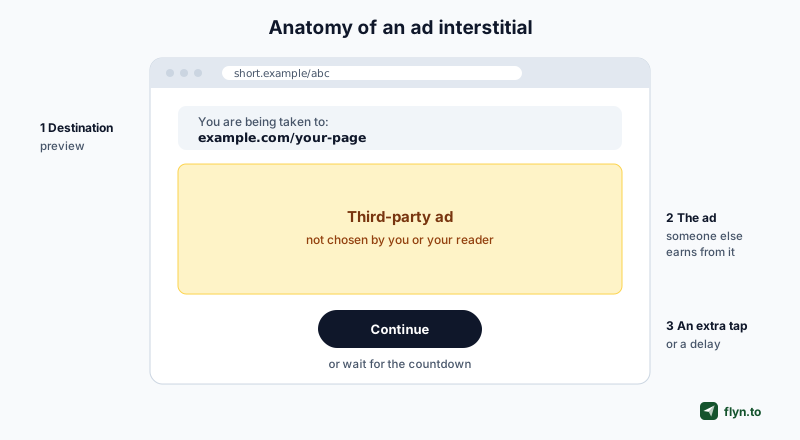
You share a link to your newsletter, your shop or your talk slides. Your reader taps it and, instead of your page, gets a page with a preview of your URL, an advert for something you have never heard of, and a button to carry on. That page is an interstitial, and on one of the biggest free URL shorteners it is now the default.
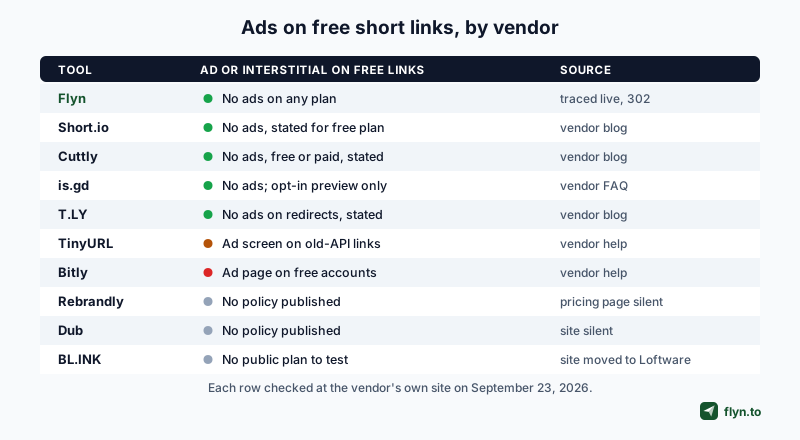
We compared ten shorteners on September 23, 2026, the same ten as in the best URL shorteners roundup. Nine were checked against the vendor's own pages, and Flyn's we traced live. We only record what each vendor says itself or what we could trace ourselves. Where a vendor says nothing, we say so.
| Tool | Ad or interstitial on free links? | What the source says |
|---|---|---|
| Flyn | No, on any plan | No ads on any plan, Free included, per its pricing page; traced live: a plain link is a 302, no page |
| Short.io | No | Its blog promises no ad page, free plan included |
| Cuttly | No | Its blog says no ads on free or paid plans |
| is.gd | No ads | FAQ: no third-party ads; preview only if the visitor asks |
| T.LY | No | Its blog says it shows no interstitial ads on redirects |
| TinyURL | On old-API links | Help: ad or preview screen on links from its deprecated API |
| Bitly | Yes | Help: free accounts get an interstitial with an ad |
| Rebrandly | Not stated | Pricing page is silent on ads for links |
| Dub | Not stated | No ad policy found on its site or pricing page |
| BL.INK | No public plan | bl.ink now redirects to Loftware's product pages |
Checked against each vendor's own page on September 23, 2026. Flyn's row also reflects its pricing page, which has promised no ads since September 24, 2026. "Not stated" means we found no statement either way, not that the vendor shows ads.
 Tap to enlarge
The two that add a page
Bitly is the only tool here that puts an ad page in front of ordinary free links as a matter of policy. We cover what that means, and how to get rid of it, in the Bitly section below. TinyURL's ad screen is real but targeted: it applies to links made through an API endpoint TinyURL has deprecated. Most people making links on tinyurl.com will never see it.
The ones that promise in writing
Flyn's pricing page makes the promise twice: the Free plan card lists "No ads or ad pages before the redirect", and the FAQ answers "No third-party ads, on any plan." Short.io and Cuttly both publish a dedicated post whose whole point is that their links never show an ad page, on the free plan as well as paid ones. T.LY published a post in May 2026 saying it does not show interstitial ads during redirects, without singling out a plan. is.gd says in its FAQ that it runs no third-party advertising. That kind of written promise is worth more than a reputation, because a reputation can change with one policy update, as Bitly's did.
The ones that say nothing
Rebrandly's pricing page mentions a watermark on free QR codes and on the free link gallery, but nothing about ads on links. We found nothing on Dub's site or pricing page that addresses it. BL.INK's own site now redirects to Loftware's connected-packaging product, so there was no public plan to test.
What an interstitial is, and what it costs you
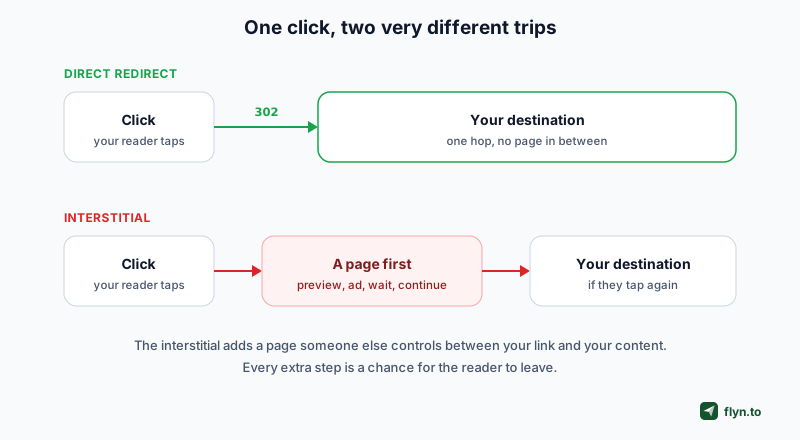
A short link is supposed to be a redirect: your reader asks for the short URL and the server answers with a status code such as 301 or 302 and the real address. The browser follows it without drawing anything. An interstitial replaces that answer with a whole web page that the reader has to look at, and often tap through, before they reach you.
 Tap to enlarge
Ad pages, preview pages and warning pages are different things
- Ad interstitial: a page the shortener inserts to earn from your traffic. You did not choose it and neither did your reader.
- Preview page: a page that shows where the link goes before sending you there. is.gd offers one, but only to visitors who ask for it.
- Warning page: a page shown because a link looks dangerous. Browsers do this themselves, and some shorteners do it for links they have flagged. It protects the reader and carries no ad.
Only the first kind is the problem this guide is about.
Why an extra page loses readers
Every step between a tap and the content is a chance for someone to leave. An ad page adds a load, an extra tap or a countdown, and a screen that does not look like the site the reader expected. On a phone, in a hurry, that is often enough to lose them. It also makes your link look like spam, which is the opposite of what a branded short link is for.
Where it breaks things quietly
The damage is worst where you cannot change the link. A QR code printed on packaging or a poster points at a short link forever, so if the shortener starts inserting an ad page, every scan hits it and you cannot reprint the code. Links inside old emails, PDFs and videos have the same problem.
 Tap to enlarge
Bitly's ad page on free accounts
Bitly's help centre is explicit. Its article on ads, last updated January 12, 2026, says Bitly uses ads on free accounts to keep offering free plans, and that it introduced an interstitial page with a preview of the destination and an ad. The ad-free experience is reserved for paid plans. You can read it on Bitly's support site.
Who sees it
Anyone who clicks a link created in a free Bitly account. The same article notes that links made with Bitly's old anonymous shortener, which it has since discontinued, have their own removal process. If your links come from a paid Bitly account, this does not apply to you.
How to remove it
Bitly's answer is to upgrade to a paid plan. The other answer is to move the links you still control to a shortener without an ad page, which is what our Bitly migration guide walks through. Printed QR codes that point at bit.ly are the exception: you cannot move those, so upgrading is the only fix for them. For a feature-by-feature view, see Bitly vs Flyn.
An ad page on your link changes what your reader sees, but it does not change your analytics. You can have a perfectly healthy click count on links that are sending every reader through an advert first. Check the link itself, not the dashboard.
TinyURL's ad screen, and who it actually affects
TinyURL has a help article on exactly this question, updated August 18, 2026. It explains that links created through its old API endpoint, the long-standing api-create.php address, now show an ad or preview screen and then redirect after a few seconds. Links you make on tinyurl.com or through its current, documented API are not the ones it describes.
Why only old-API links
TinyURL says the old endpoint was never officially supported. A September 2025 post announced an interstitial preview page, with a countdown, on links from that endpoint as part of retiring it; the August 2026 article calls the same screen an ad or preview screen. Anything that still calls that endpoint, including old plugins, scripts and browser extensions, keeps producing links with the screen.
Removing it takes a review and a paid plan
TinyURL's process is to send it your links or destination domains first, let its team check they can be whitelisted, and then upgrade to a paid plan. It says it cannot whitelist widely used domains, and that old-API links cannot be edited or deleted because it cannot verify who owns them. The practical fix for new links is to stop using the old endpoint. See TinyURL vs Flyn if you are weighing a move.
This is why "does TinyURL show ads?" gets contradictory answers online. For most people making links by hand, no. For anyone whose links came from the old API, yes. Test the actual link.
How to check any short link yourself
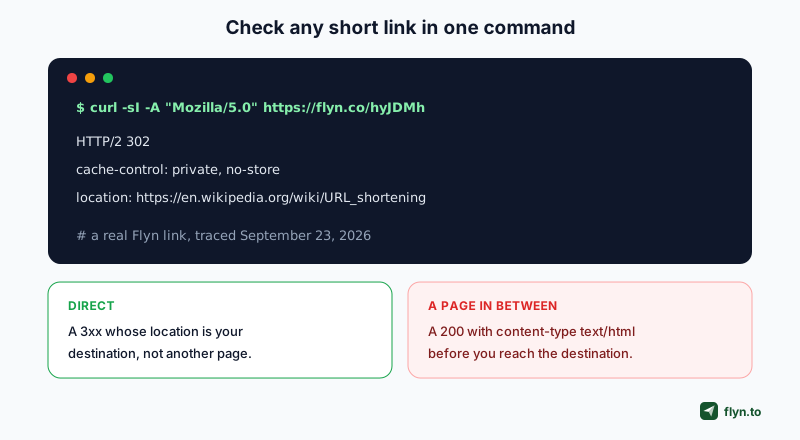
You do not have to trust a vendor, or us. One request tells you whether a short link redirects straight away or serves a page first.
 Tap to enlarge
One command
Run curl -sI -A "Mozilla/5.0" https://your.short/link. The -I asks only for the headers and -A sends a browser-style user agent, because some services only show the page to browsers. Then read the first line:
- 301, 302, 307 or 308 with a
locationheader: a redirect. If the location is your destination, nothing is rendered in between. If it points at another page on the shortener's own domain, that page is the stop in between, so follow it. - 200 with
content-type: text/html: the short link served a page. Open it in a browser to see what is on it.
No terminal? Use a redirect checker
Paste the link into our free redirect checker or URL expander. Both follow every hop and show the status code at each step, so a page in the middle stands out. The link inspector goes further and shows what the final page reports about itself.
In the browser
Open DevTools, switch to the Network tab, tick "Preserve log" and open the short link. The first request is the short URL: a 3xx straight to your destination means a clean redirect, while a 200, or a 3xx to another page on the shortener's own domain, means the shortener put a page in front.
Test a link made on the plan you would actually use. A vendor's own marketing links usually live on a paid account, so they can redirect cleanly even when free links do not.
What a Flyn link does
We ran the same test on Flyn. In a normal browser, a plain Flyn link answers with a 302 and the destination in the location header: no ad, no preview page, no countdown. That holds on the free plan and on every paid plan. Links made in a Flyn account are created on Flyn's own short domain, and links made without an account live on a separate domain kept for them; we traced one of those too and it redirected the same way.
The pages you can switch on yourself
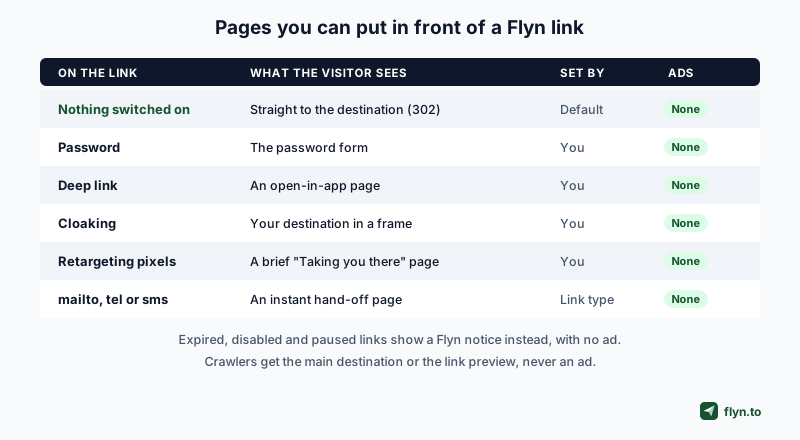
A few features need a page, because a bare redirect cannot run code or ask a question. Each one is something the link's owner turns on, and none of them carries an advert.
 Tap to enlarge
- Password: a password-protected link shows the form first. That is the point of it.
- Deep link: a link set to open in a native app uses a small page to hand off to the app.
- Cloaking: a cloaked link shows your destination inside a frame so the address bar keeps your URL.
- Retargeting pixels: a 302 cannot run a tracking script, so a link with pixels attached shows a brief "Taking you there" page while they fire. See adding a Facebook pixel to a link.
- Mac URL: on a link with its own Mac URL, Safari on a Mac or iPad first gets a blank device check page that tells the two apart, then continues.
- mailto, tel and sms links: browsers do not reliably follow a 302 to those, so Flyn uses an instant hand-off page instead.
Deep links, cloaking and pixels are Pro features. Password protection is too, with one exception: the free password-protected link generator makes password links without an account, and they keep their password if you later claim them into a free account. Apart from that, a web link you make on the free plan has none of these pages, so an ordinary browser gets a plain 302. An account that moves from Pro back to Free keeps the password, cloaking and deep-link settings its links already had, and those links keep their pages. The details are on the pricing page.
A shortener's job is to get out of the way. The moment it puts its own page between your reader and your content, it is spending your audience's attention on itself.
What Flyn does not promise
A few pages can appear that the owner did not switch on, and none of them is a third-party ad:
- Expired or disabled links send browsers to a Flyn page saying the link is no longer available, instead of the destination.
- A paused custom domain. Custom domains are a paid feature. If the owner of one stops paying, links on that domain stop forwarding and show a Flyn page saying the link is paused, with a button for the owner to reactivate it. Nothing is deleted.
- A browser's own warning, such as a red Google Safe Browsing page, is shown by the browser, not by any shortener.
Crawlers are also answered differently from people, so link previews work: they get your main destination or your custom preview. That check reads the user agent, and it can mistake a few real visitors for crawlers when their user agent happens to contain a crawler's name. Those visitors are answered like a crawler: on a link with a custom preview they get an instant hand-off page instead of the 302, and on a password-protected link they see a notice without the password form. How Flyn tells people from crawlers is in how Flyn counts clicks and filters bots.
When a page in between is worth having
None of this means every page in front of a redirect is bad. The question is who chose it and what it is for.
Pixels, passwords and app hand-offs
If you want to retarget the people who click your link, the pixel has to run in their browser, and a redirect alone cannot do that. A brief page is the price. If you run pixels, read retargeting pixels, consent and GDPR first, because firing a pixel is a consent question in many countries.
A password form is a page by definition, and password-protected, expiring links are useful for exactly the audiences you do not want forwarding things around. An open-in-app page is what makes a link land inside the app instead of a login wall in the browser.
The difference is who chose it
Every page in this section is one you decided to put there, for your own reason. An ad interstitial is one the shortener decided to put there, for its reason. That is the line worth drawing when you pick a tool.
How to choose a free shortener without ads
If ad pages are your deciding factor, here is how the options sort, using only what we could verify.
| If you want | Look at | The trade-off |
|---|---|---|
| No ads, bot-filtered click counts and editable destinations on free | Flyn | Free links live on Flyn's own short domain; custom domains are Pro |
| A short link, no account, no ads | is.gd | No branded domain; analytics only if you opt in per link |
| A written no-ads promise plus a free custom domain | Short.io | Its free plan caps branded links in total, not per month |
| A written no-ads promise on free and paid | Cuttly | Check its current free limits before you commit |
| To stay on Bitly without the ad page | Bitly paid | Bitly's answer to its own ad page is to upgrade |
Test before you commit
Whatever you pick, make one free link and run the curl test above on it. It takes ten seconds and it tells you what your readers will actually see, which is the only thing that matters. If you are choosing on more than ads, the full roundup compares free limits, custom domains and analytics for the same ten tools, and are short links safe? covers the other thing readers worry about when they see one.
If you want to try Flyn's version, you can make a free account and your first link will be a plain 302 like the one traced above.
Frequently Asked Questions
Does Bitly show ads on free links?
Does TinyURL show ads before redirecting?
What is an interstitial page on a short link?
How can I tell if a short link will show an ad before redirecting?
Are there free URL shorteners with no ads at all?
Does Flyn ever show a page before the redirect?
Is a link preview page the same as an ad page?
Free tools for this
Three Flyn tools that pair well with the strategy in this article, all free, no signup needed.
UTM Builder
Build campaign-tracked URLs in seconds.
Broken Link Checker
Scan any page for dead links and 404s.
Open Graph Checker
Preview how URLs unfurl on social.
Keep reading
Three related deep-dives from the Flyn blog.

How to Track Which Posts Drive Sales, Not Just Clicks
19 min read

Email Newsletter Click Tracking: Measure Your Real CTR
12 min read

How to Choose a Branded Short Domain for Your Links
13 min read
Ready to try Flyn?
Free plan includes 25 links/month, full analytics, and access to all 30+ free tools above. No credit card required.
Already a member? Log in
Karan Bhakuni is the founder of Flyn. He writes about branded links, click analytics, and the link-management tooling growth teams and creators actually need, drawn from building Flyn and reading a lot of user feedback.
Find these guides useful? Add Flyn as a preferred source so more of them show up in your Google results.