How does Flyn count clicks and filter bots?
Steps verified on September 23, 2026
Flyn's headline click number is human clicks only. Every request to a short link is checked before it is recorded, and anything that looks automated is excluded from your click total and counted separately. This article explains exactly what gets filtered, how the check works, and where the filtered number appears.
The check runs before a click is recorded
When someone opens a Flyn short link, the redirect handler reads the request's user agent and compares it against a list of known non-human signatures. A match, or a request with no user agent at all, never becomes a click: it is added to a separate bots-filtered tally for that link instead. Every real browser sends a user agent, so a blank one is a script or scanner rather than a person.
Filtering decides what gets counted, not who can open the link. Recognised crawlers are answered slightly differently so that previews and search engines behave: they always get your main destination rather than a device, country, rotation or A/B variant, and on a link with a password or a custom preview they receive the preview details instead of the redirect.
What counts as non-human
Six groups of user agents are filtered:
- Social, messaging and link-preview fetchers, including the unfurlers behind Facebook, X, WhatsApp, Telegram, LinkedIn, Slack, Discord, Pinterest, Apple, Skype, Quora and Embedly. These fire when you paste a link, before any person taps it.
- Search, SEO and AI crawlers, including Googlebot and its variants, bingbot, Yahoo Slurp, DuckDuckBot, YandexBot, Baiduspider, redditbot, Ahrefs, Semrush, DataForSeo, DotBot, MJ12bot, PetalBot, plus GPTBot, ClaudeBot, CCBot, Amazonbot, Bytespider and Meta's crawler.
- Anything that names itself a bot. The words bot, crawler, spider and crawl are matched anywhere in the user agent, which catches the long tail of crawlers. Browsers rarely contain them, but a few do, see the limits below.
- Headless browsers and automation runtimes, including headless Chrome, PhantomJS, Puppeteer, Playwright and Selenium.
- HTTP client libraries and command-line tools, including curl, wget, python-requests, urllib, aiohttp, httpx, Go's http client, node-fetch, axios, OkHttp, Java, libwww, Apache HttpClient and undici.
- Uptime and performance monitors, including Pingdom, StatusCake, Site24x7, Datadog, Lighthouse, PageSpeed and GTmetrix.
Matching ignores capitalisation, so GPTBot and gptbot are treated the same.
Where you see the filtered number
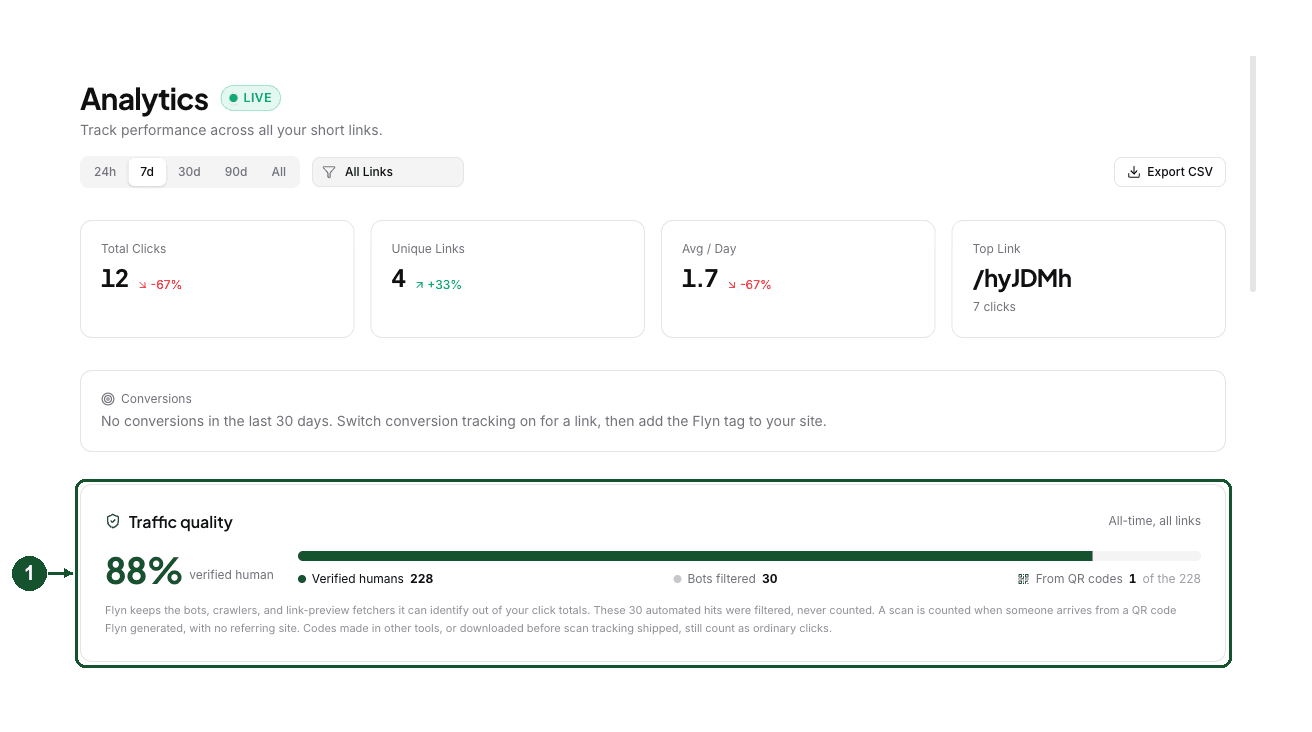
Your account-wide split is on the Analytics page, in the Traffic quality card (1). It shows the share of verified human clicks, the human total, and how many automated hits were filtered (2). Both tallies are all-time, and they follow the link filter at the top of the page, so you can narrow to one link and still compare like with like.

For a single link, open it from your Links list. The Total Clicks card (3) carries the same line underneath the number (4).
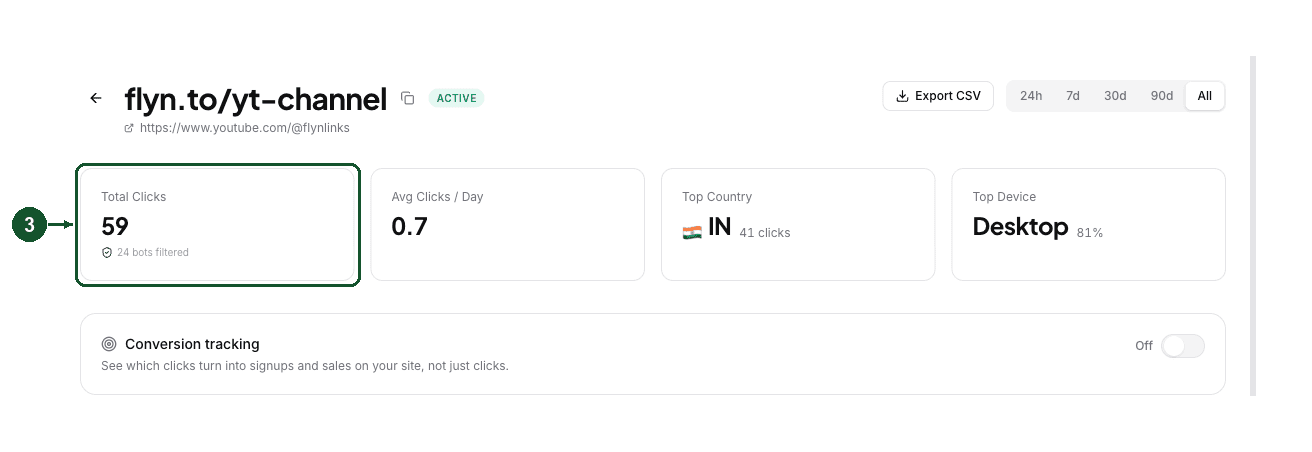
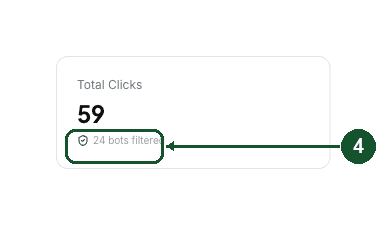
The filtered tally is all-time for that link, while the click total follows the time range you picked. That is why a 7-day view can show a handful of clicks next to a much larger filtered number. Switch the range to All to compare the two directly.
Both numbers are on every plan, including Free. The card and the line appear once at least one automated hit has been filtered, so a brand new link will not show them yet. Click counts are free; the breakdowns of where clicks come from, by country, device and referrer, are Pro features.
What the filter does not do
- It reads the user agent, nothing else. Flyn does not filter by IP address or data-centre range, so automated traffic that sends an ordinary browser user agent is counted as a human click. No user-agent filter catches everything.
- It can misread a few real people. Because it matches names, it also catches visitors in Pinterest's in-app browser, whose user agent includes the word Pinterest, and on phones whose model name contains "bot", such as CUBOT models. Their clicks go into the filtered tally instead of your human total.
- It does not label bot types. The filtered hits are stored as one running count per link, so there is no list of which crawlers arrived, and no per-bot breakdown.
- It does not block anyone. The filter is about analytics, not access. To stop traffic instead of just excluding it from counts, use link expiration or a password.
Why your total can look lower than another tool
Tools that count raw hits will usually report a bigger number than Flyn for the same link, because preview fetchers and crawlers are included in their totals. If you are reconciling two numbers, compare Flyn's human total plus its filtered tally against the other tool's raw count. For how large the automated share usually runs across Flyn links, see What Share of Short Link Clicks Are Bots?, and for the fetches a single paste into a chat app produces, see Which Bots Fetch a Link When You Share It?.
If a specific link's numbers still look wrong, Why are my clicks not showing or lower than expected? walks through the checks, and you can email [email protected] with the exact short link so we can look up its click and bot tallies directly.
Common questions
Do bot clicks count toward my link total?
No. The headline number on a Flyn link is verified human clicks only. A request that matches the bot and crawler list, or that arrives with no user agent at all, is never added to the total. It is counted in a separate bots filtered tally instead.
Why does the bots filtered number stay the same when I change the time range?
The bots filtered tally is an all-time count for the link, so it does not move when you switch between 24h, 7d, 30d, 90d and All. Your click total does follow the range, which is why a short range can show a small click count next to a much larger filtered number.
Can I see which bots were filtered?
Not individually. Flyn stores the filtered hits as a single running count per link, not as a list or a breakdown by bot type, so the Analytics page shows how many automated hits were kept out and not which ones they were.
Related articles
Did this answer it? If not, email [email protected] and a human will help.
Try it yourself
Create a branded, trackable short link free and follow along with this guide.