I bought the lifetime deal but my account still shows Free
Updated August 13, 2026
Flyn matches a Lifetime Founder Deal purchase to an account by email address. The checkout runs on Polar and is not signed in to Flyn, so the address you type there is what connects your payment to an account. If that address is not the one your Flyn account uses, the two do not match and the account stays on Free.
Nothing is lost while that is true. A paid order with no matching account is held on our side, with no expiry, until an account with that address exists and is confirmed. Do not buy the deal again.
1. Find the address you paid with
Search your inboxes for Flyn LTD Founder, the phrase in the subject line of the welcome email. That email is sent to the address on the order, so whichever inbox holds it is the address the purchase is attached to. Check spam. If you cannot find it, use whatever address is on your payment receipt.
2. Find the address on your Flyn account
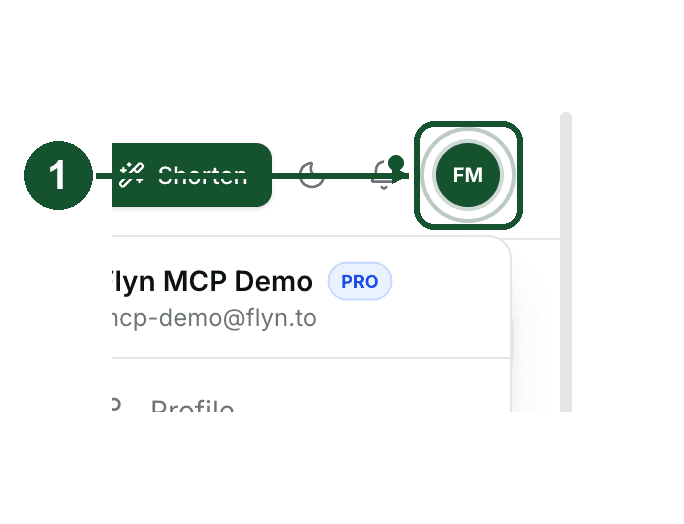
Sign in and click the round avatar button at the top right to open the menu. Your account email is shown under your name.
An LTD badge (a crown and the letters LTD) appears next to your name once the deal is applied, and the Billing tab in Settings shows Lifetime Plan instead of Free Plan.
Capitalisation does not matter: the two addresses are compared in lower case. A plus alias, a different domain, or a typo counts as a different address.
If you do not have a Flyn account yet
Sign up at /signup with the exact address you paid with.
- Continue with Google: lifetime is applied while the account is created, before you reach the dashboard.
- Email and password: click the confirmation link Flyn emails you, then press the confirm button on the page that opens. Signing up is not enough on its own, and neither is opening the email: pressing that button is the step that proves the inbox is yours and actually grants lifetime.
If the two addresses are different
- Your Flyn account is new and empty: the quickest fix is to sign up with the purchase address as above and use that account instead.
- Your links, domains, or team already live on the existing account: do not create a second account. Email [email protected] with the address you paid with, the address on your Flyn account, and the order number or receipt, and ask us to move the purchase to the account you already use.
For the lifetime deal, the automatic match looks at the address on the order, because control of that inbox is the proof we have that the purchase is yours. That is why a mismatch needs a human rather than a button.
If the two addresses match and it still says Free
Reload the dashboard. The plan is re-read when the page loads and when you switch back to the tab, so signing out and back in is not required.
If the Billing tab still shows Free Plan after a reload, something went wrong on our side rather than on yours. Email [email protected] with your account email and the order number so we can look the order up.
Common questions
Does capitalisation or a plus alias in my email matter?
Capitalisation does not matter. Flyn compares the purchase address and the account address in lower case, so [email protected] and [email protected] are the same address. A plus alias like [email protected], a different domain, or a typo counts as a different address.
I paid before creating a Flyn account. What do I do?
Sign up at flyn.to/signup with the exact address you paid with. If you use Continue with Google, lifetime is applied while the account is created. If you sign up with an email and password, open the confirmation email Flyn sends you, click the link, then press the confirm button on the page it opens, which is the step that actually applies lifetime, not just opening the email. There is no code to enter.
Will an unclaimed lifetime purchase expire?
No. A paid lifetime order with no matching Flyn account is held against the email address on the order, with no expiry, and is applied the first time an account with that address is confirmed. Do not buy the deal a second time.
What should I send support if the two emails are different?
Email [email protected] and include the address you paid with, the address on your Flyn account, and the order number or payment receipt. Those details are what we need to look the order up.
Related articles
Did this answer it? If not, email [email protected] and a human will help.
Try it yourself
Create a branded, trackable short link free and follow along with this guide.