Why are my clicks not showing or lower than expected?
Steps verified on July 31, 2026
If your Flyn click count looks lower than you expected, the number is almost always correct: Flyn counts human clicks only. Bots, crawlers, and the preview fetchers that chat apps send are filtered out before they ever reach your total. This guide explains what gets filtered and what to check if you still think clicks are missing.
Flyn counts humans, not bots
Every visit to a short link is checked against a list of known non-human traffic: search and AI crawlers, social and messaging preview bots, headless browsers, HTTP libraries like curl, uptime monitors, and requests with no user agent at all. None of these count as clicks.
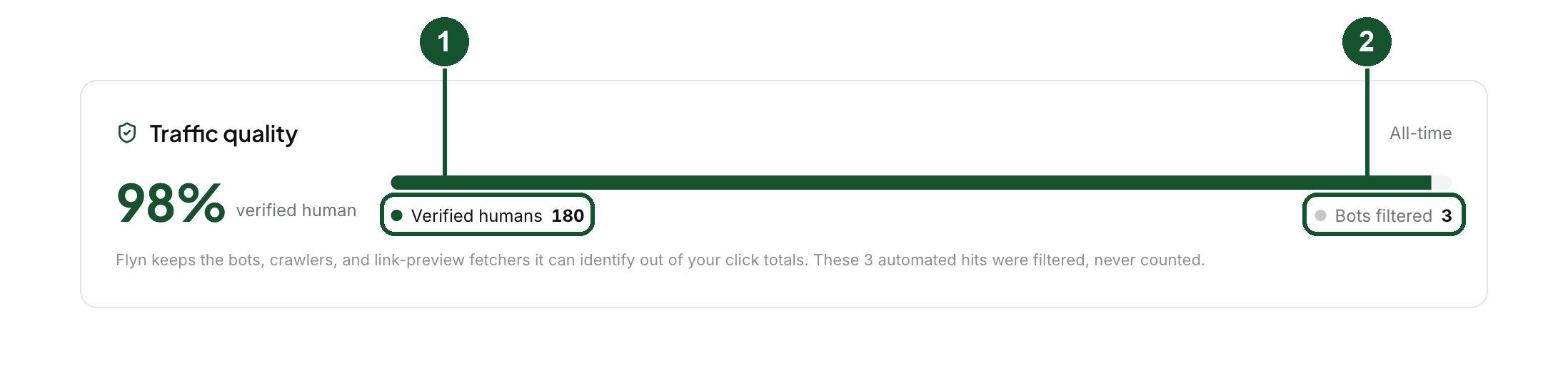
Filtered hits are tallied separately. Once at least one has been filtered, your Analytics page shows a Traffic quality card with two numbers: verified human clicks (1) and bots filtered (2), so you can see exactly how much automated traffic was kept out of your totals. For how large that share usually is across all Flyn links, see What Share of Short Link Clicks Are Bots?.
Chat apps preview your link before anyone clicks it
The most common surprise: you paste a link into WhatsApp, Telegram, Slack, Discord, X, Facebook, or LinkedIn, and the click count stays at zero. That is expected. The platform fetches your link to build the preview card, and Flyn filters that automated fetch. The count moves when a person taps the link, not when the preview loads. We measured how many fetches one paste produces on each app in Which Bots Fetch a Link When You Share It?.
Your own clicks are different: clicking your link in a normal browser is a human click and counts every time. Flyn does not filter repeat clicks or self clicks.
Free plans show the last 30 days
The Free plan keeps 30 days of click data, so time ranges past 30 days (90 days, a year, all time) are part of Pro's unlimited retention. If you are comparing this month's chart to a memory of older traffic, the older clicks are outside the Free window, not lost from your totals. The range picker (3) sits at the top of the Analytics page; a short range hides older clicks.

Click counts themselves are free on every plan. The breakdowns of where clicks come from (country, device, and referrer) are Pro features. On Pro, the referrer breakdown also has a separate AI Assistants channel, so clicks from ChatGPT, Claude, Perplexity, and other assistants show up as their own source instead of blending into Search or Other. If the referrer breakdown shows more Direct than you expected, What Referrer Does a Short Link Send? explains why so many clicks arrive with no referrer at all.
Still think clicks are missing?
- Open the link in your dashboard and confirm it is active, not expired or disabled.
- If you created the link with a free tool while signed out, check whether it has expired: anonymous links are temporary by design.
- Click the link yourself in a regular browser, wait a few seconds, and refresh your dashboard. The count should go up by one.
- Check the time range selected on your Analytics page: a short range hides older clicks.
- Comparing against another tool? If that tool counts bot and preview traffic, its numbers will run higher than Flyn's human-only count for the same link.
If the count still looks wrong, email [email protected] and include the exact short link. We can look up the link's click and bot tallies directly.
Common questions
Do my own clicks count on my Flyn link?
Yes. Flyn counts every human click, including your own clicks and repeat clicks from the same browser. Only automated traffic, like bots, crawlers, and link preview fetchers, is excluded.
Why does sharing my link in WhatsApp or Slack show zero clicks?
Pasting a link in a chat app triggers an automated preview fetch by the platform, not a human click. Flyn filters those fetches out, so the count stays at zero until a person actually taps the link.
How much click history can I see on the Free plan?
The Free plan shows the last 30 days of click data. Pro has unlimited retention, so you can analyze 90 days, a year, or all time.
Related articles
Did this answer it? If not, email [email protected] and a human will help.
Try it yourself
Create a branded, trackable short link free and follow along with this guide.