Free Password-Protected Link Generator
Lock any link behind a password in one step. Paste a URL, set a password, and share a link only the right people can open. No sign-up to start.
Free preview: 1 per day, self-destructs in 3h. Password protection is a Pro feature.
Get it permanently with ProFree to try, no sign-up. The password is bcrypt-hashed, never stored in plain text. Free links self-destruct in 3 hours.
Why password-protect a link?
A password turns a shareable link into a private one. Control who gets in, then see how many times it was unlocked.
Lock any link in one step
Paste a URL, set a password, and get a protected short link instantly. Visitors hit a lock screen before they ever reach your destination.
Passwords are bcrypt-hashed
The password is never stored in plain text. It is hashed with bcrypt and checked on the server, so it cannot be read from the page.
Destination stays hidden
The real URL is only revealed after the correct password is entered, so nobody can peek at where the link goes.
Count every unlock
Upgrade to Pro to count each time the link is unlocked: country, device, and browser, all in one dashboard.
Change the password anytime
On a Pro plan you can rotate the password whenever you like, instantly locking out anyone using the old one.
Brand it with your domain
Put your own domain on the protected link so the lock screen looks unmistakably yours, not an unfamiliar page.
Password-protect a link in 3 steps
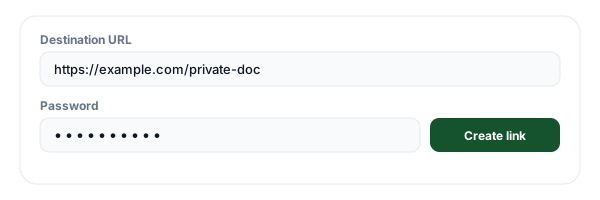
Paste the link you want to protect
Drop in the URL of the page, file, or offer you want to lock. It can be any link you can share.
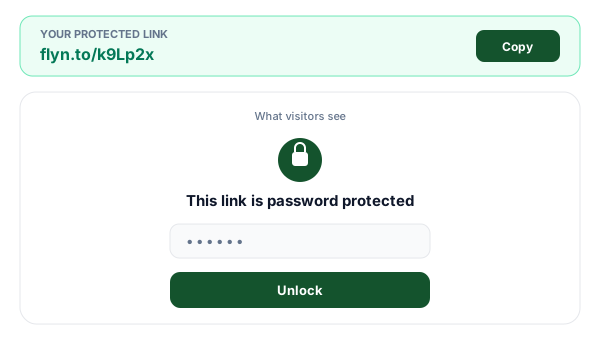
Set a password
Choose the password visitors will need to enter. It is hashed with bcrypt, never stored as plain text.
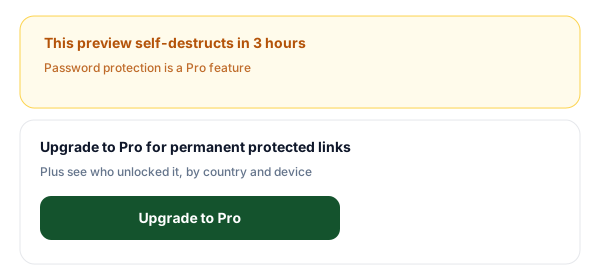
Share the link, then upgrade to keep it
Copy your protected short link and send it out. The free link self-destructs in 3 hours; upgrade to Pro to make it permanent and count each unlock.
Free preview or Pro: what you get
The free preview is perfect for a quick test: a real password gate that works right away but self-destructs in 3 hours. Password protection is a Pro feature, so the moment you want the link to last, to count its unlocks, to change the password, to brand it with your own domain, or to protect many links at once, you upgrade to Pro.
| Feature | Free preview (3 hours) | Pro |
|---|---|---|
| Password gate works | ||
| Link never expires | · | |
| Count unlocks (country, device) | · | |
| Change the password anytime | · | |
| Custom branded domain | · | |
| Bulk-protect many links | · |
Tips for sharing a protected link safely
Send the password separately
Share the link and the password through different channels (for example link by email, password by text). A single intercepted message then cannot expose both.
Use a strong, unique password
Pick something longer than a single word and not reused from another account. The strength hint in the tool nudges you toward a password that is hard to guess.
Do not put secrets in the URL
The password gates the destination, but the destination URL is still revealed after unlocking. Keep truly sensitive data behind a login on the destination, not in the link itself.
Watch how often it is unlocked
On a Pro plan you can see how many times the link was unlocked, and from where. That tells you if a link has been shared more widely than you intended.
Frequently Asked Questions
What is a password-protected link?
How secure is a password-protected link?
Is the password encrypted or stored in plain text?
Do I need an account to create a password-protected link?
Why do the free links expire in 3 hours?
Can I see who unlocked my link?
Can I change the password later?
Is this tool really free?
What happens when the link expires?
Can I use my own branded domain for protected links?
How is this different from just hiding a link?
Is the destination checked for malware?
More free link tools
Build, protect, and measure your links with the rest of the free Flyn toolkit.
Keep your protected links with Pro
Your free preview link self-destructs in 3 hours. Upgrade to Pro to create password-protected links that never expire, count unlocks of each one by country and device, change the password anytime, and brand it with your own domain.