Free Bulk URL Shortener
Shorten a whole list of links at once. Paste your URLs, get short links instantly, and copy them all in one click. No sign-up to start.
Free: 1 use per day, 10 links per batch, expire in 24h, no analytics.
Unlimited + CSV with ProFree, no sign-up to try. Links are real and work instantly.
Why use a bulk URL shortener?
Shortening links one at a time is slow. Do the whole batch in one step, then track every click. Every link in the batch gets its own random code, and the odds of two ever colliding are worked out in How Long Should a Short URL Be?
Shorten a whole list at once
Paste up to 10 URLs and get all your short links in one click, returned in the same order, ready to copy back.
Real links, instantly
No sign-up needed to try. Every short link works immediately and redirects cleanly in one hop.
Click analytics on every link
Sign up free to count every click on each link; Pro adds the country, device, browser, and referrer breakdown in one dashboard.
Branded custom domains
Put your own domain on every link so they carry your brand and earn more clicks.
CSV import on Pro
Got hundreds of links in a spreadsheet? Upload a CSV and turn every row into a tracked short link.
Safe by default
Every destination is screened against Google Safe Browsing so your links never carry malware or phishing.
Shorten multiple URLs in 3 steps
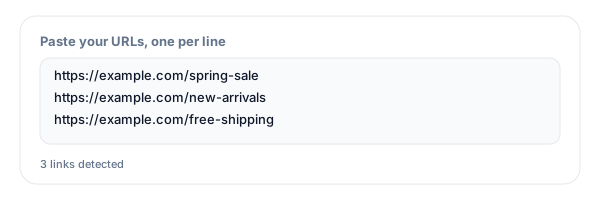
Paste your list of URLs
Drop your long URLs into the box, one per line. Copy them straight from a spreadsheet column if you like.
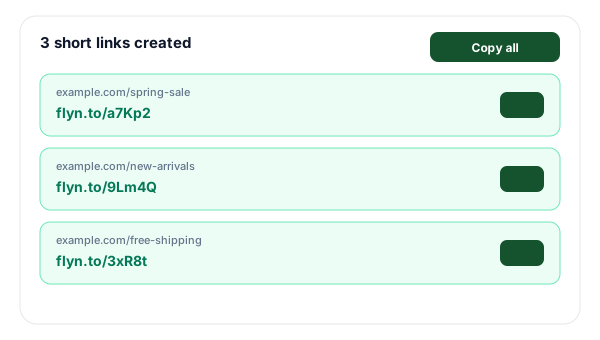
Click shorten
Every URL becomes a short link at once, in the same order, with any failures flagged individually.
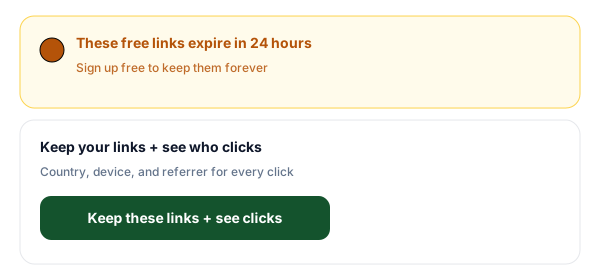
Copy all and keep them
Copy all your short links in one click. Sign up free to keep them forever and count the clicks on each one.
Free, free account, or Pro: what you get
The anonymous tool is perfect for a quick batch. The moment you want your links to last and to see how many clicks they get, a free account unlocks both. Pro adds spreadsheet-scale imports and bulk management for teams running hundreds of links.
| Feature | No sign-up | Free account | Pro |
|---|---|---|---|
| Shorten up to 10 at once | |||
| Links work instantly | |||
| Total clicks per link | - | ||
| Links last forever | - | ||
| Full click breakdown (country, device, referrer) | - | - | |
| Custom branded domain | - | - | |
| CSV import of hundreds of links | - | - | |
| Bulk edit, tags, and folders | - | - |
Tips for shortening links in bulk
Tag UTMs before you shorten
Add campaign UTM parameters to your URLs first so every click lands in Google Analytics under the right campaign. Build them fast with the free UTM Builder.
Use one branded domain
Links on a recognizable domain get clicked more. Connect a custom domain so the whole batch carries your brand.
Check the clicks after launch
The real value of shortening is the data. Watch which links in the batch get the most clicks and double down on what works.
Keep your list clean
De-duplicate and validate your URLs before pasting. The tool de-dupes and flags bad entries, but a clean list gives you a clean set of short links.
Frequently Asked Questions
What is a bulk URL shortener?
How many URLs can I shorten at once for free?
Do I need an account to use the bulk shortener?
Why do the free links expire in 24 hours?
Can I track clicks on my bulk-shortened links?
How do I shorten URLs from a spreadsheet or CSV?
Can I use my own branded domain for bulk links?
Are the short links safe and checked for malware?
What happens if one of my URLs is invalid?
Can I add UTM parameters or QR codes to bulk links?
Is there a limit to how long the short links last?
How is this different from shortening links one by one?
More free link tools
Build, protect, and measure your links with the rest of the free Flyn toolkit.
Keep your links and see their clicks
Free links expire in 24 hours. Create a free account to keep every short link forever and see your total clicks. Upgrade to Pro for the full country and device breakdown, branded domains, and CSV import.