Best Link Rotators for A/B Testing and Traffic Splitting
Most link tools claim traffic splitting. Fewer than half can actually divide clicks by percentage, and fewer still will tell you which destination won. Here is what each one really does.

The Distinction Nearly Every Comparison Blurs
You want to know whether headline A beats headline B. So you go looking for a link tool that can send half your traffic each way, and you find a dozen products all promising "smart routing", "traffic splitting" and "A/B testing". Then you buy one and discover it cannot do the thing you needed.
The confusion is that two genuinely different features get marketed with the same words.
 Tap to enlarge
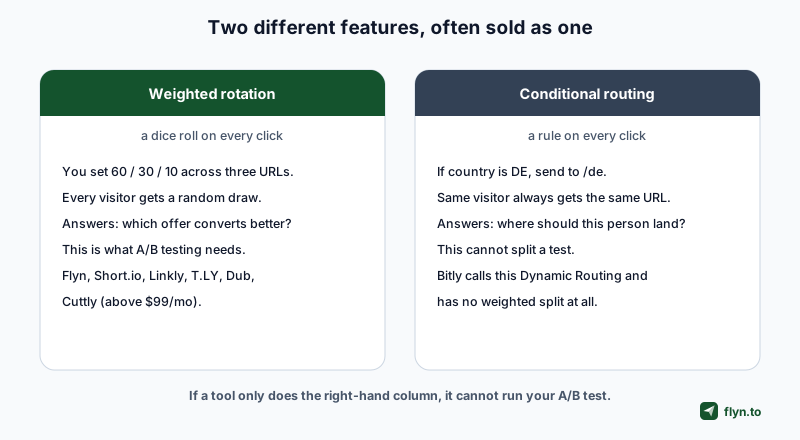
Weighted rotation is a dice roll
You set percentages across two or more URLs, say 60/30/10, and every incoming click gets a random draw. Two identical visitors can land in different places. That randomness is the whole point: it is what makes the comparison fair, and it is what A/B testing a landing page requires.
Conditional routing is a rule
You set conditions, say country is Germany, or device is iOS, and each visitor is matched against them. The same person always lands in the same place. This is geo and device routing, and it is excellent for sending people to the right regional page or app store. It cannot test anything, because nothing varies.
What each vendor calls it
The naming is the trap. Here is the same table of eight, by the words they actually use, so you can map a pricing page to the feature underneath it.
| Tool | What they call it | What it actually is |
|---|---|---|
| Flyn | Link rotation, A/B testing | Weighted split |
| Short.io | A/B testing, Split URL | Weighted split |
| Linkly | Link rotators | Weighted split |
| T.LY | A/B Rotation, Rotation URLs | Weighted split |
| Dub | A/B testing | Weighted split, time-boxed |
| Cuttly | Link rotation, A/B/C test | Fixed 50/50 until $99/mo |
| Bitly | Dynamic Routing | Conditional rules, not a split |
| Rebrandly | Traffic routing | Conditional rules, not a split |
Rebrandly is worth a note because it has both. Its marketed "traffic routing" is conditional, matching country, language, device, browser, OS and date with no weight in the model. Rebrandly does separately document a rotator, so read carefully which one a given page is describing.
If a pricing page lists "smart routing" or "dynamic routing" with no mention of percentages or weights, assume it is conditional. Bitly is the clearest case: its Dynamic Routing matches on Country, Region, Device and Platform with is/is-not logic, and offers no percentage split anywhere.
Which Tools Can Actually Split Traffic
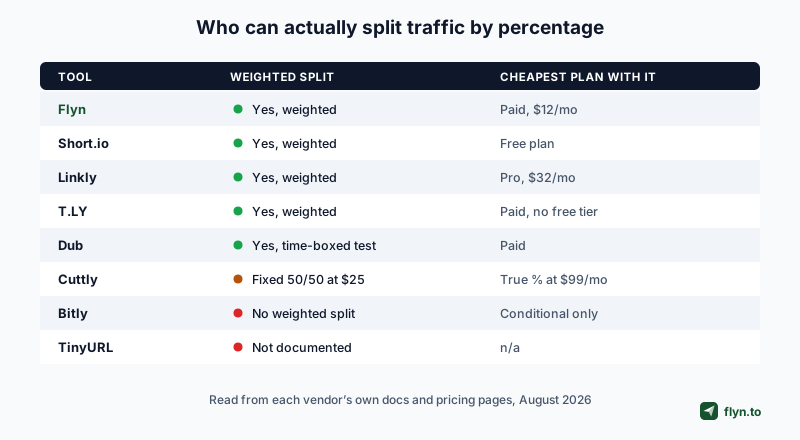
We checked eight shorteners against their own documentation and pricing pages in August 2026. Five do genuine percentage-weighted splitting. One does a fixed 50/50 until you pay a lot more. Two cannot do it at all.
 Tap to enlarge
| Tool | Weighted split | Max destinations | Cheapest plan with it | Clicks per destination |
|---|---|---|---|---|
| Flyn | Yes, weighted | 12 | Pro, $12/mo or $9 annual | Yes |
| Short.io | Yes, weighted | 10 variations | Free plan | Not documented |
| Linkly | Yes, weighted | 100 per rotator | Pro, $32/mo annual | Yes |
| T.LY | Yes, weighted | Primary plus variants | Paid, no free tier | Not documented |
| Dub | Yes, time-boxed test | 5 total | Paid | Yes, while running |
| Cuttly | Fixed 50/50 at $25 | 3 | True percentages at $99/mo | Not documented |
| Bitly | No weighted split | 10 rules, conditional | Growth $29/mo, conditions only | Yes, per rule |
| TinyURL | Not documented | n/a | n/a | n/a |
Bitly is the surprise
The biggest name in the category cannot do this. Bitly shipped Dynamic Routing in July 2026 with up to 10 rules per link, evaluated top to bottom, first match wins, with anything unmatched falling through to a default. Useful, and genuinely well reported per rule. But there is no weight, no percentage, no split. If you want to A/B test on Bitly, the workaround is creating separate links and comparing them by hand, which is not the same experiment.
Cuttly's tiering is the one to read carefully
Cuttly lists "A/B" from its $25/month Single plan, but at that tier the split is fixed at 50/50. Adjustable percentages arrive on Team at $99/month, and three-way A/B/C rotation on Team Enterprise at $149/month. If you need a 70/30 test, Cuttly's entry price for it is $99, not $25.
How Many Destinations You Actually Get
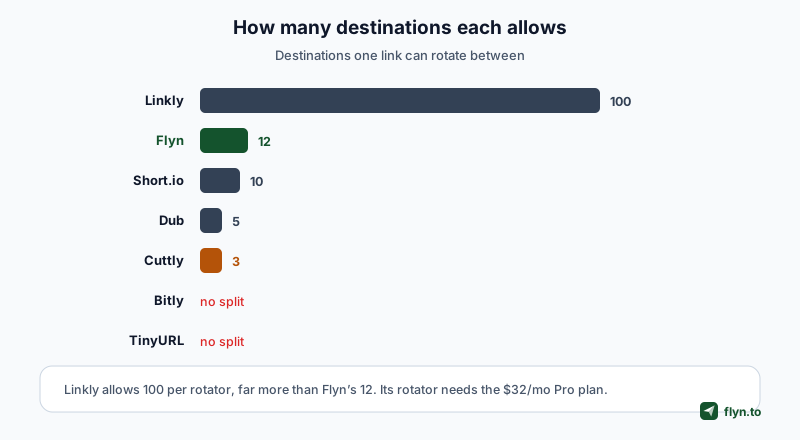
Two destinations covers a classic A/B test. Anything past that is for rotating creative, spreading load across affiliate offers, or cycling through a set of landing pages, and the caps vary enormously.
 Tap to enlarge
Flyn's cap, plainly
Flyn allows 12 weighted destinations on a paid plan. That is more than Dub or Cuttly, two more than Short.io's 10 variations, and a fraction of Linkly's 100. If you need to rotate across dozens of URLs, we are not the tool.
Linkly wins on raw capacity
Linkly allows 100 destinations per rotator, extendable by stacking rotators one level deep, with whole-number percentages down to a 1% minimum. Nothing else here is close. That capacity costs $32/month billed annually, because rotators start on their Pro plan.
Dub's is a test, not a rotator
Dub's splitting is deliberately shaped as a time-boxed A/B test rather than a permanent rotation: up to four additional URLs alongside the link's own destination, so five in total, with a 10% floor per destination and a completion date. That is the right shape for an experiment and the wrong shape for evergreen rotation.
Almost every tool here can divide traffic. The question worth asking is what happens next, when you want to know which destination actually won.
The Half Most Tools Skip: Per-Destination Reporting
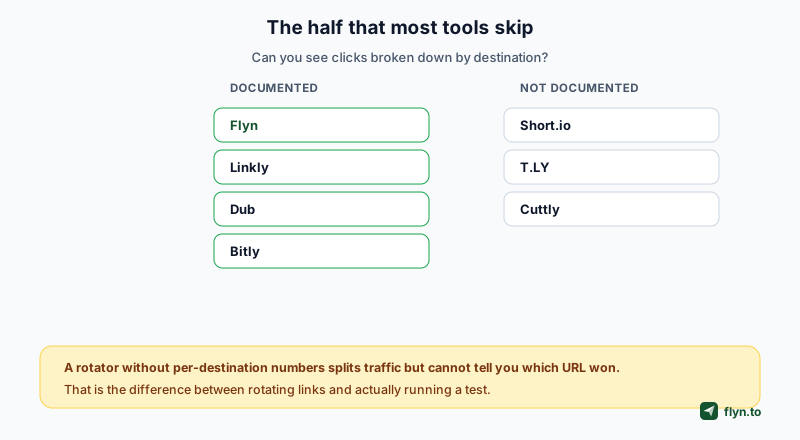
This is where the field thins out sharply, and it is the difference between rotating links and running a test.
 Tap to enlarge
What "not documented" means here
It means we could not find, on the vendor's own pages, any description of clicks broken out per destination or variant. Short.io's A/B article, its rotation article and its statistics reference all describe link-level totals. T.LY's rotation help page points at per-link stats. Cuttly's own inventory of analytics charts lists clicks by day, hour, country and referrer, with no per-variant view. None of that proves the feature is absent from the product; it means the vendor does not describe it, so do not buy on the assumption that it is there.
Who does document it
Flyn reports each destination's clicks and share on the link's analytics page. Linkly has a Destination tab in its traffic reports showing redirects per destination. Dub shows a per-destination breakdown while a test is live, including clicks, leads and sales. Bitly reports per routing rule, which is real reporting even though the underlying feature is conditional rather than weighted.
Before you commit, run a five-click test. Split a link 50/50, click it a few times from different devices, and try to answer "how many went to B" from the dashboard alone. If you cannot, no amount of traffic later will make that answer appear.
What Flyn Claims, and Where It Loses
What we would actually claim
Flyn's case is the combination rather than any single number: weighted rotation across 12 destinations, per-destination click reporting on the same screen as the link, and a bot-filtered click count underneath it so the split is measured against verified humans rather than crawlers. At $12/month, or $9 billed annually, that is the whole feature set rather than a rotation add-on.
Two honest concessions, because a roundup that never says this is not worth reading.
Short.io gives it away and we charge for it
Short.io includes percentage-weighted splitting on every plan, including free, with up to 10 variations that must sum to 100%. Flyn's rotation is a paid feature. If your only requirement is splitting traffic and your budget is zero, Short.io is the better answer and it would be silly to pretend otherwise.
Linkly scales far past us
Twelve destinations against a hundred is not a close call. If you are rotating across a large inventory of offers, Linkly's rotator is built for that and ours is not.
And the free tool, which is a different thing
Separately from the paid feature, Flyn's link rotator tool is free and needs no signup. It takes 2 to 12 destination URLs with weights and generates a small self-contained HTML file you host yourself. There is no tracking in it, because it never touches our servers. It is genuinely useful and it is not a substitute for a measured rotation.
Rotation Without Wrecking Your Attribution
A rotator changes what your analytics see, and two mistakes turn a clean test into unusable data.
Do not rotate a link that is already indexed
If a URL has been shared, bookmarked or linked to, swapping it into a rotator means returning visitors get a different page than the one they remember. For anything public-facing, rotate a fresh link.
Keep your campaign tags stable
If each destination carries different UTM parameters, your analytics will show the variants as separate campaigns and you will end up comparing two things that were never in the same report. Tag the short link, not the destinations, and let the destination reporting do the splitting.
Watch the sample size before you call it
Weighted rotation is random per click, which means small samples drift. T.LY says this out loud in its own docs, noting that rotation is random over time and small samples may not match the exact split. That is true of every weighted rotator here, ours included. A 60/40 setting will not look like 60/40 after 20 clicks.
Bot traffic distorts a split test more than most people expect, because crawlers do not distribute like humans. If your tool does not tell you how many clicks it filtered, you cannot tell a real winner from a crawler that hammered one branch.
Choosing One
 Tap to enlarge
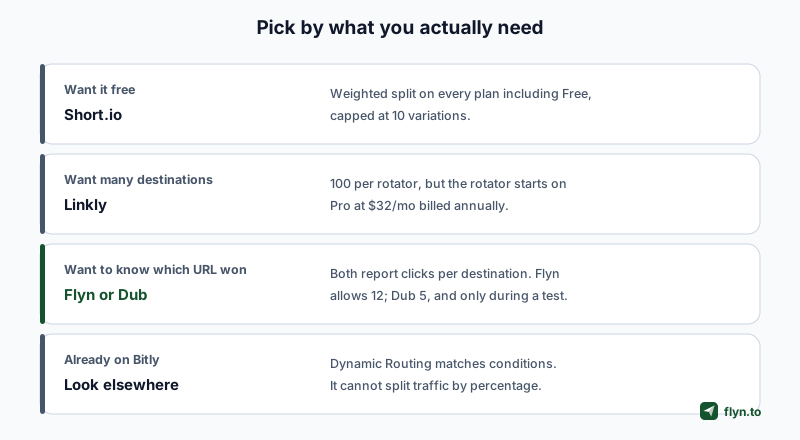
If you need to know which destination won
Flyn or Dub. Both report per destination. Dub's is scoped to an active test with up to five URLs; Flyn's runs continuously across up to 12 and sits alongside the rest of the link's click data.
If it must be free
Flyn's free link rotator tool splits across 2 to 12 weighted destinations with no tracking. For a hosted split, Short.io's free plan includes weighted splitting, a real, unusual offer in this category.
If you need many destinations
Flyn stops at 12. Linkly allows 100 per rotator, on its $32/month Pro plan.
If you are on Bitly
For conditional routing by country or device, Bitly is fine and reports well. For an actual percentage split, you will need a second tool, or a migration.
If you are on TinyURL
Nothing in TinyURL's documented feature set covers multi-destination links, so this job needs another tool entirely. Our alternatives index compares them side by side.
Setting Up a Weighted Split in Practice
The mechanics are similar everywhere. Using Flyn as the worked example.
Start from a fresh link
Create the short link with the destination you consider the control, then open it and add rotation. Starting fresh keeps old traffic out of the sample.
Set weights that add up
Give each destination a whole-number weight. Two destinations at 50/50 is the standard test. If you are rotating creative rather than testing, uneven weights like 70/20/10 let you favour a proven page while still sampling alternatives.
Read the result on the link, not in a spreadsheet
The link's analytics page shows each destination's clicks and share. Because bot clicks are filtered and counted separately, the shares you compare are human traffic rather than raw hits.
Stop when it is decided, not when it is interesting
Decide the sample size before you start. The temptation to call a winner at 30 clicks is exactly how teams ship the worse page with confidence. If you want the fuller treatment, what link rotation is covers the mechanics and the risks in more depth.
Frequently Asked Questions
What is the difference between a link rotator and A/B testing?
Can I A/B test links on Bitly?
Which link rotator is free?
How many destinations can one short link rotate between?
Do link rotators show which destination performed best?
Will rotating a link break my analytics?
Is weighted rotation exact?
Can I rotate links without paying for a shortener?
Free tools for this
Three Flyn tools that pair well with the strategy in this article, all free, no signup needed.
UTM Builder
Build campaign-tracked URLs in seconds.
Broken Link Checker
Scan any page for dead links and 404s.
Redirect Checker
Trace 301/302 redirect chains.
Keep reading
Three related deep-dives from the Flyn blog.
Best Link Shorteners for Affiliate Marketers Who Need Cloaking
16 min read
Best URL Shorteners That Filter Bot Clicks From Analytics
15 min read
URL Shortener Lifetime Deals: What Exists and What to Check
14 min read
Ready to try Flyn?
Free plan includes 25 links/month, full analytics, and access to all 30+ free tools above. No credit card required.
Already a member? Log in
Karan Bhakuni is the founder of Flyn. He writes about branded links, click analytics, and the link-management tooling growth teams and creators actually need, drawn from building Flyn and reading a lot of user feedback.
Find these guides useful? Add Flyn as a preferred source so more of them show up in your Google results.