What Is Link Rotation? One Link, Many Destinations
Link rotation sends every click on one URL to a different destination in the background, splitting clicks evenly or by a weight you set. Here is how it works, where it is genuinely useful, and where it quietly gets people banned.


What Link Rotation Actually Is
You get one slot. One link in the Instagram bio, one destination on the ad, one QR code already printed on 5,000 flyers. And you have four places you want that click to go. Link rotation is the answer to that squeeze, and it is simpler than it sounds.
The one-sentence definition
Link rotation is a single published URL that resolves to a different destination on each click. The address you share never changes. What changes is where any given visitor ends up, chosen either evenly across your destinations or weighted toward the ones you favour. One URL in, many destinations out.
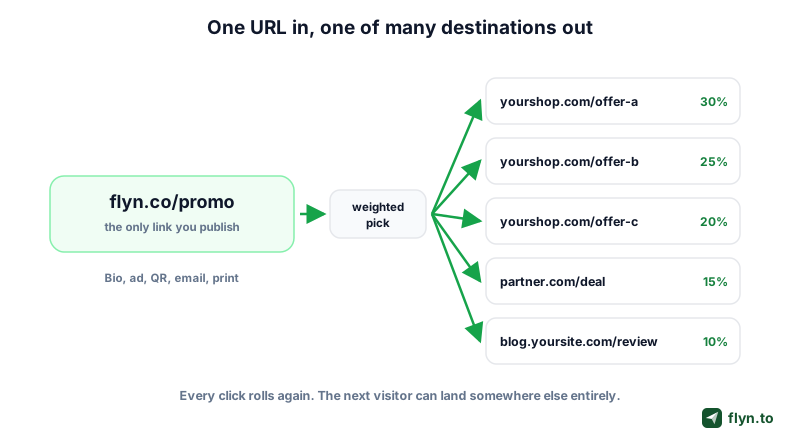 Tap to enlarge
Where the decision happens
The pick has to happen somewhere, and where it happens decides everything else. A client-side rotator is a small HTML page you host: the visitor loads it, a few lines of JavaScript choose a destination and call location.replace(), and the browser moves on. A server-side rotator makes the pick at the redirect itself, before anything renders, which is how a short-link platform does it. Flyn ships both, and the difference matters enormously once you want to measure anything.
Rotation is not a redirect chain
People confuse the two. A redirect chain is one link hopping through several intermediate URLs before it settles: slow, and suspicious-looking. Rotation is one hop with several possible endpoints. A well-built rotator adds exactly one redirect, like any other short link. If yours adds three, that is a bug, and a redirect checker will prove it.
Where Link Rotation Earns Its Keep
Rotation has a reputation problem, because the loudest use case for a decade has been affiliate spam. That is a shame: the legitimate uses are the boring operational ones, and they are hard to solve any other way.
Round-robin between sales reps
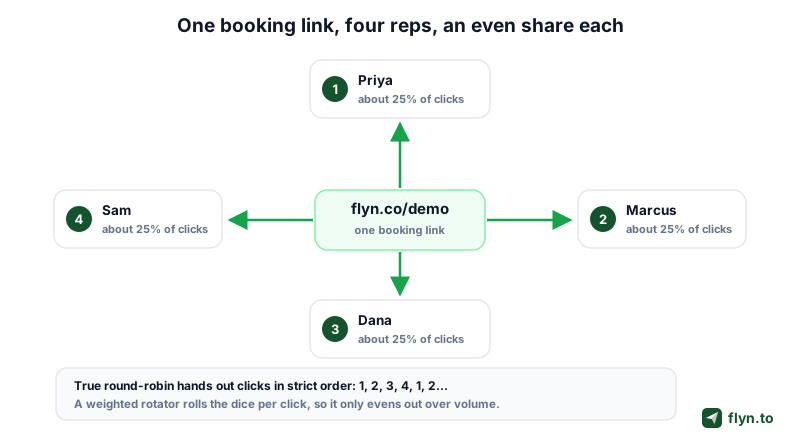
You publish one booking link on the site, in email signatures, in the deck. Behind it, four reps. Each click goes to another rep's calendar, so inbound demos split fairly instead of piling onto whoever is listed first. Change the roster and the public link never moves.
 Tap to enlarge
That caveat matters more than most articles admit. Strict round-robin hands click 1 to Priya, click 2 to Marcus, click 3 to Dana, click 4 to Sam, then repeats. A weighted random rotator rolls independently on every click, so two in a row can both land on Priya. Over a few hundred clicks the shares converge on your weights. Over the first ten, they will not. If commission depends on exact turn-taking, use your CRM's assignment rules instead.
Spreading affiliate traffic across offers
An affiliate with three comparable offers can rotate between them to see which converts on the same traffic, or stay live when one merchant runs out of stock. Read the risks section first: this is the use case most likely to get an account closed.
Load sharing between landing pages
If one page sits on a shaky host, or you are running a launch you expect to melt something, splitting traffic across mirrors buys headroom. A stopgap, not architecture, but it takes two minutes.
Rotating creatives behind one ad link
Ad platforms make you rebuild a campaign to change a destination. Put a rotator behind the ad and you can swap or reweight destinations without touching the ad itself, which keeps the learning phase intact. Tag each destination with the UTM builder so your analytics can still tell them apart.
Rotation solves one link, many destinations. If your problem is actually many links, one destination, for example a separate trackable link per channel, that is a different job: see creating multiple short links for one URL.
Rotation vs A/B Testing vs Geo and Device Routing
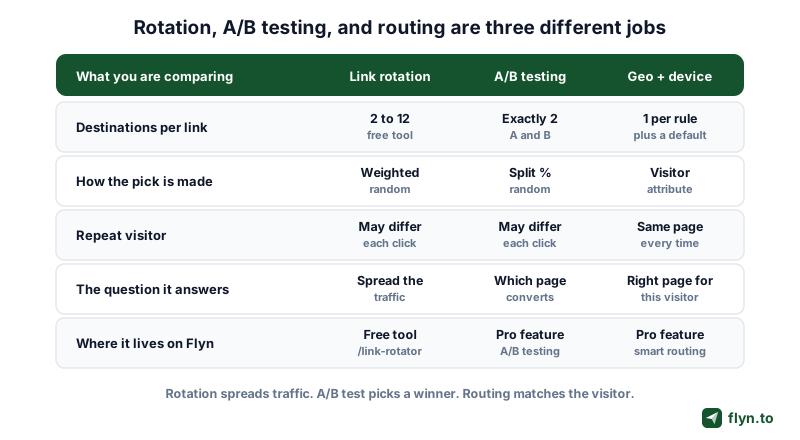
These three get sold as the same feature and they are not. Getting the distinction right saves you from running a "test" that can never produce an answer.
 Tap to enlarge
Rotation spreads traffic
Rotation is about distribution. You are not asking a question, you are dividing a pool, and success is "every destination got roughly the share I intended". It can involve many destinations and it needs no control group.
An A/B test picks a winner
An A/B test is about comparison: two destinations, a deliberate split, and a metric that decides. Adding a third and fourth arm does not make the test better, it makes each arm slower to say anything. That is why a classic A/B test uses two. Flyn supports up to 12 weighted destinations when you genuinely need them, and reports clicks and share for each one, so the choice is yours rather than the tool's. Longer walkthrough in A/B testing short links.
Geo and device routing matches the visitor
Smart routing is about relevance, and it is the only one of the three that is deterministic. An iPhone visitor always gets the App Store URL; a visitor in Germany always gets the German page. Nothing is random, so the same person gets the same page every time. That is the mechanism behind different destinations by device and country-level geo targeting, and the wider idea is covered in what smart links are.
The quick reference
| Link rotation | A/B testing | Geo / device routing | |
|---|---|---|---|
| Destinations | 2 to 12 (free tool, and hosted on a paid plan) | 2, or up to 12 with rotation | One per rule, plus a default |
| How the pick is made | Weighted random | Random against a split percentage | Visitor attribute (country, OS) |
| Same visitor, same page? | No | No | Yes |
| The question it answers | Did traffic spread as intended? | Which page converts better? | Is each visitor on the right page? |
| Needs a control group | No | Yes, that is the point | No |
| On Flyn | Free link rotator tool, or a hosted Pro link | Pro link feature | Pro link feature |
If you cannot say which destination a click went to, you are not running a test. You are running a coin flip with extra steps.
One ordering detail worth knowing on Flyn: when a link has both smart routing and an A/B split, routing wins. Device rules run first, then country rules, and the split only applies to clicks no rule matched. Correct precedence, but it means a heavily routed link can leave your split with very little traffic.
Even vs Weighted Rotation, and the Math Behind It
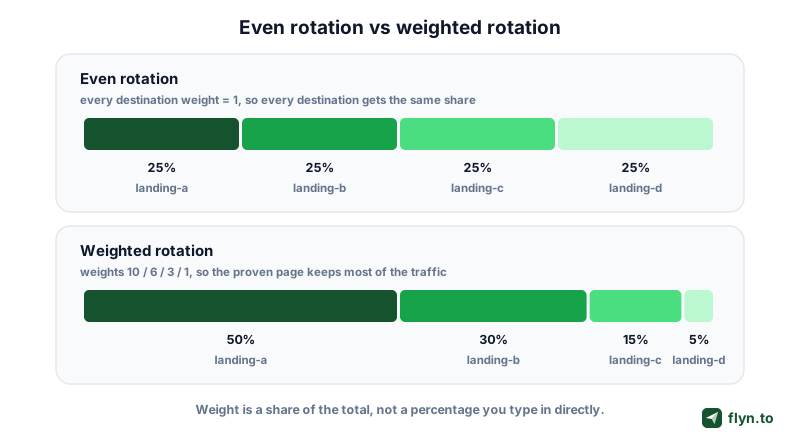
Every destination in a rotator carries a weight. The rotator sums the weights, picks a random point in that range, and walks the list until it lands. That is the entire algorithm, and understanding it prevents the most common mistake.
 Tap to enlarge
A weight is a share, not a percentage
This trips people up constantly. A weight of 10 does not mean 10 percent. It means ten parts out of however many parts exist in total. Weights of 10, 6, 3 and 1 sum to 20, so the shares are 50, 30, 15 and 5 percent. Add a fifth destination at weight 5 and the total becomes 25, silently shrinking everything else. Make your weights add up to 100 and they become percentages by construction.
When to use an even split
Use equal weights when the destinations are genuinely interchangeable: mirrors of one page, four reps with the same quota, three creatives you have no prior opinion about. Even rotation is also the honest default when you intend to measure the difference, because a small arm takes far longer to say anything useful.
When to weight
Weight the split when destinations differ in value or in risk. The classic pattern is 90/10: your proven page keeps 90 percent while a redesign earns its way up from 10. If the challenger tanks, you lost a tenth of a campaign instead of all of it. Same logic for a merchant who pays double, or a regional page only a slice of traffic should see.
Set the weights so they sum to 100 (for example 60 / 25 / 10 / 5) even when the tool does not require it. Your future self reading that config in three months will thank you, and nobody has to work out what a weight of 7 actually meant.
The sample-size trap
A weighted random pick converges on your intended shares slowly. At 100 clicks a 50/50 split can read 57/43 with nothing wrong at all. Do not reweight off a few dozen clicks. If the split still looks badly off after a few thousand, you have a real problem worth chasing.
How to Measure Rotation Without Wrecking Your Attribution
Here is the uncomfortable part. Rotation is trivial to build and genuinely hard to measure, and almost every free rotator on the internet is a measurement dead end.
The measurement problem in one line
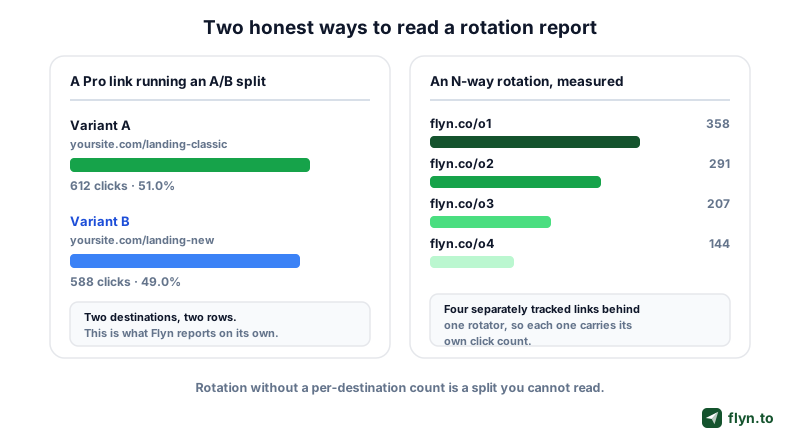
A client-side rotator runs in the visitor's browser and phones nobody. It splits traffic and records nothing. You can set the weights perfectly and still have no idea which destination anyone got or which page performed. That is not a Flyn limitation, it is what a static HTML file is.
 Tap to enlarge
What is free and what is Pro on Flyn
Be clear on this before you plan a measurement stack. On Flyn, click counts are free: every link you own shows its total clicks and its click history on the free plan. The breakdown is the paid part. Country, city, device, OS, browser and referrer detail is a Pro feature, as is the hosted rotation itself. Full detail sits on the click analytics page, and the mechanics of counting a click at all are in how to track clicks on a link.
What a hosted rotating link reports
A hosted Flyn link records which destination served every click, and the link's own analytics page turns that into a Destination Performance panel. Each destination gets a row with three numbers: the clicks it received, the share of clicks it actually took, and the share its weight was supposed to give it. That last pairing is the one worth reading. A destination sitting at 12% actual against 25% intended is telling you something, either the split is young and the sample is small, or that URL is failing in a way the weight cannot see.
Affiliates get the most out of this, because the destinations are usually the same offer behind different tracking. Rotate two referral IDs and the panel tells you how many clicks each ID earned, which is the number you reconcile against the network's own dashboard when the two disagree. Remove a destination later and its clicks stay on the report, marked as removed, because the split you ran last month is still part of your history.
Two honest bounds. The shares are of clicks that carry a destination id, so clicks from before the link had a second destination are not counted in them. And it is clicks, not conversions: Flyn does not attribute revenue per destination, declare a winner, or run a significance test for you.
Give every destination its own tracked link
This is the technique that makes a client-side rotation measurable, and it works on any plan. Instead of pointing the rotator at four raw destination URLs, create four short links first, one per destination, and rotate between those. Every destination now carries its own counter. The rotator still tells you nothing, but the four links do, and their totals add up to your split. One extra redirect hop buys you the entire report. A hosted rotating link reports its destinations itself, so this workaround is only for the generated file.
Conversions attribute to the link, not the variant
One more honest limit. Flyn's conversion tracking records signups and sales against a link, not against a variant inside it. A single Pro link running an A/B split therefore reports one combined conversion number, not one per variant. If revenue is the metric you care about, give each page its own tracked link and compare them link by link.
The Honest Risks Nobody Puts in the Sales Copy
Rotation is a legitimate technique with three failure modes that cost real money. None of them are theoretical.
Rotating affiliate links can breach network terms
Affiliate networks care a great deal about seeing where a click came from, and rotators frequently break that. Amazon's Associates Program Policies are explicit: participants "will not cloak, hide, spoof, or otherwise obscure the URL of your Site containing Special Links (including by use of Redirecting Links)" in a way that stops Amazon determining which site the customer clicked from, and separately "will not use a link shortening service, button, hyperlink or other ad placement in a manner that makes it unclear that you are linking to an Amazon Site" (Amazon Associates Program Policies, Participation Requirements). Rotating unlabelled links between merchants is exactly the pattern those clauses describe. Networks differ, so read yours, and see our guide to cloaking affiliate links for what stays inside the lines.
An affiliate account closure takes your accrued commissions with it. Before you rotate a single merchant link, read that program's policy on redirects and link shorteners, and disclose the affiliate relationship on the page doing the linking. "Everyone does it" is not a defence any network has accepted.
Extra redirect hops look like cloaking
Google's spam policies define cloaking as "presenting different content to users and search engines with the intent to manipulate search rankings and mislead users", and sneaky redirecting as doing it "maliciously in order to either show users and search engines different content or show users unexpected content that does not fulfill their original needs" (Google Search Central, Spam policies for Google Web Search). A rotator that sends a crawler to one page and humans to another is a textbook match. Automated safety systems are blunter still: they see one URL producing several endpoints and flag the pattern, which is how innocent links end up behind a red interstitial. The recovery playbook is in why Instagram says your link is unsafe and how to fix it, and you can screen a URL yourself with the short link safety checker.
Rotation scatters ranking signals
Never rotate a URL you want indexed. Search engines need one address to map to one piece of content. Rotate it and every signal that URL has earned splits across destinations that each get a fraction, while the crawler sees inconsistent content at a stable address. The free Flyn rotator writes noindex, nofollow into the generated file for exactly this reason. Keep rotators on campaign links and ads, far from canonical content.
How to Rotate Links on Flyn: Free Tool vs Pro Link
Flyn has two rotation-shaped things and they are not the same product. Here is exactly what each does, so you can pick without being disappointed later.
Option 1: the free link rotator
The link rotator is free and needs no signup. Add between 2 and 12 destination URLs, give each a weight from 1 to 999, and watch a live preview of the resulting percentages. Hit generate and you get a small, self-contained HTML file: a weighted random pick, a location.replace() so the rotator never appears in the back button, a noindex, nofollow tag, and a <noscript> fallback to the first destination. You host that file yourself, on your own site, GitHub Pages, Netlify, Cloudflare Pages or an S3 bucket, and the link you share is that file's URL.
What it gives you: a true N-way weighted rotation, up to twelve destinations, in about ninety seconds. If you are weighing platforms instead, our comparison of the best link rotators covers which of eight shorteners can genuinely split by percentage, and at what price. What it does not: any measurement at all, and no way to change destinations without regenerating and re-uploading the file.
Option 2: a hosted Pro rotating link
A hosted Flyn link can carry up to twelve destinations, each with its own weight. Every click no routing rule has already claimed gets a weighted roll, lands on one destination, and is recorded with the destination it received. The link's own analytics page then shows a Destination Performance panel listing every destination with its clicks, the share of clicks it actually took, and the share its weight intended, and you can change the destinations or the weights whenever you like without reissuing the link. That is a Pro feature.
The honest gap
Here is the part most vendors would leave out. The hosted link reports clicks per destination and stops there. There is no conversion or revenue figure per destination, no significance test and no declared winner, so the judgement is still yours: read the split, then read whatever analytics already run on the destination pages. The account-wide analytics view does not break a rotation down either, that panel lives on the individual link's page. And the free client-side file is unchanged: it rotates and measures nothing.
A Rotation Checklist Before You Publish
Run this before the link goes anywhere public. Most rotation disasters are caught by one of these eight checks.
- Every destination loads. Open all of them. A dead URL in a rotator silently 404s a share of your traffic and nothing tells you.
- Weights sum to something readable. Make them add to 100 so the split is obvious at a glance.
- The rotator is not indexable. Confirm
noindex, nofollowon the rotator page, and never rotate a URL that ranks. - One hop, not three. Trace the path with a redirect checker and remove middlemen you did not intend.
- Each destination is separately countable. Either you are on a two-way Pro split, or every destination is its own tracked short link.
- Network terms are checked. For any affiliate or ad-network destination, read the policy on redirects and shorteners first.
- Campaign tags survive the hop. Verify each tagged destination with the campaign URL QA checker.
- You know how it ends. Decide the click volume at which you reweight or stop. A rotation nobody turns off is just an untracked link.
Once that list is clean, publish. The link rotator takes two minutes and needs no account. For a hosted rotation that reports its destinations instead, create a free account and upgrade when the numbers justify it.
Frequently Asked Questions
What is link rotation in simple terms?
What is the difference between link rotation and A/B testing?
How many destinations can a Flyn link rotate between?
Does link rotation hurt SEO?
Can I see which destination each visitor got?
Is rotating affiliate links against the rules?
What is the difference between weighted and even rotation?
Free tools for this
Three Flyn tools that pair well with the strategy in this article, all free, no signup needed.
UTM Builder
Build campaign-tracked URLs in seconds.
Broken Link Checker
Scan any page for dead links and 404s.
Open Graph Checker
Preview how URLs unfurl on social.
Keep reading
Three related deep-dives from the Flyn blog.

How to Track Which Posts Drive Sales, Not Just Clicks
19 min read

Email Newsletter Click Tracking: Measure Your Real CTR
12 min read

How to Choose a Branded Short Domain for Your Links
13 min read
Ready to try Flyn?
Free plan includes 25 links/month, full analytics, and access to all 30+ free tools above. No credit card required.
Already a member? Log in
Karan Bhakuni is the founder of Flyn. He writes about branded links, click analytics, and the link-management tooling growth teams and creators actually need, drawn from building Flyn and reading a lot of user feedback.
Find these guides useful? Add Flyn as a preferred source so more of them show up in your Google results.