Google Review QR Code: How to Get More 5-Star Reviews
Your customers are not refusing to review you. They are just never getting around to it. Here is how to grab your Google review link, turn it into a QR code, and put it somewhere people will actually scan.

Why Asking for Reviews Almost Never Works
You served someone well. They said thank you, they meant it, and they walked out delighted. Two weeks later your Google rating has not moved. It is tempting to read that as apathy. It is not. It is a friction problem, and friction is the one thing on this list you can fix today.
The gap between willing and done
BrightLocal's Local Consumer Review Survey 2026, which polled 1,002 US adult consumers, puts numbers on the gap. 94% of consumers say they are open to writing reviews for local businesses and 97% read them, but only 78% were asked to leave one in the past twelve months. Of the people who were asked, 83% went on to leave one.
Read that last pair again, because it is the whole argument for this article. Asking works, and it works so reliably that the biggest lever on your review count is not persuasion or timing. It is whether you asked at all, and how few taps the ask costs.
The five steps you are silently asking for
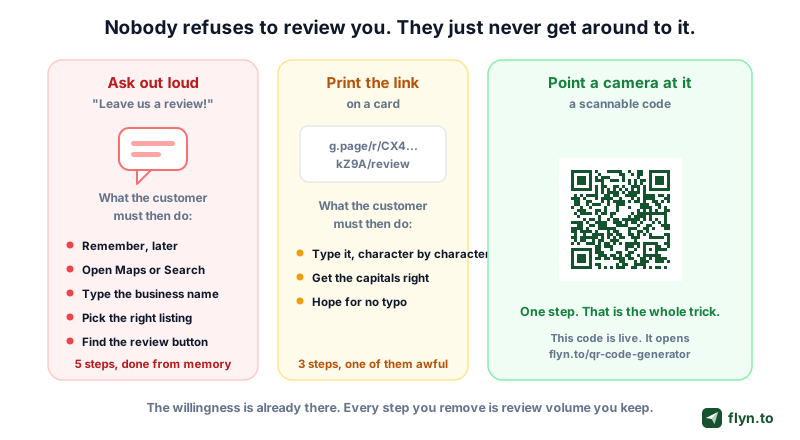
When you say "leave us a review on Google," here is the task you have actually handed over:
- Remember to do it, later, when nothing is prompting them
- Open Google Maps or Google Search
- Type your business name correctly
- Pick your listing out of the nearby lookalikes
- Scroll to find the write-a-review control
Five steps, performed from memory, competing with everything else on their phone. Printing the raw link barely helps: a string like g.page/r/CX4mkZ9A/review is still something a human has to transcribe letter by letter, capitals and all. A scannable code collapses the whole thing into one action.
 Tap to enlarge
What your ask is competing with
The moment after a good experience is short. Somebody just paid, they are picking up their bag, and whatever reaches their attention next wins. A QR code wins that moment because it needs no memory and no typing, which is why most of this guide is about where the code lives rather than what it looks like.
Get Your Google Review Link: Three Routes That Work
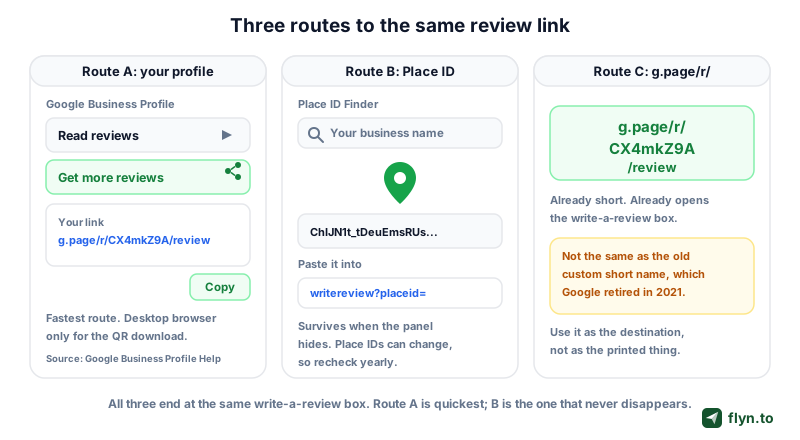
Before you can make a code you need the destination. Google already generated one for you: a URL that opens the write-a-review box with your listing preselected. There are three ways to get hold of it, and they are not equally durable.
 Tap to enlarge
Route A: the Get more reviews panel
Google's own supported path, and the one to try first. Per Google Business Profile Help:
- Go to your Business Profile, signed in as an owner or manager
- Select Read reviews
- Select Get more reviews, marked with the share icon
- Select Copy to take the link, or right-click the QR image and choose Save image as to download the code Google generated
Google's help page states plainly that review QR codes can only be generated on a computer browser, not on a mobile device, so do this bit at a desk. The panel is reachable from both Google Search and Google Maps when you are signed in as the owner, which is why the exact wording drifts slightly between surfaces.
Route B: the Place ID route
Every business on Google Maps has a Place ID, a stable textual identifier for the location. Feed that ID into a review URL and you reach the same box without touching the profile UI:
- Open Google's Place ID Finder in the Places API documentation
- Search for your business name and address
- Copy the Place ID it returns, a string that usually starts
ChIJ - Append it to
https://search.google.com/local/writereview?placeid=
This route survives UI changes and is the one to use when you are wiring the link into software. One caveat straight from Google's documentation: place IDs may change over time, and Google recommends refreshing any ID more than twelve months old. Diary a yearly check.
Route C: the short g.page/r form
The link Route A hands you is already short. It looks like g.page/r/CX4mkZ9A/review, where the middle segment is unique to your listing. Do not confuse it with the old custom short name feature, which let you pick a vanity string like g.page/yourshop/review. As Search Engine Land reported, Google began phasing custom short names out in June 2021 and you cannot create new ones. If a guide tells you to "set up your short name," it is out of date.
Test the link on a phone signed into a personal Google account, not your business one. Owners often see a different view of their own listing, so a link that looks broken from the admin account is usually fine for real customers.
Which route should you use?
Route A to get going in two minutes. Route B if you manage several locations, generate codes programmatically, or the panel has moved on you again. Route C is not really separate, it is what Route A returns, and its job is to be the destination behind your QR rather than the thing you print.
Turn That Link Into a Scannable QR Code
Google's panel will hand you a QR image, and for one sticker on one counter that is genuinely enough. Most businesses outgrow it within a month, because Google's code is fixed: it encodes the review URL directly, reports no scan data, and cannot be restyled or repointed. Generating your own takes about as long and leaves all three doors open.
The sixty-second version
Open our free QR code generator, paste the review link, download the PNG. That is the whole flow, no account required. If you want your logo in the middle, use the QR code generator with logo, which keeps the error correction high enough that the centre cutout does not break the scan.
 Tap to enlarge
Size, contrast and the quiet zone
Three boring physical properties decide whether the code scans at arm's length:
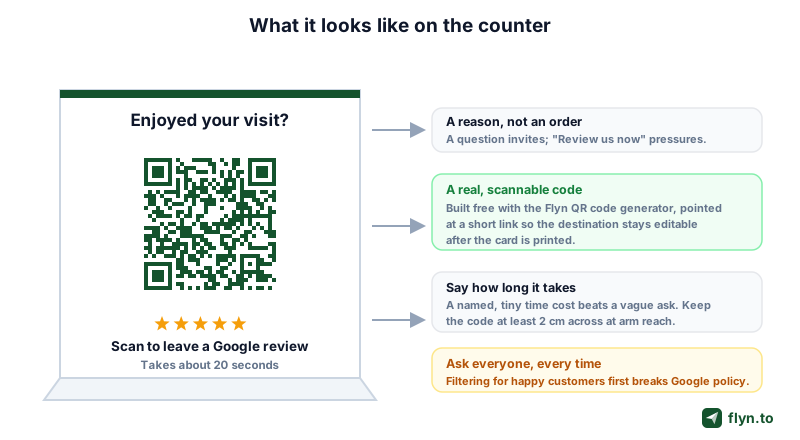
- Size. A working rule is that scan distance is roughly ten times the code's width, so a 2 cm code wants the phone within about 20 cm. Fine for a table tent, useless for a window decal read from the pavement. Our QR code size guide works through the maths per placement.
- Contrast. Dark modules on a light background, never the reverse, and never a mid-tone brand colour on a mid-tone background. Cameras threshold the image before decoding it.
- Quiet zone. The blank margin around the code is part of the code. Crop it and the scan fails. Four modules of clear space is the floor.
If a printed code is misbehaving, our guide to QR codes that will not scan walks the usual suspects in order, and you can sanity-check any image with the free QR code reader before it goes to the printer.
Never send a design to print without decoding the final artwork file. Designers routinely resize, recolour or crop a QR inside a layout, and every one of those can silently kill it. Decode the exported PDF or PNG, not the original download.
Why the Code Behind It Must Be Dynamic
Here is the mistake that costs real money. You encode the Google review URL straight into the QR, print 2,000 receipts, then discover the link goes to the wrong location, or you move premises, or you simply want to send scans somewhere smarter. Now the fix is a reprint.
Static versus dynamic, in one sentence
A static QR encodes the destination itself, so the destination is frozen the moment the ink dries. A dynamic QR encodes a short link you control, and the short link decides where the scan lands. The pattern of black squares never changes; what it means does.
| Static QR (Google's own) | Dynamic QR (short link behind it) | |
|---|---|---|
| What is encoded | The Google review URL | A short link you own |
| Fix a wrong destination | Reprint everything | Edit the link, code unchanged |
| Scan counts | None | Yes, free on Flyn |
| Multiple locations | One code each, no way to tell them apart later | One code each, each with its own count |
| Cost | Free | Free |
The reprint problem is not hypothetical
Multi-location operators hit it constantly. A new branch opens, profiles get merged or re-created, and the review link for one site quietly starts resolving to another. With a dynamic code that is a field edit. With a static code it is a print run, a delivery wait, and a fortnight of scans landing on the wrong listing.
Build the dynamic version with the free dynamic QR code generator, which mints a real Flyn short link and encodes that instead of your raw URL. The full print-versus-digital mechanics live in our guide to dynamic QR codes.
A dynamic QR generated without signing in is backed by a short link that lives for 24 hours. That is deliberate, so you can test the code before committing. Do not send an unclaimed link to the printer. Create the free account first so the link is tied to you and stays live, then print.
What dynamic does not buy you
It does not make Google trust you more, it does not influence your local ranking, and it does not tell you who reviewed you. It buys two things: the ability to change the destination after printing, and a count of scans. Both are worth having. Neither is magic.
Where to Physically Put the Code
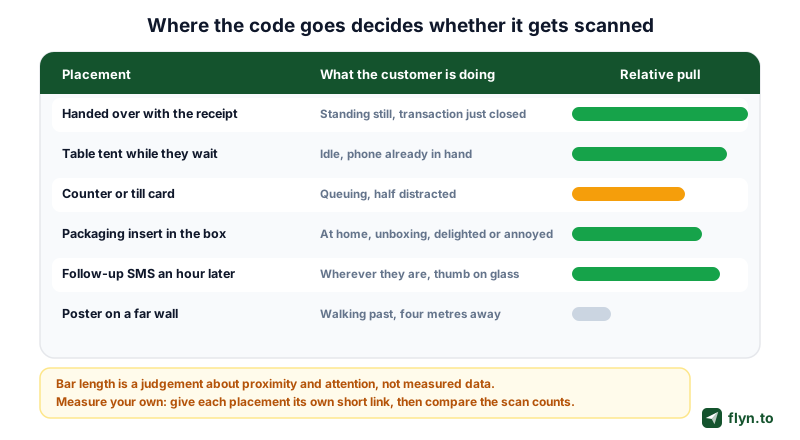
A beautiful code in the wrong place gets ignored; an ugly one in the right place gets scanned. The variable that matters is not visibility, it is whether the phone is already in the customer's hand when they see it.
 Tap to enlarge
Handed over with the receipt
The strongest placement in most retail and hospitality settings: the transaction has just closed, the customer is standing still, and something is being physically passed to them. Print it on the receipt or on a card that goes with it, and pair it with a sentence rather than a demand.
The table tent
For anywhere people wait: restaurants, salons, waiting rooms, workshops. Waiting is dead time, the phone is already out, and a tent card at eye level competes with nothing. Keep the code around 3 cm across so it reads comfortably from a seated position.
The counter or till card
Weaker than it looks. People at a counter are queuing, paying, or gathering their things, and their attention is fragmented. Worth doing because it is nearly free, but do not expect it to carry the programme.
The packaging insert
The best option for anything shipped, because it arrives at the exact moment of unboxing. Print it on the thank-you card, not the box, since the box goes straight to recycling. If you also run local pickup, a Google Maps link on the same card gets people onto your listing in the first place.
The follow-up SMS
The only placement where the customer needs no camera at all, because the link is already tappable. Send it an hour or a day after the visit, once, with an easy opt-out. Build it with our SMS link generator, or send it over WhatsApp if that is where your customers already talk to you.
The businesses that win on reviews are rarely the ones with the best-designed card. They are the ones that put the ask in the two seconds where the customer has nothing else to do.
And the poster on the far wall
Almost never worth the print cost. At four metres the code needs to be roughly 40 cm wide to scan reliably, nobody walks toward a wall to scan, and the moment has passed. If wall space is all you have, make the code enormous and put it beside the exit.
The Policy Line You Cannot Cross
This is the section most review guides skip, and it is the one that can cost you every review you have collected. Google has explicit rules about how you solicit reviews, and a QR code makes the tempting violations easier, not harder.
What Google actually prohibits
Google's Prohibited and restricted content policy for Business Profiles is unambiguous. Businesses must not "discourage or prohibit negative reviews, or selectively solicit positive reviews from customers". The same policy notes that merchants "should not require or pressure users to leave ratings or write reviews while on the premises". What is permitted is stated just as clearly: you may solicit or encourage content that represents a genuine experience, without offering incentives.
Review gating, and why a QR makes it tempting
Review gating means screening customers first, asking the happy ones for a public Google review and quietly routing the unhappy ones to a private feedback form. It is banned by the sentence above. The QR version is subtle: two different table tents, one for the customer who smiled and one for the customer who complained. Same violation, nicer paper.
The workaround people reach for next, a landing page that asks "how did we do?" and only reveals the Google link to people who tap four or five stars, is exactly the behaviour the policy names. Do not build it, and do not buy software that builds it for you.
Incentives, including the friendly-looking ones
Google's Get Google reviews guidance states that "offering incentives, like free or discounted goods or services, in exchange for customers to post reviews, change reviews, or remove negative reviews is considered fake and misleading content and is strictly prohibited". That covers a free coffee, a prize draw entry, a loyalty stamp, and a discount code printed under the QR.
What happens if you get caught
Google's page on Business Profile restrictions for policy violations lists the consequences for fake engagement: the profile can be blocked from receiving new reviews or ratings for a set period, existing reviews can be unpublished for a set period, and the profile can display a warning telling consumers that fake reviews were removed. Years of legitimate reviews sit in the blast radius of one shortcut.
The compliant version, which also works better
The rule that keeps you safe is short: ask everyone, make it effortless, offer nothing.
- Hand the same card to every customer, in the same tone, regardless of how the visit went
- Phrase it as an invitation ("Enjoyed your visit?") rather than an instruction
- Attach no reward, discount or raffle entry
- Do not stand over them while they type, and never ask for "five stars"
The compliant version also ages better. A mix of ratings reads as genuine, and a profile that only ever receives perfect scores is precisely what Google's fake-engagement systems are built to notice.
How to Measure Whether It Is Working
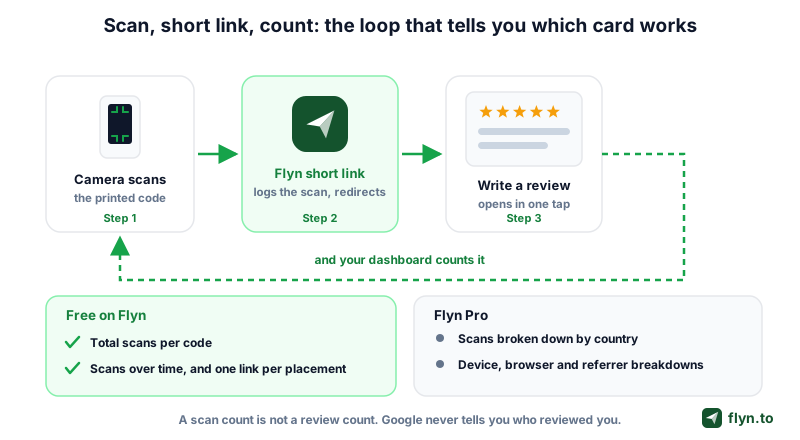
If you cannot tell which card is producing scans, you cannot improve anything, and you will keep reprinting whichever one you personally like best. The short link behind the QR is what makes measurement possible at all.
 Tap to enlarge
What a scan count tells you, and what it does not
A scan count tells you how many times people pointed a camera at your code and followed it through, which is a genuine measure of whether the placement and wording work. It is not a review count. Google does not tell any third party which visits turned into reviews, so anyone selling you "reviews generated" attribution from a QR is guessing. Watch scans as the leading indicator and your rating as the lagging one. Our guide on how to track QR code scans goes deeper on what is knowable.
One link per placement
The highest-value habit in this whole article. Do not make one review QR and copy it everywhere. Make a separate short link for the receipt, the table tent, the counter card, the packaging insert and the SMS, all pointing at the same Google review URL. Four weeks later the counts tell you which placement earns its print budget, and the argument ends.
Free versus Pro, stated plainly
On Flyn, scan counts are free: every short link you own reports total scans and scans over time on any plan, with no cap. The breakdown by country, device, browser and referrer is a Pro feature, and a single-location shop will rarely need it. Details are on the QR codes feature page and the pricing page, and the same counting mechanics are covered in how to track clicks on a link.
A Two-Week Rollout You Can Actually Finish
Most review programmes die in the planning stage. This one is deliberately small: two weeks, no new software, and a decision point at the end.
Week one: build and place
- Day 1. Get your review link via the Get more reviews panel, and record the Place ID as a backup while you are there.
- Day 1. Create one short link per placement with the dynamic QR code generator, signed in so the links persist. Name them
review-receipt,review-tent, and so on. - Day 2. Generate a QR for each with the QR code generator, or the logo version if you want your mark in the middle.
- Day 2. Decode every exported file before printing, and scan each one yourself on an old phone if you have one.
- Day 3. Print short runs. Fifty cards, not five thousand, until the numbers say which placement wins.
- Day 4. Brief the team on one sentence, the same sentence, for every customer.
Week two: watch and cut
Do nothing for seven days except serve customers and let the counts accumulate. Then open your dashboard and read scans per placement. Kill the bottom one, double the print run on the top one, leave the middle alone. Repeat monthly rather than weekly, because footfall noise will mislead you.
The three numbers to watch
- Scans per placement, which tells you where the code should live
- Total scans per week, which tells you whether the team is handing the cards out at all
- New reviews per month on your Google profile, the only number that pays the bills, read monthly and never daily
If scans are healthy but reviews are flat, the friction has moved to the Google form itself, which usually means the link lands on the wrong listing. Re-check it from a personal account. If scans are flat, the problem is placement or the team forgetting the card, and no amount of design work fixes either.
Everything here is free to try: the QR generator, the dynamic version, the reader and unlimited scan counts, with the rest of the kit on the tools page. Create a free account before you print, so the links behind your codes outlive the 24-hour window.
Frequently Asked Questions
How do I get a QR code for Google reviews?
Is it against Google policy to use a QR code to ask for reviews?
What is review gating and why does it matter?
Can I offer a discount or free item in exchange for a review?
Should the QR code point to a short link or straight to Google?
How big should a Google review QR code be?
Can I tell how many reviews my QR code actually generated?
Free tools for this
Three Flyn tools that pair well with the strategy in this article, all free, no signup needed.
UTM Builder
Build campaign-tracked URLs in seconds.
Broken Link Checker
Scan any page for dead links and 404s.
Open Graph Checker
Preview how URLs unfurl on social.
Keep reading
Three related deep-dives from the Flyn blog.

How to Track Which Posts Drive Sales, Not Just Clicks
19 min read

Email Newsletter Click Tracking: Measure Your Real CTR
12 min read

How to Choose a Branded Short Domain for Your Links
13 min read
Ready to try Flyn?
Free plan includes 25 links/month, full analytics, and access to all 30+ free tools above. No credit card required.
Already a member? Log in
Karan Bhakuni is the founder of Flyn. He writes about branded links, click analytics, and the link-management tooling growth teams and creators actually need, drawn from building Flyn and reading a lot of user feedback.
Find these guides useful? Add Flyn as a preferred source so more of them show up in your Google results.