Free QR Code Generator with Logo
Put your logo in the center of a QR code that still scans perfectly. Brand colors, live contrast checks, print-ready PNG and SVG downloads, and one-click scan tracking.
PNG, JPG, or SVG. Your logo never leaves the browser, nothing is uploaded to a server.
Error correction: H (30%), locked. Level H redundancy is what lets the code lose its center to your logo and still scan.
Your branded QR code appears here. Enter a URL, add a logo, and click Generate.
Your QR image itself never expires and is never watermarked, it is baked into the pixels. Anonymous trial links last 24 hours; links in a free Flyn account stay live, we never deactivate them when a trial or plan ends. Many QR apps kill working codes after a trial ends, silently breaking material you already printed. Flyn does not, sign up free to keep yours for good.
Want to know how often your codes get scanned?
Create Flyn short links and see total clicks and scans free. Pro adds full country, device, and referrer breakdowns, so every branded code becomes a data point you control.
How to Make a QR Code with a Logo in 3 Steps
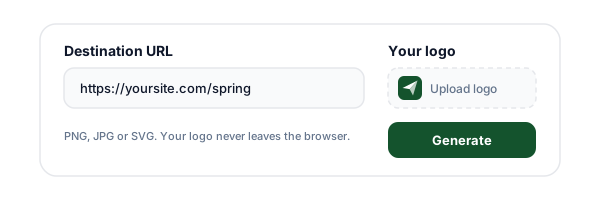
Enter your URL and add a logo
Paste the destination URL, then upload your logo as a PNG, JPG, or SVG (or try the sample logo). The file is read in your browser and never uploaded to a server.
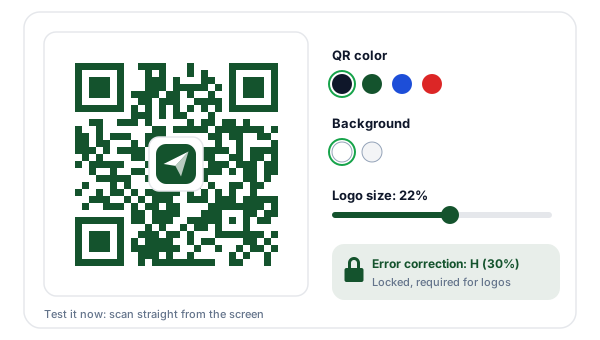
Style the code and check the preview
Set the logo size between 15% and 28% of the code width, pick brand colors, and watch the live contrast warning. Error correction is locked to H (30%), the level that lets a code lose its center to a logo and still scan.
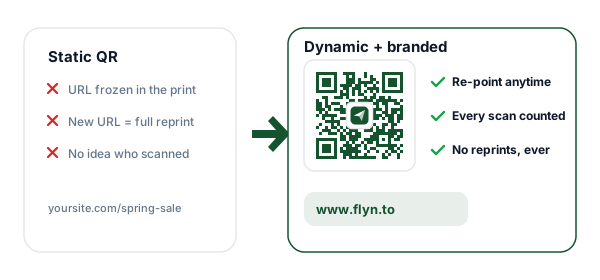
Make it editable and download
One click swaps the raw URL for a Flyn short link: the printed code becomes editable (re-point it anytime) and trackable (every scan counted). Then download the print-ready PNG or vector SVG.
What Is a QR Code with a Logo?
A QR code with a logo (also called a branded QR code, or a custom QR code with an image in the middle) is a standard QR code with a brand mark placed over its center. The code still encodes a normal destination, a URL in most cases, but the logo turns an anonymous black-and-white pattern into something people recognize. That recognition matters: users are noticeably more willing to scan a code that visibly belongs to a brand they know than a bare pattern that could lead anywhere.
Branded codes are everywhere for a reason. Payment networks, streaming services, and retailers all ship logo codes on packaging, receipts, and ads. The technique is not a hack, it relies on a capability built into the QR standard itself: error correction. This logo QR code maker does it properly, locking the highest error correction level, clearing the area behind the logo, and warning you live when a color choice would hurt scanning.
Why a Logo Does Not Break the Code
Every QR code stores its data with Reed-Solomon error correction, redundant information spread across the pattern so the code survives real-world abuse: torn corners, dirt, glare, a thumb over the edge. The standard defines four levels: L recovers up to 7% of lost modules, M 15%, Q 25%, and H 30%. A center logo is, mathematically, just deliberate damage. Keep the covered area comfortably inside the recovery budget and a QR code with a logo is still scannable, the decoder behaves as if nothing were covered at all.
That is why this tool locks error correction to level H whenever you add a logo: a 22% logo covers roughly 5-8% of the modules, leaving most of the 30% budget for printing flaws and scanning conditions. It also excavates, clearing the modules behind the logo to a clean background instead of letting the mark sit on visual noise. The three large finder squares in the corners and the timing lines between them must stay untouched, which is exactly why the logo belongs in the center and never in a corner.
How Big Can the Logo Be?
The slider runs from 15% to 28% of the code width. Here is the tradeoff at each end.
| Logo size | Reliability | Best for |
|---|---|---|
| 15% | Safest. Maximum error-correction headroom left for damage, dirt, and glare. | Small prints: business cards, product labels, stickers under 2 cm. |
| 22% (default) | The sweet spot. Clearly visible branding with a comfortable scanning margin. | Menus, flyers, table tents, posters, packaging at normal sizes. |
| 28% | Maximum branding, minimum headroom. Scans in good conditions, test before large runs. | Large formats printed big and viewed up close, with a printed test first. |
Whatever you choose, the rule is the same: print a sample and scan it before a large run. Larger print sizes tolerate larger logos, tiny codes do not.
Color Rules for Branded QR Codes
Color is where most branded codes go wrong. A custom color QR code scans exactly as well as a black-and-white one, but only when the pair is chosen carefully: scanners look for dark modules on a light background, so the safest combination is what this tool defaults to, a nearly black code on white. Brand colors work well as long as they stay dark, a deep green, navy, or burgundy code on a white or very light background scans reliably.
Two combinations to avoid. First, low contrast: a pastel code on a white card or a mid-gray on cream leaves scanners too little signal, keep the contrast ratio above 3:1 and ideally much higher. Second, inversion: a white or light code on a dark background reads fine to human eyes but fails on many phone cameras, because the decoder expects dark-on-light. The tool computes the real contrast ratio as you pick colors and warns on both problems, it allows them (you may have a controlled use case), but never print an inverted code without testing it on several devices first.
Static vs Dynamic Branded QR Codes
The logo is cosmetic. What the pattern encodes is the decision that matters, because it cannot be changed after printing.
| Static branded QR | Dynamic branded QR | |
|---|---|---|
| What the pattern encodes | Your raw destination URL | A short redirect link you control |
| Change the destination after printing | Impossible, the URL is baked in | Yes, re-point it anytime |
| Scan analytics | None | Every scan counted free; country, device, and referrer breakdowns on Pro |
| A typo or moved page means | Reprinting every copy | A 10-second edit in the dashboard |
| Works without any service | Yes, forever | Depends on the redirect staying live (Flyn never deactivates account links over plans or billing) |
| Best for | Content that will never change | Campaigns, menus, packaging, anything that evolves |
This generator gives you both: it creates a static code instantly, and one click converts it to a dynamic one by encoding a Flyn short link instead of the raw URL. Read more in our guide to dynamic QR codes for print and digital.
Print and Test Checklist
Six checks that catch nearly every real-world scanning failure before it reaches print.
Scan from the screen first
Before anything is printed, point your phone camera at the preview. If it does not scan from a screen, it will not scan from paper.
Print one sample at final size
Colors, contrast, and module sharpness change on paper. Print a single page at the real size and scan it from the distance your audience will.
Test on Android and iPhone
Camera apps differ in how they handle logos and colored codes. A quick test on both platforms catches most surprises before a print run.
Keep the quiet zone
The white margin around the code is part of the spec. Do not let layouts, borders, or background art crowd inside it, scanners need that buffer.
Mind the minimum size
A rough rule: printed width should be at least scan distance divided by 10. A code scanned from 50 cm should be 5 cm wide or more.
Use SVG for professional printing
Vector output stays sharp at any scale and keeps module edges crisp. Hand the SVG to your printer, keep the PNG for digital surfaces.
Sizing a code for a poster or a business card? See the QR code size guide. If a code refuses to scan, work through why QR codes fail to scan.
Where Branded QR Codes Work Best
QR code branding pays off anywhere a code represents you in public: a recognizable logo earns the scan.
Product packaging
A branded code on a box or label links to instructions, registration, or reorders. Make it dynamic and the same packaging can point to seasonal campaigns.
Restaurant menus
Logo codes on table tents look intentional instead of generic. Encode a short link and update the menu PDF without reprinting a single stand.
Posters and flyers
A recognizable logo in the code lifts scan rates, people scan what they trust. Print size matters here, check the size guide before sending to print.
Business cards
A small branded code linking to your site or booking page. At card sizes, keep the logo at 15% and test a printed sample, small codes have less room for error.
Branded Codes + Editable Links: Better Together
A logo makes people scan. A Flyn short link inside the code makes the scan worth something: editable destinations and a count for every scan.
Re-point printed codes
Encode a Flyn link and the destination behind your printed code can change anytime, no reprints.
Count every scan
Scans route through the short link, so each one is counted free. Pro adds country, device, and referrer breakdowns.
Never deactivated
Links in your Flyn account are never watermarked, expired, or killed. What you print keeps scanning.
Free to start
The free plan includes 25 links a month with QR codes and basic analytics. Pro adds unlimited links from $9/mo.
Frequently Asked Questions
Can I add a logo to a QR code without breaking it?
What is the best logo size for a QR code?
Why is error correction locked to level H?
What is excavation in a QR code?
Is my logo uploaded to your servers?
Can I put any image in the middle of a QR code?
Can I make a QR code with a transparent background?
Should I download PNG or SVG?
Should the QR code be dark on light or light on dark?
What is the difference between a static and a dynamic branded QR code?
Can I track how many times my branded QR code is scanned?
Will my QR code expire or get a watermark?
How do I test a branded QR code before printing?
Can I change the URL after I print the code?
More Free QR Tools
Explore more free QR code tools from Flyn, instant, no sign-up required.
Dynamic QR Code Generator
Codes you can re-point after printing, with scan tracking built in.
WiFi QR Code Generator
Let guests join your network with one scan, no typed passwords.
vCard QR Code Generator
Share your contact card with a scan, perfect for business cards.
QR Code Generator
URL, WiFi, vCard, email, phone, and SMS codes with custom colors.
Ready to brand every scan?
Create your logo QR code for free, then let Flyn make it editable and measurable: re-point printed codes anytime, count every scan free, and unlock country, device, and referrer breakdowns on Pro.